
Introduction
This manual provides comprehensive instructions for the safe and efficient use of your LG F94N14SLS front-load washing machine. Please read this manual thoroughly before operating your appliance and keep it for future reference. This washing machine is designed for household use and features a 9 kg capacity, a maximum spin speed of 1400 rpm, and advanced Steam technology for improved hygiene.
Safety Information
Always follow basic safety precautions when using this appliance to reduce the risk of fire, electric shock, or injury to persons.
- Ensure the appliance is properly grounded.
- Do not allow children to play on or in the appliance.
- Keep flammable materials away from the appliance.
- Do not wash items that have been cleaned in, washed in, soaked in, or spotted with combustible or explosive substances.
- Unplug the appliance before cleaning or performing any maintenance.
- Do not operate the appliance if it is damaged or malfunctioning.
Setup
1. Unpacking
Remove all packaging materials, including the transport bolts from the rear of the machine. Keep the transport bolts for future relocation of the appliance.
2. Location
Place the washing machine on a firm, level surface. Ensure there is adequate space around the appliance for ventilation and maintenance. Avoid direct sunlight or extreme temperatures.
3. Leveling the Appliance
Use a spirit level to check if the machine is perfectly level. Adjust the leveling feet at the bottom of the machine by turning them clockwise or counter-clockwise until the appliance is stable and level.
4. Water Supply Connection
Connect the inlet hoses to the hot and cold water taps (if applicable) and to the corresponding inlets on the back of the washing machine. Ensure all connections are tight to prevent leaks.
5. Drain Hose Installation
Securely position the drain hose into a standpipe or over the edge of a sink, ensuring it is not kinked or blocked. The end of the drain hose should be positioned at an appropriate height (between 60 cm and 100 cm from the floor).
6. Power Connection
Plug the power cord into a grounded electrical outlet. Do not use extension cords or adapters.
7. Initial Wash Cycle
Before washing laundry, run an empty wash cycle (e.g., 'Cotton' program at 60°C) with a small amount of detergent to clean the drum and remove any manufacturing residues.
Operating Instructions
1. Control Panel Overview
The control panel features a program selector dial, function buttons, and a digital display showing remaining time and error messages.

Front view of the LG F94N14SLS washing machine with the door open, showing the stainless steel drum and control panel.
2. Loading Laundry
Open the door and load items loosely into the drum. Do not overload the machine; ensure there is enough space for clothes to tumble freely. Close the door firmly.
3. Adding Detergent and Additives
Pull out the detergent dispenser drawer. Add the appropriate amount of detergent to the main wash compartment and fabric softener to its designated compartment. Close the drawer gently.
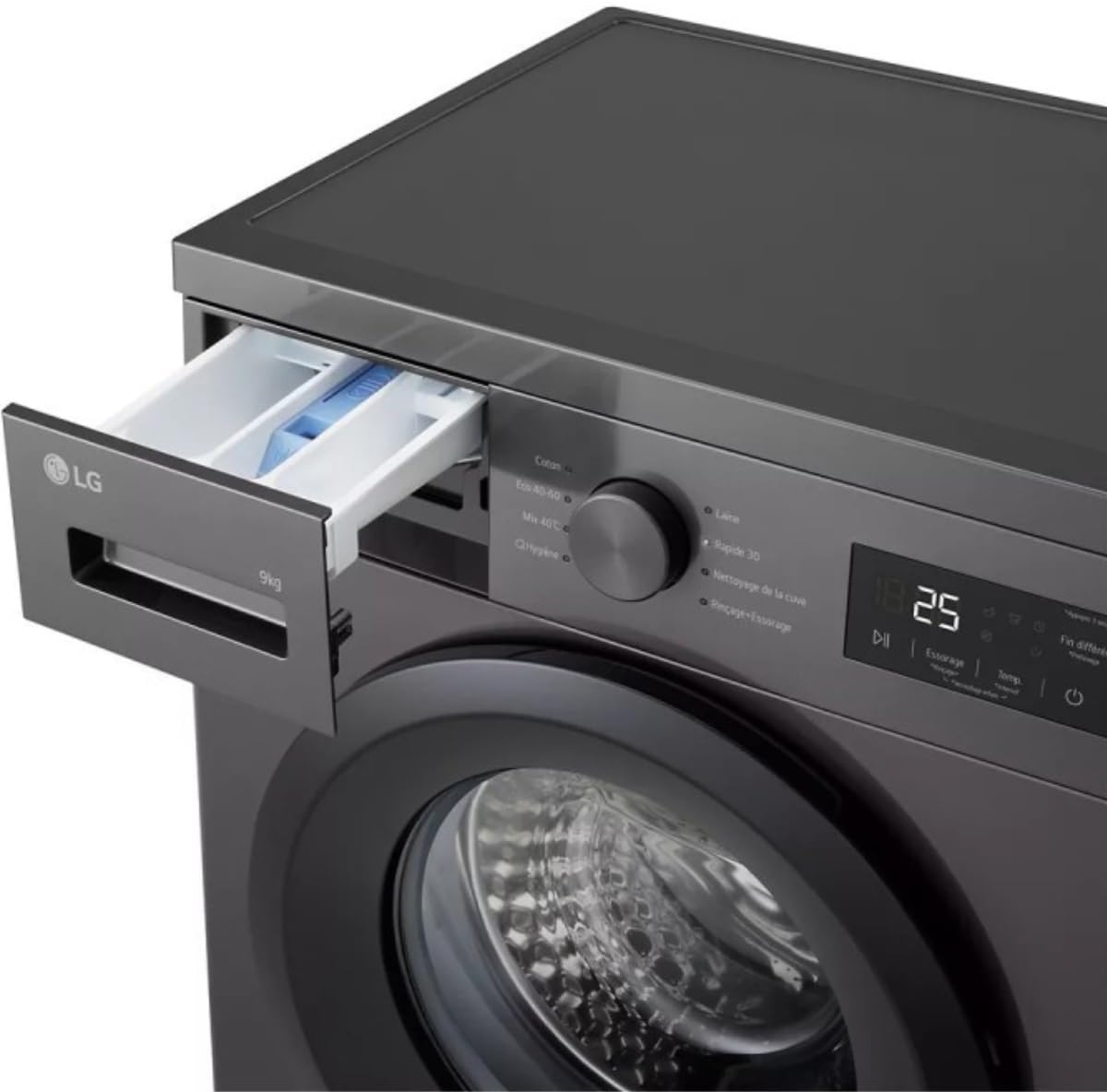
Close-up view of the detergent dispenser drawer of the LG F94N14SLS washing machine, pulled out to show compartments for detergent and fabric softener.
4. Selecting a Program
Turn the program selector dial to choose one of the available wash programs:
- Cotton: For cotton fabrics, normal to heavily soiled.
- Eco 40-60: Energy-efficient program for cottons and mixed fabrics washable at 40°C or 60°C.
- Mix 40°C: For mixed loads of different fabric types.
- Hygiene (Steam): Utilizes steam technology to eliminate allergens and provide enhanced hygiene.
- Wool: Gentle program for woolens and delicate items.
- Rapid 30: Quick wash for lightly soiled items.
- Tank Cleaning: Program for cleaning the washing machine drum.
- Rinse+Spin: For rinsing and spinning items separately.
5. Selecting Options
Depending on the selected program, you can choose additional options:
- Pre-wash: For heavily soiled laundry.
- Intensive: For stubborn stains.
- Rinse+: Adds an extra rinse cycle.
- Temperature: Adjust the wash water temperature.
- Spin Speed: Adjust the spin speed.
- Delay Start (3-19 hours): Set a delayed start time for the wash cycle.
6. Starting a Wash Cycle
Press the Start/Pause button to begin the selected wash cycle. The digital display will show the estimated remaining time.
7. Child Lock
To activate the child lock, press and hold the designated button (refer to your control panel for specific button) for a few seconds. This prevents children from changing settings during operation. Repeat the action to deactivate.
Maintenance
Regular maintenance ensures optimal performance and extends the lifespan of your washing machine.
1. Cleaning the Detergent Dispenser
Periodically remove the detergent dispenser drawer and rinse it under running water to remove any detergent or softener residue. Use a brush if necessary.
2. Cleaning the Drum
Run the 'Tank Cleaning' program regularly (e.g., once a month) to prevent odors and residue buildup in the drum.
3. Cleaning the Drain Filter
Locate the drain filter at the bottom front of the machine. Open the cover, place a shallow container underneath to catch water, and carefully unscrew the filter. Clean any lint or debris, then reinsert and tighten the filter.
4. Cleaning the Exterior
Wipe the exterior of the washing machine with a soft, damp cloth. Do not use abrasive cleaners or solvents.
Troubleshooting
If you encounter issues with your washing machine, refer to the table below for common problems and solutions. If the problem persists, contact customer support.
| Problem | Possible Cause | Solution |
|---|---|---|
| Machine does not start | No power; Door not closed; Start/Pause not pressed | Check power supply; Close door firmly; Press Start/Pause |
| Water not filling | Water tap closed; Inlet hose kinked; Water pressure low | Open water tap; Straighten hose; Check water supply |
| Water not draining | Drain hose kinked/blocked; Drain filter clogged | Straighten hose; Clean drain filter |
| Excessive vibration/noise | Transport bolts not removed; Machine not level; Uneven load | Remove transport bolts; Level machine; Redistribute laundry |
| Error code on display | Specific malfunction | Refer to the full user manual for specific error code meanings or contact service. |
Specifications
| Feature | Specification |
|---|---|
| Brand | LG |
| Model | F94N14SLS |
| Capacity | 9 Kilograms |
| Max Spin Speed | 1400 rpm (inferred) |
| Noise Level | 55 Decibel (Wash), 74 Decibel (Spin) |
| Installation Type | Freestanding |
| Special Features | Hygienic Steam, Smart Inverter Motor, Child Lock |
| Control Type | Push Button, Rotary Dial |
| Standard Cycles | 6 (plus secondary programs) |
| Loading Type | Front-Load |
| Item Weight | 65 Kilograms |
| Product Dimensions (DxWxH) | 49D x 60B x 85H centimeters (Note: 85H from description, 49H from spec list is likely a typo) |
| Drum Volume | 56 Liters (inferred) |

Energy label for the LG F94N14SLS washing machine, displaying energy efficiency class A, 9.0 kg capacity, 3:48 cycle duration, 50 L water consumption, and 74 dB noise level.

Durability index label for the washing machine, showing a score of 7.4 out of 10 for reliability and reparability, issued by the French Republic.
Warranty and Support
Your LG F94N14SLS washing machine comes with a standard manufacturer's warranty. Please refer to the warranty card included with your purchase for specific terms and conditions. For technical support, service requests, or to purchase genuine spare parts, please contact LG customer service in your region. Keep your proof of purchase for warranty claims.