
Introduction
This manual provides detailed instructions for the safe and efficient operation, maintenance, and troubleshooting of your Airpher Cordless Vacuum Cleaner. Please read this manual thoroughly before first use and retain it for future reference.
Important Safety Instructions
Always follow basic safety precautions when using electrical appliances to reduce the risk of fire, electric shock, or injury.
- Do not use outdoors or on wet surfaces.
- Do not allow to be used as a toy. Close attention is necessary when used by or near children.
- Use only as described in this manual. Use only manufacturer's recommended attachments.
- Do not use with damaged cord or plug. If appliance is not working as it should, has been dropped, damaged, left outdoors, or dropped into water, return it to a service center.
- Do not pull or carry by cord, use cord as a handle, close a door on cord, or pull cord around sharp edges or corners. Do not run appliance over cord. Keep cord away from heated surfaces.
- Do not unplug by pulling on cord. To unplug, grasp the plug, not the cord.
- Do not handle plug or appliance with wet hands.
- Do not put any object into openings. Do not use with any opening blocked; keep free of dust, lint, hair, and anything that may reduce airflow.
- Keep hair, loose clothing, fingers, and all parts of body away from openings and moving parts.
- Do not pick up anything that is burning or smoking, such as cigarettes, matches, or hot ashes.
- Do not use to pick up flammable or combustible liquids, such as gasoline, or use in areas where they may be present.
- Do not pick up toxic material (e.g., chlorine bleach, ammonia cleaner, drain cleaner).
- Do not use without dust cup and/or filters in place.
- Turn off all controls before unplugging.
- Use extra care when cleaning on stairs.
- Store your appliance indoors in a cool, dry area.
- Do not immerse the vacuum cleaner in water or other liquids.
- Only use the charging adapter provided by the manufacturer.
Package Contents
Verify that all components are present in the package:
- Main Motor (Motor & Dust Cup)
- Extension Tube
- LED Multi-Tasker Power Brush
- Hard Roller Brush
- Soft Roller Brush
- 2x Batteries
- 2x HEPA Filters (1 pre-installed, 1 extra)
- Flexible Extension Hose
- Long Crevice Tool
- 2-in-1 Dusting Brush
- Wall Mount
- Adapter (Charger)
- Cleaning Gadget
- User Manual

Image: All components of the Airpher Cordless Vacuum Cleaner, including the main unit, extension tube, various brushes, batteries, filters, and accessories.

Image: A detailed view of the Airpher Cordless Vacuum Cleaner's main unit, power brush, and various included accessories like filters, batteries, and cleaning tools.
Setup
1. Assembly
- Attach the Extension Tube: Insert the extension tube into the main motor unit until it clicks securely into place.
- Attach the Power Brush: Connect the LED Multi-Tasker Power Brush to the other end of the extension tube. Ensure it clicks firmly.
- Install Battery: Slide a charged battery into the battery slot on the main motor unit until it locks.
For handheld use, you can attach accessories directly to the main motor unit without the extension tube.
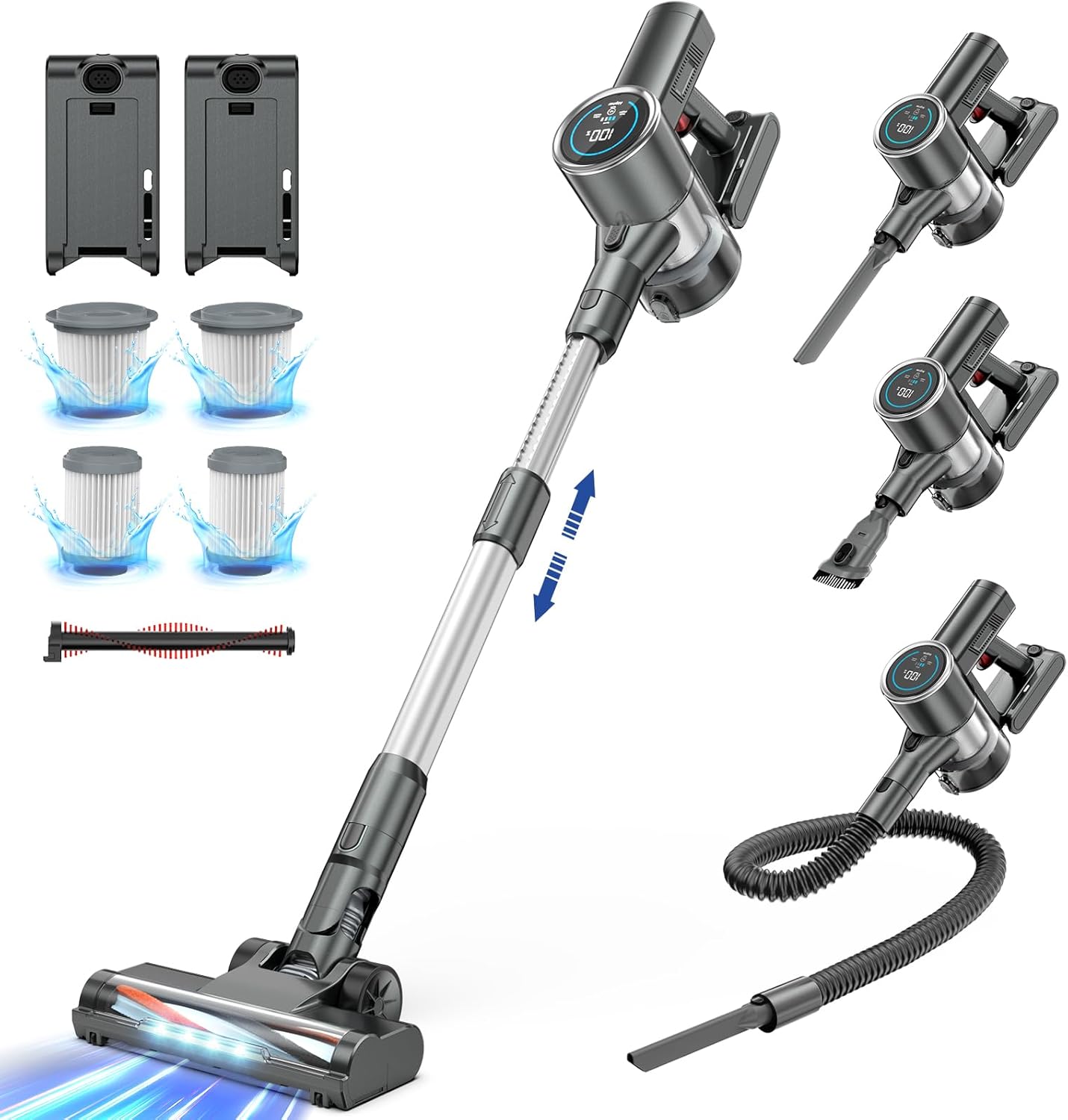
Image: The Airpher Cordless Vacuum Cleaner fully assembled in stick mode, alongside various attachments for different cleaning tasks.
2. Charging the Battery
Your Airpher Cordless Vacuum Cleaner comes with two rechargeable Lithium-Ion batteries. It is recommended to fully charge both batteries before first use.
- Connect the adapter to a power outlet and then to the battery.
- The LED display on the main unit (if battery is attached) or the battery indicator lights will show charging status.
- A full charge typically takes 3-4 hours per battery.
- You can charge the battery while it is attached to the main unit or separately.

Image: A close-up of the Airpher Cordless Vacuum Cleaner's battery, highlighting its internal structure and the dual battery system for extended runtime.

Image: The Airpher Cordless Vacuum Cleaner battery being charged separately from the main unit, with an indicator showing charging status.
3. Wall Mount Installation
The included wall mount allows for convenient storage and charging. Choose a suitable location near a power outlet.
- Mark the desired position on the wall.
- Drill holes and insert wall anchors if necessary.
- Secure the wall mount using screws.
- Hang the vacuum cleaner on the mount.

Image: The Airpher Cordless Vacuum Cleaner being stored on its wall mount, with an accessory holder visible.
Operating Instructions
1. Power On/Off and Suction Modes
- Power On: Press the power button on the handle to start the vacuum cleaner.
- Adjust Suction: Use the '+' and '-' buttons on the touch screen display to switch between the two suction modes (Standard and Max).
- Standard Mode: Suitable for daily cleaning of dust and light debris on hard floors.
- Max Mode: Provides powerful suction for deep cleaning carpets and stubborn dirt.
- Power Off: Press the power button again to turn off the vacuum cleaner.

Image: A close-up of the Airpher Cordless Vacuum Cleaner's LED display, showing battery level, current speed setting, and indicators for brush tangles or airflow blockages.

Image: The Airpher Cordless Vacuum Cleaner's power brush, illustrating the adjustable suction levels (Min, Mid, Max) and their corresponding runtimes.
2. Using Attachments
The Airpher Cordless Vacuum Cleaner includes various attachments for versatile cleaning:
- LED Multi-Tasker Power Brush: Ideal for both hard floors and carpets. The LED lights illuminate dust in dark areas.
- Hard Roller Brush: Specifically designed for hard floors to prevent scratches.
- Soft Roller Brush: Gentle on delicate hard floors.
- Long Crevice Tool: Perfect for reaching narrow gaps, corners, and edges (e.g., between sofa cushions, car seats).
- 2-in-1 Dusting Brush: Can be used as a stiff brush for stubborn dirt or as a soft brush for delicate surfaces like keyboards or curtains.
- Flexible Extension Hose: Provides extended reach and flexibility for cleaning awkward spaces, such as inside cars or high shelves.
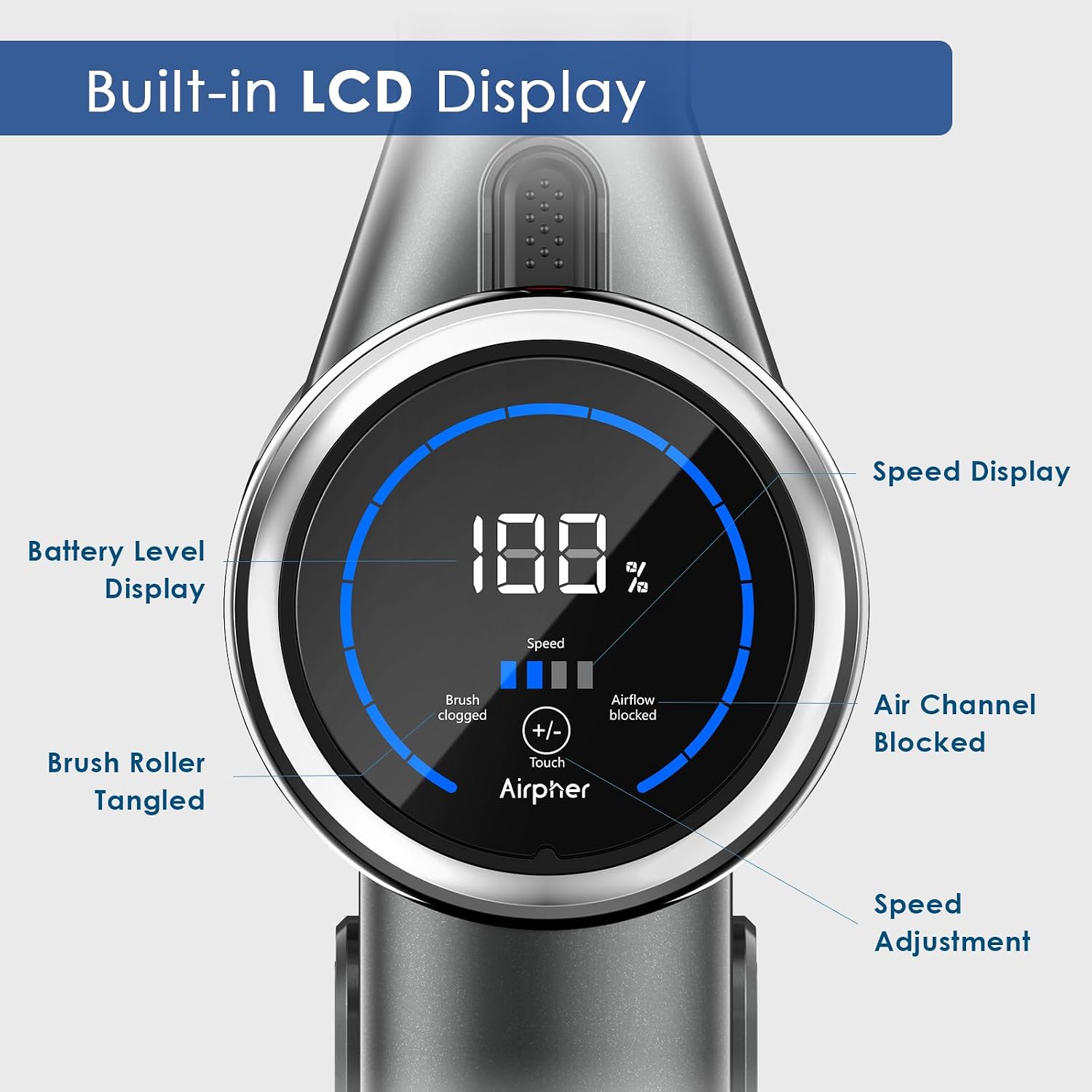
Image: The Airpher Cordless Vacuum Cleaner's main power brush, showing the two interchangeable roller brushes: a universal brush head and a blankets brush head, for different cleaning needs.

Image: The Airpher Cordless Vacuum Cleaner being used with the crevice tool to clean between sofa cushions.

Image: The Airpher Cordless Vacuum Cleaner utilizing the flexible hose and crevice tool to clean hard-to-reach areas in a car interior.
3. Maneuverability
The flexible design of the power brush allows for easy cleaning under furniture and around obstacles. The brush head rotates 150° sideways and 90° up and down.
Image: The Airpher Cordless Vacuum Cleaner demonstrating its flexible head rotation to clean under a sofa, highlighting its ability to reach hidden dust.
Maintenance
Regular maintenance ensures optimal performance and extends the lifespan of your vacuum cleaner.
1. Emptying the Dust Cup
- It is recommended to empty the dust cup after each use or when the MAX fill line is reached.
- Hold the main unit over a trash bin.
- Press the dust cup release button to open the bottom flap and empty the contents.
- Close the flap securely.

Image: A person emptying the dust cup of the Airpher Cordless Vacuum Cleaner into a waste bin, demonstrating the easy-release mechanism.
2. Cleaning the Filters
The vacuum cleaner features a 5-layer filtration system, including washable pre-HEPA and post-HEPA filters. Regular cleaning is crucial for maintaining suction power.
- Remove Filters: Twist and pull to remove the dust cup from the main unit. Then, remove the internal filters (cyclone system, stainless steel strainer, pre-HEPA, and post-HEPA filters).
- Wash Filters: Rinse the filters under cold running water until the water runs clear. Do not use detergent.
- Dry Filters: Allow all filter components to air dry completely for at least 24 hours before reassembling. Do not use a dryer or other heating devices.
- Reassemble: Once completely dry, reinsert the filters into the dust cup and attach the dust cup back to the main unit.
It is recommended to clean the filters monthly, or more frequently with heavy use.

Image: A diagram illustrating the five-layer filtration system of the Airpher Cordless Vacuum Cleaner, showing the cyclone system, stainless steel strainer, pre-HEPA filter, HEPA filter, and grid filter.

Image: The washable components of the Airpher Cordless Vacuum Cleaner's dust cup and filters being rinsed under water, demonstrating the ease of cleaning.
3. Cleaning the Brush Rollers
- If the brush roller becomes tangled with hair or debris, the LED display may indicate a "Brush Roller Tangled" alert.
- Turn off the vacuum cleaner and detach the power brush.
- Use the included cleaning gadget or scissors to carefully remove any tangled hair or fibers from the brush roller.
- The roller brushes are washable. Remove them from the power brush and rinse under water. Ensure they are completely dry before reinserting.
4. Battery Care
- Store batteries in a cool, dry place away from direct sunlight.
- Do not expose batteries to extreme temperatures.
- If the vacuum cleaner will not be used for an extended period, charge the batteries periodically to maintain their health.
Troubleshooting
Refer to the following table for common issues and their solutions:
| Problem | Possible Cause | Solution |
|---|---|---|
| Vacuum does not turn on. | Battery is not installed correctly or is depleted. | Ensure battery is securely clicked into place. Charge the battery fully. |
| Low suction power. | Dust cup is full. Filters are clogged. Airway is blocked. | Empty the dust cup. Clean or replace filters. Check for blockages in the extension tube or brush head. |
| Brush roller stops rotating or is tangled. | Hair or debris is wrapped around the brush roller. | Turn off the vacuum. Remove the brush roller and clean it thoroughly using the cleaning gadget. |
| Battery runtime is shorter than expected. | Using Max suction mode frequently. Battery not fully charged. Battery degradation over time. | Use Standard mode for lighter tasks. Ensure battery is fully charged. Consider replacing battery if significantly degraded (contact customer service). |
| LED display shows "Airflow Blocked". | Obstruction in the air path. | Check the dust cup, filters, extension tube, and brush head for any blockages and remove them. |
Specifications
| Feature | Detail |
|---|---|
| Brand | Airpher |
| Model Name | Cordless Vacuum Cleaner (Vacuum-1) |
| Motor Power | 500W |
| Suction Power | Up to 45KPA |
| Runtime | Up to 100 minutes (with 2 batteries in standard mode) |
| Battery Type | Lithium-Ion (2x 2500 mAh included) |
| Filtration System | 5-layer, fully sealed with washable HEPA filters |
| Special Features | LED Display, Lightweight, Cordless, 2 Suction Modes, LED Headlight on Power Brush |
| Product Dimensions | 17.43"L x 13.71"W x 7.75"H |
| Item Weight | 4 pounds |
Warranty and Support
Manufacturer's Warranty
Airpher offers a satisfaction guarantee for its products. If your vacuum cleaner is found to be defective, please contact customer service for assistance with returns or replacements.
Specific warranty duration details may vary. Please refer to the product packaging or contact customer support for the most accurate information.
Customer Support
For any questions, concerns, or technical assistance, please contact Airpher customer service. Round-the-clock customer service is available to help you.
Contact information can typically be found on the product packaging, the official Airpher website, or through your purchase platform.
