
1. Product Overview
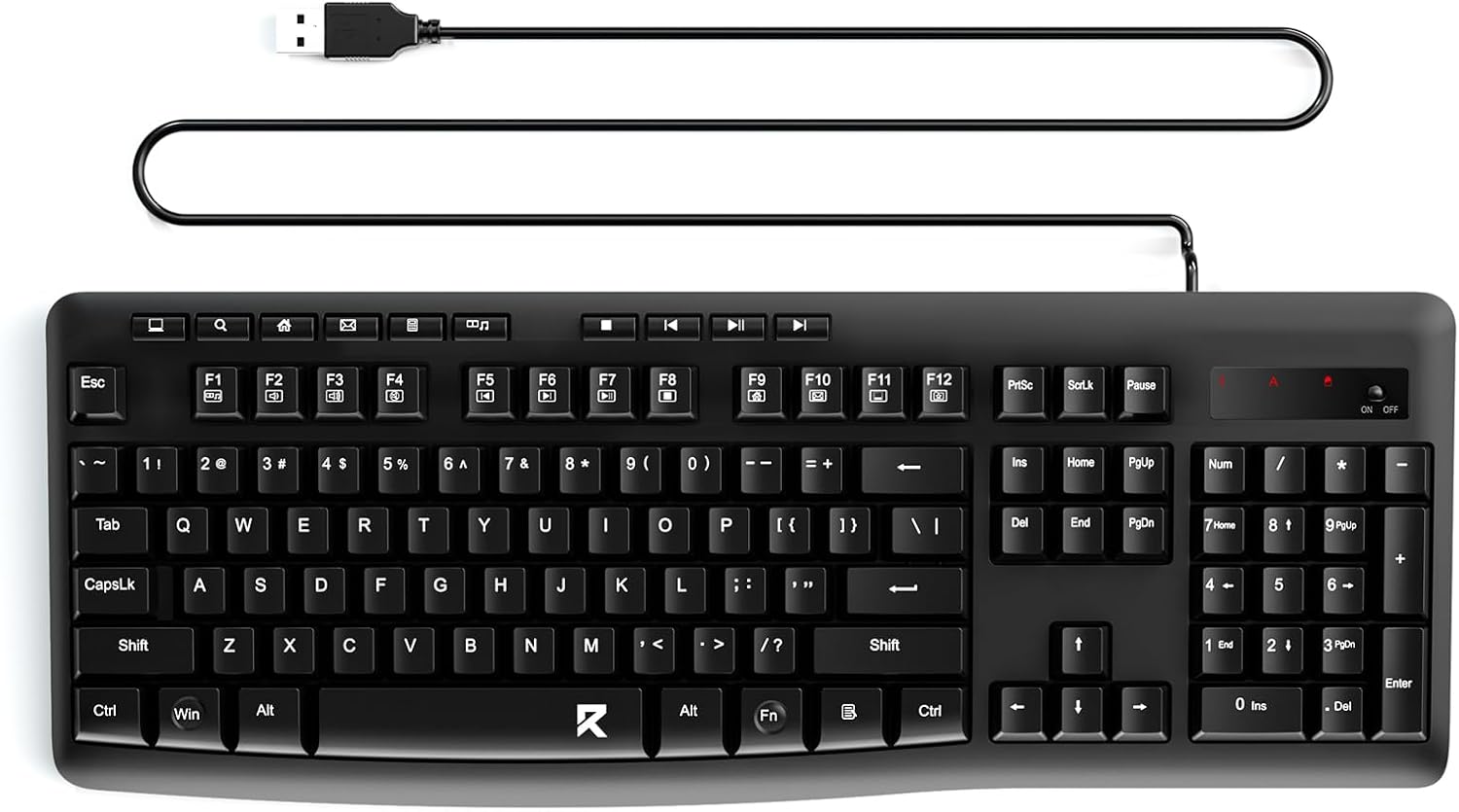
The Redragon BK7366 is a full-size wired keyboard designed for efficiency and comfort. It features a multimedia USB connection, quiet keys, and a spill-resistant design, making it suitable for various computing environments.
Key Features
- USB Wired Connection: Simple plug-and-play functionality without drivers.
- Multi-function USB Keyboard: Includes a numeric keypad, 10 independent shortcut keys, and 12 multimedia combination keys.
- Quiet Keys: Noise-reduction design for a quiet working environment.
- Adjustable Feet: Flip-up feet for ergonomic typing and reduced fatigue.
- Splashproof: Sealed membrane circuit protects against accidental spills.
- Strong Compatibility: Works with Windows 11/10/8/7/XP, Mac OS, and Windows VISTA.
2. Package Contents
- Redragon BK7366 Wired Keyboard
- User Manual
3. Setup
Connecting Your Keyboard
The Redragon BK7366 keyboard utilizes a standard USB-A wired connection for immediate use. No additional drivers or software installation is required.
- Locate an available USB-A port on your computer (desktop, laptop, or all-in-one PC).
- Plug the USB-A connector of the keyboard cable into the USB-A port on your computer.
- The keyboard will be automatically recognized by your operating system and is ready for use.
4. Operating Instructions
Basic Typing and Numeric Keypad
The keyboard features a standard QWERTY layout with a full numeric keypad on the right side. The keys are designed for quiet operation and a comfortable typing experience.
- Numeric Keypad: Use the dedicated number pad for quick data entry. Ensure 'Num Lock' is activated (indicated by an LED light above the keypad).
- Adjustable Feet: Flip out the stands on the underside of the keyboard to adjust the typing angle for improved ergonomics.

Multimedia and Shortcut Keys
The keyboard includes dedicated shortcut buttons and multimedia function keys to enhance productivity and control media playback.
- 10 Independent Shortcut Buttons: Located above the function keys, these provide quick access to common functions such as search, email, and media controls.
- 12 Multimedia Combination Keys (FN + F1-F12): These keys offer additional media and system controls when pressed in combination with the 'Fn' key. For example, control volume, playback, and access internet functions.

5. Maintenance
Care and Cleaning
To ensure the longevity and optimal performance of your Redragon BK7366 keyboard, follow these maintenance guidelines:
- Spill-Resistant Design: The keyboard features a sealed membrane circuit and multiple drainage holes on the back to protect against accidental liquid spills. In case of a spill, gently wipe the surface with a dry cloth and allow any liquid to drain through the bottom.
- Cleaning: Use a soft, slightly damp cloth to clean the surface of the keyboard. Avoid using harsh chemicals or abrasive materials.
- Storage: Store the keyboard in a dry, dust-free environment when not in use.

6. Troubleshooting
Common Issues and Solutions
- Keyboard not responding:
- Ensure the USB cable is securely plugged into a working USB-A port on your computer.
- Try plugging the keyboard into a different USB-A port.
- Restart your computer.
- Keys not functioning correctly:
- Check for any debris or obstructions under the keycaps.
- If a specific key is not working, ensure no liquid has entered the key mechanism.
- Multimedia keys not working:
- Ensure you are pressing the 'Fn' key simultaneously with the desired F-key for multimedia functions.
- Check your operating system's settings for any conflicting keyboard shortcuts or media player configurations.
7. Specifications
| Feature | Detail |
|---|---|
| Brand | Redragon |
| Model Name | BK7366 |
| Connectivity Technology | USB-A |
| Keyboard Description | Membrane |
| Special Feature | Ergonomic, Spill Proof, Waterproof, Quiet |
| Compatible Devices | PC (Windows 11/10/8/7/XP, Mac OS, Windows VISTA) |
| Color | Black |
| Material | Plastic |
| Item Weight | 1.37 pounds |
| Package Dimensions | 17.56 x 7.01 x 1.57 inches |
8. Warranty and Support
Warranty Information
Redragon products typically come with a limited manufacturer's warranty. Please refer to the product packaging or the official Redragon website for specific warranty terms and conditions applicable to your region.
Customer Support
For technical assistance, troubleshooting, or warranty claims, please contact Redragon customer support through their official website or the retailer where the product was purchased.


