
1. Introduction
Thank you for choosing the Beyution EN212FD1H Replacement Remote Control. This manual provides essential information for the proper setup, operation, and maintenance of your new remote control. Please read this manual thoroughly before use to ensure optimal performance and longevity of the product.
2. Product Overview
The Beyution EN212FD1H is a replacement infrared remote control designed for specific Hisense 2.1 CH Sound Bar models. It offers a straightforward, plug-and-play experience without the need for complex programming.
Key Features:
- No programming or setup required.
- Maximum operating distance of 10 meters (33 feet).
- Constructed from durable ABS plastic with soft, responsive buttons.
- Ergonomic design for comfortable grip.
Compatible Models:
This remote control is compatible with the following Hisense 2.1 CH Sound Bar models:
- HS216F
- HS212F
- HS216FW
- HS219

Image 2.1: The Beyution EN212FD1H remote control, showcasing its design and key features like no setup requirement, soft buttons, and ABS material construction.
3. Setup
The Beyution EN212FD1H remote control requires no programming or complex setup. Simply install the batteries, and it is ready for use with your compatible Hisense sound bar.
Battery Installation:
- Locate the battery compartment on the back of the remote control.
- Slide the battery compartment cover downwards to open it.
- Insert two (2) AAA alkaline batteries, ensuring the positive (+) and negative (-) terminals match the diagrams inside the compartment.
- Slide the battery compartment cover back into place until it clicks securely.
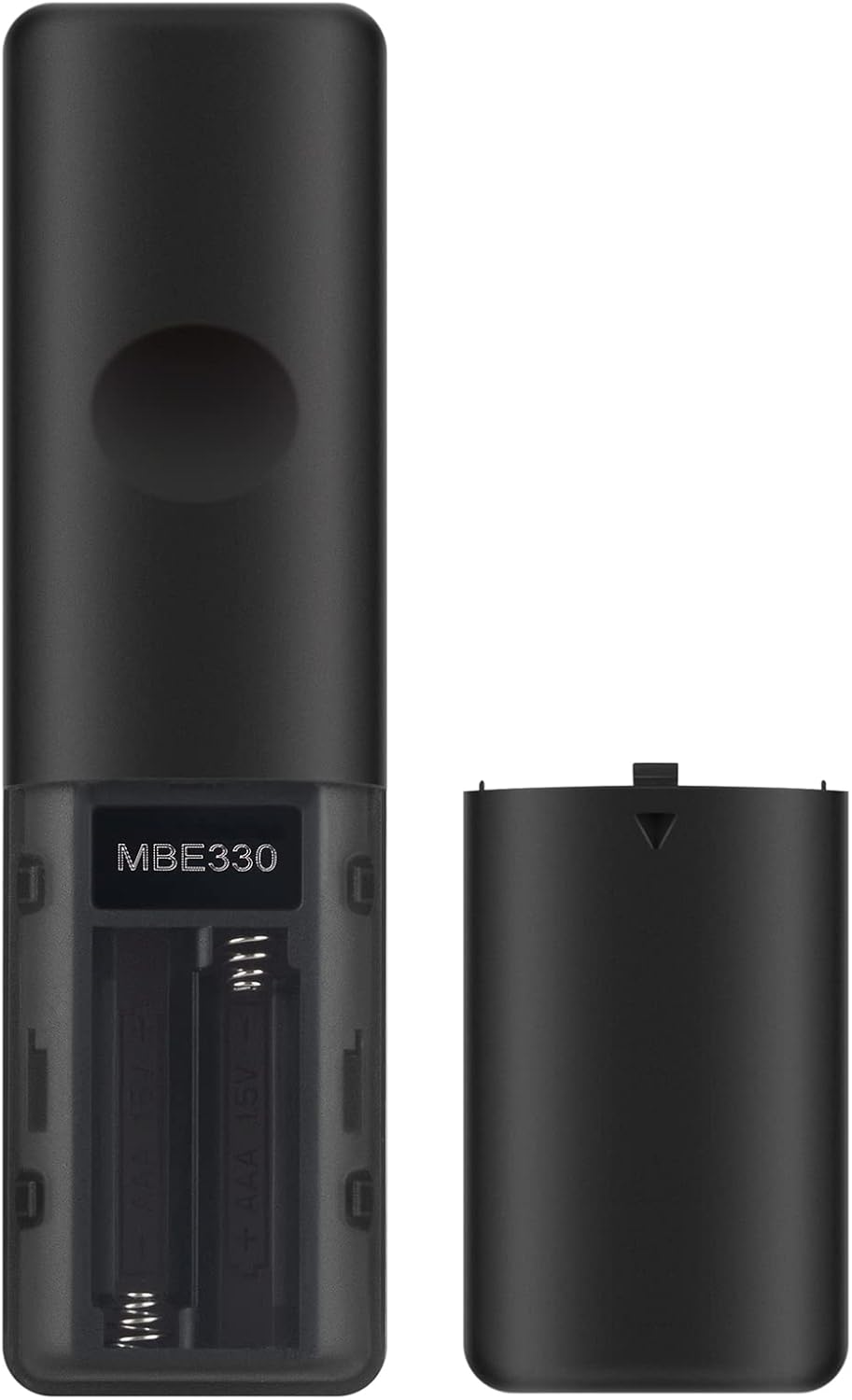
Image 3.1: Rear view of the remote control with the battery cover removed, illustrating the battery insertion process.
4. Operating Instructions
To operate your sound bar, point the remote control directly at the infrared receiver on your Hisense sound bar. Ensure there are no obstructions between the remote and the sound bar.
Button Functions:
- Power (⏻): Turns the sound bar on or off.
- Source (↷): Cycles through input sources (e.g., HDMI, Optical, Bluetooth).
- SURR: Activates or deactivates surround sound mode.
- Bluetooth (✱): Switches to Bluetooth input mode.
- EQ: Cycles through equalizer presets.
- VOL + / VOL -: Increases or decreases the main volume.
- Playback Controls (⏮︎, ⏸︎, ⏭︎): Skip backward, Play/Pause, Skip forward (for compatible sources like Bluetooth).
- BASS + / BASS -: Adjusts the bass level.
- TREBLE + / TREBLE -: Adjusts the treble level.
- DIMMER + / DIMMER -: Adjusts the brightness of the sound bar's display.
- Mute (🔇): Mutes or unmutes the sound.

Image 4.1: Example of a user operating the remote control in a home entertainment setting.
5. Maintenance
Proper maintenance ensures the longevity and reliable performance of your remote control.
Cleaning:
- Wipe the remote control with a soft, dry cloth.
- Do not use liquid cleaners, sprays, or abrasive materials, as these can damage the remote's surface or internal components.
Battery Replacement:
- Replace batteries when the remote's response becomes sluggish or it stops functioning.
- Always replace both batteries at the same time with new AAA alkaline batteries.
- Remove batteries if the remote control will not be used for an extended period to prevent leakage.
Storage:
- Store the remote control in a cool, dry place away from direct sunlight and extreme temperatures.
- Avoid dropping the remote or exposing it to excessive force.
6. Troubleshooting
If you encounter issues with your remote control, please refer to the following common solutions:
| Problem | Possible Cause | Solution |
|---|---|---|
| Remote is not working. | Dead or incorrectly inserted batteries. | Replace batteries with new AAA alkaline batteries, ensuring correct polarity. |
| Remote has short range or intermittent response. | Low batteries; Obstruction between remote and sound bar; Remote too far from sound bar. | Replace batteries. Ensure a clear line of sight to the sound bar's IR receiver. Operate within 10 meters (33 feet). |
| Specific buttons are unresponsive. | Dirt or debris under the button; Internal malfunction. | Clean the remote surface. If the issue persists, contact customer support. |
If the problem persists after attempting these solutions, please refer to the Support section for assistance.
7. Specifications
| Feature | Detail |
|---|---|
| Model Name | EN212FD1H |
| Connectivity Technology | Infrared |
| Maximum Range | 10 meters (33 feet) |
| Material | ABS Plastic |
| Color | Black |
| Number of Buttons | 20 |
| Batteries Required | 2 x AAA Alkaline batteries |
| Item Weight | 1.9 ounces (approx. 54 grams) |
| Item Dimensions (L x W x H) | 5"L x 1"W x 0.5"H (approx. 12.7cm x 2.54cm x 1.27cm) |
| Manufacturer | HONG KONG MEIBAN INDUSTRIAL LIMITED |

Image 7.1: Dimensions of the remote control for reference.
8. Warranty
This Beyution EN212FD1H Replacement Remote Control comes with a 1-year warranty from the date of purchase. This warranty covers manufacturing defects under normal use. It does not cover damage caused by misuse, accidents, unauthorized modifications, or battery leakage.
9. Support
If you have any questions, require assistance, or experience issues with your Beyution EN212FD1H remote control that are not resolved by the troubleshooting steps, please contact our customer support team. When contacting support, please provide your product model (EN212FD1H) and a detailed description of the issue.
For support, please refer to the contact information provided by your retailer or the Beyution official website.