
1. Overview
The WYBOT S2 Pro is a high-end cordless robotic pool cleaner designed for efficient and autonomous cleaning of inground pools. It features advanced technologies such as underwater wireless charging, remote APP control, and dual cleaning filtration, ensuring a pristine pool with minimal effort.

Figure 1: The WYBOT S2 Pro robotic pool cleaner, designed for efficient and autonomous pool maintenance, shown with its innovative wireless charging dock.

Figure 2: Equipped with advanced sensors including infrared for obstacle detection, a depth sensor for underwater positioning, a gyroscope for stable navigation, and sonar for precise command reception, the S2 Pro ensures comprehensive pool coverage.
2. Safety Information
Please read all instructions carefully before operating the WYBOT S2 Pro. Failure to follow these instructions may result in property damage or injury.
- Always ensure the cleaner is fully submerged in water before operation.
- Do not operate the cleaner out of water.
- Keep hands, hair, and loose clothing away from moving parts.
- Disconnect the cleaner from its charging dock before performing any maintenance or cleaning.
- Store the cleaner and charging dock in a cool, dry place when not in use.
- Use only the provided power adapter and charging dock.
- Keep children and pets away from the pool area during cleaner operation.
3. Product Components
Verify that all components are present and in good condition:
- WYBOT S2 Pro Robotic Pool Cleaner Unit
- Wireless Charging Dock
- Power Adapter
- User Manual (this document)
4. Setup
4.1 Initial Charging
Before first use, fully charge the S2 Pro. Place the cleaner onto its wireless charging dock. Ensure the dock is connected to the power adapter and a power outlet. The indicator lights on the cleaner will show charging status. A full charge typically takes approximately 3 hours.

Figure 3: The S2 Pro features automatic docking and wireless charging. When battery levels are low, the cleaner autonomously navigates back to its dock for recharging, eliminating manual retrieval for charging.

Figure 4: The advanced underwater wireless charging system ensures a secure and corrosion-free power connection, enhancing durability and user convenience.
4.2 App Connection
Download the official WYBOT app from your device's app store. Follow the in-app instructions to pair your S2 Pro cleaner with your smartphone. This will enable remote control and scheduling features.

Figure 5: The WYBOT app provides full remote control capabilities, allowing users to start, stop, direct, and schedule cleaning cycles from anywhere.
5. Operating Instructions
5.1 Starting a Cleaning Cycle
Gently place the S2 Pro into your pool. Ensure it is fully submerged. You can initiate a cleaning cycle by pressing the power button on the unit or by using the WYBOT app on your smartphone. The cleaner will begin its intelligent path planning to cover the pool floor and walls.
5.2 Scheduling and Remote Control
Utilize the WYBOT app to set up daily or weekly cleaning schedules. The app also allows for real-time remote control, enabling you to direct the cleaner to specific areas or pause/resume operations as needed.

Figure 6: The WYBOT app allows for precise scheduling of cleaning operations, enabling the S2 Pro to maintain your pool automatically at set times.
5.3 Auto-Return to Dock
Upon completion of a cleaning cycle or when the battery is low, the S2 Pro will automatically return to its charging dock. This feature simplifies retrieval and ensures the cleaner is always ready for its next task.
6. Maintenance
6.1 Filter Cleaning
Regular cleaning of the dual filtration system is crucial for optimal performance. Follow these steps:
- Carefully open the top cover of the cleaner.
- Remove the filter basket assembly.
- Open the filter basket and empty all collected debris.
- Rinse both the filter cartridge (180 µm) and the ultra-fine sponge (40 ppi) thoroughly under running water until clean.
- Ensure all debris is removed from the filter components.
- Reassemble the filter basket and place it back into the cleaner.
- Close the top cover securely.
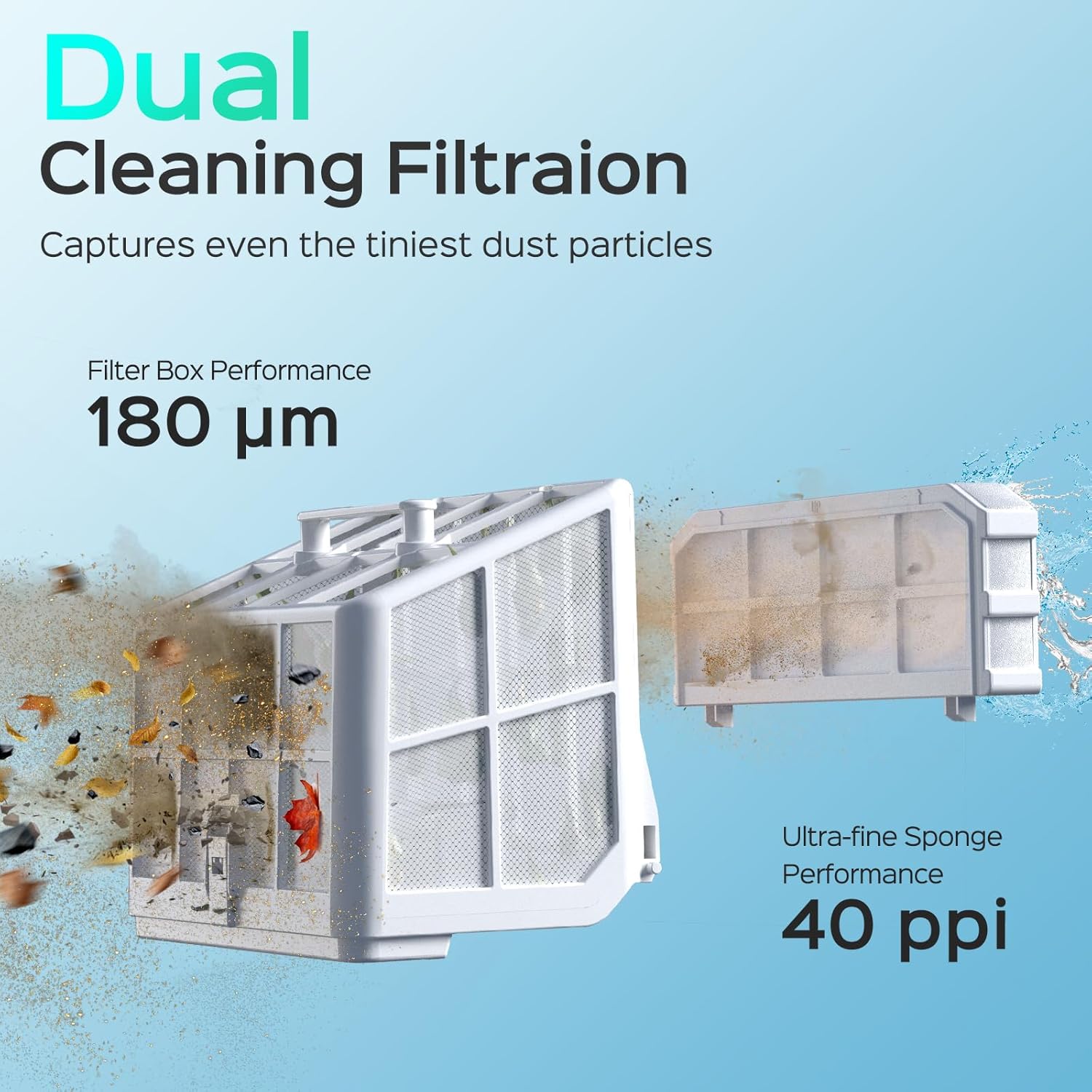
Figure 7: The S2 Pro utilizes a dual filtration system, combining a 180 µm filter cartridge and a 40 ppi ultra-fine sponge, to effectively capture various debris from large leaves to fine dust particles.
7. Troubleshooting
Refer to the table below for common issues and their solutions:
| Issue | Possible Cause | Solution |
|---|---|---|
| Cleaner not powering on | Low battery; Power adapter/dock issue | Ensure cleaner is fully charged; Check power connections. |
| Cleaner not moving or stuck | Obstruction in brushes/tracks; Insufficient water depth | Remove debris from brushes/tracks; Ensure pool has adequate water level. |
| Poor cleaning performance | Clogged filters; Excessive debris; Incorrect app settings | Clean filters thoroughly; Remove large debris manually; Adjust cleaning mode in app. |
| App connectivity issues | Bluetooth/Wi-Fi disabled; App/cleaner glitch | Ensure Bluetooth/Wi-Fi is on; Restart app and cleaner; Check for app updates. |
8. Specifications
| Feature | Detail |
|---|---|
| Brand | WYBOT |
| Model Name | WY210-WYBOT-S2 Pro |
| Item Model Number | WYBOT-WY210-S2PRO-BG-20250805 |
| Power Source | Battery Powered |
| Control Method | App, Touch |
| Battery Type | Lithium Ion (21 cells) |
| Battery Energy Content | 202 Watt Hours |
| Charging Time | 3 Hours |
| Motor Power | 90W Brushless Motor |
| Suction Power | 3592 GPH |
| Product Dimensions | 16 x 15 x 10 inches (40.6 x 38.1 x 25.4 cm) |
| Item Weight | 28.6 pounds (12.97 kg) |
| Material | Plastic |
| Color | Green Black |
9. Warranty and Support
For detailed warranty information, product registration, and technical support, please visit the official WYBOT website or contact their customer service department. Please retain your proof of purchase for any warranty claims.
You can find more information and support at the WYBOT Store on Amazon.


