
1. Product Overview
The HYVOHEX C2 Portable Air Compressor is a versatile and compact device designed for quick and efficient inflation of various items, including car tires, bicycle tires, motorcycle tires, and sports balls. It features a digital pressure gauge, automatic shut-off, and an integrated LED light for convenience and safety.
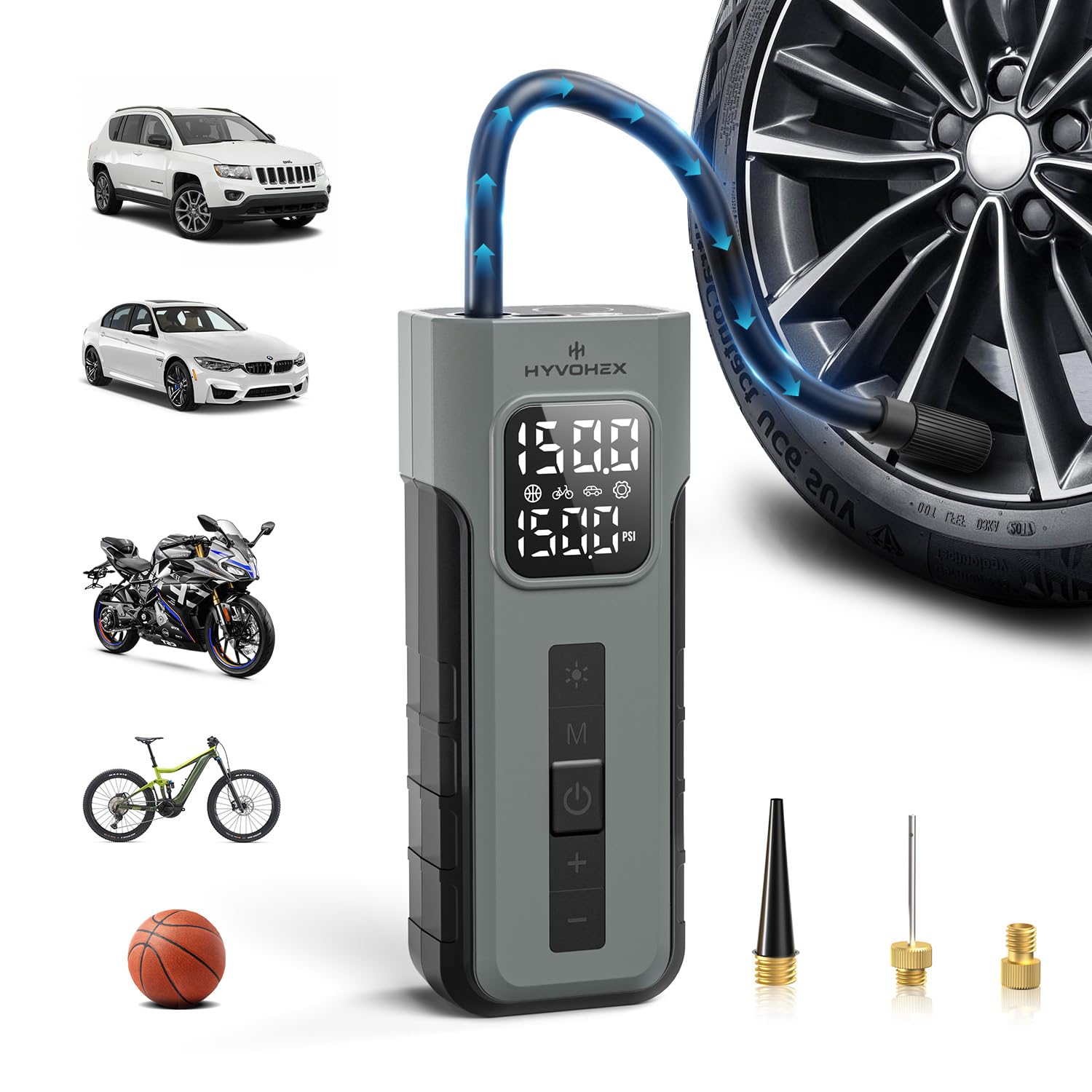
Figure 1: HYVOHEX C2 Portable Air Compressor main unit with hose attached.
2. Package Contents
Upon unboxing your HYVOHEX C2 Portable Air Compressor, please ensure all the following items are present:
- Tire Inflator (x1)
- Air Hose with Schrader Adapter Attached (x1)
- General Nozzle Cone (x1)
- Needle Adapter (x1)
- Presta Adapter (x1)
- USB-C Charging Cable (x1)
- Storage Pouch (x1)
- User Manual (x1)
Video 1: Unboxing and overview of the air pump and its accessories.
3. Specifications
| Feature | Description |
|---|---|
| Brand | HYVOHEX |
| Model Number | C2 |
| Power Source | Battery Powered (2 Lithium Ion batteries included) |
| Maximum Pressure | 150 PSI |
| Air Flow Capacity | 19 Liters Per Minute |
| Sound Level | 78 Decibels |
| Item Weight | 530 g (0.53 Kilograms) |
| Special Features | Automatic Shut-Off, Pressure Detection, Quick Inflation, Portable, Cordless, Built-in Gauge, LCD Display, Digital, LED Light, Lightweight, Memory Function |
| Material | Plastic |
4. Setup and Charging
Before first use, fully charge the device using the provided USB-C charging cable. The digital display will indicate the battery level.
- Connect the USB-C cable to the charging port on the device.
- Connect the other end of the USB-C cable to a compatible USB power adapter (not included).
- Allow the device to charge until the battery indicator on the digital display shows a full charge.
The device also features a retractable hose design for convenient storage. Simply pull out the hose when needed and store it back in its designated slot when finished.

Figure 2: Retractable hose design for easy storage.
5. Operating Instructions
5.1 Power On/Off and Mode Selection
- Press and hold the power button (usually the 'OK' button) to turn on the device.
- The digital display will show the current pressure and battery level.
- Press the 'M' button to cycle through the preset inflation modes: Car, Bicycle, Ball, and Custom. Each mode has a default PSI setting.
- Use the '+' and '-' buttons to adjust the target pressure in the selected mode.

Figure 3: Digital display showing different inflation modes and pressure settings.
5.2 Tire Inflation
- Screw the air hose onto the device's air outlet.
- Attach the appropriate nozzle (Schrader adapter for car/motorcycle/bicycle, needle for balls, cone for inflatables) to the item you wish to inflate.
- Ensure the connection is secure to prevent air leakage.
- Select the desired inflation mode and set the target pressure using the '+' and '-' buttons.
- Press the power button (OK) to start inflation. The device will display the real-time pressure.
- The compressor will automatically shut off once the preset pressure is reached.
- Carefully disconnect the nozzle from the item. Note that the nozzle may be warm after use.

Figure 4: Inflating a car tire with the auto shut-off feature.
Video 2: Demonstration of using the portable air compressor for tire inflation.
Video 3: Detailed guide on operating the tire inflator.
5.3 LED Light Function
The built-in LED light provides illumination for nighttime or low-light situations.
- Press the light button (usually the sun icon) once for a steady light.
- Press again for a flashing light (emergency signal).
- Press a third time for an SOS signal.
- Press a fourth time to turn off the light.

Figure 5: Using the integrated LED light for visibility in dark conditions.
5.4 Power Bank Function
The device can also function as a power bank to charge other electronic devices via its USB output port.
- Connect your device's charging cable to the USB output port on the air compressor.
- The air compressor's battery will provide power to charge your device.
6. Maintenance
- Keep the device clean and free from dust and debris.
- Store the device in a cool, dry place away from direct sunlight and extreme temperatures.
- Ensure the air hose and nozzles are clean before and after each use.
- Regularly check the battery level and recharge as needed to maintain optimal performance.
7. Troubleshooting
- Device not turning on: Ensure the device is fully charged. Connect it to the USB-C charging cable and allow it to charge for at least 2-3 hours.
- No air coming out: Check if the air hose is securely connected to both the device and the item being inflated. Ensure the correct inflation mode is selected and the target pressure is set above the current pressure.
- Inaccurate pressure reading: Ensure the nozzle is firmly attached to the valve stem. Slight air leakage can cause inaccurate readings.
- Device overheating: The device is designed with advanced cooling, but continuous operation for extended periods (e.g., over 20 minutes) may cause it to warm up. Allow it to cool down before further use.
8. Warranty and Support
The HYVOHEX C2 Portable Air Compressor comes with a 1-year warranty from the date of purchase.
For any questions, concerns, or technical assistance, please contact HYVOHEX’s dedicated 12-hour customer response service. Refer to the contact information provided in your purchase documentation or on the official HYVOHEX website.

