
Introduction
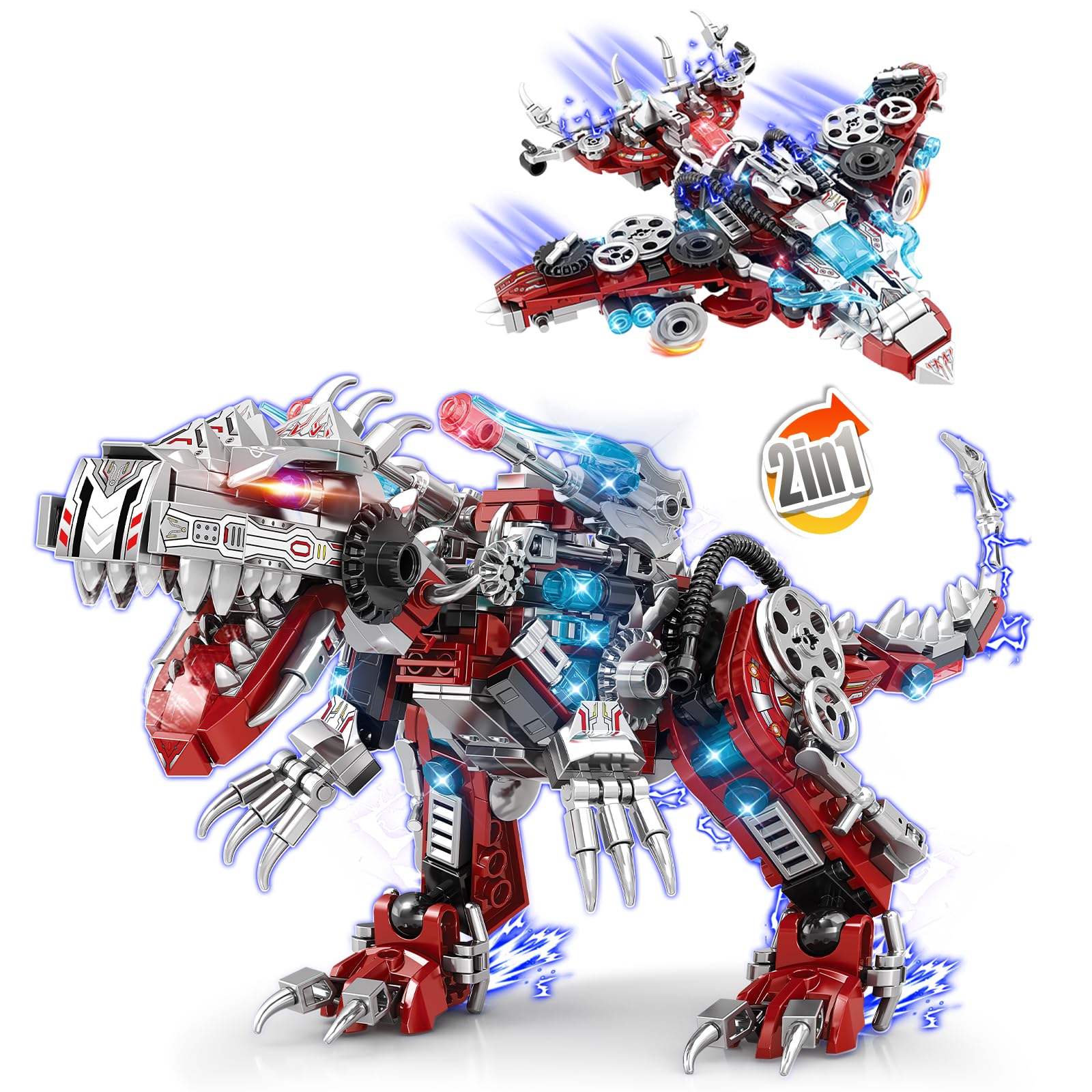
This manual provides instructions for assembling, operating, and maintaining your NEWABWN STEM 2-in-1 Dinosaur and Fighter Jet Building Set. This set allows you to construct either a detailed dinosaur model or a transforming fighter jet from the same 422 pieces. It is designed to encourage creativity and problem-solving skills.
1. Setup and Assembly
1.1 Unpacking
Carefully open the packaging and remove all components. Verify that all 422 pieces are present, along with the instruction manual.
1.2 Assembly Instructions
Refer to the included detailed instruction manual for step-by-step assembly. The set can be built into two distinct models: a dinosaur or a fighter jet. Choose your desired model and follow the corresponding instructions.
Important Assembly Tips:
- Sort pieces by color and shape before starting.
- Ensure each piece is securely connected to prevent parts from becoming loose during play or transformation.
- If pieces feel too loose, gently press them together firmly. Avoid excessive force.

2. Operating the 2-in-1 Model
2.1 Dinosaur Mode
Once assembled, the dinosaur model features articulated joints. These joints allow for various poses, enhancing play and display.
2.2 Fighter Jet Mode
The fighter jet model is designed for display. Its structure is optimized for stability in this configuration.
2.3 Transformation (Dinosaur to Fighter Jet)
To transform the model from the dinosaur to the fighter jet, or vice versa, you must disassemble specific sections and reassemble them according to the alternative model's instructions. This is not a quick-transforming toy; it requires rebuilding.
Refer to the instruction manual for detailed steps on how to convert between the two modes.

3. Maintenance
3.1 Cleaning
To clean the building set, gently wipe the pieces with a soft, dry cloth. For stubborn dirt, a slightly damp cloth can be used. Avoid harsh chemicals or abrasive cleaners.
3.2 Storage
Store the building set in a cool, dry place away from direct sunlight to prevent material degradation. Keep small parts in a designated container to avoid loss.
4. Troubleshooting
- Problem: Pieces do not fit together or are loose.
Solution: Ensure you are using the correct pieces as indicated in the instruction manual. Apply firm, even pressure when connecting pieces. If a piece consistently feels loose, double-check the surrounding connections.
- Problem: Missing pieces.
Solution: Carefully check all packaging materials. If pieces are genuinely missing, contact NEWABWN customer support for assistance. Provide the model number (YC550) and a description of the missing parts.
- Problem: Difficulty following assembly instructions.
Solution: Review the instruction manual carefully, paying close attention to the diagrams. Take breaks if you feel frustrated. Building sets can sometimes require patience.
5. Specifications
| Feature | Detail |
|---|---|
| Brand Name | NEWABWN |
| Model Name | Dinosaur Building Set |
| Model Number | YC550 |
| Number of Pieces | 422 |
| Material Type | Plastic |
| Color | Red |
| Theme | Dinosaur |
| Item Dimensions (Dinosaur Mode) | Approximately 10 x 5.23 x 6.33 inches |
| Item Dimensions (Fighter Jet Mode) | Approximately 8.38 x 7.59 x 2.4 inches |
| Recommended Minimum Age | 6 years (72 months) |
| Assembly Required | Yes |
| Operation Mode | Manual |

6. Warranty and Support
6.1 Product Support
For any questions regarding assembly, missing parts, or product functionality, please contact NEWABWN customer support. Refer to the contact information provided on the product packaging or the official NEWABWN website.
6.2 Warranty Information
Specific warranty details are typically included with the product packaging. Please retain your proof of purchase for any warranty claims.