
mingwear R11
Mingdaln R11 Ultra-Thin Smart Ring
User Manual
Product Overview
The Mingdaln R11 Ultra-Thin Smart Ring is a wearable device designed for health monitoring and activity tracking. It features a sleek, waterproof design and connects to your smartphone for data synchronization and analysis.
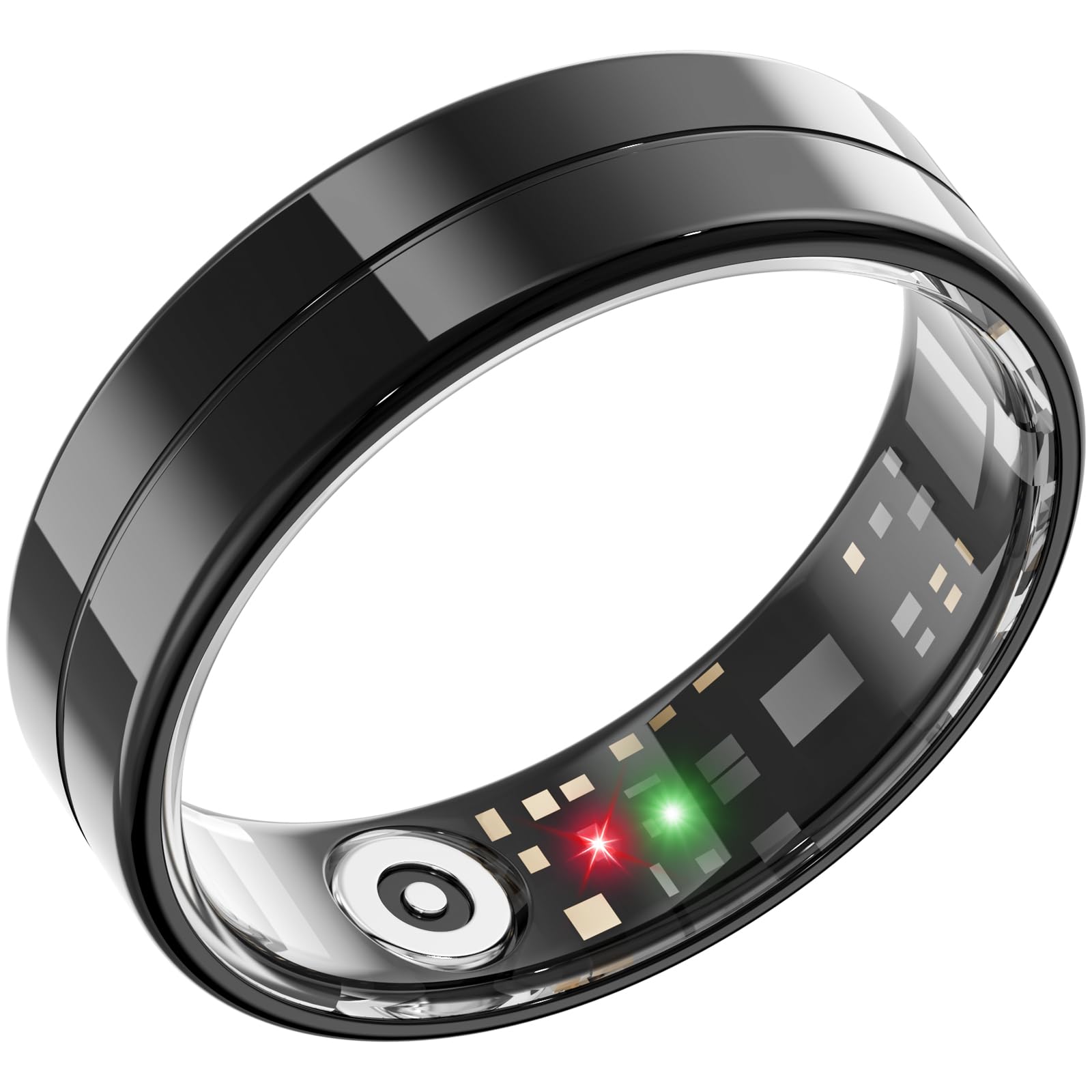
Image 1: Mingdaln R11 Smart Ring. This image displays the minimalist design of the smart ring.
Package Contents
- Mingdaln R11 Smart Ring
- Charging Cable
- User Manual (this document)
Setup Guide
1. Charging the Smart Ring
Before initial use, fully charge the smart ring. Connect the charging cable to the ring and a compatible USB power source. The LED indicator on the ring will show charging status.
- Charging Time: Approximately 1-2 hours for a full charge.
- Battery Life: Up to 10 days on a single charge.
2. Installing the Companion App
The Mingdaln R11 Smart Ring requires a companion application for full functionality. Search for "Mingdaln Smart" (or similar, as specific app name is not provided) in your device's app store.
- For Android Devices: Download from the Google Play Store.
- For iOS Devices: Download from the Apple App Store.
Ensure your smartphone meets the minimum operating system requirements (e.g., Android 6.0+ or iOS 10.0+).
3. Pairing the Ring with Your Smartphone
- Ensure Bluetooth is enabled on your smartphone.
- Open the Mingdaln Smart app.
- Follow the on-screen instructions to create an account or log in.
- Select "Add Device" or "Pair New Device" within the app.
- The app will search for available devices. Select "Mingdaln R11" from the list.
- Confirm the pairing request on both the app and, if prompted, on the ring (though the ring has no screen, so likely only app confirmation).
A successful connection will be indicated within the app.
4. Wearing the Smart Ring
For accurate data collection, wear the smart ring on the finger that provides the most comfortable and secure fit. Ensure the sensors on the inner surface of the ring are in contact with your skin.
Operating Instructions
Automatic Health Monitoring
The Mingdaln R11 Smart Ring automatically tracks various health metrics throughout the day and night. Data is synchronized with the companion app when the ring is within Bluetooth range of your paired smartphone.
- Activity Tracking: Monitors steps taken, distance traveled, and estimated calories burned.
- Heart Rate Monitor: Continuously measures your heart rate.
- Sleep Duration: Tracks your sleep patterns and duration.
Using the Companion App
The Mingdaln Smart app provides a detailed overview of your health data. Within the app, you can:
- View daily, weekly, and monthly summaries of your activity and sleep.
- Set personal fitness goals.
- Manage device settings and update firmware.
- Receive notifications (if configured).
Water Resistance
The Mingdaln R11 Smart Ring is 5ATM Waterproof, meaning it can withstand pressures equivalent to a depth of 50 meters. This makes it suitable for showering, swimming in shallow water, and other surface water activities. It is not recommended for diving, snorkeling, or high-speed water sports.
Avoid exposing the ring to hot water, steam, or chemicals, as these can compromise the water resistance seals over time.
Maintenance
Cleaning the Ring
To maintain hygiene and sensor accuracy, clean your smart ring regularly.
- Wipe the ring with a soft, damp cloth.
- For stubborn dirt, use a small amount of mild soap and rinse thoroughly with clean water.
- Ensure the ring is completely dry before wearing or charging.
- Do not use abrasive cleaners, solvents, or harsh chemicals.
Battery Care
- Avoid fully discharging the battery frequently.
- Charge the ring regularly, even if not in daily use, to prolong battery life.
- Store the ring in a cool, dry place when not in use.
Troubleshooting
Ring Not Connecting to App
- Ensure the ring is charged.
- Verify Bluetooth is enabled on your smartphone.
- Restart your smartphone and the Mingdaln Smart app.
- If previously paired, try unpairing and re-pairing the device through your phone's Bluetooth settings and the app.
- Ensure the app is updated to the latest version.
Inaccurate Data Readings
- Ensure the ring is worn correctly and snugly on your finger, with sensors in contact with the skin.
- Clean the sensors on the inner surface of the ring.
- Avoid wearing the ring too loosely or too tightly.
- Environmental factors or certain movements can sometimes affect sensor accuracy.
Short Battery Life
- Ensure the ring is fully charged.
- Frequent data synchronization or continuous high-intensity tracking might consume more power.
- Check for firmware updates in the app, as updates can sometimes improve battery efficiency.
- Battery performance naturally degrades over time.
Specifications
| Feature | Detail |
|---|---|
| Model Number | R11 |
| Brand | mingwear |
| Operating System | Android Wear 1.0 (for app compatibility, not ring OS) |
| Special Feature | Activity Tracker |
| Battery Capacity | 16 Milliamp Hours |
| Connectivity Technology | Bluetooth |
| Wireless Communication Standard | Bluetooth |
| Battery Cell Composition | Lithium Polymer |
| GPS | No GPS |
| Screen Size | 10 Inches (This seems incorrect for a ring, likely refers to a connected device screen or a generic spec.) |
| Band Material Type | Metal |
| Water Resistance Level | Waterproof (5ATM / 50 Meters) |
| Human Interface Input | Touchscreen (This also seems incorrect for a ring without a screen. Assuming it refers to the connected smartphone's interface.) |
| Supported Application | Activity Tracker, Fitness Tracker, Notifications, Time Display |
| Metrics Measured | Step Count, Distance, Heart Rate Monitor, Sleep Duration |
| Compatible Devices | Smartphone (iOS and Android) |
| Battery Average Life | 10 days |
Note: Some specifications like "Screen Size" and "Human Interface Input: Touchscreen" likely refer to the connected smartphone or generic smartwatch categories, as the R11 is an ultra-thin smart ring without a display or direct touchscreen.
Warranty Information
The Mingdaln R11 Smart Ring comes with a One Year Limited Warranty from the date of purchase. This warranty covers manufacturing defects under normal use. It does not cover damage caused by misuse, accidents, unauthorized modifications, or normal wear and tear.
Please retain your proof of purchase for warranty claims.
Customer Support
For further assistance, technical support, or warranty inquiries, please refer to the contact information provided on the official mingwear website or your purchase documentation.
Always ensure you have your product model number (R11) and proof of purchase ready when contacting support.
Ask a question about this manual
Ask about setup, troubleshooting, compatibility, parts, safety, or missing instructions. Manuals+ will review the question and use this page’s manual context to help answer it.