
1. Introduction
Thank you for choosing the Daewoo Automatic Cat Litter Box. This manual provides essential information for the safe and efficient operation, maintenance, and troubleshooting of your new automatic litter box. Please read all instructions carefully before initial use and retain this manual for future reference.
2. Safety Information
To ensure safe operation and prevent damage, please observe the following safety precautions:
- Read all instructions before operating the appliance.
- This appliance is for indoor use only. Do not expose to rain or moisture.
- Use only the provided power adapter. Ensure the voltage matches your power supply.
- Do not immerse the main unit in water or other liquids.
- Unplug the unit from the power outlet before cleaning or performing any maintenance.
- Keep hands, hair, and clothing away from moving parts during operation.
- Do not allow children or individuals with reduced physical, sensory, or mental capabilities to operate the appliance without supervision.
- Ensure the litter box is placed on a stable, level surface.
- Only use clumping cat litter suitable for automatic litter boxes.
- Do not place heavy objects on top of the unit.
- If the power cord is damaged, it must be replaced by the manufacturer, its service agent, or similarly qualified persons to avoid a hazard.
3. Package Contents
Please check that all items are present and in good condition:
- Daewoo Automatic Cat Litter Box Unit
- Power Adapter
- Waste Bags (roll)
- User Manual (this document)

4. Product Overview
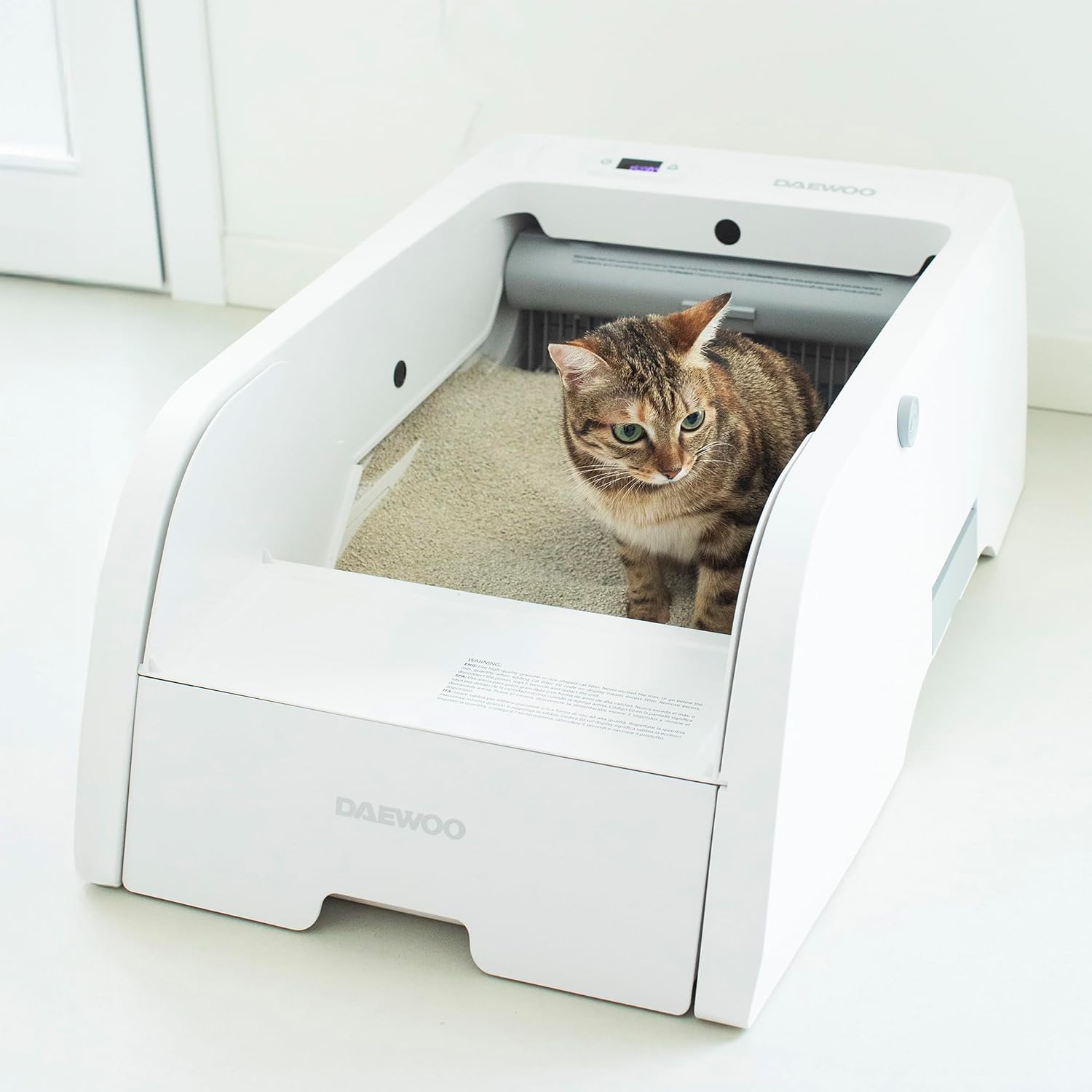
Familiarize yourself with the main components of your automatic cat litter box:
- Main Unit: The primary housing for all components.
- Litter Compartment: Where cat litter is placed.
- Waste Drawer: Collects waste after cleaning cycles.
- Control Panel: Features a power button and LED display for status and manual control.
- Rake Mechanism: Automatically sifts through litter to remove waste.
- Animal Detection Sensor: Ensures cleaning only occurs when the cat is not present.
- Power Input: Connection point for the power adapter.

5. Setup
Follow these steps for initial setup:
- Unpack: Carefully remove all components from the packaging.
- Placement: Place the litter box on a flat, stable, and dry surface in a suitable location. Ensure there is enough space around the unit for proper ventilation and access.
- Add Litter: Fill the litter compartment with approximately 5 liters of high-quality clumping cat litter. Ensure the litter level is between the 'MIN' and 'MAX' indicators. Do not overfill.
- Insert Waste Bag: Open the waste drawer and insert a waste bag (provided) securely. Close the drawer.
- Connect Power: Plug the power adapter into the power input port on the unit, then plug the adapter into a wall outlet. The unit will power on and perform an initial calibration.
- App Connection (Optional): For remote control and monitoring, download the TUYA Smart app from your mobile device's app store. Follow the in-app instructions to connect your litter box.

6. Operating Instructions
The Daewoo Automatic Cat Litter Box offers both automatic and manual cleaning modes.
6.1 Automatic Cleaning Cycle
The unit is designed to automatically clean itself after your cat uses it. The built-in animal detection sensor will recognize when your cat enters and exits the litter box. After a customizable delay (default is usually a few minutes, adjustable via app), the rake mechanism will activate, sifting the litter and depositing waste into the waste drawer. This ensures a clean environment for your cat without manual intervention.
6.2 Manual Cleaning
You can initiate a cleaning cycle manually at any time:
- On the Unit: Press the designated button on the control panel (refer to Figure 4.2 for button location). The unit will begin a cleaning cycle, provided no cat is detected inside.
- Via TUYA App: Open the TUYA Smart app on your mobile device. Select your litter box and use the manual cleaning option within the app interface.
6.3 Timer Adjustment
The delay before an automatic cleaning cycle begins can be adjusted from 1 to 20 minutes. This setting is typically managed through the TUYA Smart app, allowing you to customize the cleaning schedule to your preference.
7. Maintenance
Regular maintenance ensures optimal performance and hygiene.
7.1 Emptying Waste Drawer
The waste drawer should be emptied regularly, depending on the number of cats and their usage. When the waste drawer is full, the unit may indicate this via the LED display or app notification. Simply pull out the drawer, tie off the used waste bag, dispose of it, and insert a new waste bag.
7.2 Adding Litter
Monitor the litter level and add fresh clumping cat litter as needed to maintain the level between the 'MIN' and 'MAX' indicators. Do not add too much litter, as this can impede the rake mechanism.
7.3 Cleaning the Unit
Periodically wipe down the exterior and interior surfaces of the litter box. Always unplug the unit before cleaning. Use a damp cloth with mild soap. Avoid abrasive cleaners or harsh chemicals, as they can damage the unit or be harmful to your pet. Ensure all parts are dry before plugging the unit back in.
7.4 Deep Cleaning
For a thorough cleaning, completely empty all litter from the compartment. You may then clean the interior more extensively. Allow all components to air dry completely before reassembling and adding fresh litter.
8. Troubleshooting
If you encounter issues with your Daewoo Automatic Cat Litter Box, refer to the following common problems and solutions:
| Problem | Possible Cause | Solution |
|---|---|---|
| Unit not powering on | Power adapter not connected; Power outlet issue | Ensure power adapter is securely plugged into the unit and a working wall outlet. Try a different outlet. |
| Cleaning cycle not starting automatically | Cat still in the litter box; Litter level too high/low; Sensor obstruction | Ensure cat has exited the box. Check litter level and adjust if necessary. Clean sensors for any debris. |
| Rake mechanism stuck | Obstruction (e.g., large clump, foreign object); Too much litter | Unplug the unit. Carefully remove any obstructions. Adjust litter level. |
| App connectivity issues | Wi-Fi signal weak; Incorrect app settings; Unit not in pairing mode | Ensure strong 2.4GHz Wi-Fi signal. Restart router. Re-pair the device following app instructions. |
| Unusual noise during operation | Obstruction in rake; Unit not on a level surface | Unplug and check for obstructions. Ensure the unit is on a stable, level surface. |
9. Specifications
Technical details for the Daewoo Automatic Cat Litter Box D-HIPC102W:
| Feature | Specification |
|---|---|
| Model Number | D-HIPC102W |
| Capacity | 5 Liters |
| Voltage | AC 100-240V / DC 12V |
| Display Type | LED |
| Motor Noise Level | Ultra-silent (45 dB) |
| Dimensions (L x W x H) | 78 x 51.5 x 29.5 cm |
| Weight | 11.1 kg |
| Color | White |
| Litter Type | Clumping Litter |

10. Warranty and Support
For product-specific warranty information, please refer to the documentation included with your purchase or contact Daewoo customer support directly. For general return policies and information regarding defective or damaged products purchased through Amazon, please consult Amazon's help pages on returns and refunds. Specific marketplace return policies may also apply.