Introduction
Welcome to the world of advanced cleaning with your new Shark PowerPro Flex Pet Plus Cordless Vacuum. This manual provides essential information for the setup, operation, and maintenance of your vacuum cleaner, ensuring optimal performance and longevity.

Figure 1: Shark PowerPro Flex Pet Plus Cordless Vacuum and Included Accessories.
Key features include Hypervelocity Suction for powerful cleaning, FloorDetect Technology for automatic brushroll speed adjustment, a MultiFLEX Wand for easy under-furniture cleaning and compact storage, a self-cleaning brushroll to prevent hair wrap, and HEPA filtration with Anti-Allergen Complete Seal to capture over 99.97% of dust and allergens.
Setup
Unboxing and Initial Assembly
Carefully remove all components from the packaging. Ensure all parts listed in the Quick Start Guide are present. The main components include the handheld vacuum unit, the MultiFLEX wand, the floor nozzle, and various accessories.
Video 1: Unboxing and initial assembly of the Shark PowerPro Flex Pet Plus Cordless Vacuum. This video demonstrates how to connect the main components, including the handheld unit, MultiFLEX wand, and floor nozzle, and highlights the included accessories.
- Connect the Wand: Insert the MultiFLEX wand into the floor nozzle until it clicks securely into place.
- Attach the Handheld Unit: Align the handheld vacuum unit with the top of the MultiFLEX wand and push down until it locks. Ensure the power plugs align for proper connection.
- Attach Accessories: The 8-inch crevice tool and FurFins Tool can be attached directly to the handheld unit or the end of the wand for specialized cleaning.
Charging the Battery
The vacuum is powered by a removable battery. For optimal performance, fully charge the battery before first use.

Figure 2: The removable battery of the Shark PowerPro Flex Pet Plus Cordless Vacuum, highlighting its easy removal for charging.
- The battery can be charged while attached to the vacuum or removed for charging.
- Connect the charging adapter to the battery's charging port.
- Plug the adapter into a standard wall outlet.
- The battery indicator lights will illuminate to show charging progress. A full charge provides up to 50 minutes of runtime in standard mode.
Operating Instructions
Powering On and Mode Selection
To turn the vacuum on or off, press the power button located on the handle. The vacuum features different cleaning modes for various surfaces.
Video 2: Official product video demonstrating the Shark PowerPro Flex Pet Plus Cordless Vacuum's features, including power modes and FloorDetect Technology.
- FloorDetect Technology: The vacuum automatically detects the floor type (carpets or hard floors) and adjusts the brushroll speed for optimized cleaning. LED headlights illuminate the cleaning path.
- Carpet Mode: Provides powerful suction and brushroll action for deep cleaning carpets.
- Hard Floor Mode: Optimized for hard surfaces, ensuring effective debris pickup without scattering.
- Boost Mode: For extra suction power on tough messes, pull the MAX trigger.

Figure 3: The FloorDetect Technology in action, showing how the vacuum adapts to different floor types for efficient cleaning.
MultiFLEX Wand and Handheld Conversion
The MultiFLEX wand offers enhanced versatility for cleaning hard-to-reach areas and compact storage.
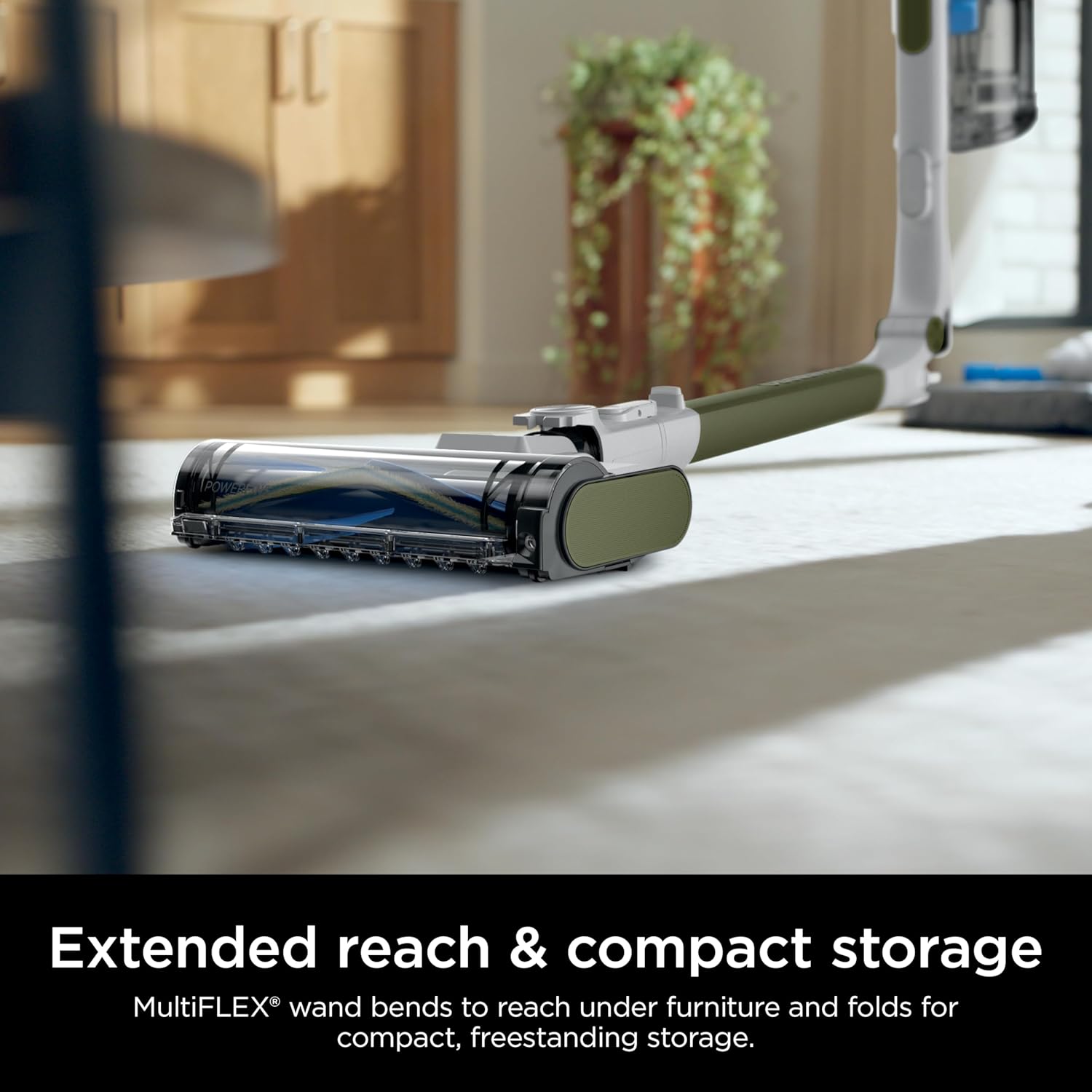
Figure 4: The MultiFLEX wand bending to reach under furniture, showcasing its flexibility.
- Under-Furniture Cleaning: Press the MultiFLEX button on the wand to bend it, allowing you to easily clean under low furniture without bending down.
- Compact Storage: Fold the wand completely for freestanding, compact storage.
- Handheld Vacuum: Detach the handheld unit from the wand by pressing the release latch. Attach the desired accessory (e.g., crevice tool, FurFins Tool) for cleaning upholstery, stairs, or elevated surfaces.
Video 3: Demonstration of the Shark PowerPro Flex Pet Plus Cordless Vacuum's versatility, including its use as a handheld vacuum and with various attachments for different cleaning tasks.
Maintenance
Emptying the Dust Cup
Empty the dust cup after each use or when debris reaches the MAX fill line to maintain optimal suction.

Figure 5: The CleanTouch Dirt Ejector feature, allowing for hygienic emptying of the dust cup.
- Ensure the handheld unit is detached from the wand.
- Hold the dust cup over a trash bin.
- Press the CleanTouch Dirt Ejector button to open the bottom flap and release debris.
- Close the flap securely after emptying.
Cleaning the Filters
Regularly clean the pre-motor and post-motor (HEPA) filters to ensure consistent suction and filtration performance.
- Pre-Motor Filters: These foam and felt filters are located inside the dust cup. Remove them and tap loose dirt between cleanings. Rinse with water as needed (every 3 months) and allow to air dry completely for at least 24 hours before reinserting.
- HEPA Post-Motor Filter: This filter is located behind the dust cup. Remove it and tap loose dirt. Rinse with water as needed (annually) and allow to air dry completely for at least 24 hours before reinserting.
Cleaning the Brushroll
The self-cleaning PowerFins brushroll is designed to minimize hair wrap, but occasional inspection and cleaning may be necessary.
- Turn off the vacuum and disconnect it from the power source.
- Inspect the brushroll for any tangled hair or debris.
- Use scissors to carefully cut away any wrapped hair.
- Ensure the PowerFins are clear of obstructions for optimal contact with surfaces.
Troubleshooting
If your Shark PowerPro Flex Pet Plus Cordless Vacuum is not performing as expected, consult the following common issues and solutions:
| Problem | Possible Cause | Solution |
|---|---|---|
| Vacuum not picking up debris or low suction. | Clogged dust cup, dirty filters, or obstructed nozzle/hose. | Empty dust cup. Clean pre-motor and HEPA filters. Check nozzle and wand for blockages. |
| Brushroll not spinning. | Hair wrap, obstruction, or incorrect mode. | Clear any hair or debris from the brushroll. Ensure the vacuum is in the correct mode for the surface. |
| Battery not charging or short runtime. | Charger not properly connected, or battery needs replacement. | Ensure charger is securely plugged into both the battery and the outlet. If issues persist, contact customer support for battery replacement options. |
For more detailed troubleshooting or issues not listed here, please refer to the full owner's guide or contact Shark customer support.
Specifications
| Feature | Detail |
|---|---|
| Brand | Shark |
| Model Name | PowerPro Flex Pet Cordless Vacuum |
| Model Number | IZ387H |
| Special Feature | Portable, Lightweight, Cordless, Rechargeable, HEPA |
| Filter Type | HEPA Filter |
| Included Components | NEW FurFins Tool, 8” Crevice Tool |
| Is Cordless? | Yes |
| Capacity | 0.79 Quarts |
| Wattage | 181 watts |
| Runtime | Up to 50 minutes (Measured at the handvac in standard mode) |
| Form Factor | Stick |
| Color | Olive |
| Product Dimensions | 13.5"L x 10.4"W x 44.68"H |
| Item Weight | 7.03 pounds |
| Manufacturer | SharkNinja |
| Country of Origin | China |
| UPC | 622356675475 |
Warranty & Support
For warranty information, please refer to the warranty card included with your product or visit the official SharkNinja website. Keep your purchase receipt as proof of purchase for warranty claims.
For customer support, product registration, or to order replacement parts and accessories, please visit www.sharkclean.com or contact their customer service hotline. Contact details can typically be found on the product packaging or the official website.