
1. Introduction and Overview
The NANU SHOP ATF-500 500W Power Supply is engineered to deliver stable and efficient power to your computer system. Designed for universal compatibility, it ensures reliable operation and safety for PCs utilizing both AMD and Intel processors. This manual provides essential information for proper installation, operation, and maintenance of your power supply.
Video Description: This video provides a brief overview of the NANU SHOP ATF-500 500W ATX PC Power Supply, showcasing its features, compatibility, and protective measures. It highlights the product's suitability for various PC builds, including gaming and workstations, and emphasizes its stable power delivery and component protection.
2. Key Features
- 500W Power Output: Provides stable and efficient energy for a wide range of PC configurations.
- Universal Compatibility: Supports both AMD and Intel motherboards, making it suitable for new builds and system upgrades.
- Ultra-Quiet 120mm Fan: Ensures effective thermal dissipation for optimal cooling and quiet operation.
- Dual Voltage (Bivolt) with Selector Switch: Compatible with both 110V and 220V electrical systems for enhanced convenience.
- Surge and Overload Protection: Incorporates safety mechanisms to protect your valuable computer components from electrical fluctuations.
3. Package Contents
Please verify that all items listed below are included in your package:
- 1x NANU SHOP ATF-500 500W Power Supply
- 1x Power Cable
- 1x User Manual (This document)

Image Description: An angled view of the NANU SHOP ATF-500 500W power supply, showing its black casing and the bundle of colorful modular cables extending from one side, ready for connection to PC components.

Image Description: A black power cable with a standard three-prong plug on one end and an IEC C13 connector on the other, used to connect the power supply to a wall outlet.
4. Specifications
Detailed technical specifications for the ATF-500 Power Supply:
| Feature | Detail |
|---|---|
| Brand | NANU SHOP |
| Model | ATF-500 |
| Output Power | 500 Watts |
| Input Voltage | AC 110-220V |
| Frequency | 50-60Hz |
| Cooling Fan | 120mm (Silent) |
| ATX Connector | 1x 20+4 Pin |
| SATA Connectors | 4x |
| IDE Connectors | 2x |
| PCI-e Connector | 1x (6+2 Pin) |
| CPU Connector | 1x (4+4 Pin) |
| Compatible Devices | Computer |
| Product Weight | 1.18 Kilograms |
| Color | Black |

Image Description: An angled view of the NANU SHOP ATF-500 500W power supply, clearly showing the product label on its side with detailed electrical specifications and certifications.
5. Setup and Installation
Follow these steps to properly install your NANU SHOP ATF-500 Power Supply:
- Prepare Your System: Ensure your computer is completely powered off and unplugged from the wall outlet. Open your PC case to access the power supply mounting area.
- Set Voltage Selector: CRITICAL STEP: Before connecting the power supply to any power source, locate the red voltage selector switch on the back of the unit. Set it to the correct voltage for your region (110V or 220V). Incorrect voltage selection can cause severe damage to the power supply and other components.
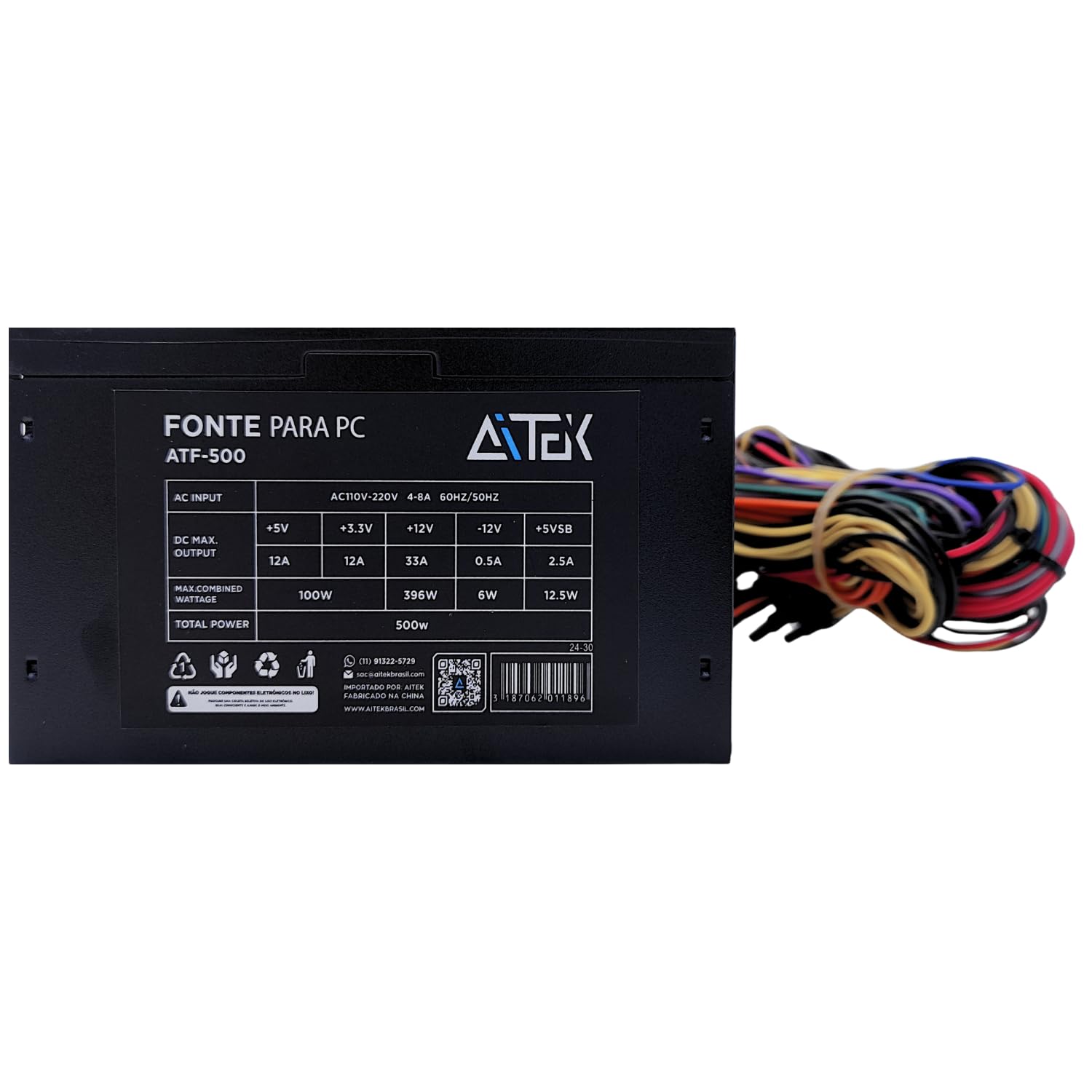
Image Description: The rear panel of the NANU SHOP ATF-500 power supply, featuring the main power switch, the AC power input socket, and a prominent red switch for selecting between 110V and 220V input voltage.
- Mount the Power Supply: Carefully slide the power supply into its designated bay in your PC case. Secure it with screws provided with your PC case or power supply.
- Connect Motherboard Power: Connect the main 20+4 pin ATX connector to your motherboard. Also, connect the 4+4 pin CPU power connector to the appropriate socket on your motherboard.
- Connect Peripherals: Connect SATA power connectors to your storage drives (HDDs, SSDs), IDE connectors to older peripherals if needed, and the 6+2 pin PCI-e connector to your graphics card(s) if applicable. Ensure all connections are firm and secure.
- Cable Management: Organize cables to ensure proper airflow within the case and prevent interference with other components.
- Close Case and Connect Power: Close your PC case. Connect the provided power cable to the power supply's AC inlet and then to a wall outlet.
6. Operating Instructions
Once installed, operating your power supply is straightforward:
- Power On: Flip the main power switch on the back of the power supply to the 'I' (On) position.
- Start PC: Press the power button on your computer case. The power supply will begin delivering power to your components.
- Fan Operation: The 120mm fan will automatically adjust its speed based on the power supply's temperature to maintain optimal cooling and quiet operation.
- Power Off: To turn off your PC, use the operating system's shutdown function. For complete power disconnection, flip the power supply switch to 'O' (Off) and unplug the power cable.
7. Maintenance
Regular maintenance helps ensure the longevity and optimal performance of your power supply:
- Dust Cleaning: Periodically clean the power supply's fan and vents to prevent dust buildup, which can hinder cooling efficiency. Use compressed air to gently remove dust. Ensure the PC is powered off and unplugged before cleaning.
- Ensure Airflow: Make sure there is adequate space around your PC case for proper airflow. Avoid blocking the power supply's intake and exhaust vents.
- Cable Management: Keep internal cables tidy to prevent them from obstructing airflow to the power supply.
8. Troubleshooting
If you encounter issues with your power supply, consider the following:
- No Power to PC:
- Check if the power cable is securely connected to both the power supply and the wall outlet.
- Ensure the power supply's main switch is in the 'I' (On) position.
- Verify the voltage selector switch (110V/220V) is set correctly for your region.
- Confirm all internal power connectors (20+4 pin ATX, 4+4 pin CPU, etc.) are firmly seated.
- Intermittent Power/System Instability:
- Check for loose cable connections inside the PC.
- Ensure the power supply is adequately ventilated and not overheating.
- If issues persist, consider testing the power supply with a power supply tester or consulting a professional.
- Loud Fan Noise:
- Clean the fan and vents to remove any dust buildup.
- Ensure the power supply is not under excessive load or overheating.
9. Warranty and Support
The NANU SHOP ATF-500 500W ATX PC Power Supply comes with a 90-day warranty provided by the store from the date of purchase. This warranty covers manufacturing defects under normal use.
For technical support, warranty claims, or any questions regarding your product, please contact NANU SHOP customer service through the retailer where you purchased the item. Please have your proof of purchase ready when contacting support.