
1. Introduction
Thank you for choosing the YELOMIN Solar Portable Charger Power Bank. This rugged and versatile power bank is designed to provide reliable power for your electronic devices in various outdoor and emergency situations. Featuring a high capacity of 59800mAh, multiple charging outputs, built-in cables, wireless charging, a hand crank generator, and an emergency LED flashlight, it ensures you stay connected and safe.
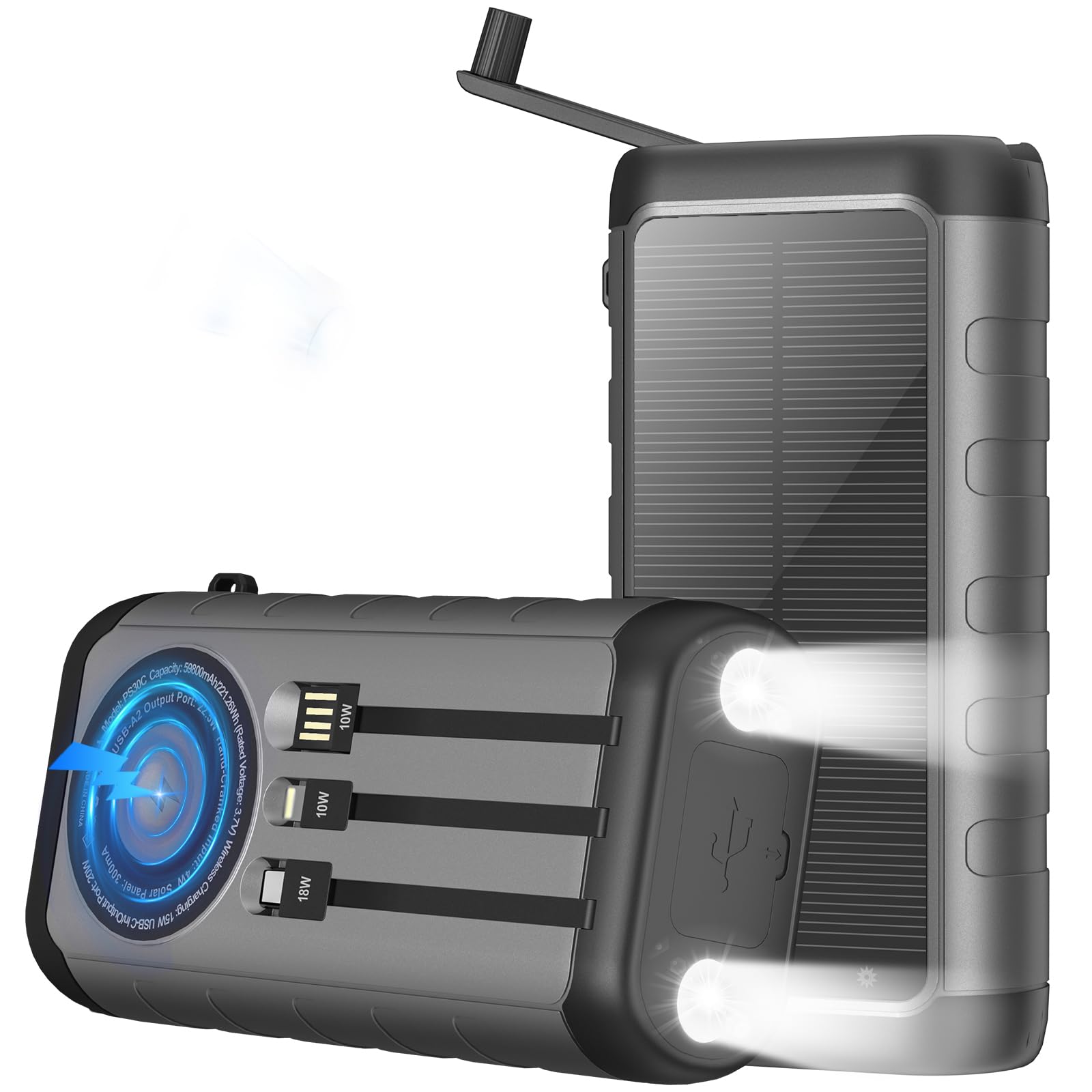
Image: YELOMIN Solar Portable Charger Power Bank 59800mAh
2. Product Features
- High Capacity: 59800mAh battery for extended power.
- Multiple Outputs: 6 output options including 2 built-in cables (iOS and USB-C), 3 USB ports (2 USB-A, 1 USB-C), and 15W wireless charging.
- Five Recharge Methods: Recharge via USB-C, Micro USB, built-in input cable, solar panel, or hand crank.
- Emergency LED Flashlight: Features Steady, Strobe, and SOS modes for various lighting needs.
- Rugged Design: Constructed with waterproof ABS+PC material, dustproof, and shockproof for outdoor durability.
- Safety Protection: Aviation-grade protection chip prevents overcharging, overcurrent, overheating, and short circuits.
3. Setup
- Initial Charge: Before first use, fully charge the power bank using a wall charger via the USB-C port. This ensures optimal battery performance.
- Power On/Off: Press the power button once to check the battery level indicators. Hold the power button for 3 seconds to activate/deactivate the LED flashlight.

Image: Recharging the power bank via wall adapter.
4. Operating Instructions
4.1 Charging Your Devices
The power bank offers multiple ways to charge your devices:
- Built-in Cables: Utilize the integrated iOS (Lightning) or USB-C cables by pulling them out from their storage slots and connecting directly to your device.
- USB Ports: Connect your device's charging cable to one of the two USB-A output ports or the USB-C output port.
- Wireless Charging: Place your Qi-enabled device on the wireless charging pad located on the back of the power bank. Ensure the device is centered for optimal charging.

Image: Charging multiple devices simultaneously.

Image: Wireless charging a smartphone.
4.2 Using the Emergency LED Flashlight
The power bank features dual LED flashlights with multiple modes:
- Activate: Press and hold the power button for approximately 3 seconds to turn on the flashlight in Steady mode.
- Cycle Modes: Briefly press the power button to cycle through the modes: Steady > Strobe > SOS.
- Deactivate: Press and hold the power button for approximately 3 seconds again to turn off the flashlight.

Image: Dual LED flashlight with three modes.
4.3 Hand Crank Operation
In situations where no other power source is available, the integrated hand crank can generate emergency power:
- Extend Crank: Pull out the hand crank handle from its slot.
- Rotate: Rotate the handle clockwise or counter-clockwise at a steady pace. The power bank's indicator lights will illuminate, showing power generation.
- Charge: Continue cranking to generate enough power to charge your device or provide minimal power for emergency communication.

Image: Using the hand crank for emergency power.
5. Charging the Power Bank
The YELOMIN power bank can be recharged using five different methods:
- USB-C Port: For the fastest daily recharge, connect a USB-C cable to a wall adapter (not included) and plug it into the power bank's USB-C input/output port.
- Micro USB Port: Connect a Micro USB cable to a wall adapter (not included) and plug it into the power bank's Micro USB input port.
- Built-in Input Cable: Use the integrated USB-A input cable to connect to a USB power source.
- Solar Panel: Place the power bank in direct sunlight. The solar charging indicator (green light) will illuminate when charging. Solar charging is primarily for emergency top-ups and is slower than wall charging.
- Hand Crank: As described in section 4.3, rotate the hand crank to generate power.

Image: Five ways to recharge the power bank.
6. Safety and Maintenance
- Durability: The power bank is designed to be IP65 waterproof, dustproof, and shockproof. However, avoid prolonged submersion in water or exposure to extreme conditions.
- Temperature: Do not expose the device to extremely high or low temperatures.
- Storage: Store the power bank in a cool, dry place when not in use.
- Cleaning: Clean the device with a soft, dry cloth. Do not use harsh chemicals or abrasive materials.
- Disassembly: Do not attempt to disassemble or repair the power bank yourself. This will void the warranty and may cause damage or injury.

Image: Rugged design for outdoor use.
7. Troubleshooting
- Device not charging: Ensure the power bank is sufficiently charged. Check all cable connections for proper seating. Verify that the device being charged is compatible with the output port/method used.
- Slow solar charging: Solar charging is designed as an emergency top-up method. Its speed depends on direct sunlight intensity, panel area, and weather conditions. For faster charging, use a wall adapter.
- Flashlight not turning on: Ensure the power button is pressed and held for approximately 3 seconds to activate the flashlight. A short press cycles modes.
- Power bank not charging: Try a different charging cable or power source. Ensure the input port is clean and free of debris.
8. Specifications
| Feature | Detail |
|---|---|
| Brand | YELOMIN |
| Model Number | PS30C |
| Battery Capacity | 59800 Milliamp Hours |
| Connector Type | USB Type C, Micro USB, Lightning |
| Power Source | Solar Powered, USB-C, Micro USB, Hand Crank |
| Number of Ports | 6 (2 Built-in Cables, 3 USB Ports, 1 Wireless) |
| Special Features | Built-in Cables, Fast Charging, Wireless Charging, Emergency LED Flashlight, Hand Crank, Waterproof (IP65), Dustproof, Shockproof |
| Voltage | 5 Volts |
| Compatible Devices | Smartphones, Tablets, Qi-enabled devices |
| Item Weight | 25.11 Ounces |
| Item Dimensions (L x W x Th) | 6.88"L x 3.14"W x 1.88"Th |
9. What's in the Box
- 1 x YELOMIN Solar Power Bank (59800mAh)
- 1 x User Manual
- 1 x Carabiner Clip
10. Warranty and Support
YELOMIN offers a friendly 6-month replacement policy. Our customer service team is available to assist you with any questions or concerns regarding our products or services. Please do not hesitate to contact us for support.
For further assistance, please refer to the contact information provided with your purchase or visit the official YELOMIN store online.