
taopodo L37
taopodo L37 Multifunctional Cell Phone Stand with Bluetooth Speaker User Manual
Model: L37
1. Introduction
Thank you for purchasing the taopodo L37 Multifunctional Cell Phone Stand with Bluetooth Speaker. This innovative device combines a stable, adjustable phone stand with a high-quality Bluetooth speaker, providing a convenient and immersive audio-visual experience. It is designed to enhance your enjoyment of media, video calls, and hands-free operation across various devices.
2. Product Overview
2.1 Package Contents
- taopodo L37 Cell Phone Stand with Bluetooth Speaker (Black)
- USB-A to Type-C charger cable *1
- User manual
2.2 Key Features
- Integrated Design: Combines a phone stand and Bluetooth speaker for a seamless experience.
- HD Stereo Sound: Delivers rich bass and clear audio with a 10-watt speaker output.
- Adjustable Viewing Angle: Flexible design allows for multiple angle options (90° to 145°) and adjustable height.
- Wide Compatibility: Supports most 4-13 inch smartphones, tablets, and e-readers with Bluetooth functionality.
- Stable & Durable: Features a metal holder, anti-slip silicone pads on the back and bottom, and a robust hook structure.
- Long Battery Life: Up to 96 hours of battery life, fully charged in less than 3 hours.
- IPX7 Waterproof: Provides protection against water splashes, suitable for various environments.
- Portable & Foldable: Compact design for easy carrying and storage.
2.3 Product Diagram and Controls
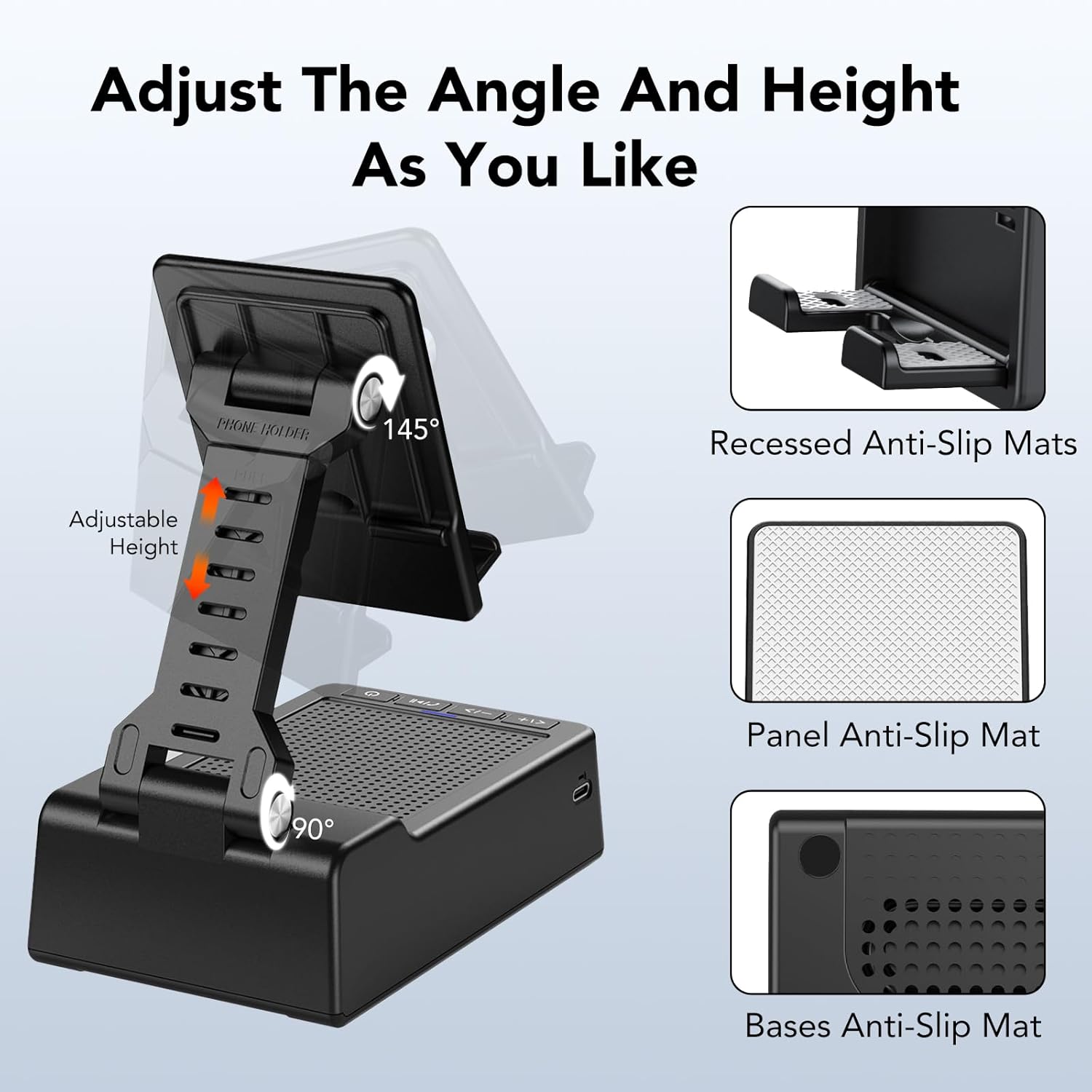
Figure 2.3.1: Adjustable Angle and Anti-Slip Features
The stand offers adjustable height and angle from 90 to 145 degrees for optimal viewing. It features anti-slip mats on the recessed phone holder, the panel, and the base for enhanced stability.

Figure 2.3.2: Multi-Function Buttons
The control panel on the speaker base includes buttons for power, volume adjustment, track control, and call management. From left to right: Previous/Volume Up, Next/Volume Down, Play/Pause/Answer/Hang up, and Power ON/OFF.
3. Setup
3.1 Charging the Device
- Locate the USB-C charging port on the side of the speaker base.
- Connect the provided USB-A to Type-C charger cable to the device.
- Plug the USB-A end of the cable into a compatible USB power adapter (not included) or a computer USB port.
- The charging indicator light will illuminate. A full charge typically takes less than 3 hours.
- Once fully charged, the indicator light may change color or turn off, depending on the model.
3.2 Powering On/Off
- To Power On: Press and hold the Power ON/OFF button (rightmost button) for approximately 3 seconds until you hear an audible prompt or see the indicator light illuminate.
- To Power Off: Press and hold the Power ON/OFF button for approximately 3 seconds until you hear an audible prompt or the indicator light turns off.
4. Operating Instructions
4.1 Bluetooth Pairing
- Ensure the taopodo L37 speaker is powered on and in pairing mode (the Bluetooth indicator light will typically flash).
- On your smartphone, tablet, or other Bluetooth-enabled device, go to the Bluetooth settings.
- Search for available devices. The speaker will appear as "L37" or "taopodo L37".
- Select "L37" to connect. Once successfully paired, you will hear a confirmation sound, and the Bluetooth indicator light will become solid.
- The speaker will automatically attempt to reconnect to the last paired device when powered on.
4.2 Media Playback
- Play/Pause: Press the Play/Pause button (middle button) once to play or pause audio.
- Next Track: Press the Next/Volume Down button (second from left) once to skip to the next track.
- Previous Track: Press the Previous/Volume Up button (leftmost button) once to go to the previous track.
- Volume Up: Press and hold the Previous/Volume Up button to increase the volume.
- Volume Down: Press and hold the Next/Volume Down button to decrease the volume.
4.3 Call Management
- Answer/End Call: Press the Play/Pause button once to answer an incoming call or end an ongoing call.
- Reject Call: Press and hold the Play/Pause button for 2 seconds to reject an incoming call.
4.4 Adjusting the Stand
- Gently pull the phone holder upwards to extend the height.
- Adjust the angle of the phone holder by tilting it forward or backward to your desired viewing position. The stand supports angles from 90 to 145 degrees.
- Ensure your device is securely placed on the stand, utilizing the anti-slip mats for stability.

Figure 4.4.1: Wide Device Compatibility
The stand is compatible with a wide range of devices, including smartphones and tablets, providing a stable and adjustable platform for various uses.
5. Maintenance
5.1 Cleaning
- Wipe the device with a soft, dry, lint-free cloth.
- For stubborn dirt, slightly dampen the cloth with water. Do not use harsh chemicals, cleaning solvents, or strong detergents.
- Avoid getting water into the charging port or speaker grille, despite its IPX7 rating, to prevent long-term damage.
5.2 Storage
- Store the device in a cool, dry place away from direct sunlight and extreme temperatures.
- When not in use, fold the stand to its compact form to save space and protect the components.
6. Troubleshooting
| Problem | Possible Cause | Solution |
|---|---|---|
| Device does not power on. | Low battery. | Charge the device using the provided USB-C cable. |
| Cannot pair via Bluetooth. | Speaker not in pairing mode; Bluetooth off on source device; too far from source device. | Ensure speaker is on and indicator is flashing. Turn on Bluetooth on your device. Move speaker closer to your device (within 10 meters). Forget "L37" from your device's Bluetooth list and try pairing again. |
| No sound or low volume. | Volume too low on speaker or source device; device not connected. | Increase volume on both the speaker and your connected device. Ensure the speaker is successfully paired. |
| Sound distortion. | Volume too high; source audio quality is poor. | Reduce the volume. Try playing a different audio source to check if the issue persists. |
| Stand is not stable. | Device not centered; anti-slip pads are dirty. | Ensure your phone/tablet is centered on the holder. Clean the anti-slip pads with a damp cloth. |
7. Specifications
| Feature | Detail |
|---|---|
| Model Name | L37 |
| Material | Plastic + Non-slip Silicone |
| Color | Black |
| Product Dimensions | 4"D x 1.9"W x 2.5"H |
| Item Weight | 12 ounces |
| Connectivity Technology | Bluetooth |
| Speaker Type | 3D |
| Speaker Maximum Output Power | 10 Watts |
| Audio Output Mode | Stereo |
| Control Method | Touch |
| Compatible Devices | Smartphones, Tablets (4-13 inches) |
| Mounting Type | Tabletop Mount |
| Special Features | Bluetooth Speaker, Handsfree Call, Phone Stand |
8. Warranty & Support
8.1 Warranty Information
This taopodo L37 Multifunctional Cell Phone Stand with Bluetooth Speaker comes with a Full Warranty from the manufacturer, taopodo. Please retain your proof of purchase for any warranty claims. The warranty covers manufacturing defects and issues arising from normal use.
8.2 Customer Support
For any questions, technical support, or warranty inquiries, please contact taopodo customer service through the retailer's platform where you purchased the product or visit the official taopodo website for contact information.
Ask a question about this manual
Ask about setup, troubleshooting, compatibility, parts, safety, or missing instructions. Manuals+ will review the question and use this page’s manual context to help answer it.