
radtel RT-4D
Radtel RT-4D DMR Radio User Manual
Model: RT-4D | Brand: Radtel
Introduction
Thank you for choosing the Radtel RT-4D DMR Radio. This digital walkie-talkie is designed for reliable and efficient amateur radio communication, supporting both digital and analog modes. With 1024 channels and dual time slot functionality, the RT-4D offers advanced features for a wide range of communication needs. Please read this manual thoroughly to understand the operation and maintenance of your device.
Package Contents
Before you begin, please verify that all items are present in your package:
- Radtel RT-4D DMR Radio Unit
- Rechargeable Battery (12V)
- Antenna
- Belt Clip
- Charging Base
- Power Adapter
- User Manual (this document)
Setup
1. Battery Installation
To install the battery:
- Align the battery pack with the grooves on the back of the radio.
- Slide the battery upwards until it clicks into place.
- Ensure the battery release latch is securely engaged.
2. Charging the Battery
For optimal performance, fully charge the battery before first use.
- Connect the power adapter to the charging base.
- Place the radio with the installed battery into the charging base.
- The charging indicator light will show the charging status (e.g., red for charging, green for fully charged).
3. Attaching the Antenna
Screw the antenna clockwise into the connector on the top of the radio until it is finger-tight. Do not overtighten.
4. Initial Power On
Rotate the Power/Volume knob clockwise to turn on the radio. Adjust the knob to your desired listening volume.

Figure 1: Front view of the Radtel RT-4D DMR Radio, showing the display, keypad, and top controls.
Operating Instructions
Basic Controls
- Power/Volume Knob: Turns the radio on/off and adjusts volume.
- Channel/Menu Knob: Navigates through channels or menu options.
- PTT (Push-to-Talk) Button: Press and hold to transmit, release to receive.
- Keypad: Used for direct frequency input, channel selection, and menu navigation.
- Display Screen: Shows current frequency, channel, mode, battery status, and other indicators.
Channel Selection and Mode Switching
The RT-4D supports 1024 channels and operates in both Analog and Digital (DMR) modes. You can switch between VFO (Variable Frequency Oscillator) mode for direct frequency input and Channel mode for pre-programmed channels.
- Press the V/M button on the keypad to toggle between VFO and Channel modes.
- In Channel mode, use the Channel/Menu knob or the up/down arrow keys on the keypad to select a channel.
- The radio automatically detects and switches between Analog and Digital modes based on the received signal or programmed channel settings.

Figure 2: The Radtel RT-4D displaying its capability for both DMR Digital and Analog handheld radio operation.
Making Calls (Digital Mode)
The RT-4D supports Single Call, Group Call, and All Call functions in DMR mode.
- Single Call: For direct communication with a specific contact. Select the desired contact from your contact list.
- Group Call: To communicate with a predefined group of users. Select the group from your group list.
- All Call: To broadcast a message to all users within range on the current channel.
Press the PTT button to initiate the call after selecting the desired call type and contact/group.

Figure 3: Illustration of the multiple calling choices available on the Radtel RT-4D, including Single Call, Group Call, and All Call.
Dual Time Slot Operation
The RT-4D utilizes 2-Time Slot TDMA (Time Division Multiple Access) technology, allowing two simultaneous conversations on a single frequency. This enhances spectrum efficiency.
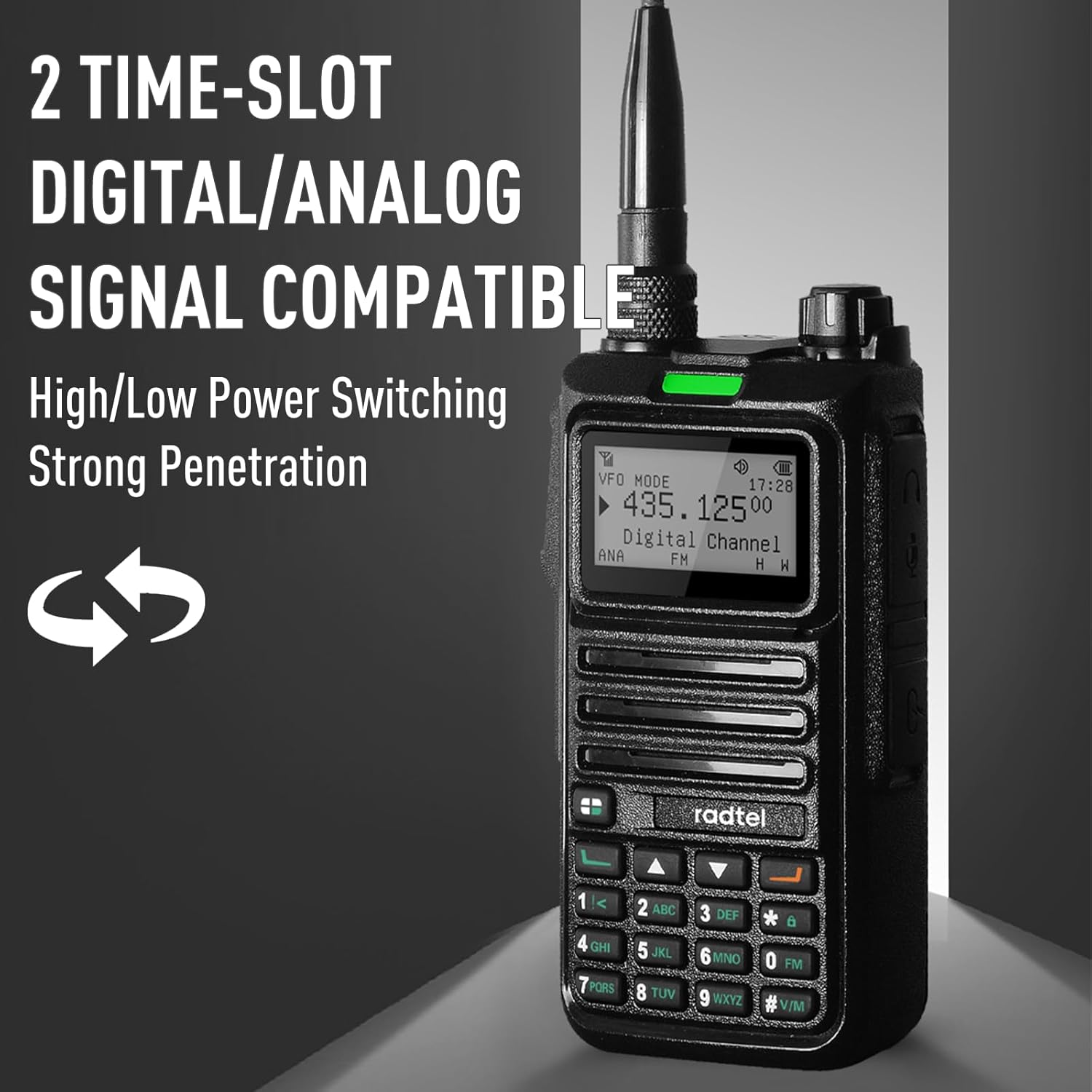
Figure 4: The Radtel RT-4D demonstrating its 2-Time Slot Digital/Analog Signal Compatibility, indicating high/low power switching and strong penetration.
Advanced Functions
- Spectrum Functions: The radio can perform a TX test to analyze and test signals across different frequencies. Access this feature through the radio's menu.
- One-Click Remote Sub-Tone Decoding: This feature allows for quick matching and decoding of remote sub-tones, simplifying communication setup.
- Digital Encryption: For enhanced communication security, the RT-4D supports digital encryption to prevent cross-interference and unauthorized listening.

Figure 5: The Radtel RT-4D displaying its Spectrum Functions, including the TX Test for analyzing signals of different frequencies.

Figure 6: The Radtel RT-4D demonstrating its One-Click Detecting Remote Sub-Tone Decoding capability for quick matching and decoding.

Figure 7: The Radtel RT-4D highlighting its Digital Encryption Safety feature, designed to avoid cross-interference of frequency and channels, and provide anti-spy protection.
Maintenance
Cleaning the Radio
Use a soft, damp cloth to clean the radio's surface. Do not use harsh chemicals or abrasive cleaners. Ensure the radio is powered off and the battery is removed before cleaning.
Battery Care
- Avoid fully discharging the battery frequently.
- Store the battery in a cool, dry place when not in use for extended periods.
- Do not expose the battery to extreme temperatures.
Storage
When storing the radio for a long time, remove the battery and store the radio in a dry, dust-free environment.
Troubleshooting
| Problem | Possible Cause | Solution |
|---|---|---|
| Radio does not power on. | Battery is not installed correctly or is discharged. | Ensure battery is properly seated. Charge the battery fully. |
| No signal reception. | Incorrect frequency/channel, antenna not attached, or out of range. | Verify frequency/channel settings. Ensure antenna is securely attached. Move closer to the transmitting radio or repeater. |
| Radio freezes or becomes unresponsive. | Temporary software glitch. | Perform a hard reset by removing and reinserting the battery. If the issue persists, contact support. |
| Poor audio quality. | Low battery, weak signal, or incorrect squelch setting. | Charge the battery. Adjust squelch level. Ensure good signal strength. |
Specifications
| Feature | Detail |
|---|---|
| Brand | Radtel |
| Model | RT-4D |
| Dimensions | 3 x 6.3 x 31.19 cm |
| Weight | 500 grams |
| Battery | 1 x 12V (included, rechargeable) |
| Voltage | 7.4 Volts |
| Number of Channels | 1024 |
| Maximum Talk Range | 5 Kilometers |
| Compatible Devices | Two-way radios with 144-146 MHz and 430-440 MHz frequency bands, DMR digital mode, and standard two-way accessories supporting UHF/VHF. |
| Connection Protocol | DMR |
| UPC | 016392405514 |
Warranty and Support
Radtel products are designed for durability and performance. For information regarding warranty coverage, returns, or technical support, please refer to the official Radtel website or contact your point of purchase. Keep your proof of purchase for any warranty claims.
Software updates are not guaranteed beyond the initial purchase date, as indicated by "unknown" for guaranteed updates.
Related documentsRT-4D


Ask a question about this manual
Ask about setup, troubleshooting, compatibility, parts, safety, or missing instructions. Manuals+ will review the question and use this page’s manual context to help answer it.