
Poolin EOC02
Poolin EOC02 Computerized Sewing Machine User Manual
Model: EOC02 (EOC2720)
Introduction
Welcome to the Poolin EOC02 Computerized Sewing Machine user manual. This guide provides comprehensive instructions for setting up, operating, maintaining, and troubleshooting your new sewing machine. Designed for both beginners and experienced sewers, the EOC02 offers a wide range of features to enhance your sewing projects.
The Poolin EOC02 is a full-featured computerized sewing machine equipped with 200 built-in stitches, 7 presser feet, an LCD display, and a wide table for versatile sewing applications. Its user-friendly design includes an automatic needle threader, speed control slider, and start/stop button for precise and convenient sewing.
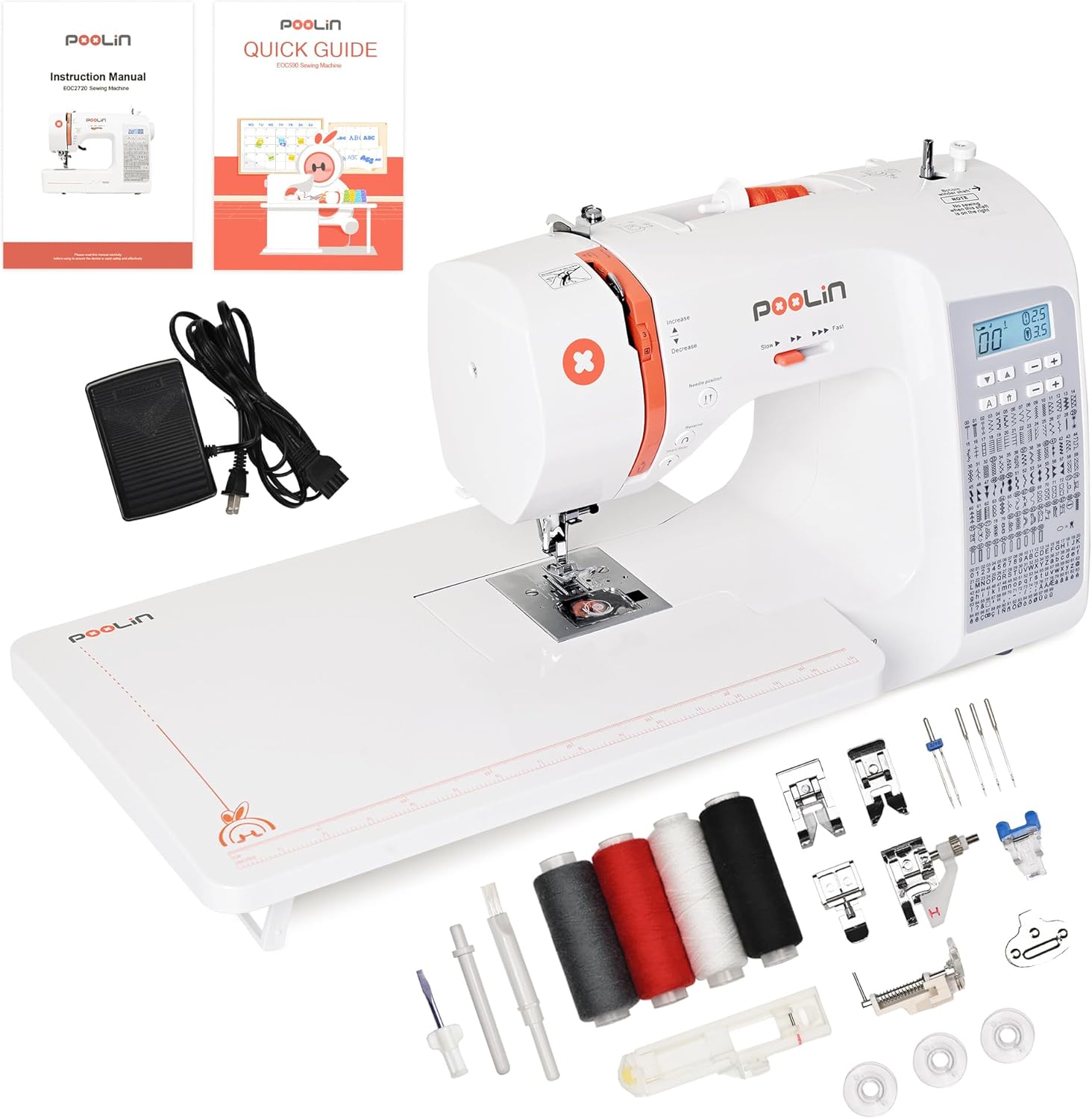
Figure 1: Poolin EOC02 Computerized Sewing Machine with included accessories, including the wide table, foot pedal, bobbins, and various presser feet.
Setup
1. Unpacking and Placement
- Carefully remove the sewing machine and all accessories from the packaging.
- Place the machine on a stable, flat surface with adequate lighting.
- Ensure there is enough space around the machine for fabric movement and comfortable operation.
- Attach the extra-wide table if desired, by sliding it onto the machine's free arm.

Figure 2: The Poolin EOC02 Sewing Machine with the removable wide table attached, providing an extended workspace for larger projects.
2. Power Connection
- Connect the power cord to the machine and then to a suitable electrical outlet.
- If using the foot pedal, connect it to the designated port on the machine.
3. Threading the Machine
Proper threading is crucial for optimal stitch quality. Follow the numbered guides on the machine for upper thread path. The automatic needle threader simplifies this process.
Winding the Bobbin:
- Place a spool of thread on the spool pin.
- Guide the thread through the bobbin winding tension disc.
- Place an empty bobbin onto the bobbin winder spindle.
- Wrap the thread around the bobbin a few times, then push the spindle to the right.
- Press the Start/Stop button or gently press the foot pedal to begin winding. Stop when the bobbin is full.
- Cut the thread and remove the bobbin.
Inserting the Bobbin:
- Open the bobbin cover plate.
- Insert the wound bobbin into the bobbin case, ensuring the thread unwinds in the correct direction (usually counter-clockwise).
- Guide the thread through the tension spring and into the thread guide slot.
- Close the bobbin cover.
Threading the Upper Thread:
- Raise the presser foot lever.
- Place the thread spool on the spool pin.
- Follow the numbered threading path indicated on the machine, ensuring the thread passes through all guides and the take-up lever.
- Use the automatic needle threader to thread the needle quickly and easily.
Operating Instructions
1. Stitch Selection and Adjustment
The EOC02 features 200 built-in stitches, including utility, decorative, and alphanumeric patterns. Use the control panel and LCD display to select your desired stitch.

Figure 3: The LCD display clearly shows the selected stitch number, along with recommended stitch length and width settings. Use the arrow buttons to navigate through the stitch options.
- Stitch Variety: Features 200 built-in stitches including utility, decorative, and alphanumeric patterns displayed clearly on the LCD screen.
- Adjustable Width & Length: Use the dedicated buttons to adjust stitch width and length as needed for your project.

Figure 4: A sample of fabric demonstrating the wide variety of functional and decorative stitches available on the Poolin EOC02 sewing machine.
2. Speed Control
The machine features a speed control slider, allowing you to adjust the sewing speed from slow to fast, providing precise control for different sewing tasks.

Figure 5: The speed control slider on the Poolin EOC02, allowing users to easily adjust the sewing speed for optimal control.
3. Start/Stop and Reverse Functions
The EOC02 offers convenient one-click sewing with its Start/Stop button, eliminating the need for a foot pedal. The Reverse button allows you to reinforce stitches at the beginning and end of seams.

Figure 6: The one-touch Start/Stop button on the Poolin EOC02, enabling pedal-free operation.

Figure 7: The Reverse stitch function button on the Poolin EOC02, used to secure seams at the beginning and end of stitching lines.
4. Presser Feet
The machine comes with 7 different presser feet, each designed for specific sewing applications. Refer to the quick guide for details on each foot's use.

Figure 8: The Poolin EOC02 machine is ready to use out of the box, including the instruction manual, quick guide, and a set of 7 presser feet for various sewing tasks.
5. Fabric Compatibility
The Poolin EOC02 is designed to handle a versatile selection of fabrics, making it perfect for both everyday sewing and creative projects:
- Delicate Fabrics: Satin, Silk, Organza, Taffeta – ideal for dresses, linings, and bridal wear.
- Stretch & Knit Materials: Jersey, Lycra, Spandex – perfect for activewear and t-shirts. Thin and stretch fabrics require stabilizers to ensure clean, even stitching.
- Medium-weight Fabrics: Cotton, linen, and poplin – ideal for home décor, shirts, and crafts.
- Heavier Materials: Denim, twill, and canvas for jeans, bags, and jackets.
- Upholstery and Textured Fabrics: Including velvet and corduroy, plus layered or quilted materials up to 6mm thick.

Figure 9: Examples of various projects that can be created with the Poolin EOC02, showcasing its versatility with different fabric types and sewing techniques.
6. Official Product Video
Watch the official product video for a visual guide on the features and operation of the Poolin EOC02 Sewing Machine.
Video 1: "Poolin Smart Sewing Machine EOC02 | 200 Built-In Stitches". This video provides an overview of the machine's capabilities, including its 200 built-in stitches and smart features.
Maintenance
Regular maintenance ensures the longevity and optimal performance of your sewing machine.
1. Cleaning
- Lint Removal: Regularly remove lint and dust from the bobbin area and feed dogs using a small brush.
- Surface Cleaning: Wipe the exterior of the machine with a soft, dry cloth. Avoid using harsh chemicals.
2. Oiling
Refer to the detailed instruction manual for specific oiling points and frequency. Use only high-quality sewing machine oil.
3. Needle Replacement
Replace the needle frequently (after every 8-10 hours of sewing or when it becomes dull) to prevent skipped stitches and fabric damage. Use the correct needle type and size for your fabric.
Troubleshooting
This section addresses common issues you might encounter and their solutions. For more complex problems, refer to the full instruction manual or contact customer support.
| Problem | Possible Cause | Solution |
|---|---|---|
| Skipped Stitches | Incorrect needle, bent needle, improper threading, wrong needle size for fabric. | Replace needle, re-thread machine, ensure correct needle type/size. |
| Thread Breaking | Incorrect tension, poor quality thread, burr on needle plate, improper threading. | Adjust tension, use good quality thread, check for burrs, re-thread. |
| Fabric Not Feeding | Feed dogs lowered, presser foot not down, lint accumulation. | Raise feed dogs, lower presser foot, clean feed dogs. |
| Machine Not Starting | Power cord loose, foot pedal not connected, bobbin winder engaged. | Check power connections, ensure foot pedal is connected, disengage bobbin winder. |
| Error Prompts | Various internal issues or user errors. | The machine provides different error prompts to make problem-solving easier. Consult the full manual for specific error codes and their meanings. |
Specifications
| Feature | Detail |
|---|---|
| Model Number | EOC02 (EOC2720) |
| Product Dimensions | 7.46"D x 12.2"W x 16.14"H |
| Item Weight | 12.5 pounds |
| Built-in Stitches | 200 (Utility, Decorative, Alphanumeric) |
| Presser Feet Included | 7 |
| Display Type | LCD |
| Special Features | Automatic Needle Threader, Speed Control Slider, Start/Stop Button, Wide Table, Free Arm Functionality, Needle Position Button, Error Prompts |
| Country of Origin | China |
Warranty and Support
Poolin is committed to providing excellent support for its users.
Technical Support
We have a dedicated support team for each of our users. We will guide you step-by-step through assembling, threading, and testing to ensure you overcome the learning curve quickly.
Social Media Support
We highly suggest you join our user group by searching "Poolin Embroidery & Sewing Machine" to connect with other people for tips and tricks. You can also access a variety of helpful video tutorials by searching "POOLIN Sewing Machine" on video platforms.

Figure 10: Poolin offers comprehensive service and support, including assistance from experts, one-to-one technical support, daily project sharing, and step-by-step video guides.
Related documentsEOC02

Ask a question about this manual
Ask about setup, troubleshooting, compatibility, parts, safety, or missing instructions. Manuals+ will review the question and use this page’s manual context to help answer it.