
1. Introduction
The DOOGEE Blade 10 Pro is a rugged smartphone designed for durability and performance. It features an ultra-thin body, a large display, a powerful processor, and a high-capacity battery, making it suitable for various environments and daily use. This manual provides essential information for setting up, operating, and maintaining your device.

Figure 1: Overview of the DOOGEE Blade 10 Pro Rugged Smartphone with key features.
2. What's in the Box
Verify that all items are present in your package:
- 1 x Blade10 Pro Rugged Smartphone
- 1 x Manual
- 1 x Packing Box
- 1 x Type-C USB Cable and 1 x Charger
- 1 x Warranty Card
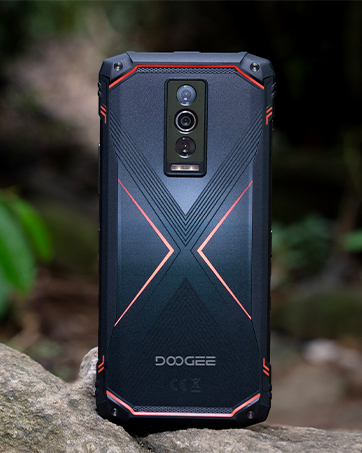
Figure 2: Package contents of the DOOGEE Blade 10 Pro.
3. Device Overview
The Blade 10 Pro features a slim 10.7mm body, a 6.56-inch HD+ IPS display, and a robust design. It includes a 50MP AI main camera and an 8MP front camera.
3.1 Physical Features
- Dimensions: 7.63 x 4.09 x 2.02 inches
- Weight: 9.2 ounces (262 grams)
- Form Factor: Bar
- Color: Silver
3.2 Buttons and Ports
The device includes standard volume and power buttons, a custom key function, and a Type-C USB port. It also features a SIM/TF card slot.

Figure 3: The 10.7mm ultra-thin body design of the Blade 10 Pro.
4. Initial Setup
4.1 Inserting SIM and TF Card
The Blade 10 Pro supports triple SIM slots with independent channels for dual nano SIM cards and one TF card for memory expansion up to 2TB.

Figure 4: Triple card slot for SIM and TF card installation.
4.2 Powering On and Initial Configuration
Press and hold the power button to turn on the device. Follow the on-screen prompts to select your language, connect to Wi-Fi, and set up your Google account.
4.3 Security Features: Face Unlock
The device is equipped with a facial unlock feature for quick and secure access. Configure this feature in the security settings.

Figure 5: NFC and Face Unlock features.
4.4 Memory Expansion
The Blade 10 Pro comes with 30GB (6GB + 24GB extended) RAM and 256GB internal storage. You can expand the memory up to 2TB with a TF card.
Video 1: Instructions on how to expand memory on the smartphone.
5. Operating Instructions
5.1 Display and Navigation
The 6.56-inch HD+ IPS waterdrop screen offers a 90 Hz refresh rate for smooth interaction and 400 nits of brightness for clear visibility.

Figure 6: Display features of the Blade 10 Pro.
5.2 Camera Usage
Capture moments with the 50MP AI main camera and 8MP front camera. Advanced shooting modes like HDR, Panorama, Pro Mode, and Beauty Mode are available.

Figure 7: Camera system and shooting modes.
5.3 Network and Connectivity
The device supports various network bands (GSM, WCDMA, TDD, FDD) and features NFC, USB, and Wi-Fi connectivity.
Important: Before purchasing, ensure compatibility with your local frequency band. Supported bands include: GSM:B2/3/5/8 WCDMA:B1/2/4/5/8 TDD:B34/38/39/40/41 FDD:B1/2/3/4/5/7/8/18/19/20/25/26/28AB/66.
6. Maintenance and Durability
The DOOGEE Blade 10 Pro is built to be rugged, featuring IP68, IP69K, and MIL-STD-810H certifications for water, dust, and drop resistance.
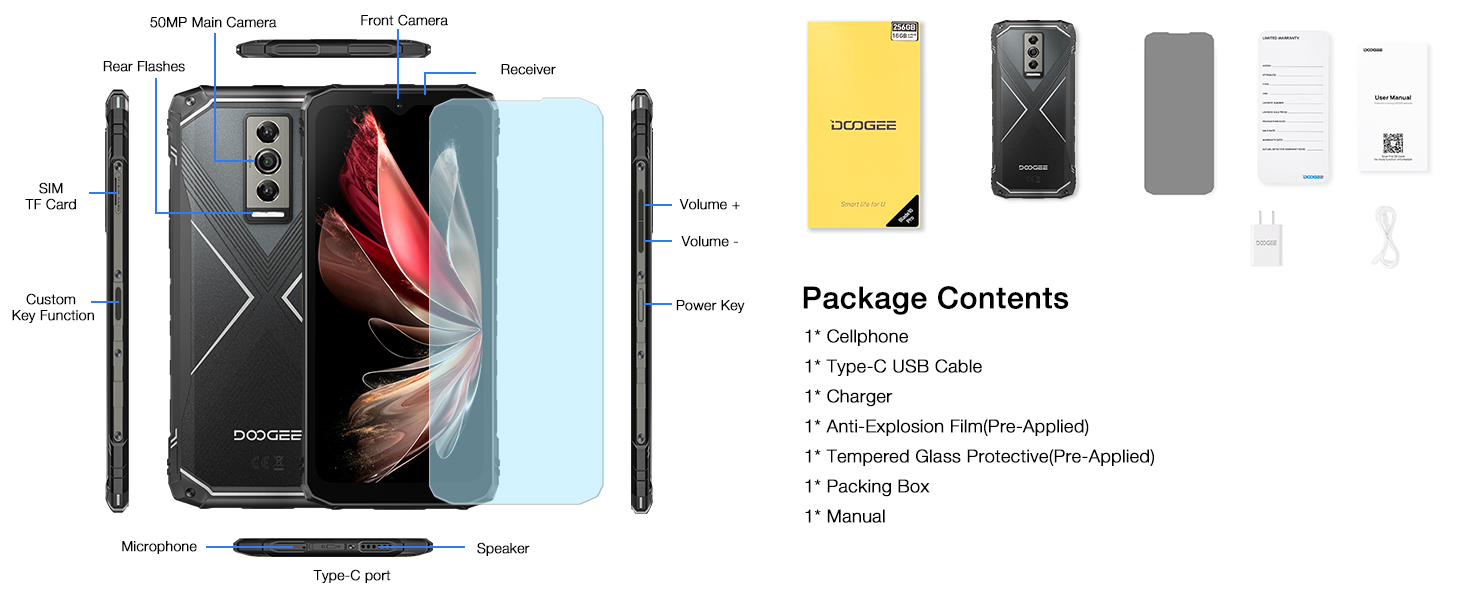
Figure 8: Ruggedness features: Waterproof, Dust-proof, Drop-proof.
6.1 Battery Care
The device is equipped with a large 5150 mAh battery. Use the provided 10W charger and Type-C USB cable for optimal charging. Avoid extreme temperatures and prolonged exposure to direct sunlight to preserve battery life.
Video 2: Demonstration of the Blade 10 Pro Energy's 6150mAh battery and reverse charging capabilities.
7. Troubleshooting
7.1 Common Issues
- Device not powering on: Ensure the battery is charged. Connect to the charger and try again.
- Network connectivity issues: Check SIM card insertion and network settings. Verify compatibility with local frequency bands.
- Slow performance: Close unnecessary background applications. Clear cache and temporary files.
8. Specifications
| Operating System | Android 15 |
| Processor | UNISOC T7200 Octa-Core (1.6 GHz) |
| RAM | 30 GB (6GB + 24GB extended) |
| Internal Storage | 256 GB |
| Expandable Storage | Up to 2 TB with TF card |
| Display Size | 6.56 Inches |
| Resolution | 720 x 1560 |
| Refresh Rate | 90 Hz |
| Main Camera | 50 MP AI |
| Front Camera | 8 MP |
| Battery Capacity | 5150 mAh |
| Connectivity | NFC, USB, Wi-Fi, GPS |
| Durability | IP68, IP69K, MIL-STD-810H |
9. Warranty and Support
Your DOOGEE Blade 10 Pro comes with a warranty. Please refer to the included Warranty Card for details on coverage and terms. For technical support or service inquiries, please visit the official DOOGEE website or contact their customer service.
Manufacturer: DOOGEE
Date First Available: March 25, 2025
Protection Plans: Additional protection plans are available for purchase. Refer to product listing for details.


