
1. Introduction
Thank you for choosing the Comfytemp Portable Foot Massager with Heat. This device is designed to provide dynamic compression massage and soothing heat to your feet and ankles, promoting relaxation and temporary relief from discomfort. This manual provides essential information for safe and effective use, setup, operation, and maintenance of your massager.
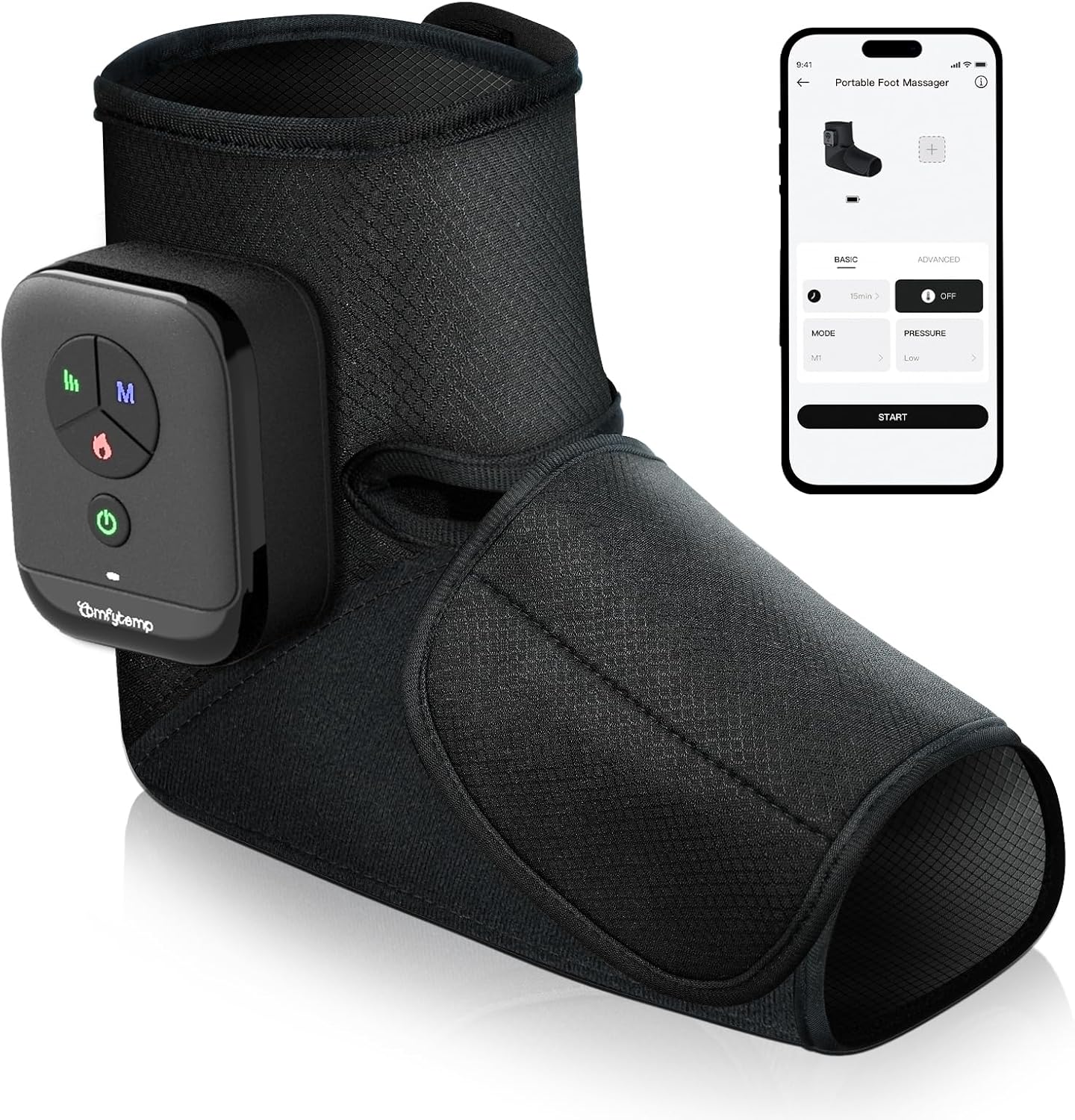
Figure 1: The Comfytemp Portable Foot Massager, showcasing its design and the mobile application interface.
2. Important Safety Instructions
Please read all instructions carefully before using this product. Failure to follow these instructions may result in injury or damage to the device.
- Do not use this product if you have any medical conditions such as pacemakers, heart disease, blood clots, or are pregnant, without consulting a physician.
- Keep the device away from water or excessive moisture.
- Do not use the massager on swollen, inflamed, or injured areas.
- Avoid using the device for prolonged periods. A 15-minute auto-off timer is included for safety.
- If you experience any discomfort or pain during use, discontinue immediately.
- Ensure the device is fully charged before first use.
- This appliance is not intended for use by persons with reduced physical, sensory, or mental capabilities, or lack of experience and knowledge, unless they have been given supervision or instruction concerning use of the appliance by a person responsible for their safety.
3. Package Contents
- Comfytemp Portable Foot Massager (Model FM-07-CB1)
- USB-C Charging Cable
- User Manual
4. Product Overview and Features
The Comfytemp Portable Foot Massager is designed for convenience and effective relief. Key features include:
- Cordless Design: Enjoy unrestricted movement and use the massager anywhere. Equipped with a 2500mAh battery, it offers 80 to 150 minutes of use per charge.
- Dynamic Compression Massage: Features 3 independent airbags that apply rhythmic pressure across your forefoot, arch, heel, and ankle.
- Soothing Heat Function: A built-in heating element provides warmth up to 118°F (48°C) at the sole.
- Adjustable Fit: Two adjustable Velcro straps accommodate US shoe sizes 6 to 10. Pressure can be adjusted by loosening or tightening the straps.
- Dual Control Options: Control the massager using the built-in buttons or through the dedicated mobile application.

Figure 2: A user demonstrating the cordless operation of the foot massager, highlighting its portability and battery life.

Figure 3: An internal diagram showing the three airbag zones for compression and the foot bottom heating area.
5. Getting Started
5.1 Charging the Device
- Connect the provided USB-C charging cable to the charging port on the massager's control unit.
- Plug the other end of the USB-C cable into a 5V/2A USB power adapter (not included).
- The indicator light on the control unit will blink red during charging and turn solid red when fully charged.
- A full charge typically takes approximately 2-3 hours.
5.2 Wearing the Massager
- Unfold the massager and place your foot inside, ensuring your heel is comfortably seated.
- Wrap the forefoot strap around your foot and secure it with the Velcro.
- Wrap the ankle/calf strap around your ankle and secure it with the Velcro.
- Ensure the control unit is positioned on your ankle, not upside down, for proper operation.
- Adjust the straps to achieve a comfortable yet secure fit. Loosen for less pressure, tighten for more intense compression.

Figure 4: Sizing and adjustment guide for the foot massager, indicating suitability for US shoe sizes 6-10 and how to adjust straps for pressure.
6. Operating Instructions
The massager can be controlled via its built-in buttons or a mobile application.
6.1 Using the Built-in Controller
The control unit features several buttons for direct operation:
- Power Button (⏻): Press and hold to turn the device ON/OFF.
- Mode Button (M): Press to cycle through 3 massage modes (M1, M2, M3).
- Intensity Button (|||): Press to adjust between 3 intensity levels (Low, Medium, High).
- Heat Button (♨): Press to turn the heating function ON/OFF.
The device has a default 15-minute auto-off timer for each session.
6.2 Using the Mobile App
For enhanced customization and control, download the Comfytemp app (available for iOS and Android) by scanning the QR code in the included manual.
- The app allows for custom massage combinations.
- Expanded timer options are available through the app.
- You can monitor and adjust settings remotely via the app.

Figure 5: Illustration of the dual control system, detailing functions available via physical buttons and the mobile application.
7. Care and Maintenance
7.1 Cleaning
- Ensure the device is turned off and unplugged before cleaning.
- Wipe the exterior with a soft, damp cloth. Do not use abrasive cleaners or immerse the device in water.
- Allow the device to air dry completely before storing or next use.
7.2 Storage
- Store the massager in a cool, dry place, away from direct sunlight and extreme temperatures.
- Keep out of reach of children and pets.
8. Troubleshooting
| Problem | Possible Cause | Solution |
|---|---|---|
| Device does not turn on. | Low battery or not charged. | Charge the device fully. |
| No compression or weak compression. | Straps are too loose or device is off. | Ensure device is on and straps are tightened appropriately. Check intensity setting. |
| Heat function is not noticeable. | Heat is subtle or not activated. | Ensure heat function is turned on. The heat is designed to be gentle and may feel less intense in warmer environments. |
| App cannot connect to the device. | Bluetooth is off or device is not discoverable. | Ensure Bluetooth is enabled on your mobile device and the massager is powered on. Restart both devices if necessary. |
9. Specifications
- Model Number: FM-07-CB1
- Product Dimensions: 2 x 1 x 3 inches (5.08 x 2.54 x 7.62 cm)
- Item Weight: 1.57 Pounds (0.71 Kilograms)
- Power Source: Battery Powered (2500mAh)
- Rated Voltage: 5V
- Heat Temperature: Up to 118°F (48°C) at the sole
- Auto-off Timer: 15 minutes (default)
- Manufacturer: Shenzhen Yicai Health Technology Co. , Ltd
10. Support and Warranty
For product support, technical assistance, or warranty inquiries, please contact Comfytemp customer service through the contact information provided on the product packaging or the official Comfytemp website. Please retain your proof of purchase for warranty claims.


