
1. Introduction
Thank you for choosing the UNITOPSCI 7086W Double Din Car Stereo. This advanced multimedia system is designed to enhance your driving experience with its 6.9-inch IPS touchscreen, wireless Apple CarPlay, Android Auto, Bluetooth 5.2, and a range of connectivity options. This manual provides essential information for installation, operation, and maintenance to ensure optimal performance and safety.

Image 1.1: UNITOPSCI 7086W Double Din Car Stereo and accessories.
2. Safety Information
- Always consult a professional for installation to prevent damage to the unit or your vehicle.
- Do not operate the unit in a way that distracts you from driving. Always prioritize road safety.
- Ensure all wiring is correctly connected to avoid short circuits or electrical hazards.
- Keep the unit away from water and excessive moisture.
- Do not attempt to repair the unit yourself. Refer to qualified service personnel.
- Use only the specified power supply (DC 12V).
3. Package Contents
Verify that all items are present in the package:
- 1 x Car MP5 Player (UNITOPSCI 7086W)
- 1 x Power Cable
- 1 x Speaker Cable
- 1 x Microphone (MIC)
- 1 x Steering Wheel Control (Battery Not Included)
- 1 x User Manual
- 1 x D-BUS Cable
- 1 x Backup Camera
- 1 x Remote Control (Battery Not Included)
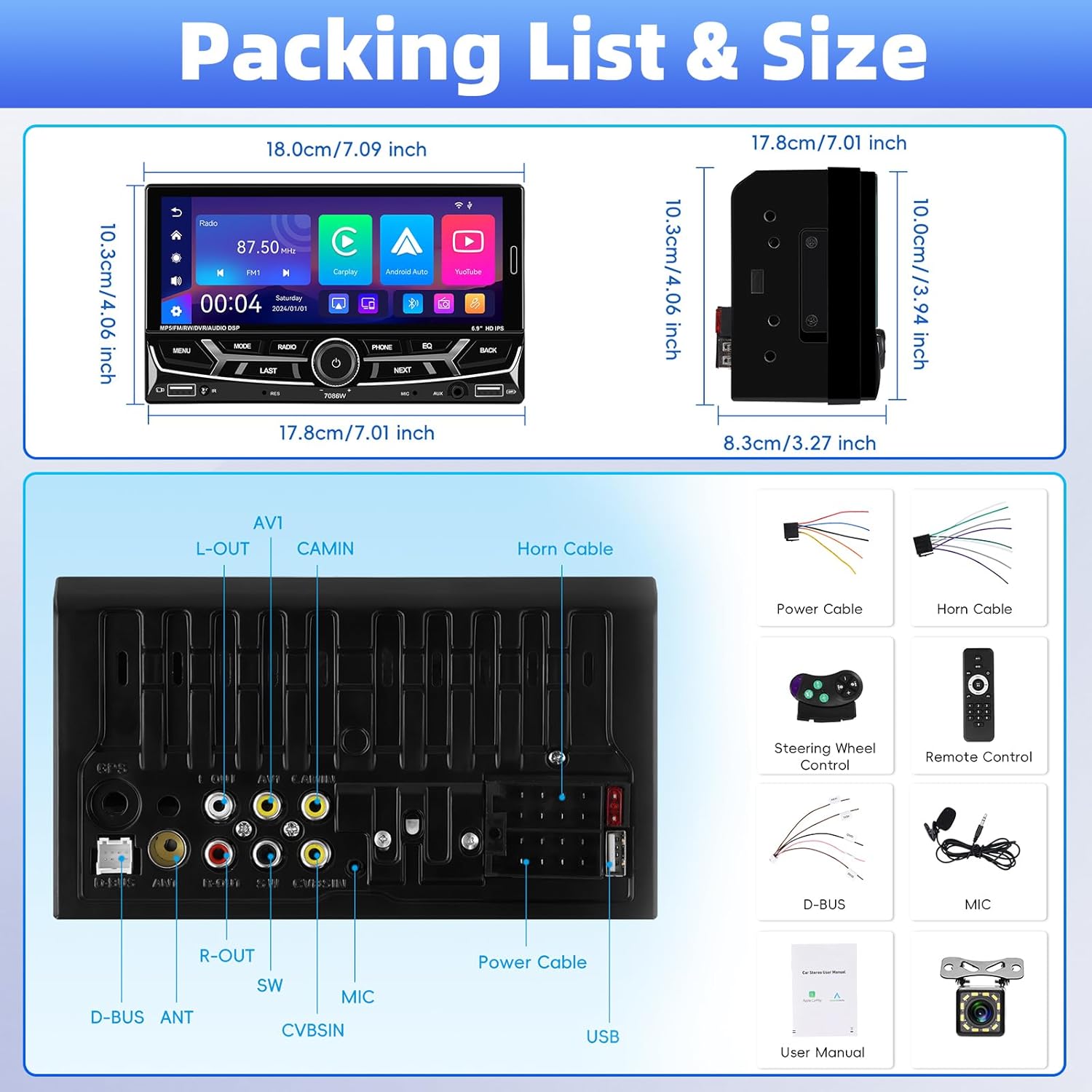
Image 3.1: Detailed view of package contents and wiring diagram.
4. Specifications
| Feature | Specification |
|---|---|
| Model | 7086W |
| Screen Material | IPS |
| Voltage | DC 12V |
| CPU Chip | 2900 |
| Screen Size | 6.9 inches |
| Screen Resolution | 1280*480 |
| Mirror Link | Support (iOS up to 13.4, Android up to 10.1) |
| Radio Band | FM/AM/RDS |
| Radio Chip | QN8035 |
| Power Output | 45W*4 (Max 180 Watts) |
| Work Temperature | -10~60℃ |
| Bluetooth Version | 5.2 |
| Colorful Backlight | Support (7 colors) |
| Reversing Input | AHD720/CVBS |
| Power Amplifier Chip | TDA7388 |
| Radio Frequency | FM: 87.5-108MHz, AM: 530-1710KHz |
| Audio Format | MP3/WMA/WAV/APE/FLAC |
| Video Format | RM/RMVB/AVI/MP4/MKV/3GP |
| Picture Format | JPG BMP PNG |
| Product Dimensions | 4.37 x 7 x 4.01 inches |
| Item Weight | 2.64 pounds |
5. Setup and Installation
Proper installation is crucial for the performance and safety of your car stereo. It is highly recommended to have the unit installed by a qualified professional.
5.1 Wiring Connections
Refer to the detailed wiring diagram provided in Image 3.1 (Packing List & Size) and the included user manual for specific connection points. Key connections include:
- Power Cable: Connect to vehicle's power supply (constant 12V, accessory 12V, and ground).
- Speaker Cable: Connect to your vehicle's speakers. Ensure correct polarity.
- Backup Camera Input (CVBSIN): Connect the included backup camera for automatic rear view display.
- Microphone (MIC): Connect the external microphone for improved hands-free calling.
- Steering Wheel Control (SWC): Connect to your vehicle's steering wheel control wires for integrated control.
- USB Ports: Two USB ports are available for media playback, charging, and DVR input.
- AUX Input: For connecting external audio devices.
Ensure all connections are secure and insulated to prevent short circuits.
6. Operating Instructions
6.1 Power On/Off and Basic Controls
The unit powers on automatically with the vehicle's ignition. Use the physical knob and buttons on the front panel for basic operations like volume control, mode selection, and track skipping.
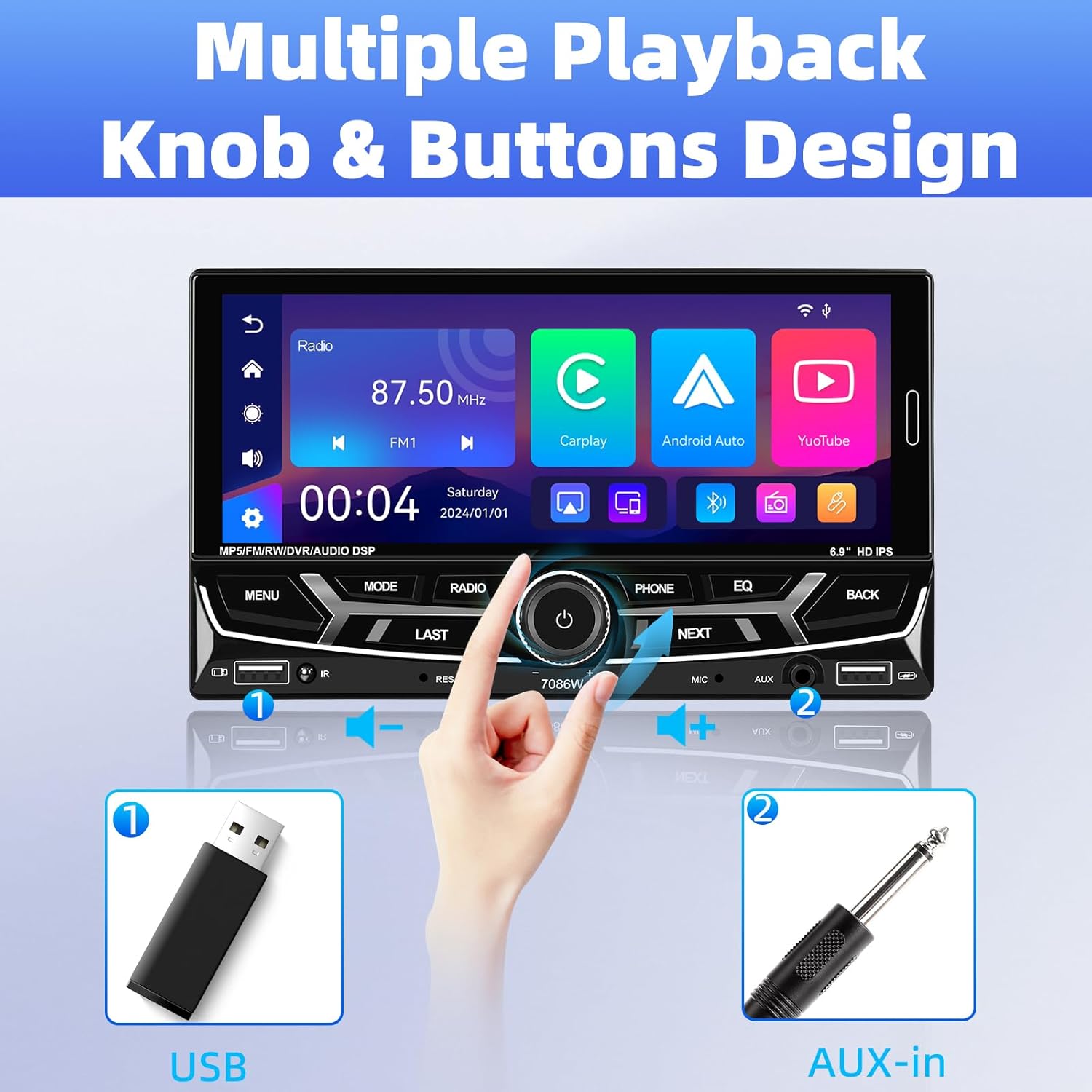
Image 6.1: Front panel controls and connectivity options.
6.2 Wireless Apple CarPlay and Android Auto
Connect your smartphone wirelessly via Bluetooth to access Apple CarPlay or Android Auto. This allows you to use navigation, make calls, send messages, and listen to music directly from your phone's interface displayed on the stereo screen.
- Ensure Bluetooth is enabled on your smartphone.
- On the car stereo, navigate to the Bluetooth settings and pair with your phone.
- Once paired, select the CarPlay or Android Auto icon on the stereo's main menu.
- Follow any on-screen prompts on your phone to grant necessary permissions.

Image 6.2: Wireless Apple CarPlay and Android Auto interfaces.
6.3 Bluetooth 5.2 Hands-free Calling and Audio Streaming
The built-in Bluetooth 5.2 module allows for stable hands-free calling and high-quality audio streaming.
- Pairing: Go to the Bluetooth menu on the stereo, search for your phone, and pair.
- Hands-free Calls: Once paired, you can dial numbers, answer, or end calls directly from the stereo's touchscreen or via voice commands (e.g., Siri). The external microphone ensures clear communication.
- Audio Streaming: Play music from your phone through the car's speakers via Bluetooth.

Image 6.3: Bluetooth 5.2 hands-free and audio features.
6.4 Mirror Link Function
The Mirror Link function allows you to display your smartphone's screen directly onto the car stereo. This is compatible with iOS devices up to version 13.4 and Android devices up to version 10.1.
- Connect your smartphone to the stereo via a USB cable.
- Select the 'Mirror Link' option on the stereo.
- Follow the on-screen instructions to establish the connection.
6.5 FM/AM/RDS Radio
Access local radio stations with the built-in FM/AM/RDS tuner.
- Tuning: Use the touchscreen to scan for stations or manually tune to a specific frequency.
- Preset Stations: Save up to 30 of your favorite stations for quick access.
- RDS (Radio Data System): Displays station information such as song title or program type where available.
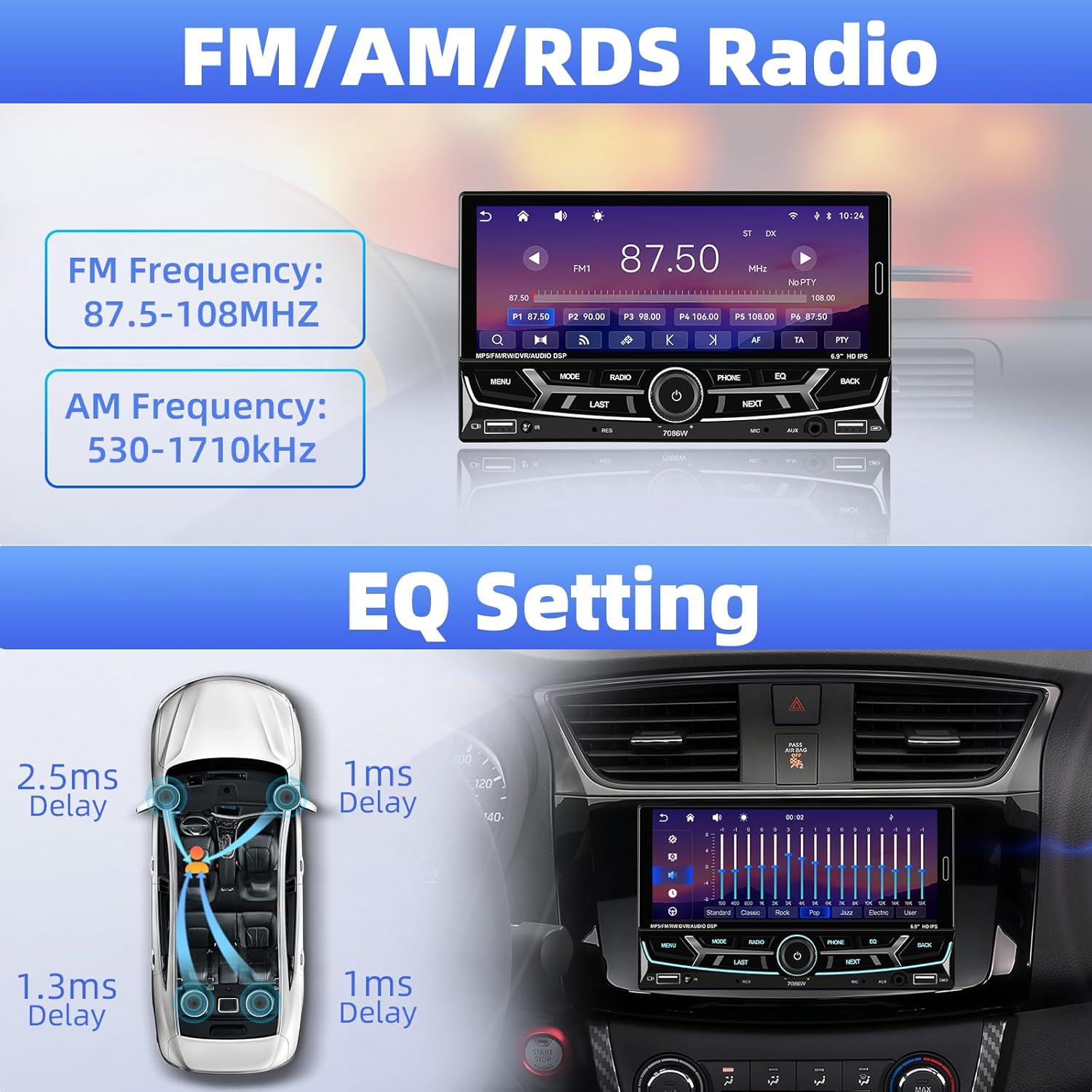
Image 6.4: FM/AM/RDS Radio interface and EQ settings.
6.6 DSP/EQ Audio Setting
Customize your audio experience with the Digital Sound Processor (DSP) and Equalizer (EQ) settings. Choose from preset sound styles like Pop, Rock, Classic, Jazz, or create your own custom profile.
6.7 USB Playback and Charging / Auxiliary Audio Input
- USB: Insert a USB drive into one of the USB ports for media playback (audio/video/pictures) or to charge your devices.
- AUX: Connect external audio devices (e.g., MP3 players) to the 3.5mm AUX input on the front panel.
6.8 Rear View Camera
When the vehicle is shifted into reverse gear, the stereo automatically displays the feed from the connected backup camera. The included camera features 12 LEDs, a 170° wide angle, and night vision for clear visibility, along with parking guidelines.

Image 6.5: Rear view camera display and features.
6.9 Steering Wheel Control (SWC)
If your vehicle supports steering wheel controls, connect the SWC wires to the stereo. This allows you to control functions like volume, track skipping, and mode switching directly from your steering wheel for convenience and safety.
Image 6.6: Steering wheel control functionality.
6.10 6.9-Inch IPS Touchscreen and 7-Color Backlight Display
The high-definition IPS touchscreen offers clear visuals and responsive touch control. You can customize the backlight color of the physical buttons to match your vehicle's interior or personal preference, choosing from 7 available colors.

Image 6.7: IPS Touchscreen and 7-color backlight display.
7. Maintenance
- Cleaning the Screen: Use a soft, lint-free cloth to gently wipe the touchscreen. Do not use abrasive cleaners or solvents.
- General Cleaning: Keep the unit free from dust and debris. Use a soft, dry cloth for cleaning the exterior.
- Avoid Extreme Temperatures: Do not expose the unit to prolonged direct sunlight or extreme cold, as this can affect performance and lifespan.
8. Troubleshooting
| Problem | Possible Cause | Solution |
|---|---|---|
| No power | Incorrect wiring; Blown fuse | Check power cable connections; Inspect and replace fuse if necessary. |
| No sound | Speaker wires disconnected; Volume too low; Incorrect audio source | Verify speaker connections; Increase volume; Select correct audio input. |
| Bluetooth not connecting | Bluetooth off on phone/stereo; Incorrect pairing process | Ensure Bluetooth is active on both devices; Re-attempt pairing process. |
| CarPlay/Android Auto not starting | Phone not compatible; Incorrect connection; App issues | Check phone compatibility; Ensure proper Bluetooth connection; Restart phone and stereo. |
| Backup camera not displaying | Camera wiring incorrect; Reverse trigger wire not connected | Check camera power and video signal cables; Ensure reverse trigger wire is connected to vehicle's reverse light. |
| Steering Wheel Control not working | SWC wires not connected; Incorrect configuration | Verify SWC wiring; Refer to vehicle-specific instructions for SWC setup. |
If problems persist, please contact customer support.
9. Warranty and Support
UNITOPSCI is committed to providing high-quality products and customer satisfaction.
- Replacement: Replacement available within 24 months of purchase.
- Returns: 60-day no-worry return policy.
- Technical Support: Lifetime after-sales consultation and technical support.
- Response Time: Quick response to inquiries within 16 hours.
For support, please contact us at: UNITOPSCI@126.com


