Introduction
This manual provides essential instructions for the setup, operation, and maintenance of your Uvital LD-858 Big Button Corded Landline Phone. Designed for ease of use, this phone features large buttons, one-touch dialing, adjustable volume, and hands-free calling, making it suitable for seniors and individuals with visual impairments.
Package Contents
Verify that all items are present in the package:
- Big Button Phone (Base Unit)
- Handset
- Coiled Handset Cord
- Telephone Line Cord
Product Overview
Familiarize yourself with the components and features of your Uvital LD-858 phone.
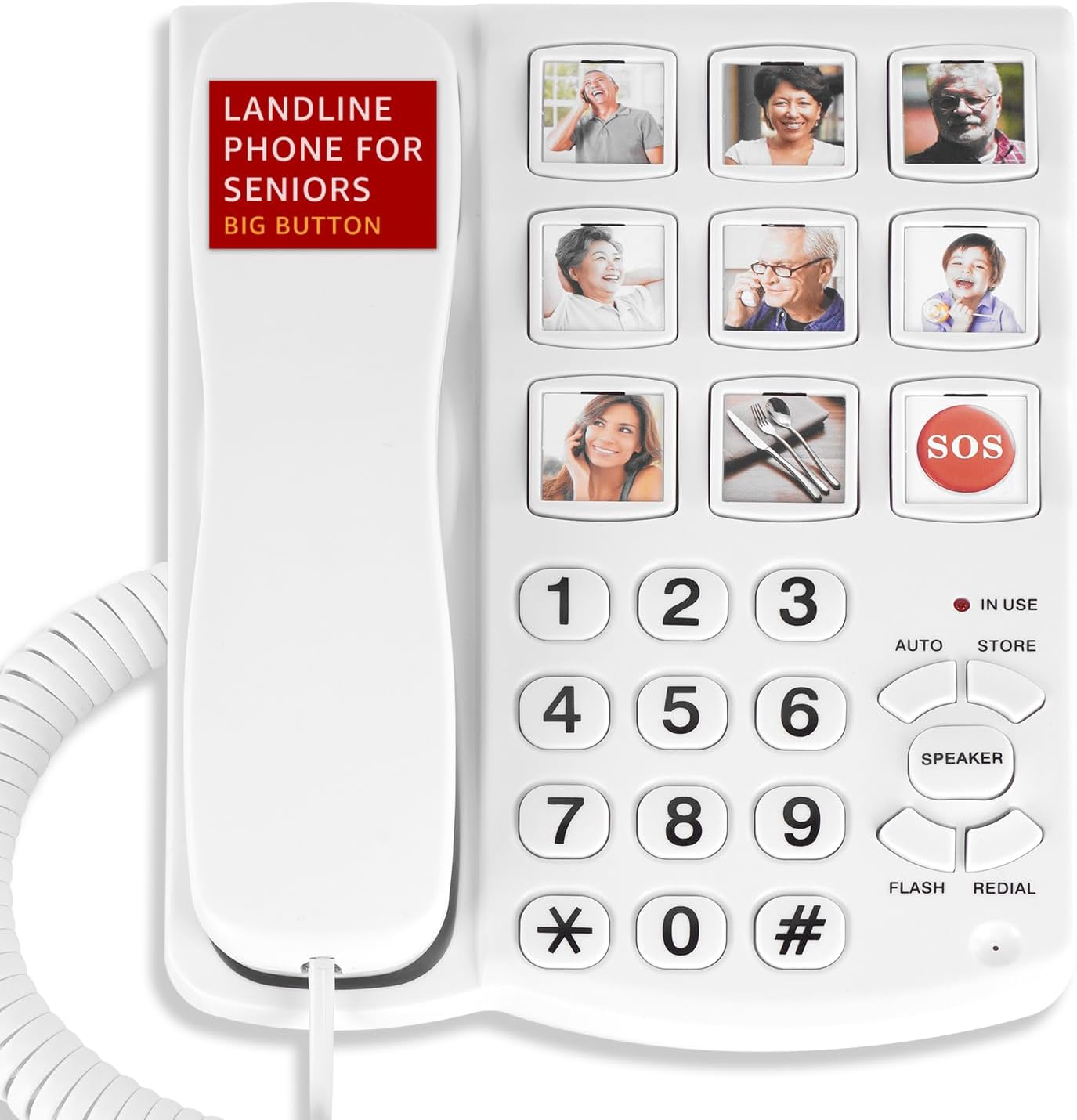
Figure 1: Front view of the Uvital LD-858 Big Button Corded Landline Phone, showing the large keypad, one-touch dialing buttons, and handset.

Figure 2: Detail of the 9 large one-touch dialing buttons, designed to hold replaceable pictures for easy contact identification.
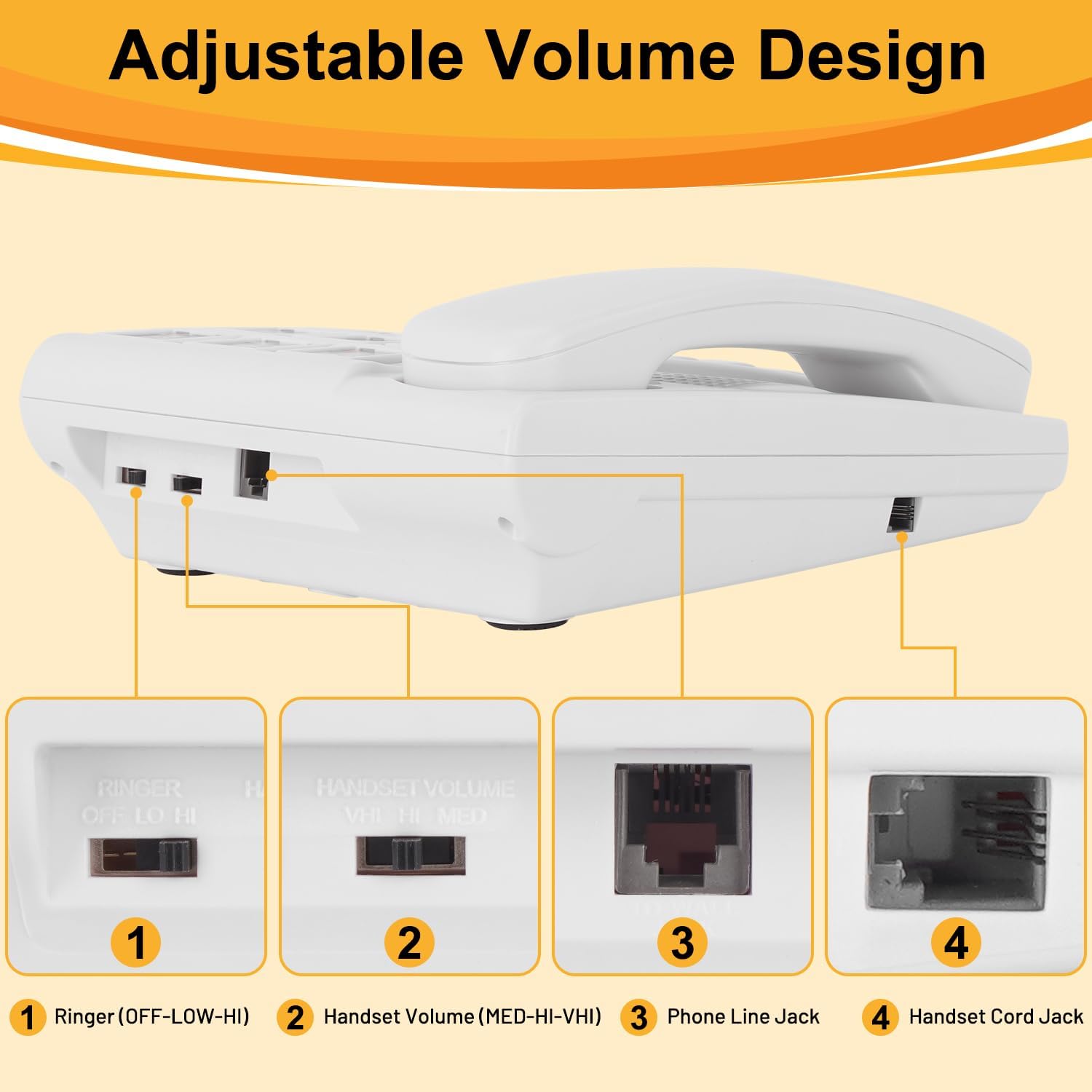
Figure 3: Rear view illustrating the ringer volume switch (OFF-LOW-HI), handset volume switch (MED-HI-VHI), phone line jack, and handset cord jack.
Key Features:
- Large Keypad: Easy-to-read numbers for dialing.
- 9 One-Touch Dialing Buttons: Customizable buttons for frequently called numbers with space for pictures.
- SOS Button: A dedicated button for emergency calls (if programmed).
- Adjustable Ringer Volume: Three levels (OFF, LOW, HIGH) up to 120dB.
- Adjustable Handset Volume: Three levels (MED, HIGH, VERY HIGH).
- Hands-Free Speakerphone: Up to 98dB for clear conversations without holding the handset.
- Flashing LED Indicator: Visual alert for incoming calls.
- Redial Button: Dials the last number called.
- Flash Button: Used for call waiting or transferring calls (if supported by your phone service).
- No Battery Required: Operates solely on phone line power.
Setup Instructions
Follow these steps to set up your Uvital LD-858 phone:
- Connect the Handset: Plug one end of the coiled handset cord into the handset and the other end into the handset jack on the side of the phone base (refer to Figure 3, labeled '4 Handset Cord Jack').
- Connect the Phone Line: Plug one end of the telephone line cord into the phone line jack on the back of the phone base (refer to Figure 3, labeled '3 Phone Line Jack'). Plug the other end of the telephone line cord into your wall telephone jack.
- Verify Connection: Lift the handset. You should hear a dial tone. If not, check all connections.
- Adjust Ringer Volume: Locate the RINGER switch on the back of the phone (refer to Figure 3, labeled '1 Ringer (OFF-LOW-HI)'). Set it to your desired level (LOW or HIGH). Set to OFF to disable the ringer.
Operating Instructions
Making a Call:
- Lift the handset or press the SPEAKER button for hands-free calling.
- Dial the desired phone number using the large numeric keypad.
- Wait for the call to connect.
- To end the call, replace the handset or press the SPEAKER button again.
Receiving a Call:
- When the phone rings and the LED indicator flashes, lift the handset or press the SPEAKER button to answer.
- To end the call, replace the handset or press the SPEAKER button again.
Programming One-Touch Dialing Buttons (M1-M9):
The phone features 9 one-touch dialing buttons (M1-M9) where you can store frequently called numbers. You can also place small pictures of contacts under the clear covers of these buttons.
- Lift the handset.
- Press the STORE button (located above the SPEAKER button). The 'IN USE' indicator may light up.
- Dial the phone number you wish to store (up to 16 digits).
- Press the desired one-touch dialing button (M1-M9) where you want to save the number.
- Replace the handset. The number is now stored.
- Important: Do not unplug the phone line after programming, as this may result in the loss of stored contact numbers.
Using One-Touch Dialing Buttons:
- Lift the handset or press the SPEAKER button.
- Press the desired one-touch dialing button (M1-M9). The phone will automatically dial the stored number.
Adjusting Handset Volume:
During a call, locate the HANDSET VOLUME switch on the back of the phone (refer to Figure 3, labeled '2 Handset Volume (MED-HI-VHI)'). Slide the switch to your preferred volume level: MED (Medium), HI (High), or VHI (Very High).
Using Hands-Free Calling:
- To initiate a call hands-free, press the SPEAKER button, then dial the number.
- To answer a call hands-free, press the SPEAKER button when the phone rings.
- To switch from handset to speakerphone during a call, press the SPEAKER button and then replace the handset.
- To switch from speakerphone to handset, simply lift the handset.
Redialing the Last Number:
- Lift the handset or press the SPEAKER button.
- Press the REDIAL button. The phone will automatically dial the last number called.
Using the Flash Function:
The FLASH button is used for services like call waiting or transferring calls, if these features are provided by your telephone service provider. Press the FLASH button briefly during a call to activate these services.
Maintenance
To ensure the longevity and proper functioning of your Uvital LD-858 phone, follow these maintenance guidelines:
- Cleaning: Wipe the phone's surface with a soft, damp cloth. Avoid using harsh chemicals, abrasive cleaners, or excessive moisture.
- Placement: Place the phone on a stable, flat surface away from direct sunlight, heat sources, and areas with high humidity.
- Cord Care: Avoid tangling or stretching the coiled handset cord and telephone line cord excessively to prevent damage.
- Power Source: As the phone operates without batteries, ensure the telephone line connection remains secure.
Troubleshooting
If you encounter issues with your phone, refer to the following common problems and solutions:
| Problem | Possible Cause | Solution |
|---|---|---|
| No dial tone. | Telephone line cord is disconnected or faulty. | Check that the telephone line cord is securely plugged into both the phone base and the wall jack. Try a different phone line cord if available. |
| Cannot hear caller or caller cannot hear me. | Handset volume is too low or microphone is obstructed. | Adjust the HANDSET VOLUME switch to a higher setting. Ensure the microphone on the handset is not covered. If using speakerphone, ensure the speaker is not covered. |
| Stored numbers are lost. | Phone line was unplugged. | Stored numbers may be lost if the phone line is disconnected. Re-program the one-touch dialing buttons. |
| Ringer is not audible. | Ringer volume is set to OFF. | Adjust the RINGER switch to LOW or HIGH. |
| LED indicator does not flash on incoming calls. | Phone is faulty. | If all other functions work, contact customer support. |
Specifications
- Model: LD-858
- Brand: Uvital
- Color: White
- Telephone Type: Corded
- Material: Acrylonitrile Butadiene Styrene (ABS)
- Power Source: Corded Electric (Phone Line Powered)
- Dialer Type: Single Keypad
- Ringer Volume: 3 levels (OFF, LOW, HIGH), Max 120dB
- Handset Volume: 3 levels (MED, HIGH, VERY HIGH)
- Hands-Free Speaker Volume: Up to 98dB
- Product Dimensions: 1 x 1 x 1 inches (L x W x H)
- Item Weight: 1.57 pounds
- Caller Identification: No
- Multiline Operation: Single-Line Operation
- Answering System Type: Digital (Note: This refers to the phone's internal digital processing, not an integrated answering machine)

Figure 4: Dimensions of the phone components, including the phone line (59in), handset (7.8in length, 1.9in width), telephone base (8.6in length, 6.7in width), and handset cord (15in).
Warranty and Support
Warranty Information:
Please refer to your purchase documentation or the product packaging for specific warranty details and duration. Uvital products are manufactured with quality materials and undergo rigorous testing.
Customer Support:
Uvital is committed to providing excellent customer service. For technical assistance, troubleshooting, or any inquiries regarding your product, please contact Uvital customer support. Support services typically include:
- 24/7 Quick Reply
- Technical Support
- Assistance with Returns & Replacements
Contact information can usually be found on the Uvital official website or through your retailer's customer service portal.


