
1. Important Safety Instructions
Please read all instructions carefully before using the EasyAcc KW-MF15 Portable Misting Fan. Retain this manual for future reference.
- Do not immerse the fan unit or power cord in water or other liquids.
- Ensure the power source matches the fan's requirements before charging.
- Keep out of reach of children and pets.
- Do not block the fan's air intake or outlet during operation.
- Use only pure or filtered water in the water tank to prevent clogging and maintain mist quality.
- Unplug the fan before cleaning or when not in use for extended periods.
- Do not attempt to repair or disassemble the fan yourself. Contact customer support for assistance.
2. Package Contents
Verify that all items are present in the package:
- EasyAcc KW-MF15 Misting Fan Unit
- 7L Water Bucket
- Remote Control (AAA batteries not included)
- USB-C Charging Cable
- User Manual
3. Product Overview
Familiarize yourself with the components of your EasyAcc Misting Fan.

Image: The EasyAcc KW-MF15 Misting Fan can be used as a spray fan with its water bucket or as a compact desk fan.
The fan features a main fan unit, a detachable 7-liter water bucket, and a remote control for convenient operation. It is designed for both misting and air circulation, suitable for various indoor and outdoor environments.
4. Setup Instructions
4.1 Assembly
Follow these steps to correctly assemble your misting fan and prevent leaks:
- Align the 2 water tank buckles on the fan unit with the mounting holes on the water tank.
- Insert the screw through the tank's installation hole and tighten it to secure the fan unit to the water tank.
- Before connecting the water pipe, remove the red silicone cap at the bottom of the fan head.
- Connect the water pipe to the port at the bottom of the fan unit.
- Lock the water tank locks to ensure a secure connection.

Image: Visual guide for the correct assembly of the fan unit onto the water bucket, highlighting the importance of removing the red silicone cap.
4.2 Filling the Water Tank
The 7L water tank can be filled with pure water or ice cubes for enhanced cooling.
- Open the water tank lid.
- Pour pure or filtered water into the tank. Using tap water directly may cause mineral buildup and clog the spray port.
- Optionally, add ice cubes for colder mist.
- Close the water tank lid securely.
4.3 Charging the Battery
The fan is equipped with a 20000mAh battery.
- Connect the USB-C charging cable to the fan's charging port and to a suitable power adapter (not included).
- A full charge takes approximately 10 hours.
- The battery indicator will show charging status.
5. Operating Instructions
5.1 Power On/Off
Press the power button on the fan unit or the remote control to turn the fan on or off.
5.2 Fan Speed Adjustment
The fan features stepless speed control. Rotate the knob on the fan unit or use the speed buttons on the remote control to adjust the airflow from low to high.
5.3 Misting Function
The fan has a 3-hole mist design, allowing you to select the number of active mist holes.
- Press the mist button on the fan unit or remote control to activate the misting function.
- Press again to cycle through 1-hole, 3-hole mist, or turn off the mist.
- The sprayer has an automatic timer function, turning off after approximately 4 hours of continuous use. To restart, press the mist button again.

Image: The fan features a 4-hour smart mist cycle, requiring a button press to restart the mist function after the cycle completes.
5.4 Oscillation
The fan head offers automatic oscillation and manual vertical adjustment.
- Press the oscillation button on the fan unit or remote control to activate 45° or 90° automatic left and right oscillation.
- Manually adjust the fan head vertically from 0-45° to direct airflow.
5.5 Remote Control
The included remote control allows for convenient operation from a distance.
- Insert 2 AAA batteries (not included) into the remote control.
- Use the dedicated buttons for power, fan speed, mist, and oscillation.
6. Maintenance
6.1 Cleaning
- Always unplug the fan before cleaning.
- Wipe the exterior of the fan unit and water bucket with a soft, damp cloth.
- Regularly clean the water tank to prevent mold or mineral buildup. Rinse with clean water and dry thoroughly.
- If mist nozzles become clogged, gently clean them with a soft brush or cotton swab. Use pure or filtered water to minimize clogging.
6.2 Storage
When not in use for extended periods, store the fan in a cool, dry place.
- Empty and dry the water tank completely.
- The fan head can be inverted and placed into the water tank for compact storage. The tank lid is equipped with a handle for easy carrying.

Image: The fan unit can be inverted and placed into the water tank for compact storage and easy transport.
7. Troubleshooting
Refer to this section for common issues and their solutions.
| Problem | Possible Cause | Solution |
|---|---|---|
| Fan does not turn on. | Battery is depleted. | Charge the fan for approximately 10 hours. |
| No mist or weak mist. | Water tank is empty or low. Clogged mist nozzles. Red silicone cap not removed. | Refill the water tank. Clean the mist nozzles. Ensure the red silicone cap at the bottom of the fan head is removed. |
| Sprayer turns off after 4 hours. | Normal operation (timer function). | Press the mist button again to restart the mist function. |
| Water droplets on control panel. | Condensation or minor leakage from mist nozzles. | This can be a normal phenomenon during misting. Ensure the fan is on a stable surface. Wipe away any excess water. |
| Remote control not working. | Dead batteries. Obstruction between remote and fan. | Replace AAA batteries. Ensure clear line of sight to the fan's receiver. |
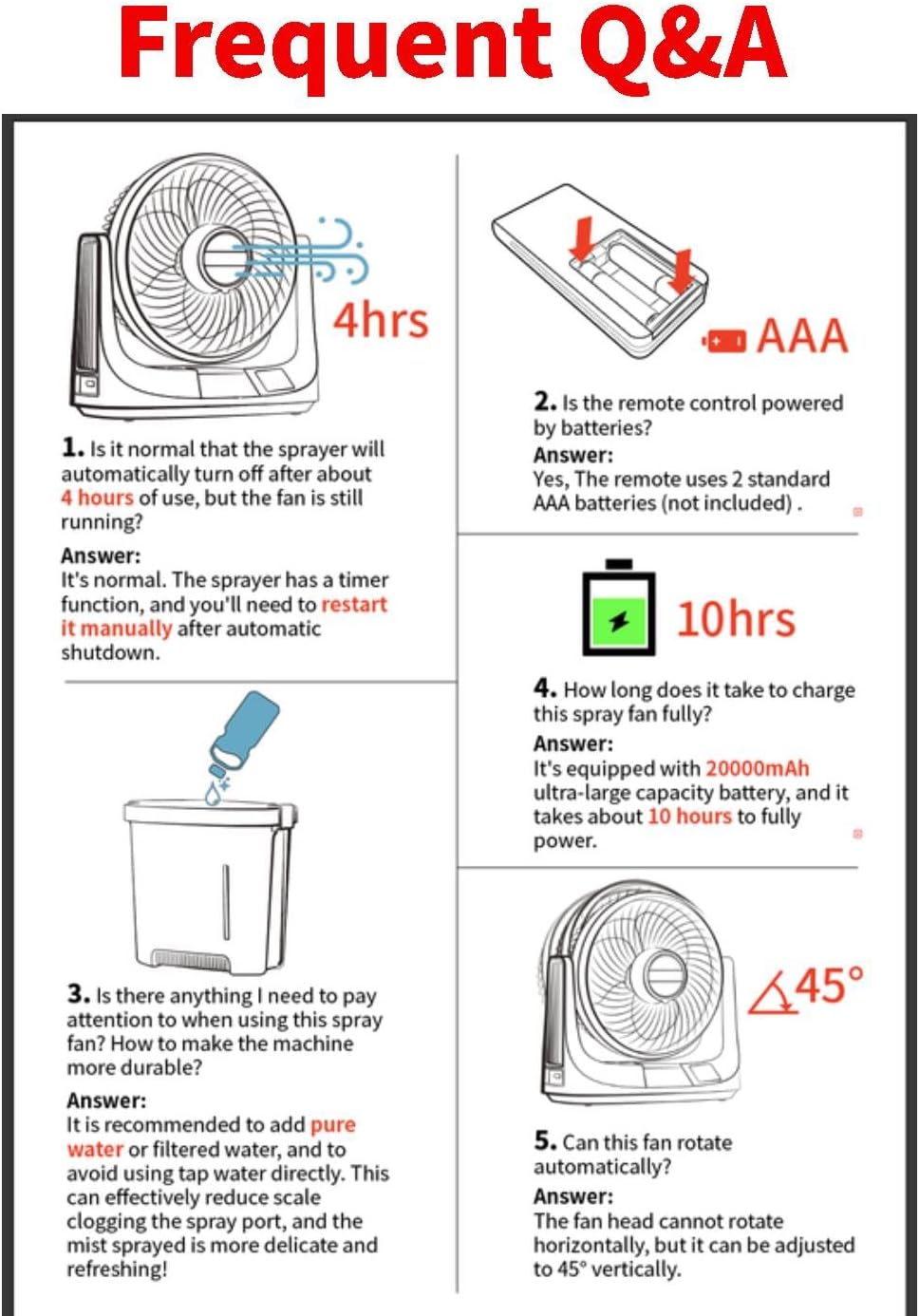
Image: A visual summary of frequently asked questions, including details on the 4-hour mist timer, remote control batteries, recommended water type, 10-hour charging time, and 45-degree vertical fan adjustment.
8. Specifications
| Feature | Detail |
|---|---|
| Model Number | KW-MF15 |
| Brand | EasyAcc |
| Power Source | Battery Powered |
| Battery Capacity | 20000mAh Lithium Polymer |
| Charging Time | Approx. 10 hours |
| Working Time (Fan Only) | 16-116 hours |
| Working Time (High Fan + Mist) | 12-60 hours |
| Water Tank Capacity | 7 Liters |
| Noise Level | As low as 30 Decibels |
| Max Wind Speed | 4.3 m/s |
| Oscillation | 45°/90° Automatic Horizontal |
| Vertical Adjustment | 0-45° Manual |
| Product Dimensions | 18D x 29W x 55H Centimetres |
| Weight | 2.42 kg (approx. 5.3 lbs) |
| Control Method | Remote, On-device buttons |
| Material | Plastic |
9. Warranty and Support
EasyAcc products are designed and manufactured to the highest quality standards. For warranty information or technical support, please contact our customer service team.
Customer Support Email: support@easyacc.com
Please have your model number (KW-MF15) and purchase details ready when contacting support.