
1. Introduction
This manual provides essential information for setting up, operating, and maintaining your Telefunken QLED VIDAA QU50VP750S 50-inch 4K UHD Smart TV. Please read these instructions carefully before using the product to ensure proper function and safety. Keep this manual for future reference.
2. Product Features
The Telefunken QLED VIDAA QU50VP750S Smart TV offers an immersive viewing experience with advanced features:
- Stunning 4K Ultra HD QLED Display: Enjoy crisp 4K Ultra HD content on the brilliant QLED screen.
- Impressive Visual Details: Dolby Vision HDR, Super Resolution, and Micro Dimming provide contrasted shots with natural color and impressive detail sharpness.
- Unlimited Smart Entertainment: The VIDAA operating system offers access to numerous applications and media libraries such as Prime Video, Netflix, DAZN, Disney+, YouTube, and more.
- Innovative Audio Experience: Dolby Atmos delivers enhanced sound quality.
- Extensive Connectivity: Features 3 HDMI ports, 2 USB ports with media player, Wi-Fi, and Bluetooth for various external devices.
- Integrated Triple Tuner: Receive programs via antenna (DVB-T2), cable (DVB-C), or satellite (DVB-S2) without an additional receiver.
- HD+ Access: Includes 6 months of non-binding access to the extensive HD+ range for premium television (for satellite reception in Germany).
3. Package Contents
Please check that all items are present in the package:
- Telefunken QLED VIDAA QU50VP750S Smart TV
- Remote Control with 2 AAA batteries
- TV Stand Feet
- User Manual (this document)
4. Setup
4.1 Physical Installation
Place the TV on a stable, flat surface or mount it on a wall using a VESA-compatible bracket (M6 200x200). Ensure adequate ventilation around the TV.

Figure 4.1: Physical dimensions of the 50-inch Telefunken QLED TV. The TV measures 112.0 cm in width, 68.5 cm in height with the stand, and 27.0 cm in depth with the stand. The VESA mounting standard is M6 200x200.
4.2 Connecting Devices
Connect your external devices such as game consoles, DVD players, sound systems, and antenna/cable/satellite feeds to the appropriate ports on the TV.
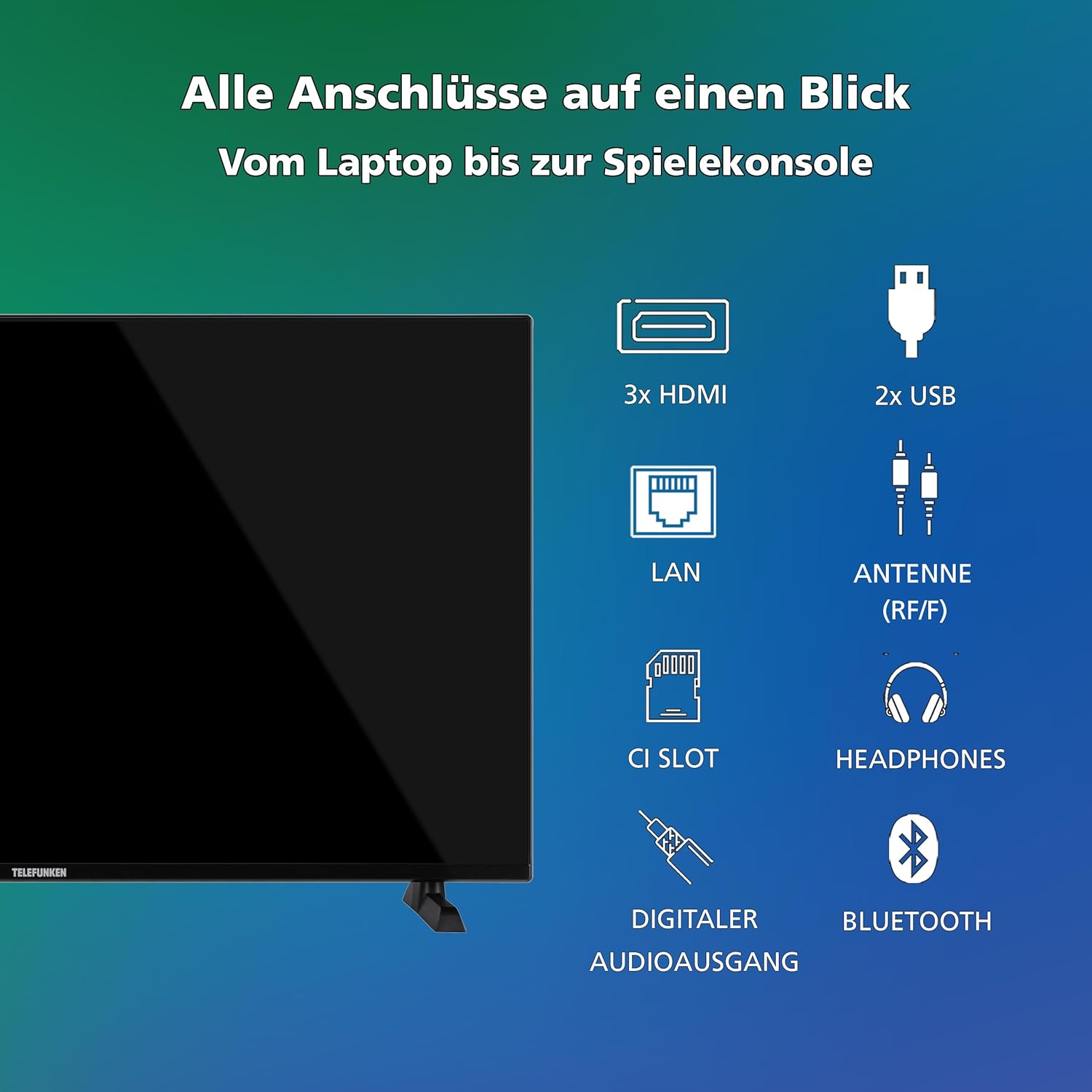
Figure 4.2: Overview of all connection ports. The TV includes 3 HDMI ports, 2 USB ports, a LAN port, an Antenna (RF/F) input, a CI Slot, a Headphones output, a Digital Audio Output, and supports Bluetooth.
- Power Connection: Plug the power cord into the TV and then into a wall outlet.
- Antenna/Cable/Satellite: Connect your antenna, cable, or satellite feed to the 'ANTENNA (RF/F)' input.
- HDMI Devices: Use HDMI cables to connect devices like Blu-ray players, game consoles, or set-top boxes to the HDMI ports.
- USB Devices: Insert USB drives for media playback into the USB ports.
- Network Connection: Connect an Ethernet cable to the LAN port for a wired internet connection, or connect wirelessly via Wi-Fi during initial setup.
5. Operating Instructions
5.1 First-Time Setup
Upon first power-on, the TV will guide you through the initial setup process, including language selection, network connection, and channel scanning.
5.2 Remote Control Functions
The included remote control provides access to all TV functions and smart features. Familiarize yourself with the button layout.
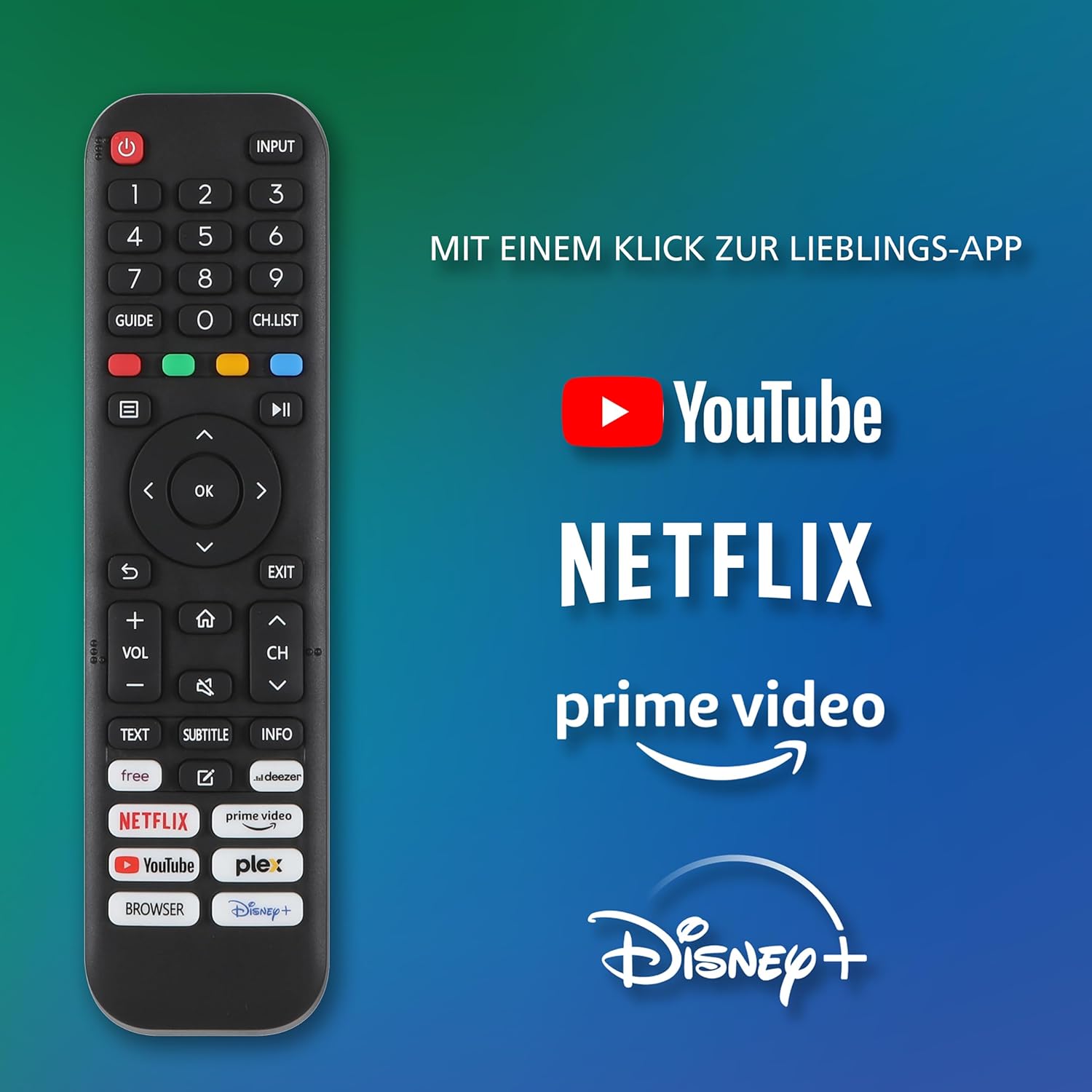
Figure 5.1: Telefunken Smart TV Remote Control. The remote features dedicated buttons for quick access to YouTube, Netflix, Prime Video, and Disney+, alongside standard controls for power, input, navigation, volume, and channels.
5.3 Basic Operation
- Power On/Off: Press the power button on the remote control or TV.
- Input Selection: Use the 'INPUT' button to switch between connected sources (HDMI, USB, TV tuner).
- Volume Control: Use the 'VOL +/-' buttons to adjust the volume.
- Channel Selection: Use the 'CH +/-' buttons or number pad to change channels.
- Menu Navigation: Use the arrow keys and 'OK' button to navigate through menus and settings.
6. Picture and Sound Settings
Your TV supports advanced picture and sound technologies for an optimal viewing experience.
6.1 Picture Settings
Access the picture settings menu to adjust brightness, contrast, color, sharpness, and select picture modes (e.g., Standard, Dynamic, Movie, Game). The TV supports Dolby Vision HDR and HDR10 for enhanced dynamic range.

Figure 6.1: Dolby Vision HDR vs. HDR10. This image illustrates the superior picture quality offered by Dolby Vision HDR, characterized by more vibrant colors and deeper contrast compared to standard HDR10.
6.2 Sound Settings
Adjust audio settings such as sound mode (e.g., Standard, Music, Movie, Speech), equalizer, and surround sound options. The TV features Dolby Atmos for an immersive audio experience.
7. Smart TV Features (VIDAA OS)
The Telefunken Smart TV runs on the VIDAA operating system, providing a user-friendly interface for accessing a wide range of applications and online content.

Figure 7.1: VIDAA Smart TV Interface. The home screen displays a selection of popular streaming applications such as Netflix, YouTube, Pluto TV, Disney+, Prime Video, DAZN, and Rakuten TV, along with personalized content recommendations.
7.1 Accessing Apps
From the home screen, navigate to and select your desired application. Popular apps like Netflix, Prime Video, Disney+, and YouTube are pre-installed or easily accessible.

Figure 7.2: Telefunken Smart TV in a living room setting. The TV is displaying the VIDAA interface, highlighting its smart capabilities and integration into a modern home entertainment system.
7.2 Network Connection
Ensure your TV is connected to the internet via Wi-Fi or Ethernet to utilize all Smart TV features. You can manage network settings in the TV's main menu.
8. Optimal Viewing Distance
For the best viewing experience, position yourself at an appropriate distance from the screen based on the TV size and content resolution.
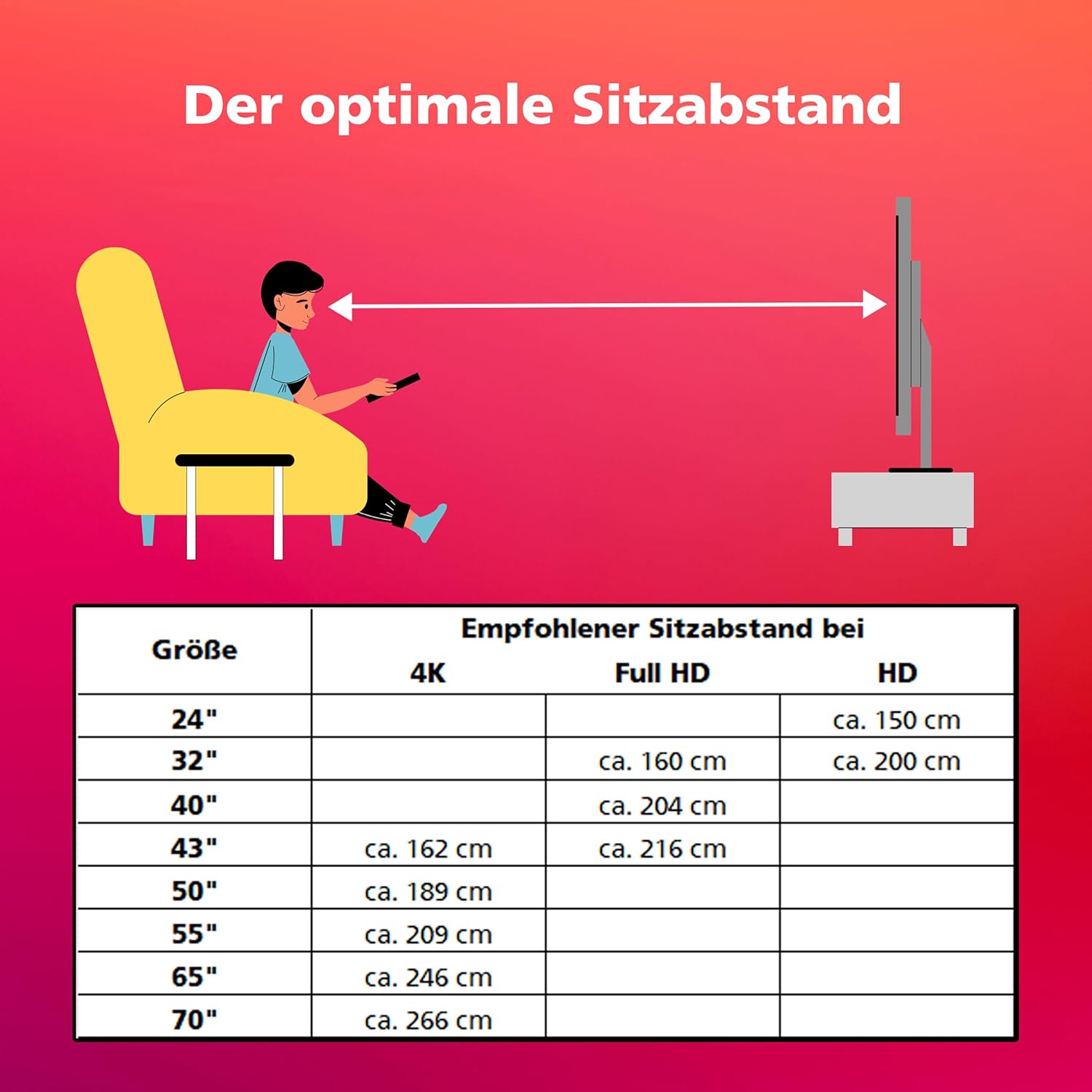
Figure 8.1: Recommended Optimal Viewing Distance. This table provides guidelines for the ideal seating distance from the TV screen, varying by screen size and resolution (4K, Full HD, HD).
| Screen Size | Recommended Seating Distance | ||
|---|---|---|---|
| 4K | Full HD | HD | |
| 24" | approx. 150 cm | ||
| 32" | approx. 160 cm | approx. 200 cm | |
| 40" | approx. 204 cm | ||
| 43" | approx. 162 cm | approx. 216 cm | |
| 50" | approx. 189 cm | ||
| 55" | approx. 209 cm | ||
| 65" | approx. 246 cm | ||
| 70" | approx. 266 cm | ||
9. HD+ Service
For satellite reception in Germany, your TV includes 6 months of non-binding access to the HD+ service. This service provides private channels in HD and UHD quality, along with features like restart and media libraries.

Figure 9.1: HD+ Service Information. This image highlights the benefits of HD+, including HD and UHD quality private channels, restart features, media libraries, and a 6-month free trial. Activation is recommended during initial TV installation.
Activate the HD+ service directly during the initial TV installation process to enjoy its benefits.
10. Specifications
Detailed technical specifications for the Telefunken QLED VIDAA QU50VP750S TV:
| Feature | Specification |
|---|---|
| Brand | TELEFUNKEN |
| Model Number | QU50VP750S |
| Color | Black |
| Operating System | VIDAA |
| Screen Size | 50 Inches (126 cm) |
| Display Technology | QLED |
| Resolution | 4K (3840x2160 Pixels) |
| Refresh Rate | 120 Hz |
| Aspect Ratio | 16:9 |
| Special Features | 6 months HD+ included, Dolby Atmos, Dolby Vision HDR, QLED, VIDAA Smart TV |
| Connectivity Technology | Bluetooth, HDMI, USB, Wi-Fi |
| Connections | 3x HDMI, 2x USB, Wi-Fi |
| Total USB Ports | 2 |
| Product Dimensions (DxWxH) | 27P x 112l x 68,5H centimeters |
| Manufacturer | Telefunken |
| Country of Origin | Turkey |
| Spare Parts Availability | 7 Years |
| Batteries | 2 AAA - included |
| Energy Efficiency Class (SDR) | E |
| Energy Efficiency Class (HDR) | G |
| Power Consumption (SDR) | 54.0 W |
| Power Consumption (HDR) | 104 W |
| Power Consumption (Standby) | 0.5 W |
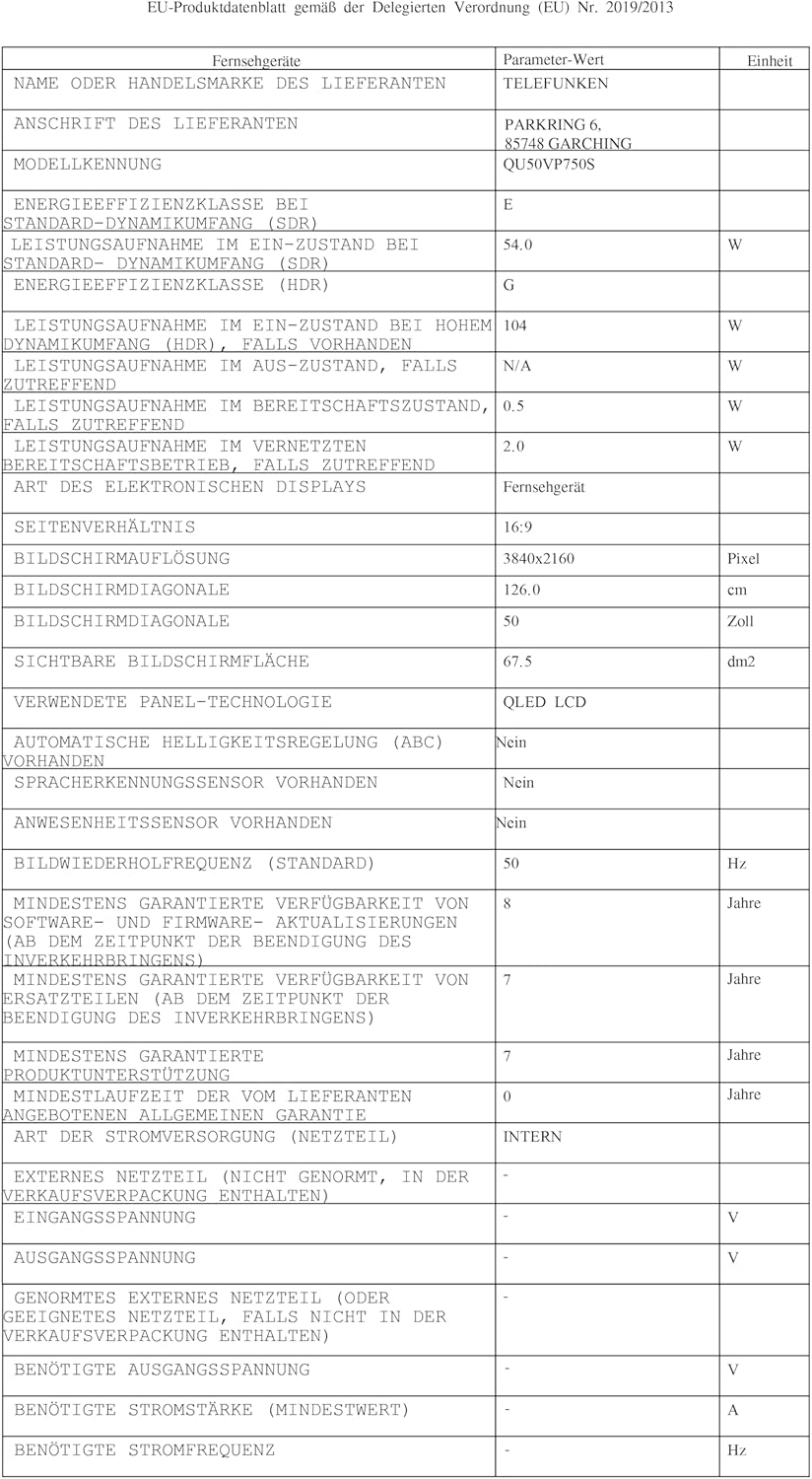
Figure 10.1: EU Product Data Sheet. This document provides comprehensive technical details and compliance information for the Telefunken QU50VP750S television.
For more details, refer to the EPREL database: https://eprel.ec.europa.eu/qr/2243408

Figure 10.2: EU Energy Label. This label indicates the energy efficiency class of the Telefunken QU50VP750S TV, showing 'E' for SDR and 'G' for HDR, along with power consumption in kWh per 1000 hours.
11. Troubleshooting
If you encounter issues with your TV, refer to the following common troubleshooting steps:
- No Power: Ensure the power cord is securely connected to both the TV and the wall outlet. Check if the outlet is working.
- No Picture/Sound: Verify that the correct input source is selected. Check all cable connections (HDMI, antenna). Try restarting the TV.
- Remote Control Not Working: Check the batteries in the remote control and ensure there are no obstructions between the remote and the TV's IR sensor.
- No Internet Connection: Check your Wi-Fi router or Ethernet cable connection. Re-enter Wi-Fi password if necessary.
- Smart Apps Not Loading: Ensure a stable internet connection. Try restarting the app or the TV.
For more complex issues, consult the full electronic manual or contact customer support.
12. Maintenance
Proper care and maintenance will extend the life of your Telefunken TV.
- Cleaning the Screen: Gently wipe the screen with a soft, dry, lint-free cloth. For stubborn marks, use a screen-specific cleaning solution applied to the cloth, not directly to the screen.
- Cleaning the Cabinet: Use a soft, dry cloth to clean the TV cabinet. Avoid using abrasive cleaners or solvents.
- Ventilation: Ensure the ventilation openings on the TV are not blocked to prevent overheating.
- Power Off When Not in Use: For extended periods of inactivity, unplug the TV from the power outlet.
13. Warranty and Support
Your Telefunken QLED VIDAA QU50VP750S TV comes with a manufacturer's warranty. Please refer to the warranty card included in your package for specific terms and conditions.
- Spare Parts Availability: Spare parts for this model are guaranteed to be available for 7 years from the date of purchase.
- Customer Support: For technical assistance or service inquiries, please contact Telefunken customer support through their official website or the contact information provided in your warranty documentation.


