
1. Introduction
This manual provides detailed instructions for the assembly, operation, maintenance, and troubleshooting of your ModernMate 4 Drawer File Cabinet, Model F1. This versatile wood filing cabinet is designed for home and office use, featuring multiple storage options, a built-in power strip, and adjustable shelves.
Important Safety Information
- Always use appropriate gear when assembling the cabinet due to its weight.
- Be cautious when opening and closing the drawers to prevent injury from pinch points.
- Do not overload the cabinet, as it may tip over and cause injury or damage.
- Keep the cabinet away from heat sources and do not place heavy objects on top of it.
- Ensure all connections for the power strip are secure and follow electrical safety guidelines.
2. Package Contents
Before beginning assembly, please verify that all components and hardware are present. Refer to the packing list included in your package. If any parts are missing or damaged, please contact ModernMate customer service.
- Cabinet panels (top, bottom, sides, back)
- 4 Drawer units
- Adjustable shelves
- Power strip with AC outlets and USB ports
- Locking mechanism and keys (4 universal keys)
- All necessary assembly hardware (screws, dowels, cam locks, drawer slides, handles)
3. Setup and Assembly
Assembly of the ModernMate F1 File Cabinet requires careful attention to the provided instructions. It is recommended to have two people for assembly due to the size and weight of the components. Please follow the step-by-step guide included in your package for detailed assembly instructions.
Assembly Tips:
- Lay out all parts on a clean, soft surface to prevent scratches.
- Identify each component by its label before starting.
- Do not overtighten screws.
- Ensure dowels are fully inserted but do not use glue, as this may cause damage during assembly if they are too long.

Figure 3.1: Overall dimensions of the ModernMate 4 Drawer File Cabinet. The cabinet measures 41.3 inches wide, 26 inches high, and 15.8 inches deep.

Figure 3.2: The integrated storage system features open cubbies and drawers, designed to accommodate various office items like shredders, printers, books, files, and craft machines.
4. Operating Instructions
4.1 Using the Drawers
The cabinet features four drawers designed for versatile storage. The larger drawers are equipped to hold both Letter and A4-sized documents using hanging file folders. The smaller drawers are suitable for stationery and miscellaneous items.
- Opening/Closing Drawers: Gently pull or push the handles to open and close the drawers. Avoid forcing them.
- File Organization: Utilize hanging file folders for efficient organization of documents in the larger drawers.
- Locking Mechanism: The cabinet includes a locking mechanism for security. Insert the key into the lock on the side of the cabinet and turn to secure or unlock the drawers. Four universal keys are provided.
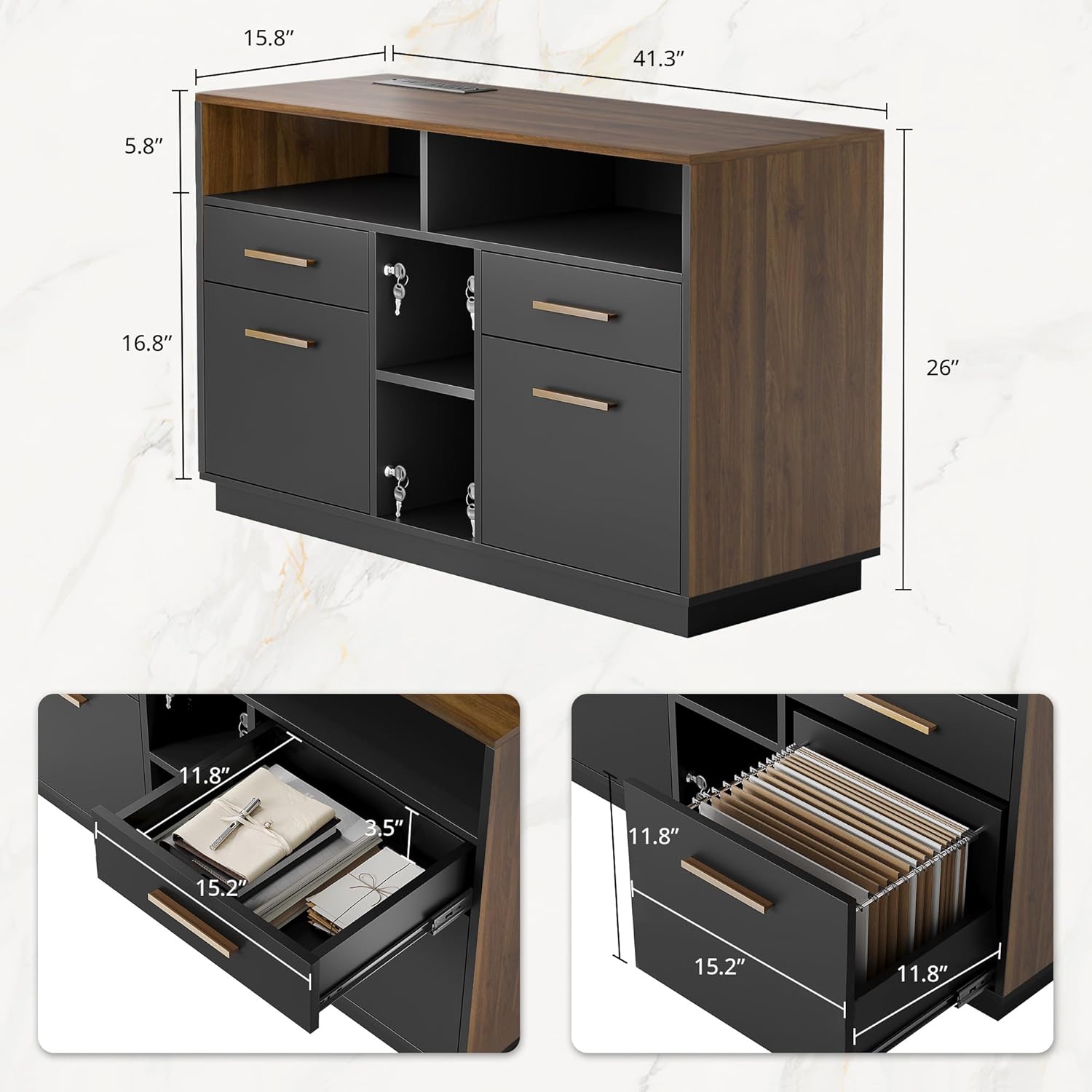
Figure 4.1: Detailed view of drawer dimensions, showing the capacity for files and other items. The drawers are 15.2 inches deep and 11.8 inches wide.

Figure 4.2: The cabinet supports two types of file storage (Letter Size and A4 Size) and features adjustable shelves for flexible organization. The shelf height can be modified.
4.2 Using the Power Strip
A built-in power strip is integrated into the top surface of the cabinet, providing convenient access to power for your electronic devices.
- AC Outlets: The power strip includes two standard AC outlets for laptops, monitors, or other office equipment.
- USB Ports: Two USB ports are available for charging smartphones, tablets, and other USB-powered devices.
- Cable Management: Utilize the cable hole to route power cords neatly, reducing clutter.

Figure 4.3: Close-up view of the power strip with 2 AC outlets and 2 USB ports, the side lock mechanism, and the cable management hole.
4.3 Adjusting Shelf Height
The internal shelves are adjustable, allowing you to customize the storage space to fit items of various heights.
- Empty the shelf before attempting to adjust its height.
- Carefully lift the shelf and reposition the shelf pins into the desired holes.
- Ensure the shelf is level and securely seated on all four pins before placing items on it.
5. Maintenance
Proper care and maintenance will ensure the longevity and appearance of your ModernMate File Cabinet.
- Cleaning: Wipe surfaces with a soft, damp cloth. Avoid harsh chemicals or abrasive cleaners, which can damage the wood finish.
- Spills: Immediately wipe up any spills to prevent staining or damage to the engineered wood.
- Hardware: Periodically check all screws and fasteners to ensure they are tight. Retighten if necessary.
- Drawer Slides: If drawers become stiff, a small amount of silicone-based lubricant can be applied to the slides.
6. Troubleshooting
This section addresses common issues you might encounter with your file cabinet.
| Problem | Possible Cause | Solution |
|---|---|---|
| Drawers do not slide smoothly. | Misaligned drawer slides or debris in the tracks. | Check that drawer slides are correctly installed and aligned. Clean tracks of any obstructions. Apply silicone lubricant if needed. |
| Power strip is not working. | Not plugged into a wall outlet, circuit breaker tripped, or faulty connection. | Ensure the cabinet's power cord is securely plugged into a functional wall outlet. Check your home's circuit breaker. Verify internal connections of the power strip if accessible and safe. |
| Cabinet feels unstable. | Uneven floor or loose assembly hardware. | Ensure the cabinet is placed on a level surface. Check and tighten all assembly screws and fasteners. Do not overload drawers. |
7. Specifications
| Feature | Detail |
|---|---|
| Brand | ModernMate |
| Model Number | F1 |
| Color | Black Walnut |
| Material | Engineered Wood |
| Product Dimensions (D x W x H) | 15.8"D x 41.3"W x 26"H |
| Item Weight | 89.1 Pounds |
| Number of Drawers | 4 |
| Number of Shelves | 4 (adjustable) |
| Power Strip | 2 AC Outlets, 2 USB Ports |
| File Compatibility | Legal/Letter Size |
| Mounting Type | Freestanding |
| Required Assembly | Yes |
8. Warranty and Customer Support
ModernMate is committed to providing high-quality products and excellent customer service. Your file cabinet comes with detailed instructions to ensure a smooth assembly process.
If you encounter any issues during assembly, operation, or if you have questions regarding your product, please do not hesitate to contact ModernMate customer service. Refer to your purchase documentation or the ModernMate website for contact information.
For warranty details, please consult the specific warranty information provided at the time of purchase or on the official ModernMate website.
