
QWORK WD10790 Infusion Stand with Wheels User Manual
Model: WD10790
Product Overview
The QWORK WD10790 Infusion Stand with Wheels is designed for safe and convenient fluid administration in both hospital and home settings. Constructed from high-quality stainless steel, this stand offers durability and resistance to rust. Its adjustable height feature allows for flexible use, whether the user is lying in bed or seated in a wheelchair. The stand is equipped with smooth-gliding wheels, two of which have locking functions to ensure stability when stationary. It also features four robust hooks, accommodating multiple users or various medical bags simultaneously.

Figure 1: The QWORK Infusion Stand in various application settings, demonstrating its versatility.
Safety Information
Important Safety Instructions:
- Ensure all components are securely assembled according to the instructions to prevent instability or damage.
- Handle all parts with care during assembly and use to ensure safe operation.
- Always engage the wheel locks when the stand needs to remain stationary to prevent accidental movement.
- Do not exceed the maximum weight capacity of the hooks. Refer to specifications for details.
- Keep the stand on a level surface to maintain stability.
Setup Instructions
Follow these steps to assemble your QWORK WD10790 Infusion Stand:
- Unpack Components: Carefully remove all parts from the packaging. Verify that all components are present: base with wheels, lower pole section, upper adjustable pole section, and hook assembly.
- Attach Lower Pole to Base: Insert the lower pole section into the central opening of the wheeled base. Ensure it is firmly seated.
- Attach Upper Pole: Slide the upper adjustable pole section into the lower pole. The blue adjustment collar should be facing upwards.
- Install Hook Assembly: Place the four-hook assembly onto the top of the upper pole section. Press down firmly until it is secure.
- Check Stability: Once assembled, gently shake the stand to ensure all connections are secure and the stand is stable.

Figure 2: Fully assembled QWORK WD10790 Infusion Stand with Wheels.
Operating Instructions
This section details how to use your infusion stand effectively.
Adjusting Height
The stand's height can be adjusted to suit various needs:
- Locate the blue adjustment collar on the pole.
- Loosen the collar by rotating it counter-clockwise or by pressing the release mechanism.
- Carefully raise or lower the upper pole to the desired height. The stand is adjustable from approximately 125 cm (lowest) to 200 cm (highest).
- Tighten the adjustment collar by rotating it clockwise or releasing the mechanism to secure the pole at the chosen height.

Figure 3: Illustration of the adjustable height mechanism, showing the stand at its minimum and maximum heights (125 cm to 200 cm).
Using the Hooks
The stand is equipped with four robust hooks for holding infusion bags or other medical equipment.
- Hang infusion bags or other items securely on the hooks.
- Distribute weight evenly among the hooks if using multiple items to maintain stability.
- Ensure that the total weight does not exceed the stand's capacity.

Figure 4: Close-up view of the four robust hooks designed for secure attachment of infusion bags.
Moving the Stand and Locking Wheels
The stand features smooth-rolling wheels for easy repositioning and locking mechanisms for stability.
- To move the stand, ensure all wheel locks are disengaged.
- Gently push or pull the stand to the desired location.
- To secure the stand in place, press down on the locking levers located on two of the wheels until they click into position. This prevents unintended movement.
- To unlock, lift the levers until the wheels are free to roll.
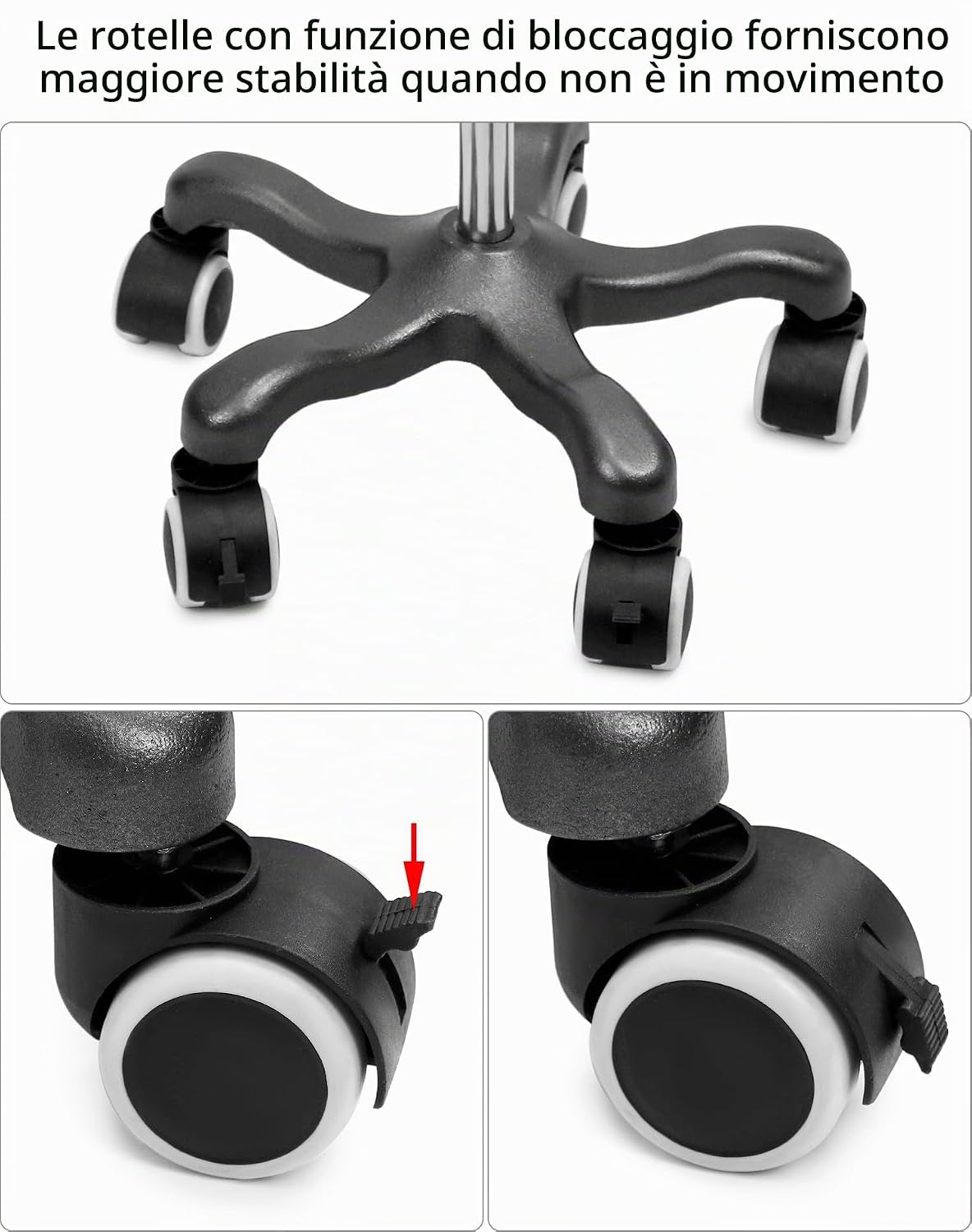
Figure 5: Detail of the wheels, illustrating the locking mechanism for enhanced stability when the stand is stationary.
Maintenance
Proper maintenance ensures the longevity and safe operation of your infusion stand.
- Cleaning: Wipe down the stainless steel surfaces with a damp cloth and mild detergent. Avoid abrasive cleaners or harsh chemicals that could damage the finish.
- Inspection: Regularly inspect all components for signs of wear, damage, or loose connections. Pay particular attention to the pole adjustment mechanism and wheel functionality.
- Lubrication: If wheels become stiff, a small amount of silicone-based lubricant can be applied to the wheel axles. Avoid over-lubrication.
- Storage: When not in use for extended periods, store the stand in a clean, dry environment. The height can be adjusted to its lowest setting for more compact storage.
Troubleshooting
This section addresses common issues you might encounter with your infusion stand.
| Problem | Possible Cause | Solution |
|---|---|---|
| Stand is unstable | Loose connections; uneven surface; wheels not locked (if stationary); excessive weight on one side. | Ensure all pole sections are securely tightened. Move stand to a level surface. Engage wheel locks when stationary. Distribute weight evenly on hooks. |
| Height adjustment mechanism is stuck or difficult to move | Adjustment collar is too tight; dirt or debris in the mechanism; pole sections are misaligned. | Loosen the adjustment collar. Clean the pole sections and mechanism. Ensure poles are aligned correctly before adjusting. |
| Wheels do not roll smoothly or are difficult to lock/unlock | Dirt or hair caught in wheels; lack of lubrication; damaged wheel. | Clean wheels and remove any obstructions. Apply a small amount of silicone lubricant to axles. If a wheel is damaged, contact customer support for replacement options. |
Specifications
- Model Number: WD10790
- Material: High-quality Stainless Steel
- Adjustable Height: Approximately 125 cm (lowest) to 200 cm (highest)
- Number of Hooks: 4
- Base Type: 5-leg wheeled base with locking casters
- Item Weight: Approximately 3.11 kg
- Package Dimensions: 108.6 x 37 x 6 cm

Figure 6: Detailed dimensions of the QWORK Infusion Stand, showing height adjustments and base measurements.
Warranty Information
QWORK products are manufactured to high-quality standards. For specific warranty details, please refer to the warranty card included with your product or visit the official QWORK website. Keep your purchase receipt as proof of purchase for any warranty claims.
Customer Support
If you have any questions, require assistance with assembly, or encounter issues not covered in this manual, please contact QWORK customer support:
- Email: Refer to product packaging or official website.
- Website: www.qwork.com
- Please have your model number (WD10790) and purchase date available when contacting support.