
1. Introduction
Thank you for choosing the AWithZ HD2 Cordless Spot Welder. This manual provides essential information for the safe and efficient operation, maintenance, and troubleshooting of your device. Please read this manual thoroughly before use and retain it for future reference.
The AWithZ HD2 is a compact and portable spot welder designed for DIY projects and battery pack assembly. It features replaceable welding needles, 99 adjustable power levels, and an intuitive LCD screen for precise control.
2. Safety Information
Always observe the following safety precautions to prevent injury or damage to the device:
- Keep the device away from children and pets.
- Do not operate the spot welder in wet conditions or near flammable materials.
- Wear appropriate personal protective equipment, including safety glasses, during operation.
- Ensure proper ventilation when welding.
- Do not touch the welding needles immediately after use, as they may be hot.
- Only use the provided charging cable and power source.
- If the device exhibits abnormal behavior or overheating, discontinue use immediately.
3. Package Contents
Verify that all items are present in your package:
- AWithZ HD2 Spot Welder
- Multi-language User Manual
- Sandpaper
- Type-C Charging Cable
- Nickel-plated Sheet (2 meters, 0.1mm thickness)
- Spare Welding Needles (2 pairs)

Image 3.1: Contents of the AWithZ HD2 package.
4. Product Overview
The AWithZ HD2 is a lightweight (140g) and compact spot welder designed for single-hand operation. It features an integrated design with a 1.5-inch color LCD screen for clear display of settings and real-time monitoring.

Image 4.1: AWithZ HD2 Spot Welder and its components.
4.1. Display Screen
The 1.5-inch color LCD screen provides comprehensive information and allows for various functional adjustments. It displays:
- Battery level
- Welding mode (Automatic/Manual)
- Preheating setting
- Gear (Power level)
- Trigger time
- Temperature
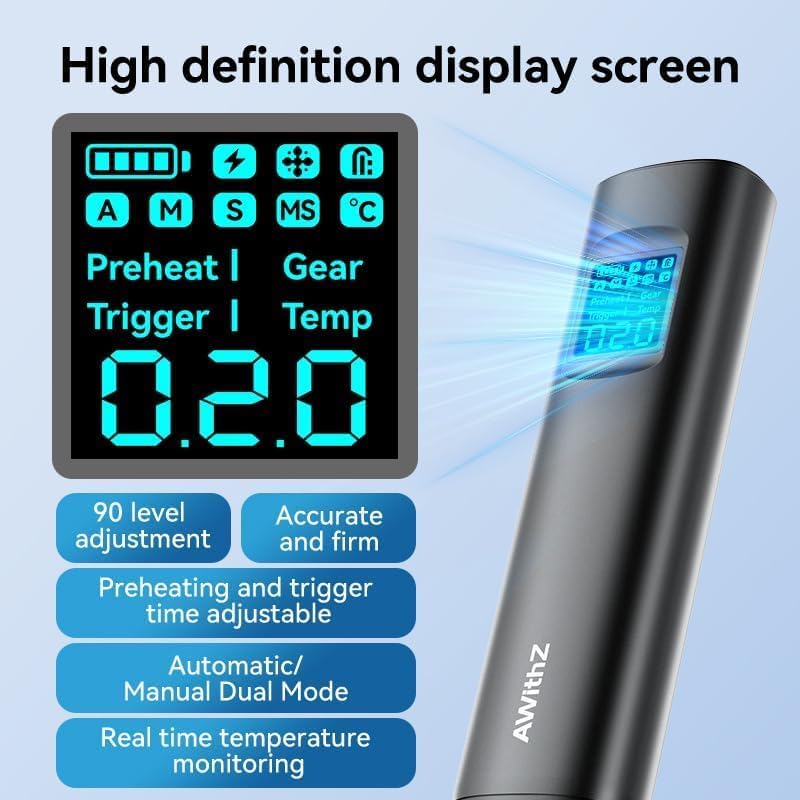
Image 4.2: High-definition display screen of the HD2.
4.2. Internal Battery
The device is powered by high-magnification A-grade battery cells, ensuring reliable performance.

Image 4.3: Illustration of the internal A-grade battery cells.
5. Setup
5.1. Initial Charging
Before first use, fully charge the AWithZ HD2 using the provided Type-C charging cable. Connect the cable to the device and a compatible USB power adapter. The LCD screen will indicate the charging status.
5.2. Welding Needle Installation/Adjustment
The HD2 features replaceable welding needles. Ensure they are securely installed and properly spaced for optimal welding performance. The preset welding distance is 0.8mm, with support for automatic adjustment.
6. Operating Instructions
6.1. Power On/Off
Press and hold the power button to turn the device on or off. The LCD screen will illuminate upon power-on.
6.2. Power Level Adjustment (Gear)
The HD2 offers 99 power settings (gears) for spot welding. Adjust the power level via the LCD screen interface to match the thickness and material of the nickel-plated or stainless steel sheets you are welding. It is recommended for thicknesses between 0.05mm and 0.2mm.
6.3. Welding Modes
The device supports two welding modes:
- Automatic Mode: Suitable for quick welding tasks, offering simple and efficient operation.
- Manual Mode: Provides full control over the welding process, ideal for fine welding applications.
Select the desired mode through the LCD screen settings.
6.4. Advanced Settings
The 1.5-inch color LCD screen allows for adjustment of various functional parameters, including:
- Preheating time
- Welding speed
- Trigger time
- Permanent point settings
Refer to the on-screen menu for detailed adjustments.

Image 6.1: Examples of welding applications with the HD2.
6.5. Welding Procedure
- Ensure the battery surface and nickel strip are clean and free of oxidation. Use sandpaper if necessary.
- Place the nickel strip firmly against the battery terminal.
- Position the welding needles onto the nickel strip, applying gentle, even pressure.
- Initiate the weld (automatically in auto mode, or manually in manual mode).
- Inspect the weld for strength and consistency. Adjust power settings if needed.
7. Maintenance
7.1. Cleaning
After each use, clean the welding needles and the surrounding area with a dry cloth to remove any residue. Ensure the device is powered off before cleaning.
7.2. Welding Needle Replacement
The AWithZ HD2 features an innovative design with replaceable welding needles, extending the device's lifespan and reducing maintenance costs. Replace needles when they become worn or damaged.

Image 7.1: Scientific design for easy needle replacement.
Procedure for Replacing Welding Needles:
- Loosen the fixing screws on both sides of the welding pins.
- Remove the old soldering pins by pulling them in the direction of the pin.
- Install new soldering pins and adjust their spacing as needed.
- Tighten the fixing screws on both sides to secure the new pins.

Image 7.2: Step-by-step guide for welding needle replacement.
7.3. Storage
Store the device in a cool, dry place, away from direct sunlight and extreme temperatures. Ensure the device is fully charged before long-term storage to maintain battery health.
8. Troubleshooting
This section addresses common issues you might encounter with your AWithZ HD2 Spot Welder.
| Problem | Possible Cause | Solution |
|---|---|---|
| Device does not power on | Low battery; Faulty charging cable/adapter | Charge the device fully; Try a different Type-C cable or adapter. |
| Weak or inconsistent welds | Incorrect power setting; Dirty welding needles/workpiece; Worn needles; Insufficient pressure | Increase power level; Clean needles and workpiece; Replace worn needles; Apply firm, even pressure. |
| "Temperature Anomaly" alarm | Device overheating due to continuous use | Stop welding and allow the device to cool down. The device will automatically resume operation once the temperature returns to normal. |
| Low battery alarm | Battery charge is critically low | Recharge the device immediately. |
9. Specifications
| Feature | Detail |
|---|---|
| Model Number | HD2 |
| Manufacturer | AWithZ |
| Dimensions (L x W x H) | 3 x 2 x 20 cm |
| Weight | 310 grams |
| Battery Type | Lithium-polymer (1 included) |
| Power Levels | 99 |
| Recommended Welding Thickness | 0.05mm - 0.2mm (nickel-plated/stainless steel sheets) |
| Display | 1.5-inch Color LCD |
| Charging Port | Type-C |
| Country of Origin | China |
10. Warranty and Support
AWithZ is committed to providing high-quality products and customer service. For any questions, concerns, or technical support regarding your HD2 Spot Welder, please contact our expert team. Refer to your purchase documentation or the AWithZ official website for specific warranty terms and contact information.
We strive to offer efficient and reliable welding solutions. Your satisfaction is our priority.


