
1. Important Safety Instructions
Please read all instructions carefully before using this appliance and retain them for future reference. Always follow basic safety precautions to reduce the risk of fire, electric shock, and injury to persons.
- Ensure the power supply matches the voltage specified on the rating label.
- Do not operate the unit with a damaged cord or plug. If the supply cord is damaged, it must be replaced by the manufacturer or a qualified service agent.
- Do not block air outlets or inlets. Maintain a minimum distance of 20 cm from walls or other objects.
- Do not insert fingers or foreign objects into the air inlet or outlet.
- Always unplug the unit before cleaning or servicing.
- This appliance is not intended for use by persons (including children) with reduced physical, sensory or mental capabilities, or lack of experience and knowledge, unless they have been given supervision or instruction concerning use of the appliance by a person responsible for their safety.
- Do not use the unit in wet environments such as bathrooms or laundry rooms.
- Place the unit on a flat, stable surface to prevent tipping.
2. Product Overview
The Euker 12,000 BTUs Portable Air Conditioner is a versatile 3-in-1 unit designed to provide cooling, dehumidification, and fan functions for rooms up to 450 square feet. It features an intelligent touch panel, remote control, 24-hour timer, and Smart/Sleep modes for enhanced comfort and energy efficiency.
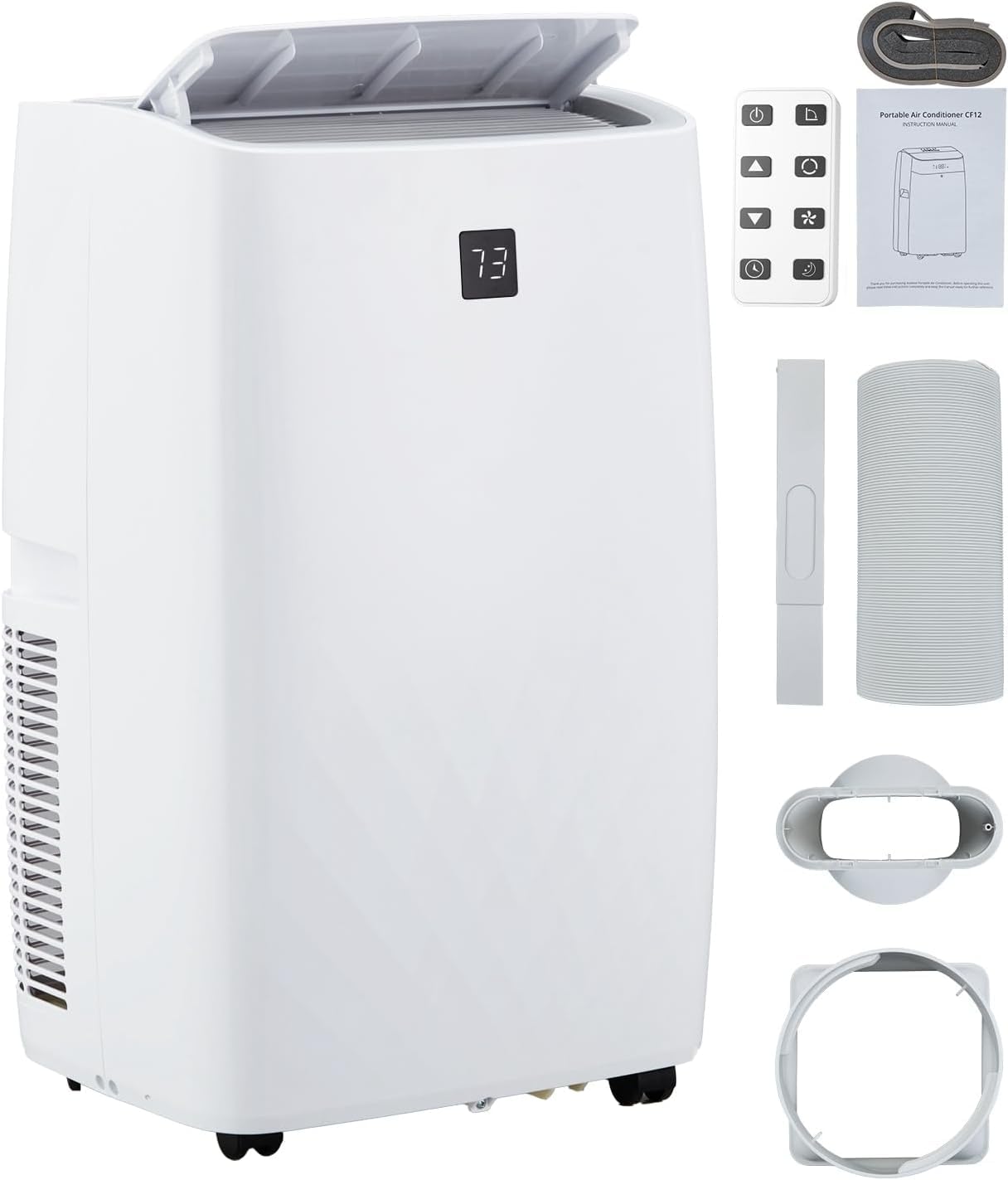
Image: The Euker 12,000 BTUs Portable Air Conditioner, a compact white unit with a top-mounted control panel.
Control Panel and Remote Control
The unit can be operated using the intuitive touch control panel located on top of the appliance or via the included remote control. Both offer access to all functions and settings.

Image: Close-up of the unit's LED display showing '73' and touch buttons for Swing, Fan, Timer, Sleep, Mode, and On/Off. Below, a hand holds the remote control with similar function buttons.
3. Setup
Proper installation is crucial for optimal performance. The portable air conditioner comes with a window seal kit and exhaust hose for easy setup.
Placement
- Place the unit on a firm, level surface.
- Ensure there is at least 20 cm (8 inches) of space around the unit for proper airflow.
- Position the unit near a window for exhaust hose installation.
Window Kit Installation
The included window kit is designed for quick and easy installation in various window types without the need for screws or nails.
- Assemble the window slider kit according to your window type (double/single-hung or sliding sash window).
- Extend the exhaust hose and connect one end to the unit's exhaust outlet and the other end to the window kit adapter.
- Secure the window kit in the open window, ensuring a tight seal to prevent air leakage.

Image: Diagram illustrating the window kit setup for double/single-hung and sliding sash windows, showing adjustable lengths from 20.47" to 39.9". The portable AC unit is shown next to a window, with dimensions 17.2" (width), 13.1" (depth), and 27.7" (height).
4. Operating Instructions
Familiarize yourself with the operating modes and features to maximize your comfort.
Operating Modes
The unit offers three primary operating modes: Cooling, Dehumidifying, and Fan.
- Cooling Mode: Reduces room temperature. Set your desired temperature between 64°F and 90°F. The 12,000 BTUs capacity quickly cools rooms up to 450 sq. ft.
- Dehumidifying Mode (Dry): Removes excess moisture from the air, with a capacity of up to 75 pints per day. This helps create a drier, more comfortable environment.
- Fan Mode: Circulates air without cooling or dehumidifying. Choose between High, Low, or Auto fan speeds.

Image: Visual representation of the three modes: Cooling (snowflake icon, 64°F-90°F), Dry (water droplet icon, 75 pints/day), and Fan (fan icon, High, Low, Auto).
Special Features
- Smart/Sleep Mode: Maintains an optimal temperature at a low fan speed with reduced noise levels (as low as 48 dB) for a quiet and comfortable night's sleep.
- 24-Hour Timer: Allows you to program the unit to turn on or off automatically within a 24-hour period, saving energy and ensuring comfort when needed.
- Auto Shut Off: For energy efficiency and safety.

Image: A graphic illustrating the low noise level of 48 dB during sleep mode, with icons for 24h Smart Timer, Auto Shut Off, Sleep Mode, and Ultra Quiet operation.
5. Maintenance
Regular maintenance ensures the longevity and efficient operation of your portable air conditioner.
Cleaning the Air Filter
The air filter should be cleaned every two weeks or more frequently depending on usage and air quality. A dirty filter can reduce efficiency and airflow.
- Unplug the unit from the power outlet.
- Locate and remove the air filter from the back or side of the unit.
- Wash the filter with warm, soapy water. Rinse thoroughly.
- Allow the filter to air dry completely before reinstalling. Do not expose to direct sunlight.
Water Drainage (Self-Evaporation)
This unit features a self-evaporation system, which significantly reduces the need for manual water drainage. Most condensed water is evaporated and expelled through the exhaust hose.
In high humidity conditions, some water may accumulate in the internal reservoir. If the reservoir becomes full, the unit will stop operating and display an error code. In such cases, manually drain the water:
- Unplug the unit.
- Place a shallow pan or tray under the drainage port (usually located at the bottom rear of the unit).
- Remove the drain plug to allow water to flow out.
- Once drained, replace the drain plug securely.

Image: A close-up view of the rear of the portable air conditioner, highlighting the internal components related to the self-evaporation system, indicating reduced need for manual drainage.
6. Troubleshooting
Before contacting customer support, please refer to the following common issues and solutions.
- Unit does not turn on: Check if the power cord is securely plugged into a working outlet. Ensure the unit is not in standby mode and the timer is not set to off.
- Unit is running but not cooling: Verify that the air filter is clean. Check if the exhaust hose is properly installed and not blocked. Ensure windows and doors are closed to prevent warm air from entering the room. The room temperature might be below the set temperature.
- Unit is noisy: Ensure the unit is placed on a flat, stable surface. Check for any obstructions in the air inlets or outlets.
- Water leakage: Check if the drain plug is securely in place. In high humidity, manual drainage might be required.
- Error codes: Refer to the specific error code displayed on the LED panel. Common codes relate to full water tanks or sensor malfunctions.
7. Specifications
| Feature | Specification |
|---|---|
| Brand | Euker |
| Model Name | portable air conditioner |
| ASIN | B0F29J5DMX |
| Cooling Power | 12,000 BTUs |
| Coverage Area | Up to 450 sq. ft. |
| Product Dimensions (D x W x H) | 18.5 x 15.35 x 35.24 inches |
| Item Weight | 76.8 pounds |
| Voltage | 115 Volts |
| Noise Level | 51 Decibels |
| Dehumidifying Capacity | 75 pints/day |
| Included Components | Remote control, Window seal kit, Exhaust hose |
8. Warranty and Support
Warranty Information
The manufacturer states that there is NO specific warranty description provided for this product. Please refer to your retailer's return policy or contact the seller directly for any warranty-related inquiries.
Customer Support
For technical assistance, troubleshooting not covered in this manual, or other inquiries, please contact Euker customer support. You can visit the official Euker store on Amazon for more information: Euker Store.