
1. Product Overview
The Ulefone Armor Molle Holster is a universal tactical pouch designed for secure and convenient carrying of most phones and radios. Constructed from rugged nylon material, it offers superior protection and features an adjustable design to accommodate various device sizes. It includes a quick-release buckle and a functional carabiner for versatile attachment options.

Image 1.1: Front view of the Ulefone Armor Molle Holster, showcasing its design and a device securely held within.
2. Key Features
- Rugged Nylon Material: Provides superior protection against abrasion and drops.
- Adjustable Design: Hook and loop upright and sideways adjustments for proper device fit. Elastic cord for secure fixing of devices at different heights.
- Lightweight and Utility: Molle webbing and clips for easy attachment to tactical vests, backpacks, belts, and other equipment.
- Functional Carabiner: Allows use as a keychain or for hooking to backpacks, belts, or waistbands.
- Quick-Release Buckle: Offers quick access to the device and adjustable fit.
- Universal Compatibility: Accommodates most phones and multiple styles of radios.
3. Package Contents
The Ulefone Armor Molle Holster package includes:
- 1 x Armor Molle Holster
- 1 x Carabiner Clip
4. Setup and Installation
The holster offers multiple ways to attach to your gear, ensuring your device is always accessible and secure.
4.1 Attaching to a Belt (Vertical Mount)
- Locate the vertical Molle straps on the back of the holster.
- Thread your belt through the loops created by the Molle webbing.
- Ensure the hook and loop fasteners are securely closed to prevent movement.

Image 4.1: Holster attached vertically to a belt, demonstrating a secure vertical carry position.
4.2 Attaching to a Belt (Horizontal Mount)
- Locate the horizontal Molle straps on the back of the holster.
- Thread your belt through these horizontal loops.
- Secure the hook and loop fasteners to keep the holster firmly in place.

Image 4.2: Holster attached horizontally to a belt, providing an alternative carry option.
4.3 Using the Carabiner Clip
- Attach the provided carabiner clip to the top loop of the holster.
- Clip the carabiner to a backpack, D-ring, or other suitable attachment point.
- The carabiner can also be used to attach keys, flashlights, or small tools.

Image 4.3: Holster with a radio and carabiner clip, illustrating its versatility for various attachments.
5. Operating Instructions
5.1 Inserting Your Device
- Open the quick-release buckle at the front of the holster.
- Adjust the hook and loop upright and sideways straps to match the width and thickness of your phone or radio.
- Gently slide your device into the holster.
- If your device is shorter, use the elastic cord at the top to secure it by tightening it around the top of the device.
- Close the quick-release buckle, ensuring it clicks into place.

Image 5.1: Side view of the holster with a phone, highlighting the adjustable straps for a snug fit.
5.2 Removing Your Device
- Press the release button on the quick-release buckle to open it.
- Carefully slide your device out of the holster.
5.3 Adjusting for Different Device Sizes
The holster features adjustable hook and loop straps on the sides and an elastic cord at the top to accommodate a wide range of devices. Adjust these elements until your device is held securely without excessive movement.
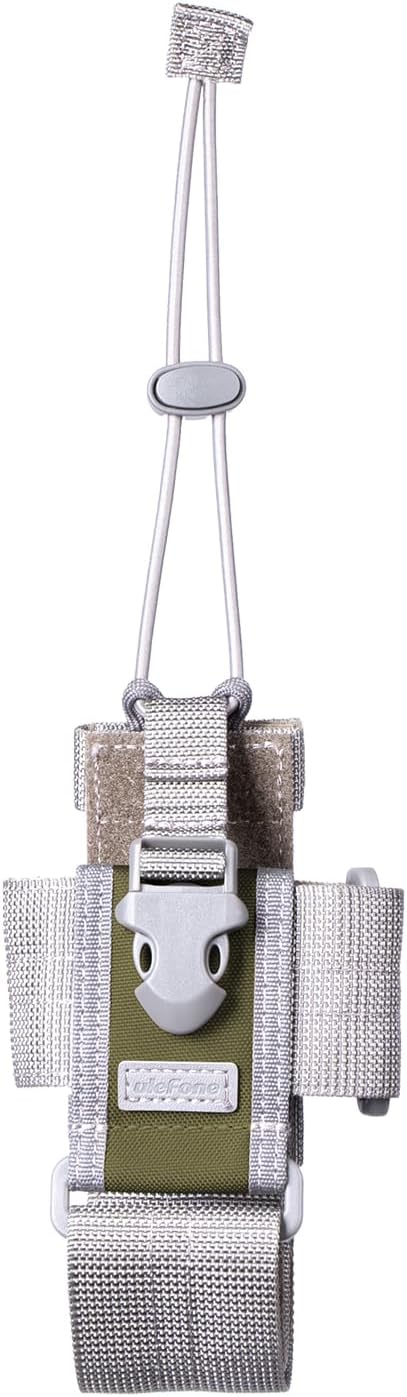
Image 5.2: Top view of the holster, illustrating the elastic cord and adjustable straps for securing devices of varying heights.
6. Maintenance
To ensure the longevity and performance of your Ulefone Armor Molle Holster, follow these maintenance guidelines:
- Cleaning: Wipe the holster with a damp cloth to remove dirt and debris. For tougher stains, use a mild soap solution and rinse thoroughly. Allow to air dry completely before re-use.
- Storage: Store the holster in a cool, dry place away from direct sunlight when not in use.
- Inspection: Periodically check the stitching, buckles, and hook and loop fasteners for any signs of wear or damage. Replace the holster if any critical components are compromised.
7. Troubleshooting
If you encounter issues with your holster, consider the following:
- Device does not fit: Ensure all adjustable hook and loop straps are loosened before inserting the device. Adjust them to fit snugly around your specific phone or radio. The elastic cord at the top can be used for taller devices or to provide extra security for shorter ones.
- Holster feels loose on belt: Make sure the Molle webbing is threaded correctly through your belt and that all hook and loop fasteners are securely closed.
- Buckle not securing: Check for any debris obstructing the quick-release buckle mechanism. Clean if necessary. Ensure the straps are adjusted so the buckle can engage properly without being overly stretched or too loose.
8. Specifications
| Feature | Detail |
|---|---|
| Product Dimensions | 7.28 x 7.28 x 7.28 inches |
| Item Weight | 5.9 ounces |
| Material | Nylon |
| Color | Green |
| Fastener Type | Hook and Loop |
| Compatible Devices | Most phones and multiple styles of radios |

Image 8.1: Reference dimensions of the Ulefone Armor Molle Holster, detailing adjustable circumference and height.
9. Product Videos
Watch the following video for a demonstration of the Ulefone Armor 26 Ultra phone, which can be used with this holster.
Video 9.1: Ulefone Armor 26 Ultra Walkie Talkie 5G Rugged Phone. This video demonstrates the phone's features and briefly shows it being placed into a holster, similar to the Armor Molle Holster.
10. Warranty and Support
For warranty information and customer support, please refer to the official Ulefone website or contact their customer service directly. Keep your purchase receipt for any warranty claims.
Official Ulefone Store: Ulefone Store on Amazon