
1. Introduction
This manual provides essential instructions for the safe operation, setup, maintenance, and troubleshooting of your CUSHYBITE FVN51K Lithium Cordless 4-in-1 Stapler/Nailer Kit. This versatile tool is designed to drive four types of fasteners: light-duty staples, heavy-duty staples, round crown staples, and brad nails, making it suitable for a variety of crafting and home improvement tasks.
Please read this manual thoroughly before using the tool to ensure proper function and to prevent injury.
2. Important Safety Instructions
WARNING: Read all safety warnings and instructions. Failure to follow the warnings and instructions may result in electric shock, fire, and/or serious injury.
- Eye Protection: Always wear appropriate eye protection, such as safety goggles with side shields, when operating this tool.
- Hearing Protection: Wear hearing protection during extended use.
- Work Area: Keep your work area clean and well-lit. Cluttered or dark areas invite accidents.
- Tool Handling: Do not carry the tool with your finger on the trigger. Ensure the tool is off before connecting the battery pack.
- Battery Safety: Use only the specified battery and charging cable. Do not expose batteries to water or extreme temperatures.
- Fastener Awareness: Always assume the tool contains fasteners. Point the tool away from yourself and others when loading or clearing jams.
- Maintenance: Disconnect the battery before performing any adjustments, changing accessories, or storing the tool.
- Children and Bystanders: Keep children and bystanders away while operating a power tool.
3. Package Contents
Verify that all items listed below are present and undamaged upon opening the package:
- CUSHYBITE FVN51K 4-in-1 Stapler/Nailer
- USB Lithium 3.0 Ah Battery
- Charging Cable (USB-A to USB-C)
- Operator's Manual (this document)
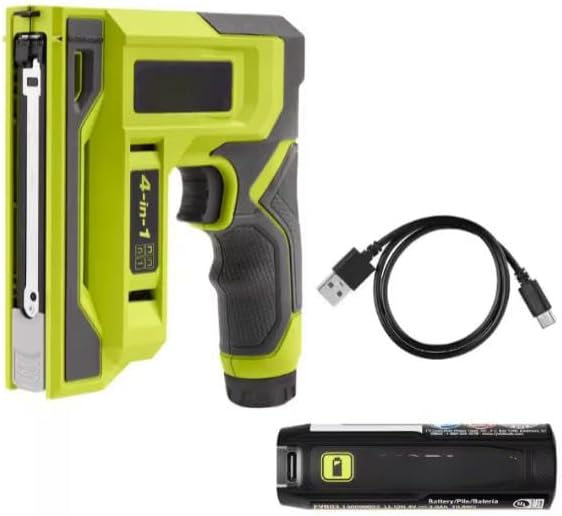
Image 3.1: Components of the FVN51K Kit, showing the stapler/nailer, USB Lithium 3.0 Ah battery, and charging cable.
4. Product Features
The CUSHYBITE FVN51K is engineered for versatility and ease of use. Key features include:
- 4-in-1 Fastener Capability: Drives light-duty staples (1/4" - 9/16"), heavy-duty staples (1/4" - 9/16"), round crown staples (3/8" - 9/16"), and brad nails (5/8").
- USB Lithium Power: Utilizes a 3.0 Ah USB Lithium battery for over 600 staples/nails per charge.
- Compact and Lightweight Design: Facilitates use in confined spaces and reduces user fatigue during prolonged operation.
- Integrated Guide Line: Ensures precise fastener placement.
- Low Staple/Nail Indicator: Provides a visual alert when fasteners are running low, prompting a reload.
- Battery LED Fuel Gauge: Monitors battery charge level.
- USB-C Charging Port: Allows for convenient charging of the battery and can also charge mobile devices.

Image 4.1: Labeled features of the FVN51K tool, highlighting the integrated guideline, low staple/nail indicator, LED low battery indicator, and fastener compatibility.
5. Setup
5.1 Charging the Battery
- Connect the provided charging cable to the USB-C port on the USB Lithium 3.0 Ah battery.
- Plug the other end of the charging cable (USB-A) into a compatible USB power source (e.g., wall adapter, computer USB port).
- The LED fuel gauge on the battery will indicate the charging status. A full charge is indicated when all LEDs are solid.
- Once fully charged, disconnect the charging cable.
Note: The battery can also be used to charge mobile devices via its USB-C port when not in use with the tool.
5.2 Loading Fasteners
Ensure the tool is disconnected from the battery before loading fasteners.
- Locate the magazine release latch, typically at the bottom or rear of the tool.
- Press the latch to open the fastener magazine.
- Insert the desired type of fasteners (light-duty staples, heavy-duty staples, round crown staples, or brad nails) into the magazine. Ensure the fasteners are oriented correctly according to the tool's markings.
- Push the magazine closed until it securely latches.
- Check the low staple/nail indicator to confirm fasteners are loaded.
Refer to the tool's markings for compatible fastener sizes and types.
6. Operating Instructions
6.1 Attaching the Battery
Align the charged USB Lithium battery with the battery port on the tool and slide it in until it clicks securely into place.
6.2 Driving Fasteners
- Ensure the tool is loaded with the correct fasteners for your application.
- Position the nose of the tool firmly against the workpiece where the fastener is to be driven. The integrated guide line can assist with precise placement.
- Press the trigger to drive the fastener. Release the trigger to stop.
- Observe the low staple/nail indicator. Reload fasteners when the indicator shows they are low.
- Monitor the battery LED fuel gauge. Recharge the battery when the indicator shows a low charge.
Always maintain a firm grip on the tool and keep hands clear of the fastener exit area.
7. Maintenance
Regular maintenance ensures optimal performance and extends the life of your tool.
- Cleaning: Keep the tool's air vents clean and free of debris to prevent overheating. Use a dry cloth to wipe down the exterior. Do not use solvents or harsh chemicals.
- Fastener Jams: If a fastener jam occurs, disconnect the battery immediately. Carefully open the magazine and remove the jammed fastener using pliers if necessary. Never attempt to clear a jam with the battery connected.
- Battery Care: Store the battery in a cool, dry place away from direct sunlight and extreme temperatures. Do not store fully discharged for extended periods.
- Storage: When not in use, store the tool and battery in a secure, dry location out of reach of children.
8. Troubleshooting
| Problem | Possible Cause | Solution |
|---|---|---|
| Tool does not fire. | Battery is not charged or not properly connected. | Charge the battery. Ensure battery is fully inserted. |
| Tool does not fire. | Magazine is empty or fasteners are jammed. | Check low staple/nail indicator. Reload fasteners or clear jam (see Maintenance). |
| Fasteners are not driven flush. | Tool not held firmly against workpiece. | Apply more pressure to the tool against the workpiece. |
| Battery LED indicator shows low charge quickly. | Battery not fully charged or nearing end of life. | Ensure battery is fully charged. If problem persists, consider battery replacement. |
9. Specifications
| Feature | Detail |
|---|---|
| Model Number | FVN51K |
| Manufacturer | CUSHYBITE |
| Fastener Types | Light-duty staples (1/4" - 9/16"), Heavy-duty staples (1/4" - 9/16"), Round crown staples (3/8" - 9/16"), Brad nails (5/8") |
| Battery Type | USB Lithium 3.0 Ah |
| Staples/Nails per Charge | Over 600 |
| Date First Available | January 22, 2025 |
10. Warranty and Support
The CUSHYBITE FVN51K Lithium Cordless 4-in-1 Stapler/Nailer Kit is backed by a 2-year manufacturer's warranty from the date of purchase. This warranty covers defects in materials and workmanship under normal use.
For warranty claims, technical support, or inquiries regarding replacement parts, please contact CUSHYBITE customer service. Refer to the product packaging or the manufacturer's official website for current contact information.
Please retain your proof of purchase for warranty validation.