1. Introduction
Thank you for choosing the NENEN HSH-DV3A Air Duct Temperature and Humidity Sensor. This device is designed for precise environmental monitoring and management in various settings. This manual provides essential information for the safe and efficient installation, operation, and maintenance of your sensor.
Key Features:
- Precise Monitoring: Utilizes advanced detection technology to ensure accurate data collection for both temperature and humidity.
- Versatile Application: Suitable for a wide range of environments including homes, offices, warehouses, and greenhouses.
- Energy-Saving Design: Engineered for low power consumption, contributing to economical long-term operation.
- Easy Installation: Designed for straightforward setup, allowing for quick deployment without complex procedures.
- Robust and Reliable: Constructed with high-quality materials to ensure long-lasting stability and dependable performance under various environmental conditions.
2. Safety Information
Please read and understand all safety instructions before installing or operating the sensor. Failure to follow these instructions may result in electric shock, fire, or damage to the device.
- Ensure the power supply matches the specified working voltage (24V).
- Do not expose the sensor to extreme physical shock or vibration.
- Avoid installing the sensor in locations with corrosive gases or liquids.
- Only qualified personnel should perform installation and wiring.
- Disconnect power before performing any maintenance or wiring.
3. Package Contents
Verify that all items are present and undamaged upon opening the package:
- NENEN HSH-DV3A Air Duct Temperature and Humidity Sensor (1 unit)
- User Manual (this document)
- (Additional mounting hardware or accessories may be included depending on the specific kit)
4. Product Overview
The NENEN HSH-DV3A sensor consists of a main housing containing the electronics and a probe designed for insertion into air ducts. The probe accurately measures temperature and humidity within the airflow.

Figure 4.1: Angled view of the NENEN HSH-DV3A sensor, showing the main housing and the elongated probe for duct insertion.
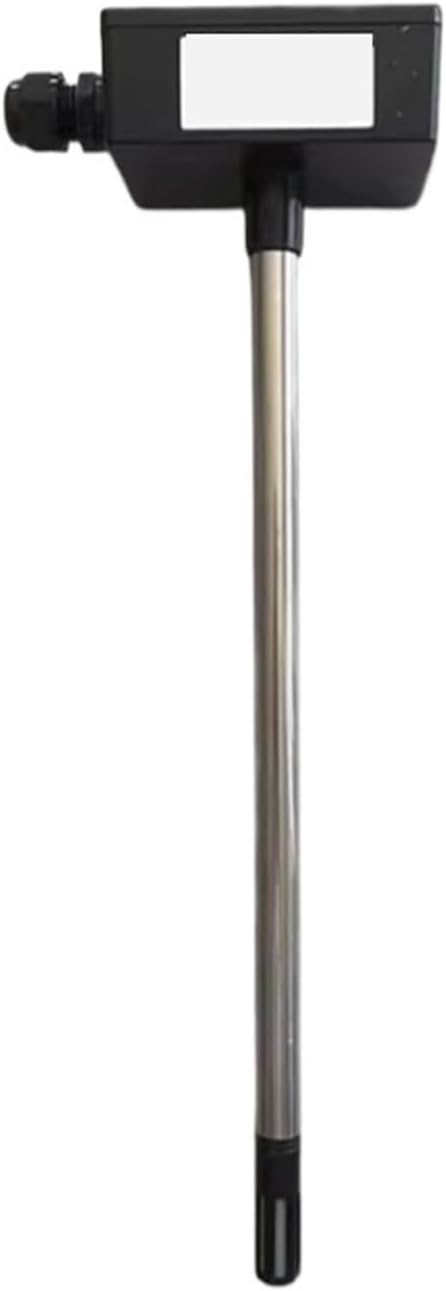
Figure 4.2: Front view of the NENEN HSH-DV3A sensor, illustrating the probe extending downwards from the main housing.

Figure 4.3: Rear view of the NENEN HSH-DV3A sensor, highlighting the mounting plate and cable gland connection point.
5. Specifications
| Parameter | Value |
|---|---|
| Model | HSH-DV3A |
| Measurement Range | -40 to 60 ℃ (-40 to 140 ℉) |
| Working Voltage | 24V |
| Package Dimensions | 1.18 x 0.79 x 0.39 inches |
| Item Weight | 2.2 pounds |
| Manufacturer | NENEN |
| Assembly Required | No |
| Number of Pieces | 1 |
6. Setup & Installation
The NENEN HSH-DV3A sensor is designed for easy installation. Follow these steps for proper setup:
- Select Location: Choose a suitable location within the air duct where temperature and humidity measurements are representative of the overall airflow. Avoid areas with stagnant air or direct exposure to heat sources/coolants.
- Prepare Mounting Hole: Drill an appropriately sized hole in the air duct for the sensor's probe. Ensure the hole is clean and free of debris.
- Mount Sensor: Insert the sensor probe into the prepared hole. Secure the main housing to the exterior of the duct using appropriate fasteners (not included, typically self-tapping screws or bolts) through the mounting plate. Ensure a tight seal to prevent air leakage.
- Wiring: Connect the sensor to your control system or data logger. Refer to the wiring diagram provided with your specific control system for correct terminal connections. The sensor requires a 24V power supply. Ensure all connections are secure and insulated.
- Power On: Once installation and wiring are complete, apply power to the sensor. The device will begin monitoring automatically.
Note: For optimal performance, ensure the sensor probe is fully immersed in the airflow.
7. Operating Instructions
The NENEN HSH-DV3A sensor operates continuously once powered. It provides real-time temperature and humidity data to your connected monitoring system. There are no user-adjustable settings directly on the sensor itself.
- Data Output: The sensor outputs data via its wired connection to your building management system (BMS), HVAC controller, or data acquisition system. Consult the documentation for your specific control system to interpret the sensor's output signals.
- Continuous Monitoring: The sensor is designed for continuous, unattended operation, providing consistent environmental data.
8. Maintenance
Regular maintenance ensures the longevity and accuracy of your NENEN HSH-DV3A sensor.
- Cleaning: Periodically inspect the sensor probe for dust, lint, or other obstructions. Gently clean the probe surface with a soft, dry cloth. Do not use abrasive cleaners or solvents.
- Calibration: While the sensor is factory-calibrated, long-term drift can occur. If precise accuracy is critical, periodic recalibration by a qualified technician is recommended.
- Connection Check: Annually inspect wiring connections for tightness and signs of corrosion.
9. Troubleshooting
If you encounter issues with your sensor, refer to the following common problems and solutions:
| Problem | Possible Cause | Solution |
|---|---|---|
| No data output | No power; incorrect wiring; faulty sensor | Check 24V power supply; verify wiring connections; test sensor with known good power/system. |
| Inaccurate readings | Sensor probe obstructed; improper placement; calibration drift | Clean probe; reposition sensor for better airflow; consider recalibration. |
| Intermittent readings | Loose wiring connections; power fluctuations | Secure all wiring connections; ensure stable 24V power supply. |
If the problem persists after attempting these solutions, please contact customer support.
10. Warranty & Support
NENEN products are manufactured to high-quality standards. For warranty information, technical support, or service inquiries, please refer to the warranty card included with your purchase or contact your authorized NENEN dealer or customer service directly. Please have your model number (HSH-DV3A) and purchase details ready when contacting support.
For further assistance, visit our official website or contact the seller from whom you purchased this product.


