
1. Introduction
Thank you for choosing the KAER 13-15 Biometric Gun Safe. This manual provides essential information for the safe and effective use of your new gun safe. Please read these instructions carefully before installation and operation to ensure proper functionality and security. Keep this manual for future reference.

Image 1.1: KAER 13-15 Biometric Gun Safe (Closed and Open)
2. Safety Information
- Always store firearms unloaded and locked.
- Keep ammunition stored separately from firearms, ideally in a separate locked container.
- Ensure the safe is securely mounted to a wall or floor to prevent unauthorized removal or tipping.
- Keep emergency keys in a secure location away from the safe and out of reach of children and unauthorized individuals.
- Do not share access codes or fingerprint access with unauthorized persons.
- Regularly check the safe's locking mechanism and batteries to ensure proper function.
3. Package Contents
Verify that all components are present before proceeding with installation:
- 1 x Assembled Gun Safe
- 2 x Emergency Keys
- 3 x Gun Racks (removable)
- 4 x Expansion Screws (for mounting)
- 1 x User Manual (this document)
- 2 x Pistol Holders
- 2 x Storage Cases

Image 3.1: Internal Components of the Safe
4. Setup
4.1 Initial Inspection
Upon receiving your KAER 13-15 Biometric Gun Safe, inspect it for any signs of damage. This safe comes fully assembled, eliminating the need for complex setup procedures.

Image 4.1: No Assembly Required Feature
4.2 Mounting the Safe
For optimal security, it is recommended to mount the safe to a wall or floor using the provided expansion bolts. This prevents unauthorized removal or tipping.
- Choose a suitable location for the safe, ensuring it is level and stable.
- Mark the drilling points through the pre-drilled holes at the back or bottom of the safe.
- Drill pilot holes into the wall or floor using an appropriate drill bit.
- Align the safe with the drilled holes and insert the expansion bolts.
- Tighten the bolts securely to anchor the safe in place.

Image 4.2: Wall or Floor Mounting Instructions
4.3 Battery Installation
The biometric and digital keypad requires 4 AAA batteries (not included). Open the safe using the emergency key to access the battery compartment located on the inside of the door.
- Locate the battery box inside the safe door.
- Insert 4 AAA batteries, ensuring correct polarity.
- Close the battery compartment cover.
5. Operating Instructions
5.1 Unlocking Methods
Your KAER gun safe offers three methods for quick access:
- Biometric Fingerprint Recognition: Provides 0.1-second access for up to 30 registered fingerprints.
- Digital Password: Allows entry using a 3-12 digit PIN code.
- Emergency Keys: For manual override in case of battery failure or forgotten codes.

Image 5.1: Three Unlocking Methods
5.2 Setting Fingerprints
To register a fingerprint for biometric access:
- Ensure batteries are installed and the safe door is open.
- Press the green setup button located inside the safe.
- Place your finger on the fingerprint recognition area and press 4 times, lifting your finger slightly between each press.
- After hearing a confirmation beep, the fingerprint is successfully registered.

Image 5.2: How to Set Fingerprint
5.3 Setting Passwords
You can set up to two digital passwords (3-12 digits each):
- To set the FIRST password: Press "00", then press the green button inside the safe. Input your desired 3-12 digit password and press "#" to confirm.
- To set the SECOND password: Press "11", then press the green button inside the safe. Input your desired 3-12 digit password and press "#" to confirm.

Image 5.3: How to Set Password
5.4 Using Emergency Keys
In case of electronic lock malfunction or dead batteries, use the emergency keys:
- Locate the keyhole cover on the keypad. Press the button under the lock cover upwards, then rotate it to the left to remove the cover.
- Insert an emergency key into the keyhole.
- Rotate the key clockwise and turn the handle to open the door.

Image 5.4: Emergency Key Unlock Procedure
5.5 Alarm System and Silent Mode
The safe is equipped with an anti-theft alarm system and a silent mode feature:
- Alarm Activation: The safe will sound an alarm for 30 seconds and lock for 3 minutes if 5 incorrect fingerprints or 3 incorrect passwords are entered consecutively, or if violent vibration is detected.
- Silent Mode: To turn silent mode on or off, press "11#" on the keypad. This allows for discreet access without audible feedback.
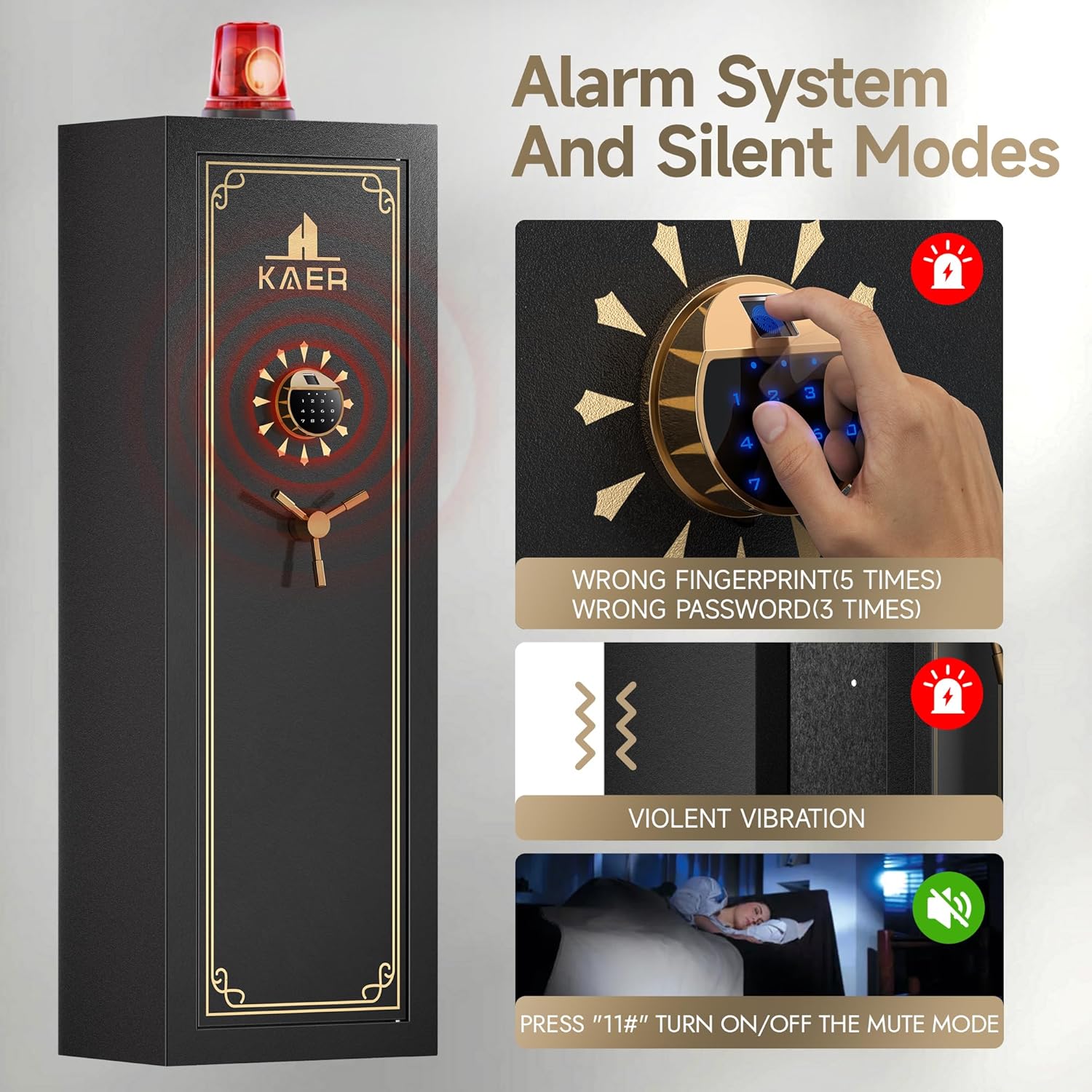
Image 5.5: Alarm System and Silent Mode
6. Maintenance
- Battery Replacement: Replace batteries promptly when the low battery indicator appears or if the keypad becomes unresponsive. Always use new AAA alkaline batteries.
- Cleaning: Clean the exterior of the safe with a soft, damp cloth. Avoid abrasive cleaners or solvents that could damage the finish or electronic components.
- Lock Mechanism: Periodically check the locking bolts and hinges for any obstructions or signs of wear. Do not lubricate the electronic lock mechanism.
- Fingerprint Sensor: Keep the fingerprint sensor clean and dry for optimal recognition.
7. Troubleshooting
| Problem | Possible Cause | Solution |
|---|---|---|
| Safe does not open with fingerprint. | Low batteries; Fingerprint not registered correctly; Dirty sensor; Incorrect finger placement. | Replace batteries; Re-register fingerprint (refer to Section 5.2); Clean sensor; Ensure full finger contact. |
| Safe does not open with digital password. | Low batteries; Incorrect password entered; Password not set correctly. | Replace batteries; Re-enter password carefully; Re-set password (refer to Section 5.3). |
| Alarm sounds unexpectedly. | Multiple incorrect entries; Violent vibration detected. | Enter correct access method; Avoid disturbing the safe; Check for external factors causing vibration. |
| Safe is completely unresponsive. | Dead batteries. | Use emergency keys to open the safe and replace batteries. |
8. Specifications
| Feature | Detail |
|---|---|
| Brand | KAER |
| Model Number | 5a0ca6e9-bcdb-4e0d-9e8b-64b59d8429f8 |
| Product Dimensions | 11.81"D x 17.72"W x 51.97"H |
| Lock Type | Biometric Electronic Combination Lock |
| Material | Alloy Steel (14-gauge steel door & body) |
| Mounting Type | Floor Mount, Wall Mount |
| Item Weight | 75 pounds |
| Capacity | Designed for 13-15 guns (rifles and pistols) |
| Locking Bolts | 3 x 20mm high-strength solid locking bolts |

Image 8.1: Safe Dimensions and Capacity

Image 8.2: Example Firearm Storage Capacity
9. Warranty and Support
KAER is committed to providing high-quality products and customer satisfaction. If you encounter any issues with your KAER 13-15 Biometric Gun Safe, please contact our professional after-sales team. They are available 24 hours a day to assist you.
Contact Information: Refer to the contact details provided on the product packaging or the official KAER website.
Return Policy: This product is eligible for a 30-day easy return policy. Please refer to your purchase platform for specific return procedures.


