
PINDOWS PDS-8025
PINDOWS Men's Digital Sports Watch User Manual
Model: PDS-8025
Introduction
Thank you for choosing the PINDOWS Men's Digital Sports Watch. This manual provides comprehensive instructions for setting up, operating, and maintaining your watch. Designed for durability and precision, this watch features a stopwatch, countdown timer, alarm, LED backlight, and 50M water resistance, making it ideal for sports enthusiasts and outdoor activities.

Front view of the PINDOWS Men's Digital Sports Watch, showcasing its digital display and robust design in a white and black color combination.
Product Overview and Button Functions
Familiarize yourself with the watch's buttons and their primary functions:
- LIGHT Button: Activates the LED backlight for improved visibility in low-light conditions.
- MODE Button: Cycles through different modes: Time, Stopwatch (STW), Timer (TMR), Alarm (ALM), and Chime (CHM).
- START Button: Used to start/stop functions in Stopwatch and Timer modes, and to adjust settings.
- RESET Button: Used to reset functions in Stopwatch and Timer modes, and to adjust settings.

Side view of the watch, highlighting the 'START' and 'RESET' buttons on the right side of the watch case.
Setup: Initial Time and Date Setting
- In Time Mode, press and hold the MODE button until the seconds begin to flash. This indicates you are in setting mode.
- Press the RESET button to cycle through the settings: Seconds → Hour → Minute → Month → Date → Day of the week.
- Use the START button to adjust the flashing value.
- Once all settings are correct, press the MODE button again to exit setting mode.
- To switch between 12-hour and 24-hour format, press the START button while the hour is flashing.
Operating Instructions
Stopwatch Function
The stopwatch measures elapsed time with 1/100 second precision.
- From Time Mode, press the MODE button once to enter Stopwatch (STW) mode. The display will show "00:00:00".
- Press the START button to begin timing.
- Press the START button again to pause timing.
- Press the RESET button to reset the stopwatch to zero.
- To record split times (SPL), press the RESET button while the stopwatch is running. The display will show the split time. Press RESET again to return to the running stopwatch.
Countdown Timer Function
Set a specific time for the watch to count down from.
- From Time Mode, press the MODE button twice to enter Timer (TMR) mode.
- Press and hold the RESET button until the hour digits flash to set the countdown time.
- Press the MODE button to select hours, minutes, or seconds. Use the START button to adjust the value.
- Once the desired countdown time is set, press the RESET button to confirm and exit setting mode.
- Press the START button to begin the countdown.
- Press the START button again to pause/resume the countdown.
- When the countdown reaches zero, an alarm will sound. Press any button to stop the alarm.
Alarm Function
Set a daily alarm.
- From Time Mode, press the MODE button three times to enter Alarm (ALM) mode.
- Press and hold the RESET button until the hour digits flash.
- Press the MODE button to select hours or minutes. Use the START button to adjust the value.
- Press the RESET button to confirm and exit setting mode.
- To turn the alarm ON/OFF, press the START button in Alarm mode (without holding RESET). An alarm icon will appear/disappear.
Hourly Chime Function
The hourly chime sounds a short beep every hour on the hour.
- From Time Mode, press the MODE button four times to enter Chime (CHM) mode.
- Press the START button to toggle the hourly chime ON/OFF. A chime icon will appear/disappear.
LED Backlight
Press the LIGHT button at any time to illuminate the display for a few seconds.

A visual representation of key features including 50m water resistance, high-hardness mineral glass, durable TPU material, and an easy-to-read luminous dial.
Maintenance and Care
- Water Resistance: This watch is 50M water resistant. It is suitable for daily use, hand washing, rain, and short periods of swimming. Do not press any buttons while the watch is submerged in water. Not suitable for diving or hot water activities.
- Cleaning: Wipe the watch case and band with a soft, damp cloth. Avoid using chemical cleaners.
- Temperature: Avoid exposing the watch to extreme temperatures (hot or cold) for prolonged periods.
- Impact: While shock-resistant, avoid severe impacts or dropping the watch.
- Battery: The watch uses a standard watch battery. Battery replacement should ideally be performed by a qualified technician to ensure water resistance is maintained.

The back of the watch, displaying the stainless steel case back and the "WATER RESIST 50M" marking, indicating its water resistance capabilities.
Troubleshooting
| Problem | Possible Cause | Solution |
|---|---|---|
| Display is blank or dim. | Low battery. | Replace the battery. |
| Buttons are unresponsive. | Watch may be in a locked mode or internal issue. | Try pressing all buttons to see if it responds. If not, a battery reset or professional inspection may be needed. |
| Time is inaccurate. | Time not set correctly or battery low. | Re-set the time following the "Setup" instructions. If issue persists, replace battery. |
| Water inside the watch. | Buttons pressed underwater or seal compromised. | Immediately take the watch to a professional for inspection and repair to prevent further damage. |
Specifications
| Feature | Detail |
|---|---|
| Model Number | PDS-8025 |
| Water Resistance | 50M (5 ATM) |
| Display Type | Digital |
| Functions | Time, Date, Day, Stopwatch (1/100s), Countdown Timer, Alarm, Hourly Chime, LED Backlight |
| Case Material | ABS |
| Band Material | TPU |
| Clasp Type | Buckle |
| Case Diameter | 1.9 inches / 48mm |
| Case Thickness | 0.67 inches / 17mm |
| Band Width | 0.8 inches / 20mm |
| Band Length | 5.5 - 8.7 inches / 141 - 223mm |
| Weight | 4.59 ounces / 44g |
| Manufacturer | PINDOWS |
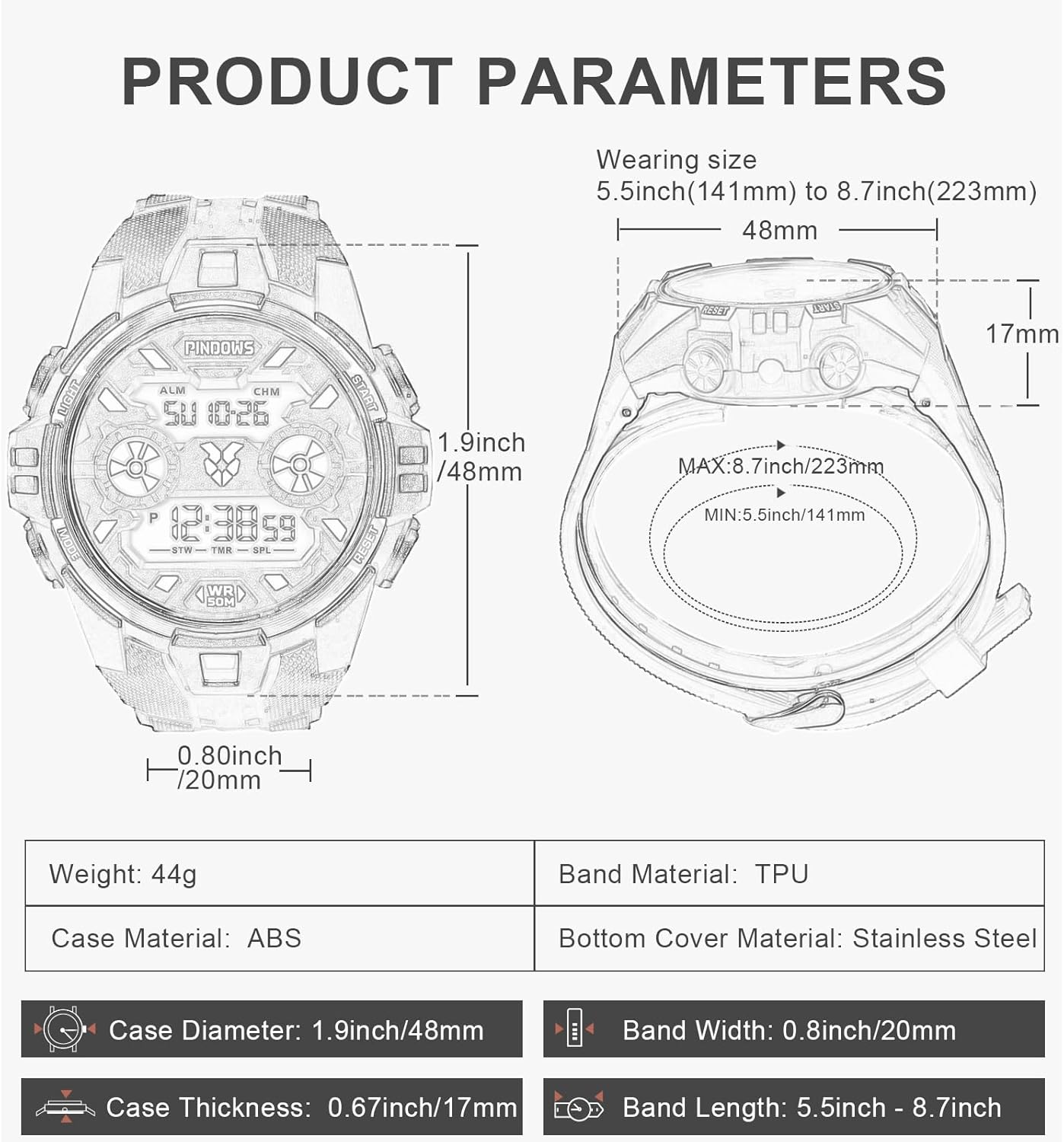
Detailed product parameters including dimensions, weight, and materials for the PINDOWS Digital Sports Watch.
Additional Information
For further assistance or inquiries, please refer to the official PINDOWS brand store or contact customer support through your purchase platform.

The PINDOWS watch worn on a wrist, demonstrating its practical use and style in an outdoor environment.

Two PINDOWS watches, one black and one white, displayed in a rugged outdoor setting, emphasizing their durability and design.
Ask a question about this manual
Ask about setup, troubleshooting, compatibility, parts, safety, or missing instructions. Manuals+ will review the question and use this page’s manual context to help answer it.