
1. Introduction and Overview
Thank you for choosing the HARDELL 8V Cordless Rotary Tool Kit. This versatile tool is designed for a wide range of DIY projects and precision tasks, including sanding, polishing, engraving, cutting, and drilling. Its cordless design, variable speed settings, and comprehensive accessory kit make it an essential tool for hobbyists and crafters.

The HARDELL 8V Cordless Rotary Tool Kit, including the tool, carrying case, and a wide array of accessories.
Key features include a smart digital display for speed, 6 variable speed settings for precise control, and a comprehensive kit of 80 accessories. The tool also boasts a safety-enhanced design with a non-slip grip and body lock for secure accessory replacement, and convenient USB-C fast charging for continuous operation.
2. Safety Information
Always prioritize safety when operating power tools. Read and understand all instructions before use. Failure to follow these instructions may result in electric shock, fire, and/or serious injury.
- Eye Protection: Always wear ANSI-approved safety goggles or safety glasses with side shields when operating the rotary tool.
- Hand Protection: Wear appropriate gloves to protect your hands from debris and vibrations.
- Work Area: Ensure your work area is clean, well-lit, and free of clutter. Keep children and bystanders away.
- Ventilation: Work in a well-ventilated area, especially when sanding or cutting materials that produce dust.
- Secure Workpiece: Always secure your workpiece with clamps or a vise. Never hold the workpiece by hand.
- Accessory Replacement: Utilize the body lock feature for safer and more secure accessory replacement. Ensure the tool is off before changing accessories.
- Avoid Overloading: Do not force the tool. Let the tool and accessory do the work.
- Battery Safety: Use only the provided charging cable. Do not expose the battery to extreme temperatures or moisture.
The HARDELL rotary tool features a non-slip grip and a body lock mechanism to enhance user safety during operation and accessory changes.
3. Package Contents
Verify that all items listed below are included in your HARDELL 8V Cordless Rotary Tool Kit:
- 8V Rotary Tool (1)
- Sandpaper (20pcs)
- Big Sand Ring (5pcs)
- Big Sand Drum (1pc)
- Small Sand Ring (10pcs)
- Small Sand Drum (1pc)
- Standard Cutting Disc (15pcs)
- Mesh Cutting Disc (5pcs)
- Diamond Cutting Disc (1pc)
- Cutting Disc Connecting Handle (1pc)
- Big Wool Wheel (5pcs)
- Wool Wheel Self-Tapping Handle (1pc)
- Silicon Carbide Grinding Wheel (2pcs)
- Aluminum Oxide Grinding Wheel (3pcs)
- Wire Brush (flat) (1pc)
- 3.2 Chuck (2pcs)
- 3.2 Twist Drill (1pc)
- Column Milling Cutter (1pc)
- Diamond Grinding Head (3pcs: large round head 14#, cone type 19#, flat head 18#)
- Wrench (1pc)
- TYPE-C Charging Cable (1pc)

Visual guide to the 80 included accessories, organized by their primary function.
4. Product Features
- Smart Digital Display: The cordless rotary tool features a smart digital gear display, providing clear visibility of current speed settings. This display facilitates seamless transitions during DIY projects, ensuring smoother completion of various tasks.
- 6 Variable Speeds: Designed with six adjustable speed settings, this 8V cordless tool offers versatility in operations. It allows for precise control and adaptability across different DIY scenarios, from intricate engraving to robust polishing, with a maximum rotational speed of 28000 RPM and a minimum of 8000 RPM.
- High Brightness LED Ring Light: An integrated LED ring light illuminates the workpiece, ensuring clear visibility even in dimly lit conditions and allowing for precise detail work.
- Comprehensive DIY Tool Kit: The rotary tool kit comes with 80 versatile accessories suitable for engraving, drilling, sanding, and polishing. This makes it an ideal tool for craft lovers and a thoughtful gift.
- Safety Enhanced Design: Prioritizing user safety, the grip features a non-slip design to ensure a secure hold, and a body lock mechanism is included for safer accessory replacement. This design minimizes risks during manual processes.
- Convenient USB-C Charging: Equipped with a USB-C fast charging cable, this tool ensures work continuity without battery depletion concerns. The rotary tool offers cordless operation convenience, ideal for environments without power outlets. It supports charging while in use.
- Powerful and Lightweight: Despite its robust performance, the tool is designed to be lightweight, weighing only 0.88 pounds (14.1 ounces), reducing user fatigue during extended use.

The clear digital display allows for easy monitoring and adjustment of speed settings.

Internal view highlighting the efficient 6-speed high power motor.

The LED ring light provides excellent illumination for detailed work.

The tool can be conveniently charged via USB-C, even during operation.

The tool's design balances powerful performance with a lightweight form factor.
5. Setup
5.1 Initial Charging
Before first use, fully charge the rotary tool. Connect the provided USB-C charging cable to the tool's charging port and plug the other end into a compatible USB power adapter (not included). The digital display may indicate charging status.
5.2 Attaching Accessories
- Ensure the rotary tool is turned OFF.
- Press and hold the body lock button located near the chuck to prevent the shaft from rotating.
- Use the included wrench to loosen the chuck nut by turning it counter-clockwise.
- Insert the desired accessory (e.g., sanding band, cutting disc, drill bit) into the chuck. Ensure the accessory shank is fully seated.
- Tighten the chuck nut clockwise with the wrench while still holding the body lock button. Do not overtighten.
- Release the body lock button. The accessory should now be securely fastened.
6. Operating Instructions
6.1 Powering On/Off
Press the power button (usually marked with a power symbol) to turn the tool ON. Press it again to turn the tool OFF.
6.2 Adjusting Speed
The HARDELL rotary tool features 6 variable speed settings, indicated on the digital display. Use the '+' and '-' buttons to increase or decrease the rotational speed to suit your application and material.
6.3 Application Guide
The tool is suitable for various tasks. Always select the appropriate accessory and speed for the material and task at hand.
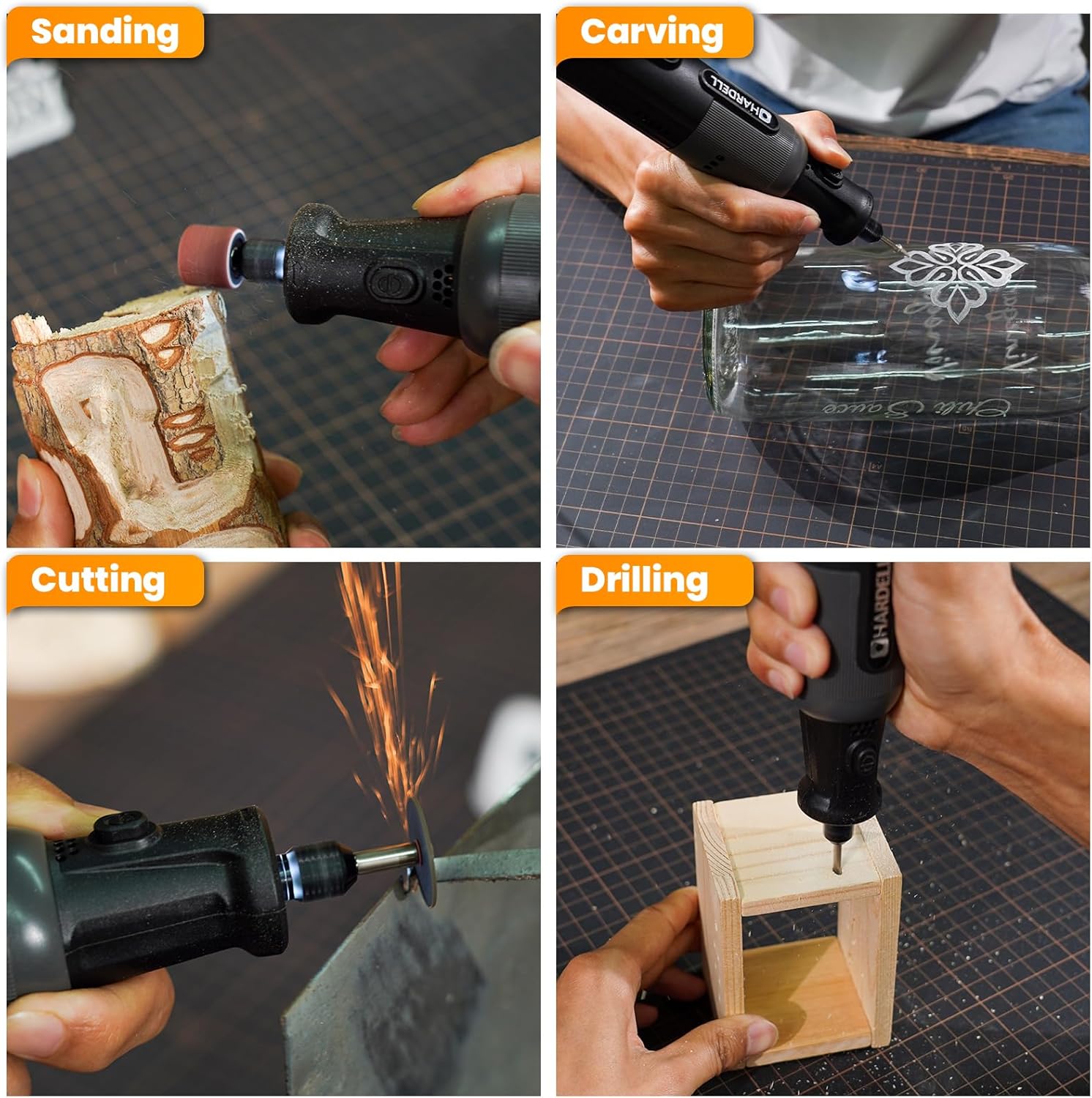
The rotary tool is versatile for sanding, carving, cutting, and drilling.
- Sanding: Use sanding bands or sandpaper discs for smoothing surfaces, shaping, or removing rust. Start with a lower speed and gradually increase if needed.
- Engraving/Carving: Utilize diamond bits for intricate designs on materials like glass, metal, or wood. Use a steady hand and appropriate speed for detail work.
- Polishing: Attach wool wheels with polishing compound to bring a shine to metal, plastic, or other surfaces. Use lower speeds for best results.
- Cutting: Use standard or mesh cutting discs for light cutting tasks on various materials. Always ensure the workpiece is stable and wear eye protection.
- Drilling: Select the appropriate twist drill bit for drilling small holes in wood, plastic, or soft metals.
- Grinding/Sharpening: Use silicon carbide or aluminum oxide grinding wheels for sharpening tools or grinding down rough edges.

Sanding wood with a sanding drum attachment.

Engraving intricate patterns on glass.

Drilling a precise hole in a wooden workpiece.

Grinding and sharpening applications, such as rust removal from metal.
6.4 Speed Selection Guide
Refer to the table below for recommended speed settings based on the function and material:

Guide for choosing the optimal speed for different materials and applications.
7. Maintenance
7.1 Cleaning the Tool
After each use, wipe down the tool with a clean, dry cloth to remove dust and debris. Do not use harsh chemicals or abrasive cleaners. Ensure no dust enters the ventilation openings.
7.2 Accessory Care
Clean accessories after use. Store them in their designated compartments within the carrying case to prevent damage and loss. Replace worn or damaged accessories promptly.
7.3 Battery Care
The tool uses a Lithium Ion battery. For optimal battery life:
- Avoid fully discharging the battery before recharging.
- Store the tool in a cool, dry place when not in use, away from direct sunlight and extreme temperatures.
- If storing for extended periods, charge the battery to approximately 50% capacity.
8. Troubleshooting
If you encounter issues with your HARDELL rotary tool, refer to the following common problems and solutions:
| Problem | Possible Cause | Solution |
|---|---|---|
| Tool does not turn on. | Battery is depleted. | Charge the tool using the USB-C cable. |
| Power button not pressed correctly. | Ensure a firm press on the power button. | |
| Accessory wobbles or falls out. | Chuck nut is loose. | Tighten the chuck nut firmly with the wrench while holding the body lock. |
| Accessory shank is too small for chuck. | Ensure you are using the correct chuck size (3.2mm) for the accessory. | |
| Tool loses power quickly. | Battery not fully charged or aging. | Ensure full charge before use. If battery life significantly degrades, contact support. |
| Excessive vibration or noise. | Accessory is bent or damaged. | Replace the accessory. |
| Accessory not properly seated. | Re-seat and tighten the accessory. |
If the problem persists after attempting these solutions, please contact HARDELL customer support.
9. Specifications
| Specification | Detail |
|---|---|
| Brand | HARDELL |
| Model Number | DM22501BAGHD-1@#SYYSMM |
| Voltage | 8 Volts |
| Power Source | Battery Powered (Lithium Ion) |
| Color | Black |
| Special Features | Compact, Cordless, Variable Speed, Digital Display, LED Light |
| Item Weight | 0.88 Pounds (14.1 ounces) |
| Maximum Rotational Speed | 28000 RPM |
| Minimum Speed | 8000 RPM |
| Number of Batteries | 1 AAAA batteries required (included) |
| Package Dimensions | 9.17 x 4.53 x 2.48 inches |
| Recommended Uses | Cutting, Drilling, Polishing, Sanding, Engraving |
10. Warranty and Support
HARDELL products are manufactured to high-quality standards. For information regarding warranty coverage, please refer to the warranty card included with your product or visit the official HARDELL website.
For technical support, troubleshooting assistance beyond this manual, or to inquire about replacement parts, please contact HARDELL customer service. You can often find contact information on the product packaging or through the brand's official online presence.
Visit the HARDELL Store on Amazon for more product information and support resources.


