
1. Introduction
Thank you for choosing the Clatronic ERB 3815 A Electric Cleaning Brush. This cordless, powerful cleaning tool is designed to simplify your cleaning tasks with its 300 rpm motor and versatile attachments. Please read this manual carefully before first use to ensure safe and optimal operation of your device.

The Clatronic ERB 3815 A electric cleaning brush offers powerful, flexible, and cordless cleaning for various surfaces.
2. Safety Instructions
Always observe the following safety precautions to prevent injury or damage to the device:
- Read all instructions before operating the device.
- Keep the device out of reach of children and pets.
- Do not immerse the main unit in water. The device is IPX5 splash-proof, but not submersible.
- Use only the provided USB-C charging cable or a compatible certified cable for charging.
- Do not operate the device if it is damaged, has a faulty cable, or if the battery is leaking.
- Ensure brush heads are securely attached before use.
- Avoid applying excessive pressure, which can reduce motor efficiency and battery life.
- Do not use on delicate surfaces without testing a small, inconspicuous area first.
3. Package Contents
Verify that all items are present in the package:
- Clatronic ERB 3815 A Electric Cleaning Brush (Main Unit)
- 8 x Interchangeable Cleaning Attachments (various brushes and pads)
- 1 x USB-C Charging Cable

The complete set includes the main cleaning unit and a variety of brush heads and pads designed for different cleaning applications.
4. Product Overview
Components
- Main Unit: Ergonomic handle with power button and motor.
- Power Button: To turn the device on and off.
- Charging Port: USB-C port for battery charging.
- Attachment Connector: For securing brush heads.
- Interchangeable Brush Heads: Various types for different cleaning needs.

This diagram provides an overview of the main unit's dimensions and the sizes of the 8 included cleaning attachments, highlighting their compact and efficient design.
Brush Head Types
- Round Brush Head: Ideal for grout, corners, and curved surfaces.
- Wire Cleaning Head: Suitable for tough grime on grills and ovens.
- Oval Brush Head: For larger surfaces like tiles and general scrubbing.
- 2-in-1 Polishing Head: For achieving shine on various surfaces.
- 3 Sanding/Abrasive Heads: For removing rust and persistent residues.

The cleaning brush comes with 8 versatile attachments, including round brushes for grout, wire brushes for grills, oval brushes for large surfaces, polishing pads, and abrasive pads for tough stains.
5. Setup
5.1. Charging the Battery
- Before first use, fully charge the device.
- Connect the USB-C charging cable to the charging port on the device.
- Plug the other end of the USB-C cable into a compatible USB power adapter (not included) or a USB port.
- The charging indicator (if present) will show the charging status. A full charge provides up to 90 minutes of runtime.

The integrated 1200 mAh battery is conveniently rechargeable via the included USB-C cable, providing cordless operation.
5.2. Attaching Brush Heads
- Ensure the device is turned off before attaching or removing brush heads.
- Align the desired brush head with the attachment connector on the main unit.
- Press firmly and twist slightly until the brush head clicks securely into place.
- To remove, twist the brush head in the opposite direction and pull it off.
6. Operating Instructions
6.1. Powering On/Off
- Press the power button once to turn the device on. The brush head will begin to rotate.
- Press the power button again to turn the device off.
6.2. Cleaning Tips
- Select the appropriate brush head for the surface and type of dirt.
- Apply a small amount of cleaning solution directly to the surface or the brush head, if suitable for the cleaning agent.
- Gently guide the rotating brush over the surface. Avoid pressing too hard, as the motor's rotation is more effective than brute force.
- For stubborn stains, allow the cleaning solution to soak for a few minutes before scrubbing.
- The IPX5 rating allows for safe use in wet environments like showers and sinks, but avoid submerging the unit.

The electric cleaning brush effectively removes stubborn dirt from surfaces like oven trays with its powerful 300 rpm motor.
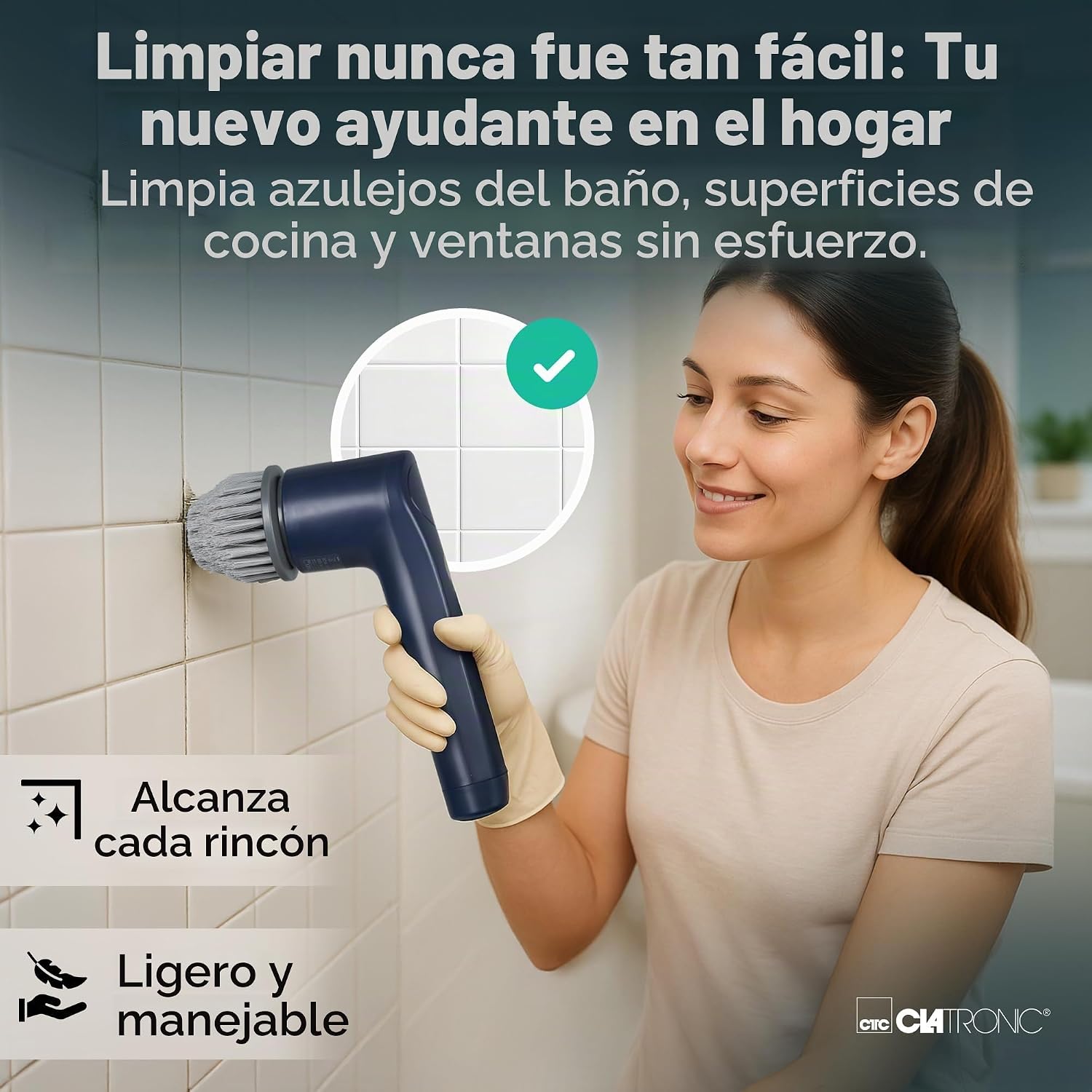
The lightweight and ergonomic design allows for easy cleaning of various surfaces, such as bathroom tiles, reaching corners effortlessly.
7. Maintenance and Care
7.1. Cleaning the Device
- After each use, remove the brush head and rinse it under running water. Allow it to air dry completely.
- Wipe the main unit with a damp cloth. Do not use abrasive cleaners or immerse the unit in water.
- Ensure the charging port is clean and dry before charging.

The device features IPX5 splash protection, making it suitable for wet cleaning, and offers up to 90 minutes of continuous operation on a single charge.
7.2. Storing the Device
Store the cleaning brush and its accessories in a cool, dry place, away from direct sunlight and extreme temperatures.
8. Troubleshooting
| Problem | Possible Cause | Solution |
|---|---|---|
| Device does not turn on. | Battery is depleted. | Charge the device fully using the USB-C cable. |
| Brush head does not spin or spins weakly. | Battery is low; excessive pressure applied; incorrect brush head for task. | Recharge the battery; reduce pressure; select a more suitable brush head. |
| Device is not charging. | USB-C cable or power adapter is faulty; charging port is dirty. | Try a different USB-C cable or power adapter; ensure charging port is clean and free of debris. |
| Brush head detaches during use. | Brush head not securely attached. | Ensure the brush head is firmly twisted and clicked into place. |
9. Technical Specifications
| Feature | Specification |
|---|---|
| Model Number | ERB3815A |
| Brand | Clatronic |
| Dimensions (L x W x H) | 30.1 x 14.5 x 9.7 cm |
| Weight | 350 g |
| Motor Speed | 300 rpm |
| Battery Capacity | 1200 mAh |
| Runtime | Up to 90 minutes |
| Charging Interface | USB-C |
| Water Protection Rating | IPX5 (splash-proof) |
| Material | 18/10 Steel (handle material) |
| Special Features | Water-jet resistant housing, one-hand operation |
| Recommended Surfaces | Ceramic, Metal, Paint, Glass, Plastic, Leather, Wood |
10. Warranty and Support
For warranty information and customer support, please refer to the documentation provided with your purchase or contact Clatronic customer service directly. Keep your proof of purchase for any warranty claims.
