
YONHAN RJ-C121501B
YONHAN 15A 12V/24V Smart Battery Charger
Model: RJ-C121501B
Brand: YONHAN
1. Safety Information
Please read and understand all safety information before operating this battery charger. Failure to follow these instructions may result in electric shock, fire, or serious injury.
- Always wear eye protection and protective clothing when working with batteries.
- Ensure adequate ventilation during charging to prevent the buildup of explosive gases.
- Avoid sparks or flames near the battery.
- The 12/24-volt battery charger has a built-in protection system, including reverse polarity, short circuit, overcharge, over-heat, over-voltage, and over-current protection.
- Do not charge LiFePO4 batteries without a Battery Management System (BMS).
- Keep out of reach of children.

Figure 1: The YONHAN charger features 8 smart protections, including smart control, temperature compensation, reverse protection, cooling system, overcurrent, fireproof material, overvoltage, and short circuit protection.
2. Product Overview
2.1 Key Features
- 15-Amp 12V and 24V Fully-Automatic Smart Charger.
- Compatible with all 12V and 24V lead-acid batteries (AGM/Gel/SLA/Flooded) and LiFePO4 deep-cycle batteries.
- 9-stage quick charging process.
- Advanced pulse repair technology to detect and reverse sulfation and acid stratification.
- Comprehensive safety protections: reverse polarity, short circuit, overcharge, over-heat, over-voltage, and over-current.
- Intelligent Memory & One-Touch Operation for hassle-free charging.
- Temperature-adaptive float/trickle charging mode.
2.2 Package Contents
- YONHAN 15A Battery Charger Unit
- Battery Clamps (Red and Black)
- User Manual
2.3 Product Diagram

Figure 2: Front view of the YONHAN Smart Battery Charger with its attached battery clamps.
3. Specifications
| Specification | Value |
|---|---|
| Brand | YONHAN |
| Model Number | RJ-C121501B |
| Item Weight | 1.46 pounds |
| Product Dimensions | 6.49"D x 3.42"W x 2.59"H |
| Input Voltage | 110-230V (50-60Hz) AC |
| Output Voltage/Current | 12V-15.5V/24V-31V (-15°C~45°C automatic voltage compensation) |
| Output Current | DC 12V15A / 24V8A (Max) |
| Compatible Battery Types | 12V/24V Lead-Acid (AGM, GEL, SLA, Flooded), LiFePO4 |
4. Setup
4.1 Connecting the Charger
Follow these steps to safely connect the charger to your battery:
- Ensure the charger is unplugged from the AC power outlet.
- Connect the red positive (+) clamp to the positive (+) terminal of the battery.
- Connect the black negative (-) clamp to the negative (-) terminal of the battery.
- Plug the charger into a suitable AC power outlet (110-230V, 50-60Hz). The charger will automatically detect the battery voltage (12V or 24V).

Figure 3: Proper connection of the charger clamps to a vehicle battery.
5. Operating Instructions
5.1 Understanding the Display
The charger features a large color screen that visualizes charging information. The display cycles through various parameters:
- Temperature Display: Shows the ambient temperature (in Celsius).
- Voltage Display: Shows the current battery voltage.
- Current Display: Shows the charging current in Amperes.
- Finish Display ("FUL"): Indicates when the battery is fully charged.
- Fix Display ("PUL"): Indicates the pulse repair mode is active.
- Power Off System ("OFF"): Indicates the charger is powered off.
- Reverse/Abnormal Display ("Err"): Indicates an error or incorrect connection.
- Desulfurization ("dFS"): Indicates the desulfurization process is active.

Figure 4: The intelligent display provides real-time charging status and battery information.
5.2 Selecting Charging Mode
The charger has a touch-sensitive mode selection button. Press the 'MODE' button to cycle through the available charging modes:
- STD (Standard): For standard lead-acid batteries.
- LiFePO4: Specifically for Lithium Iron Phosphate batteries.
- AGM/GEL: For AGM and Gel batteries.
- MOTORCYCLE: Optimized for motorcycle batteries.
- REPAIR: For pulse repair function.
The charger has an automatic memory function for the car battery charging mode. While the charger is smart enough to often select the correct mode, manual selection ensures optimal charging for specific battery types.
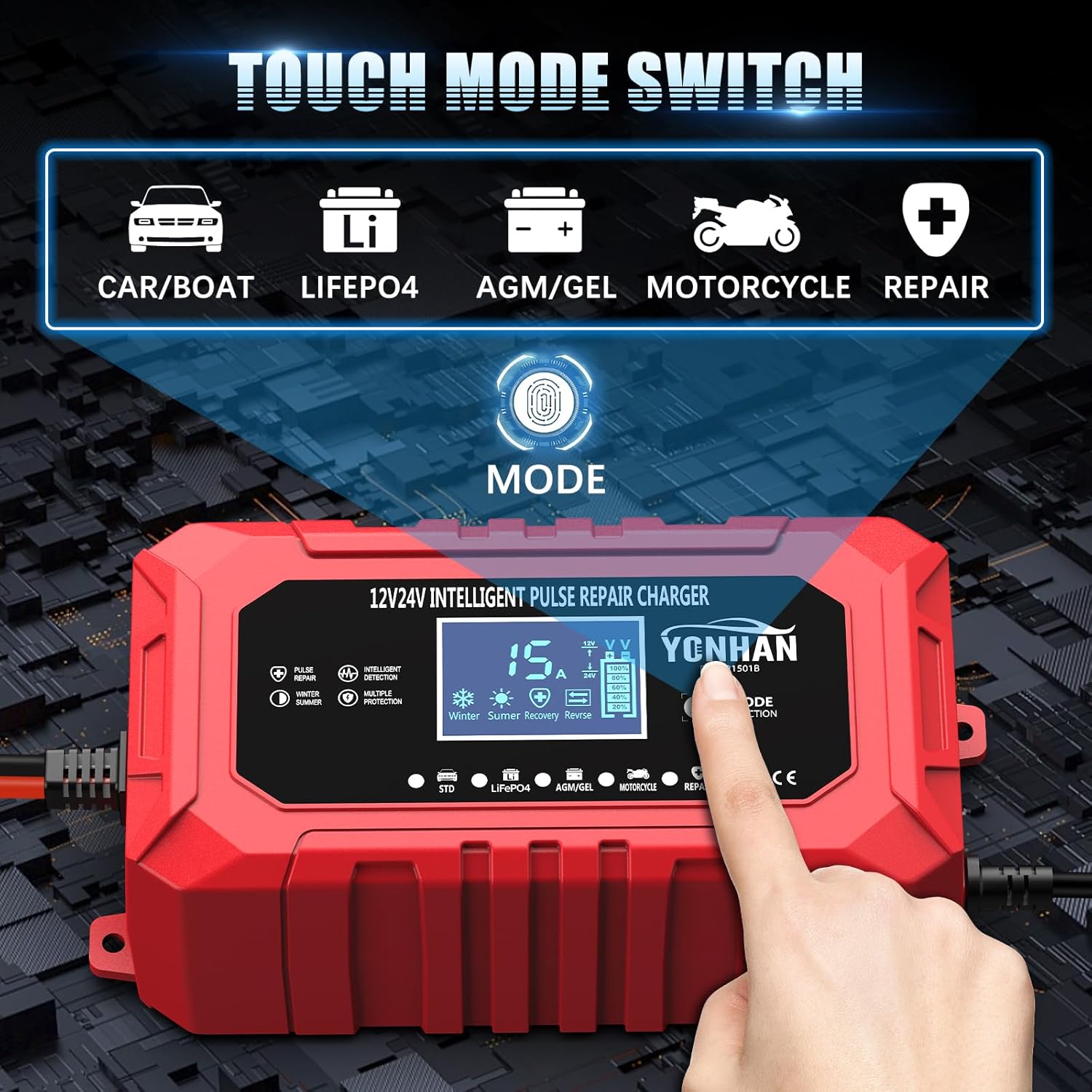
Figure 5: The touch mode switch allows selection of the appropriate charging program for your battery type.
5.3 Charging Process
Once connected and the mode is selected, the charger will initiate its 9-stage charging process (5-stage for LiFePO4). This intelligent process optimizes charging for battery health and longevity.
- The charger automatically detects the battery voltage (12V or 24V).
- It adjusts charging parameters based on ambient temperature for efficient charging in various climates.
- The display will show the charging progress, voltage, current, and temperature.
- When the battery is fully charged, the screen will display "FUL" and the charger will automatically stop charging.
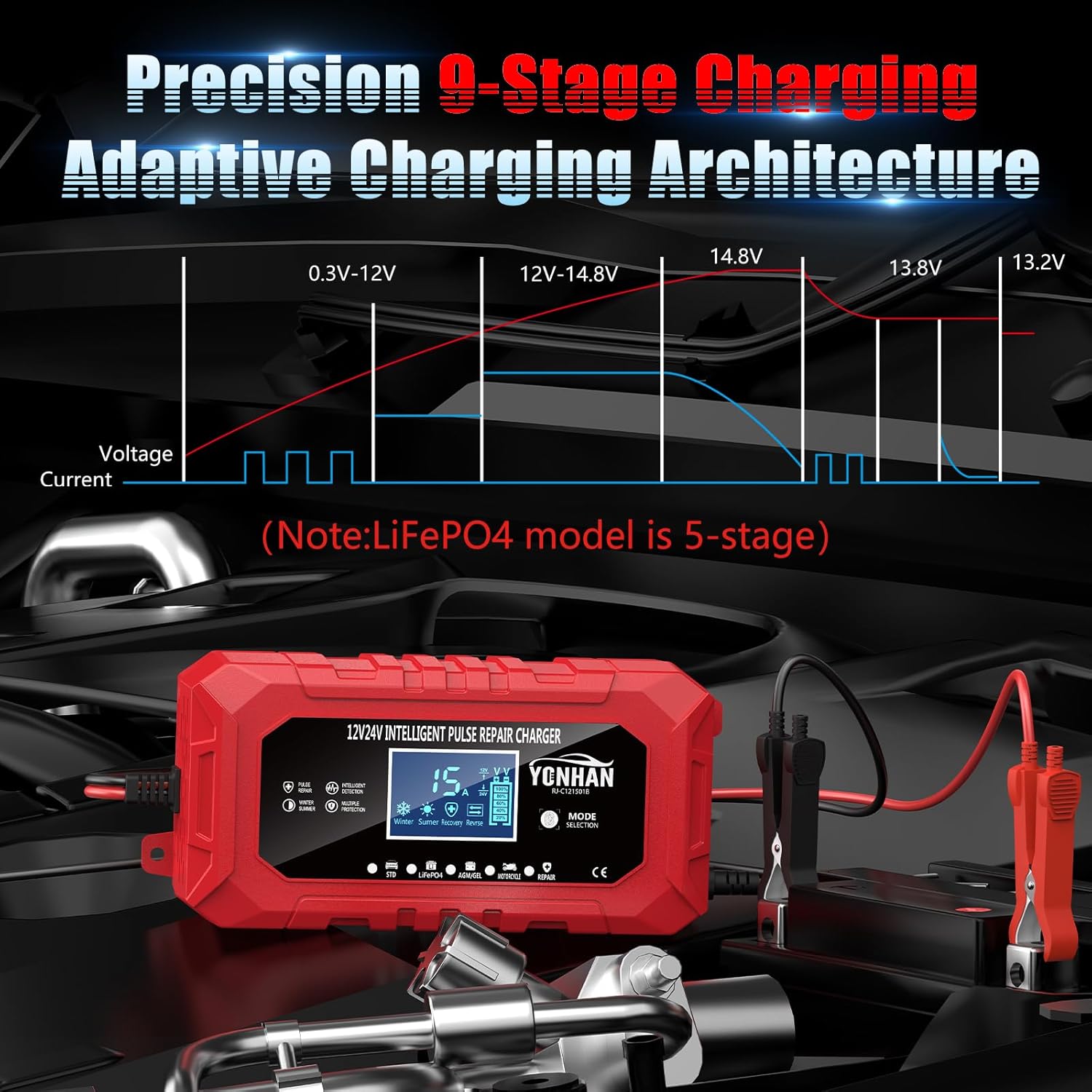
Figure 6: The 9-stage adaptive charging architecture ensures optimal battery charging (LiFePO4 model is 5-stage).
5.4 Pulse Repair Function
The pulse repair function is designed to address prolonged vehicle dormancy issues, correct voltage depletion, and revive aged batteries beyond conventional charging. This technology automatically detects sulfation and acid stratification, reversing damage to boost performance and extend battery life. (Note: This function cannot revive completely dead batteries.)

Figure 7: The pulse repair function helps restore battery performance.
5.5 Temperature-Adaptive Charging
This trickle charger is optimized for climate conditions, enabling it to effortlessly handle a variety of over-cooling and over-heating voltage environments. To maintain the battery during winter, switch to the float/trickle charge mode as follows: Select the appropriate mode (STD/AGM, GEL/WET, or MOTORCYCLE) to fully charge the battery. The screen will display "FUL". Then, switch to the "MOTORCYCLE" mode. The charger will automatically enter trickle charging mode, keeping the battery charged for an extended period.

Figure 8: The charger adapts its charging parameters based on ambient temperature.
6. Maintenance
Proper maintenance ensures the longevity and optimal performance of your YONHAN battery charger:
- Always disconnect the charger from the power outlet and the battery before cleaning or performing any maintenance.
- Clean the charger casing with a soft, dry cloth. Do not use abrasive cleaners or solvents.
- Inspect the battery clamps and cables for any damage or corrosion before each use. Replace if necessary.
- Store the charger in a cool, dry place when not in use, away from direct sunlight and moisture.
7. Troubleshooting
Refer to the table below for common issues and their solutions:
| Problem | Possible Cause | Solution |
|---|---|---|
| Charger does not turn on. | No power, incorrect connection. | Ensure charger is plugged into a live outlet and connected correctly to the battery. |
| "Err" displayed on screen. | Reverse polarity, short circuit, or abnormal battery. | Check battery clamp connections for correct polarity. Ensure no short circuits. Consult a professional if the battery is severely damaged. |
| "dE5" displayed during charging. | Charger is automatically adjusting. | No action required. Wait at least 5 minutes for the charger to automatically adjust and start charging the battery. |
| Battery not charging. | Incorrect mode selected, battery too deeply discharged. | Verify the correct charging mode is selected for your battery type. Note that the charger cannot revive completely dead batteries. |
8. Warranty and Support
YONHAN products are manufactured to high-quality standards. For warranty information, technical support, or service inquiries, please refer to the warranty card included with your product or contact YONHAN customer service through the retailer's platform where the product was purchased.
For more information, visit the official YONHAN store: YONHAN Store
Ask a question about this manual
Ask about setup, troubleshooting, compatibility, parts, safety, or missing instructions. Manuals+ will review the question and use this page’s manual context to help answer it.