1. Introduction
This manual provides detailed instructions for the safe and effective use of your RDINSCOS 2-in-1 Pin & Pinless Moisture Meter, Model MT28. This device is designed to accurately measure moisture content in various materials such as wood, drywall, and other building materials, utilizing both pin-type and non-invasive pinless detection methods. Please read this manual thoroughly before operation and retain it for future reference.
2. Safety Information
- Always handle the device with care. Avoid dropping or subjecting it to strong impacts.
- Do not attempt to disassemble or modify the meter. Repairs should only be performed by qualified personnel.
- Keep the device away from water and high humidity environments to prevent damage.
- When using the pin probes, exercise caution to avoid injury. Keep the protective cap on the pins when not in use.
- Ensure there is no metal (e.g., pipes, electrical wires, rebar) within 2 inches of the testing area when using the pinless mode to prevent inaccurate readings and potential damage.
- Store the meter in a cool, dry place when not in use.
3. Product Overview
The RDINSCOS MT28 is a versatile moisture meter featuring both pin and pinless measurement capabilities, a large LCD display, and a rechargeable battery.
3.1 Components
- Main Unit (Moisture Meter)
- Wired Remote Pin-Type Probe
- Type-C Charging Cable
- Replacement Pins
- Wrench
- User Manual

Figure 1: Included components of the RDINSCOS MT28 Moisture Meter.
3.2 Key Features
- 2-in-1 Pin & Pinless Detection: Offers both non-invasive scanning and precise pin-type measurements.
- Wide Measurement Range: Pin mode for wood (5–52%) and building materials (2–30%) with ±2.5% accuracy. Pinless mode for relative readings (0-100).
- Large Backlit LCD Display: 2.9-inch display for clear readings in various lighting conditions.
- Tri-color LED Indicator: Visually indicates low (green), medium (blue), or high (red) moisture levels.
- Audible Alarm: Sounds when moisture exceeds a user-defined set point.
- Rechargeable Battery: Built-in 1200mAh battery, eliminating the need for disposable batteries.
- Auto Shut-off: Powers off after 30 minutes of inactivity to conserve battery.
- HOLD Function: Freezes the current reading on the display for easy recording.

Figure 2: Front view of the RDINSCOS MT28 Moisture Meter main unit.
4. Setup
4.1 Charging the Battery
The MT28 meter is equipped with a built-in 1200mAh rechargeable battery. Before first use, or when the battery indicator on the display shows low power, charge the device using the provided Type-C charging cable.
- Connect the Type-C end of the cable to the charging port on the meter.
- Connect the USB-A end of the cable to a standard USB power adapter (not included) or a computer USB port.
- The battery indicator on the display will show charging status. Once fully charged, the indicator will show full.
4.2 Powering On/Off
Press and hold the power button (U) to turn the meter on or off.
5. Operating Instructions
5.1 Pinless (Non-Invasive) Mode
The pinless mode uses a spherical sensor to scan surfaces for moisture without causing damage. This mode provides relative readings and is ideal for quick assessments over large areas.
- Ensure the meter is powered on.
- Select the pinless mode (often indicated by a spherical icon on the display or a dedicated button).
- Place the spherical sensor firmly and flat against the surface of the material to be tested.
- Ensure your fingers are clear of the scanning area on the back of the meter to avoid inaccurate readings.
- Read the moisture level displayed on the LCD. The tri-color LED indicator will also provide a visual cue (green for dry, blue for moist, red for wet).

Figure 3: Performing a non-destructive pinless scan on a wall surface.

Figure 4: Proper hand placement to ensure accurate pinless measurements.
5.2 Pin-Type Mode
The pin-type mode uses two sharp pins to penetrate the material, providing precise percentage readings of moisture content. This mode is suitable for wood and building materials where direct contact is acceptable.
- Connect the wired remote pin-type probe to the meter.
- Remove the protective cap from the pins.
- Carefully push the pins into the material to be tested. Ensure both pins are fully inserted and making good contact.
- Read the moisture percentage on the LCD. The tri-color LED indicator will also provide a visual cue.
- After measurement, carefully withdraw the pins and replace the protective cap.
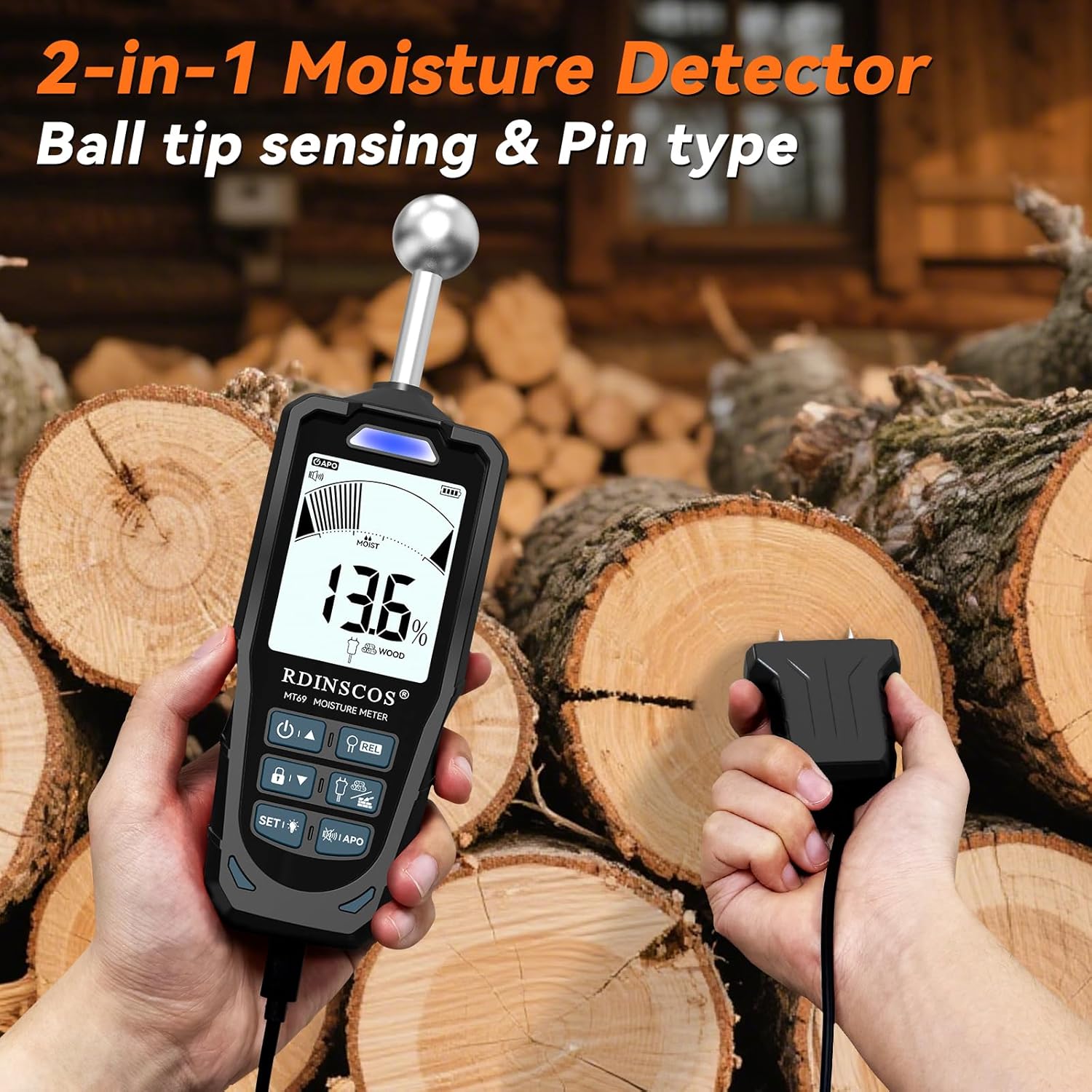
Figure 5: Using the pin-type probe to measure moisture in wood.
5.3 Material Selection and Measurement Range
The meter supports different material types with specific measurement ranges:
- Wood Mode: Measures moisture content from 5% to 52%.
- Building Material (BLD) Mode: Measures moisture content from 2% to 30%.
- Pinless (Induction/Spherical) Mode: Provides relative readings from 0 to 100.
Use the mode selection button on the meter to switch between Wood and Building Material modes for pin-type measurements. The pinless mode is typically selected automatically or via a dedicated button.

Figure 6: Illustration of measuring depth and range for both pinless and pin-type modes.
5.4 Alarm Settings and HOLD Function
The MT28 features customizable alarm thresholds and a data hold function.
- Customizable Alarm: You can set specific moisture thresholds for the audible alarm. When the measured moisture exceeds this threshold, the alarm will sound, and the LED indicator will turn red. Refer to the meter's on-screen menu or specific buttons (e.g., 'SET') for adjusting these values.
- HOLD Function: Press the 'HOLD' button to freeze the current reading on the display. This is useful for taking readings in hard-to-reach areas where direct viewing of the display is difficult. Press 'HOLD' again to release the reading.

Figure 7: Factory default settings for alarm values and indicators.
5.5 Important Measurement Notes
- Avoid Metal Interference: When using the pinless mode, ensure there is no metal (e.g., pipes, electrical wires, rebar) within 2 inches (approximately 5 cm) of the testing area. Metal objects can significantly interfere with readings, leading to inaccurate results.

Figure 8: Illustration showing correct measurement without metal interference and incorrect measurement with metal interference.
6. Maintenance
- Cleaning: Wipe the meter's exterior with a soft, dry cloth. Do not use abrasive cleaners or solvents.
- Pin Care: Keep the pin probes clean and free of debris. Replace bent or dull pins using the provided wrench and replacement pins.
- Storage: Store the meter in its original packaging or a protective case in a dry environment when not in use. Ensure the protective cap is on the pin probes.
- Battery: For long-term storage, ensure the battery is partially charged (around 50%) and recharge it every few months to maintain battery health.
7. Troubleshooting
| Problem | Possible Cause | Solution |
|---|---|---|
| Meter does not power on. | Low or depleted battery. | Charge the battery using the Type-C cable. |
| Inaccurate readings in pinless mode. |
|
|
| Inaccurate readings in pin mode. |
|
|
| Display is difficult to read in bright sunlight. | High ambient light conditions. | Move to a shaded area or shield the display from direct sunlight. The meter's backlight is designed for low-light conditions. |
8. Specifications
| Feature | Specification |
|---|---|
| Model Number | MT28 |
| Measurement Principle | Pin-type (resistance) & Pinless (electromagnetic induction) |
| Wood Moisture Range | 5% ~ 52% |
| Building Material (BLD) Range | 2% ~ 30% |
| Pinless (Induction) Range | 0 ~ 100 (Relative) |
| Accuracy | ±2.5% |
| Measurement Depth (Pinless) | 20 ~ 40 mm |
| Display | 2.9-inch Backlit LCD |
| Power Source | Built-in 1200mAh Rechargeable Battery |
| Auto Shut-off | 30 minutes |
| Item Weight | 1.1 pounds (approximately 500g) |
| Package Dimensions | 9.33 x 5.83 x 1.54 inches |
| Manufacturer | SHENZHEN REDDRAGON INSTRUMENTS CO.,LTD |
9. Warranty and Support
For warranty information or technical support, please contact the manufacturer directly. Refer to the product packaging or the official RDINSCOS website for contact details. Please have your model number (MT28) and purchase information ready when contacting support.


