
Introduction
The Husky 850 Lumens Dual-Power LED Rechargeable Headlamp is designed to provide versatile and powerful illumination for various tasks, from personal lighting to larger job site requirements. This headlamp integrates advanced LED and COB (Chip-on-Board) technology to deliver exceptional brightness and adaptable beam patterns. It features a dual-power system, allowing operation with either the included rechargeable battery or standard AAA alkaline batteries, ensuring continuous functionality.

Image: The Husky 850 Lumens Dual-Power LED Rechargeable Headlamp, showcasing its compact design and adjustable strap.
Product Features
- 8 Light Modes: Includes Turbo, High Spot, High Flood, High Combo, High Wide-Angle, ECO, Red, and Red Flashing modes for diverse lighting needs.
- Dual-Power System: Operates with the included rechargeable lithium-polymer battery or three AAA alkaline batteries (not included).
- USB Type-C Rechargeable: Equipped with a lithium-ion battery and charging cable for convenient recharging.
- Variable Dimming: Allows adjustment of light intensity across various modes.
- Integrated Tilt Feature: Enables precise control over light direction to prevent glare.
- Water Resistance: Designed to meet an IP54 rating, offering protection against splashing water.
- Comfortable Design: Features an adjustable head strap for a secure and comfortable fit.
- Smart Memory: Remembers the last used mode setting for quick recall.
Setup
Battery Installation and Charging
- Rechargeable Battery: The headlamp comes with a pre-installed rechargeable lithium-polymer battery. To charge, connect the included USB Type-C cable to the headlamp's charging port and to a compatible USB power source. The charging indicator will show the charging status. A full charge typically takes approximately 2 hours.
- AAA Alkaline Batteries (Optional): For alternative power, open the battery compartment and insert three AAA alkaline batteries (not included), ensuring correct polarity (+/-). Close the compartment securely.

Image: Close-up view of the headlamp's USB-C charging port, indicating where to connect the charging cable.
Adjusting the Head Strap
The headlamp features an adjustable elastic strap for a comfortable and secure fit. To adjust, slide the buckles on either side of the strap until the headlamp sits snugly on your head without being too tight. Ensure the headlamp unit is centered on your forehead.

Image: Detail of the adjustable head strap, highlighting its comfort and fit features.
Operating Instructions
Power On/Off and Mode Selection
The headlamp is operated via a single power button located on the top of the unit.
- Power On: Press the power button once to turn on the headlamp. It will activate in the last used mode due to the Smart Memory feature.
- Cycle Modes: While the headlamp is on, press the power button repeatedly to cycle through the 8 available light modes: Turbo, High Spot, High Flood, High Combo, High Wide-Angle, ECO, Red, and Red Flashing.
- Power Off: Press and hold the power button for approximately 2 seconds to turn off the headlamp from any mode.
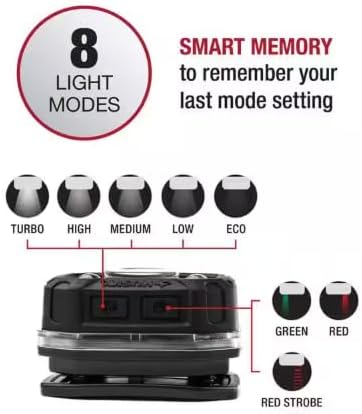
Image: Diagram illustrating the 8 light modes and the Smart Memory feature, showing the button layout.
Variable Dimming
Some light modes support variable dimming. To adjust brightness, press and hold the power button while the headlamp is in a dimmable mode. The light intensity will gradually increase or decrease. Release the button when the desired brightness is reached.
Adjustable Tilt
The headlamp unit can be tilted up or down to direct the light beam precisely where needed. This feature helps in controlling light dispersion and preventing blinding others, especially in close quarters.
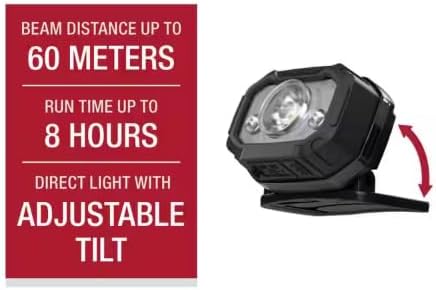
Image: Illustration demonstrating the adjustable tilt mechanism of the headlamp, showing its range of motion.
Maintenance
Cleaning
To clean the headlamp, wipe it with a soft, damp cloth. Do not use abrasive cleaners or solvents, as these may damage the unit. Ensure the charging port cover is securely closed before cleaning or exposing to moisture.
Storage
When storing the headlamp for extended periods, especially if using AAA alkaline batteries, remove the batteries to prevent leakage and potential damage to the unit. Store the headlamp in a cool, dry place away from direct sunlight and extreme temperatures.
Water Resistance
The headlamp has an IP54 water-resistance rating, meaning it is protected against dust ingress and splashing water from any direction. It is not designed for submersion in water.
Troubleshooting
| Problem | Possible Cause | Solution |
|---|---|---|
| Headlamp does not turn on. | Battery is depleted or incorrectly installed. | Recharge the lithium-polymer battery or replace AAA alkaline batteries, ensuring correct polarity. |
| Light is dim or flickers. | Low battery charge. | Recharge the lithium-polymer battery or replace AAA alkaline batteries. |
| Headlamp does not charge. | Charging cable or power source issue. | Ensure the USB-C cable is properly connected and the power source is functional. Try a different cable or power adapter. |
| Cannot cycle through all modes. | Button not pressed correctly or internal issue. | Ensure a firm, single press for mode cycling. If issue persists, contact customer support. |
Specifications
| Feature | Detail |
|---|---|
| Model Number | 91308 |
| Light Source Type | LED, COB |
| Brightness (Turbo Mode) | 900 Lumens |
| Brightness (Spot+Flood) | 1000 Lumens |
| Brightness (High Spot) | 500 Lumens |
| Brightness (High Flood) | 100 Lumens |
| Brightness (ECO Mode) | 10 Lumens |
| Beam Distance (Max) | 80 meters (87 yards) |
| Run-time (ECO Mode) | 36 Hours |
| Run-time (Spot+Flood) | 8 Hours |
| Run-time (High Spot) | 13 Hours |
| Run-time (High Flood) | 45 Hours |
| Power Source | Rechargeable Lithium-Polymer Battery (1100mAh, 3.7V) or 3 AAA Alkaline Batteries (not included) |
| Charging Time | Approx. 2 hours (via USB-C) |
| Water Resistance Rating | IP54 |
| Material | Plastic |
| Dimensions (D x W x H) | 1.97" x 4.19" x 2.69" |
| Item Weight | 13.9 ounces |

Image: Performance table based on FL1 standards, showing lumens, run time, and beam distance for various modes.
Warranty and Support
Warranty Information
This Husky headlamp is backed by a Lifetime Warranty. For specific details regarding warranty coverage and claims, please refer to the warranty documentation included with your product or visit the official Husky tools website.
Customer Support
If you encounter any issues or have questions regarding the operation, maintenance, or troubleshooting of your Husky 850 Lumens Dual-Power LED Rechargeable Headlamp, please contact Husky customer support. Contact information can typically be found on the product packaging or the official Husky website.


