
1. Introduction
This manual provides detailed instructions for the installation, operation, and maintenance of your VicoSafe VicoHome X81 Wireless Outdoor Security Camera. The X81 is a 2K battery-powered WiFi security camera designed for outdoor use, featuring smart motion detection, color night vision, two-way audio, and IP65 weatherproofing. Please read this manual thoroughly before using the product to ensure proper function and safety.
2. What's in the Box
Verify that all components are present in the package:
- 1 × VicoHome X81 Wireless Security Camera
- 1 × Mounting Bracket
- Screws for mounting
- 1 × USB Charging Cable
- 1 × Quick Start Guide

Image: Contents of the VicoHome X81 package, including the camera, mounting bracket, and USB charging cable.
3. Product Overview
The VicoHome X81 camera is designed for robust outdoor surveillance. Key features include:
- 2K Ultra HD Video (5 MP): Captures clear and detailed footage.
- Full-Color Night Vision: Provides color images even in low-light conditions.
- Wire-Free & Battery-Powered: Rechargeable 9000mAh battery for flexible placement.
- AI Motion Detection: Differentiates between people, vehicles, pets, and packages to reduce false alarms.
- Two-Way Audio: Allows for real-time communication through the camera.
- IP65 Weatherproof: Designed to withstand various weather conditions.
- Cloud & SD Storage: Offers flexible options for video recording storage.
- Alexa Compatible: Integrates with Alexa-enabled devices for voice control and live viewing.

Image: Front view of the VicoHome X81 camera, showing the lens, sensors, and dual antennas.
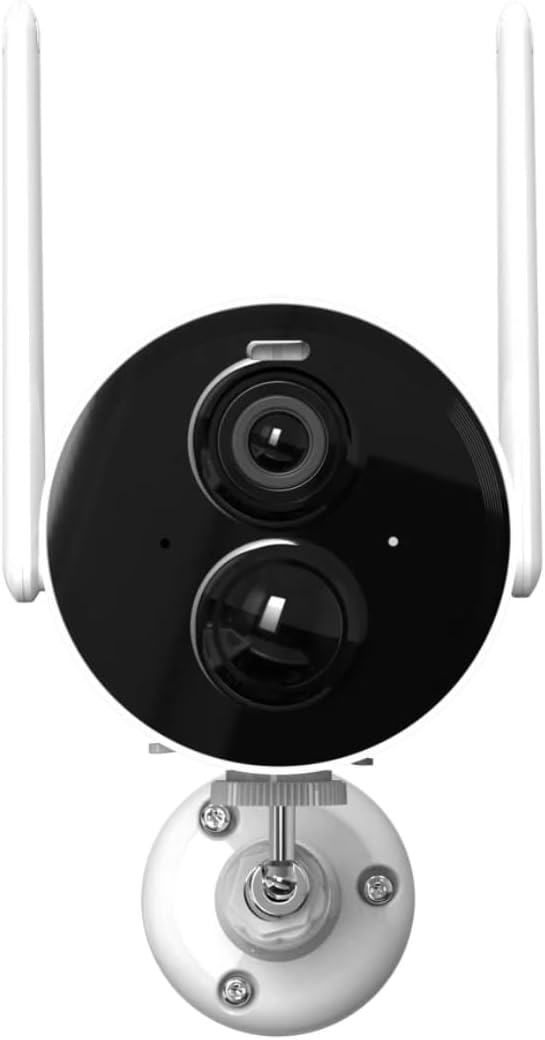
Image: The VicoHome X81 camera highlighting its wire-free design, large capacity battery, low power consumption, full-color day & night vision, and IP65 waterproof rating.
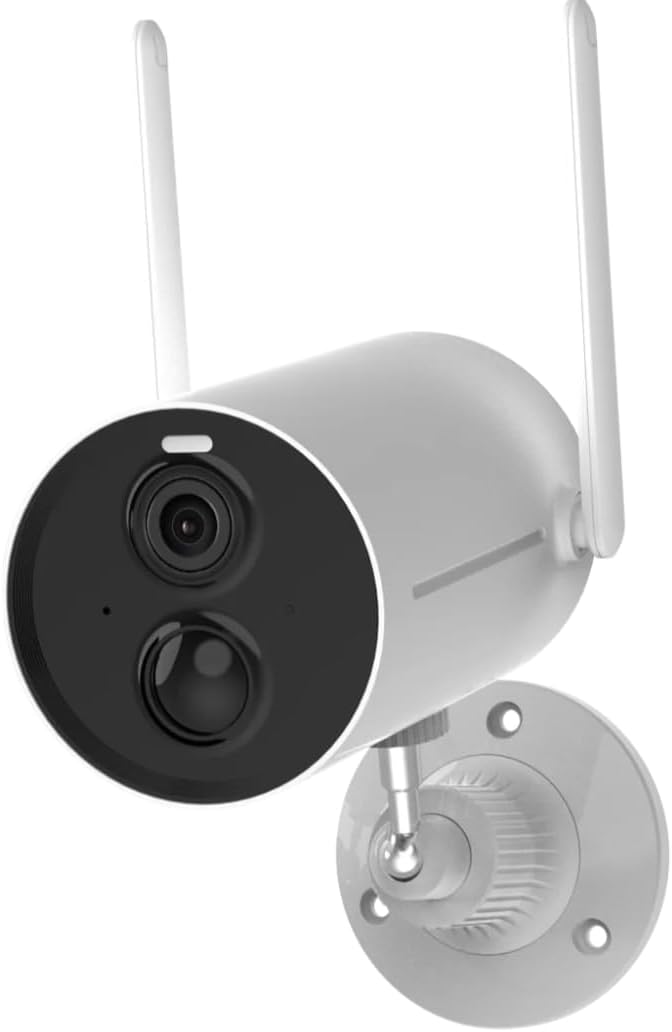
Image: The VicoHome X81 camera operating reliably in rainy conditions, illustrating its IP65 waterproof and dustproof capabilities.
4. Setup and Installation
4.1 Charging the Camera
Before initial use, fully charge the camera using the provided USB charging cable. Connect the cable to the camera's charging port and a standard USB power adapter (not included). The charging indicator light will show the charging status.
4.2 App Download and Account Creation
Download the "VicoHome" app from your smartphone's app store (iOS or Android). Follow the in-app instructions to create an account and log in.
4.3 Connecting to Wi-Fi
- Open the VicoHome app and tap "Add Device" or the "+" icon.
- Select your camera model (X81) from the list.
- Follow the on-screen prompts to connect the camera to your 2.4GHz Wi-Fi network. Note: The VicoHome X81 only supports 2.4GHz Wi-Fi, not 5GHz.
- Scan the QR code displayed on your phone with the camera lens when prompted.
- Once connected, the camera will indicate successful pairing.
4.4 Mounting the Camera
Choose a suitable outdoor location for mounting. Consider the desired viewing angle, Wi-Fi signal strength, and proximity to charging access if using a solar panel (sold separately).
- Position the mounting bracket against the wall or surface.
- Mark the screw holes.
- Drill pilot holes if necessary.
- Secure the mounting bracket using the provided screws.
- Attach the camera to the mounting bracket and adjust the angle as needed.

Image: The VicoHome X81 camera securely mounted on an exterior wall, demonstrating its outdoor placement.
5. Operating the Camera
5.1 Live View and Recording
Access the VicoHome app to view live footage from your camera. You can manually record video or take screenshots directly from the live view interface.
5.2 Motion Detection and Alerts
The X81 features advanced AI motion detection. Configure detection sensitivity and zones within the app. The camera can identify people, vehicles, pets, and packages, sending specific alerts to your smartphone.

Image: Diagram illustrating the AI Smart Technology of the VicoHome X81, showing detection capabilities for humans, pets, vehicles, and packages.

Image: Examples of smart push notifications from the VicoHome app, showing alerts for human activity, pet activity, package activity, and vehicle activity.
5.3 Two-Way Audio
Use the two-way audio feature to communicate with visitors or deter unwanted guests. Tap the microphone icon in the live view to speak, and listen through the camera's speaker.
5.4 Night Vision
The VicoHome X81 provides full-color night vision, offering clear and detailed images even in complete darkness. This is achieved through advanced infrared and white light technology.

Image: A comparison showing the difference between traditional infrared night vision (monochrome) and the VicoHome X81's full-color night vision, highlighting improved detail and color retention.
5.5 Storage Options
The camera supports two storage methods for recorded footage:
- Cloud Storage: Includes 3 days of rolling cloud video storage via the VicoHome app. Optional subscription plans are available for extended storage.
- Micro SD Card: Supports up to 128GB Micro SD card (not included). Insert the card into the designated slot on the camera.
5.6 Alexa Integration
To integrate with Alexa, enable the VicoHome skill in your Alexa app. You can then use voice commands to view live feeds on compatible Alexa-enabled devices.
6. Maintenance
6.1 Battery Management
The X81 camera is powered by a rechargeable battery. Monitor the battery level through the VicoHome app. Recharge the camera when the battery is low using the provided USB cable. For continuous power, a compatible solar panel (sold separately) can be connected.
6.2 Cleaning
Periodically clean the camera lens and housing with a soft, damp cloth to ensure optimal image quality and prevent debris buildup. Avoid using harsh chemicals or abrasive materials.
6.3 Firmware Updates
Ensure your camera's firmware is up to date for the best performance and security. The VicoHome app will notify you of available updates. Follow the in-app instructions to perform firmware upgrades.
7. Troubleshooting
- Camera not connecting to Wi-Fi:
- Ensure your Wi-Fi network is 2.4GHz. The camera does not support 5GHz Wi-Fi.
- Check Wi-Fi signal strength at the camera's location.
- Verify the Wi-Fi password entered in the app is correct.
- Restart your router and the camera.
- Poor image quality:
- Clean the camera lens.
- Ensure adequate lighting for optimal color night vision.
- Check your internet connection speed.
- Motion alerts are too frequent or not triggering:
- Adjust motion detection sensitivity in the VicoHome app.
- Configure detection zones to focus on specific areas.
- Ensure AI detection settings (human, vehicle, pet, package) are correctly configured.
- Battery draining quickly:
- Frequent motion detection and live view usage can consume more battery.
- Ensure the camera is fully charged.
- Consider purchasing a solar panel for continuous charging.
- Two-way audio not working:
- Check microphone and speaker permissions for the VicoHome app on your smartphone.
- Ensure the camera's microphone and speaker are not obstructed.
- Verify volume settings in the app.
8. Specifications
| Model Name | VicoHome X81-Pro |
| Brand | VicoSafe |
| Video Capture Resolution | 2K (5 MP effective still resolution) |
| Connectivity Technology | 2.4GHz Wi-Fi (IEEE 802.11b/g/n) |
| Power Source | Rechargeable Battery (9000mAh) |
| Weather Resistance | IP65 (Waterproof and Dustproof) |
| Night Vision | Full-Color Night Vision, Infrared |
| Storage Options | Cloud Storage, Micro SD Card (up to 128GB, not included) |
| Audio | Two-Way Audio (Built-in Microphone & Speaker) |
| Smart Features | AI Motion Detection (Human, Vehicle, Pet, Package), Alexa Compatible |
| Dimensions | 7.32 x 2.64 x 2.64 inches |
| Weight | 1.76 pounds |
Note: Specifications are subject to change without prior notice.
9. Warranty and Support
VicoSafe is committed to providing quality products and customer satisfaction. As an authorized VicoHome distributor, we offer dedicated customer support for the VicoHome X81 camera.
For technical assistance, troubleshooting, or warranty inquiries, please refer to the contact information provided in your Quick Start Guide or visit the official VicoSafe website. Please retain your proof of purchase for warranty claims.