
Introduction
Thank you for purchasing the Generic King Size LED Bed Frame. This manual provides detailed instructions for assembly, operation, maintenance, and troubleshooting to ensure safe and optimal use of your new bed frame. Please read this manual thoroughly before beginning assembly and retain it for future reference.
Important Safety Information
- Always follow assembly instructions carefully. Incorrect assembly can lead to instability and injury.
- Ensure all bolts and screws are securely tightened before use. Periodically check and re-tighten as necessary.
- Do not exceed the maximum weight capacity of 1200 lbs.
- Keep small parts and packaging materials away from children to prevent choking hazards.
- Use only the provided power adapter for the LED lighting system. Do not attempt to modify the electrical components.
- Avoid placing the bed frame in direct sunlight or near heat sources to prevent material degradation.
- Always lift the bed frame when moving it; do not drag it, as this may damage the frame or flooring.
Package Contents
Before assembly, please verify that all parts listed below are present and undamaged. If any parts are missing or damaged, please contact customer support.
- Headboard (Upholstered with integrated LED lights)
- Side Rails (Left and Right)
- Footboard with Storage Drawer Mechanism
- Storage Drawers (x4)
- Center Support Beam(s)
- Wooden Slats (x11)
- Support Legs
- Hardware Pack (Screws, bolts, washers, Allen wrench)
- LED Remote Control
- Power Adapter for LED Lights
- Instruction Manual
Setup and Assembly
Assembly typically requires two adults. Clear a spacious area for assembly and lay out all components on a soft, clean surface to prevent scratches.
Step 1: Assemble the Headboard
Attach the headboard legs to the upholstered headboard panel using the provided bolts. Ensure they are securely fastened.

Image: Close-up view of the upholstered headboard, highlighting the tufted design and the integrated RGB LED light strip along the top and sides.
Step 2: Connect Side Rails and Footboard
Connect the side rails to the headboard and footboard using the designated hardware. Do not fully tighten all bolts until the entire frame is assembled.
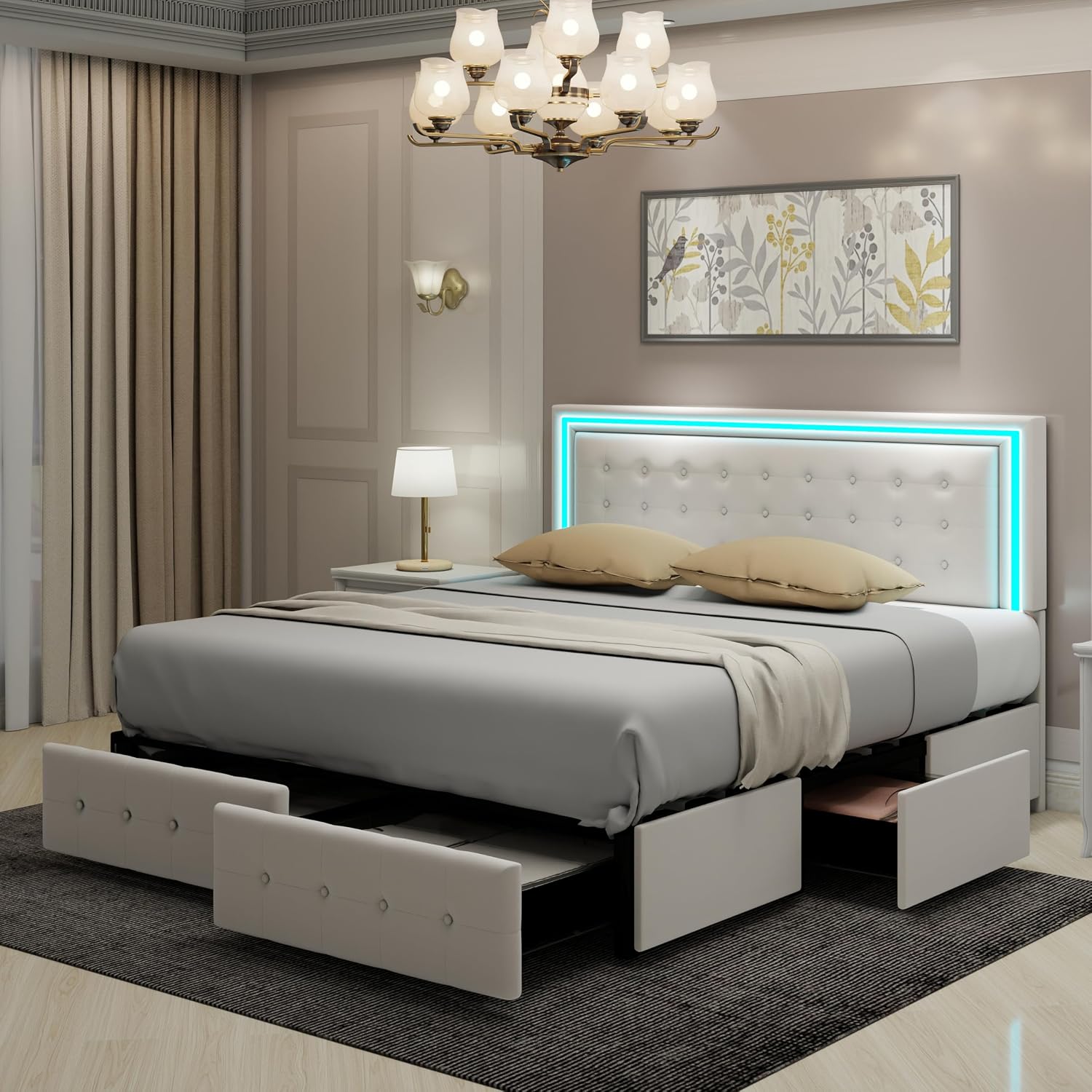
Image: Technical diagram illustrating the overall dimensions of the King Size bed frame, including length, width, height, and internal measurements for the mattress area and drawer placement.
Step 3: Install Center Support and Slats
Install the center support beam(s) and attach the wooden slats across the frame. Ensure slats are evenly spaced and secured according to the instructions. This frame is designed with 11 solid wooden slats for robust support.
Step 4: Assemble and Insert Storage Drawers
Assemble the four storage drawers following the separate drawer assembly instructions. Once assembled, slide the drawers into their designated compartments beneath the bed frame. The drawers are equipped with wheels for smooth operation.

Image: Lifestyle shot of the King Size LED bed frame in a bedroom setting, with all four storage drawers partially pulled out, showcasing their capacity.
Step 5: Adjust Headboard Height
The headboard offers three adjustable height options. Select the appropriate height to accommodate your mattress, ranging from 8 to 14 inches in thickness. Adjust by repositioning the headboard attachment points on the legs.
Step 6: Connect LED Lights
Locate the LED light strip connector on the headboard and connect it to the provided power adapter. Plug the power adapter into a standard electrical outlet.
Operating Instructions
LED Lighting System
The integrated RGB LED lights on the headboard can be controlled via the included remote control or a compatible mobile application.
- Remote Control: Use the remote to power the lights on/off, change colors, adjust brightness levels, and select various flashing frequencies or modes. Refer to the remote control's specific button functions for detailed operation.
- Mobile App: Download the designated mobile application (refer to packaging or a sticker on the LED controller for app name/QR code). Pair your device with the LED system via Bluetooth. The app allows for advanced control, including custom color settings, brightness adjustments, and music synchronization. The lights can flash in time with your music for an immersive experience.
Storage Drawers
The four large storage drawers are designed for easy access and organization. Simply pull the drawer handles to open and push to close. The integrated wheels ensure smooth sliding. These drawers provide ample space for bedding, seasonal clothing, or other items.
Maintenance
Cleaning the Upholstery
- For general cleaning, gently vacuum the velvet upholstery using a soft brush attachment to remove dust and debris.
- For spills, blot immediately with a clean, dry cloth. Do not rub, as this can spread the stain.
- For stubborn stains, use a mild upholstery cleaner specifically designed for velvet. Test on an inconspicuous area first.
- Avoid using harsh chemicals or abrasive cleaners, as these can damage the fabric.
Frame and Slats
- Wipe down the metal and engineered wood components with a damp cloth and mild detergent if necessary. Dry thoroughly.
- Periodically check all bolts and screws to ensure they remain tight. Re-tighten as needed to maintain stability.
LED Lights
- Ensure the LED power adapter and wiring are free from damage. If any damage is observed, discontinue use and contact customer support.
- Keep the LED strip clean and free of dust for optimal light output.
Troubleshooting
| Problem | Possible Cause | Solution |
|---|---|---|
| Bed frame is wobbly or unstable. | Loose bolts or screws. | Check and tighten all assembly bolts and screws. Ensure all support legs are making firm contact with the floor. |
| LED lights are not turning on. | Power adapter not plugged in; loose connection; remote control battery dead. | Ensure the power adapter is securely plugged into both the wall outlet and the LED strip connector. Check remote control battery and replace if necessary. |
| LED remote control not working. | Battery dead; remote not paired (if applicable); obstruction. | Replace the remote control battery. Ensure there are no obstructions between the remote and the LED receiver. If applicable, re-pair the remote according to specific instructions. |
| Storage drawers are difficult to open/close. | Drawer contents are too heavy or unevenly distributed; debris in tracks; wheels are misaligned. | Reduce the weight or redistribute contents within the drawer. Clean any debris from the drawer tracks. Check if drawer wheels are properly aligned and not damaged. |
| Headboard height adjustment issues. | Bolts too tight; incorrect alignment. | Loosen the headboard attachment bolts slightly, adjust to the desired height, and then re-tighten securely. Ensure both sides are adjusted evenly. |
Specifications
| Model Number | B0F26YCYJM |
| Size | King |
| Material | Engineered Wood, Metal, Velvet Upholstery |
| Product Dimensions (L x W x H) | 85.4" x 80.1" x 46.2" |
| Weight Capacity | Up to 1200 lbs |
| Headboard Adjustment | Accommodates mattresses from 8 to 14 inches in height |
| Color | Cream |
| Special Features | Smart Control RGB LED Lights, 4 Storage Drawers, Upholstered Adjustable Headboard |
Warranty and Customer Support
This product is covered by a standard return policy. For specific warranty details, please refer to your purchase documentation or contact the seller directly. For any questions, missing parts, or assistance with assembly or operation, please contact our customer support team.
Seller: AnhuaUSA
For support, please visit the seller's page on Amazon or refer to the contact information provided with your purchase.