
1. Introduction
Thank you for choosing the FIMEI 3-in-1 Bright Floor Lamp. This modern standing light is designed to provide versatile illumination for various activities and moods. It features three distinct light sources: an upward-facing ambient light, a multi-angle rotatable ring light, and a small reading light. Each light can be independently controlled for color temperature and brightness, offering a customizable lighting experience. This manual provides essential information for safe assembly, operation, maintenance, and troubleshooting.

Image 1.1: FIMEI 3-in-1 Bright Floor Lamp in a modern living space, showcasing its central round lamp, outer ring lamp, and small reading light.
2. Safety Instructions
- Read all instructions before assembly and use.
- Ensure the power supply voltage matches the lamp's requirements (110 Volts).
- Do not operate the lamp with a damaged cord or plug. If damaged, contact customer support.
- Keep the lamp away from water or damp environments. This product is for indoor use only.
- Do not attempt to disassemble or modify the lamp. There are no user-serviceable parts inside.
- Place the lamp on a stable, flat surface to prevent tipping.
- Unplug the lamp from the power outlet before cleaning or performing any maintenance.
- Avoid looking directly into the LED light source for extended periods, as it may cause eye strain.
3. Package Contents
Verify that all components are present and in good condition upon unpacking.
- Floor Lamp Base
- Lamp Pole Sections (typically 3-4 sections)
- Lamp Head Assembly (with central, ring, and reading lights)
- Power Adapter
- Remote Control
- User Manual (this document)
4. Product Overview
The FIMEI 3-in-1 Bright Floor Lamp integrates multiple lighting solutions into a single, sleek design. It features:
- Central Round Lamp: Provides ambient, reflected lighting for a soft glow.
- Outer Ring Lamp: Offers multi-angle illumination, ideal for broader area lighting.
- Small Reading Light: A focused light source for tasks such as reading or crafting.
- Independent Control: Each light can be controlled separately for brightness and color temperature.
- Flexible and Adjustable Lamp Heads: The rotatable heads allow you to direct light precisely where needed.
- Stepless Adjustment: Seamlessly adjust color temperature from 3000K to 6000K and brightness from dim to bright.
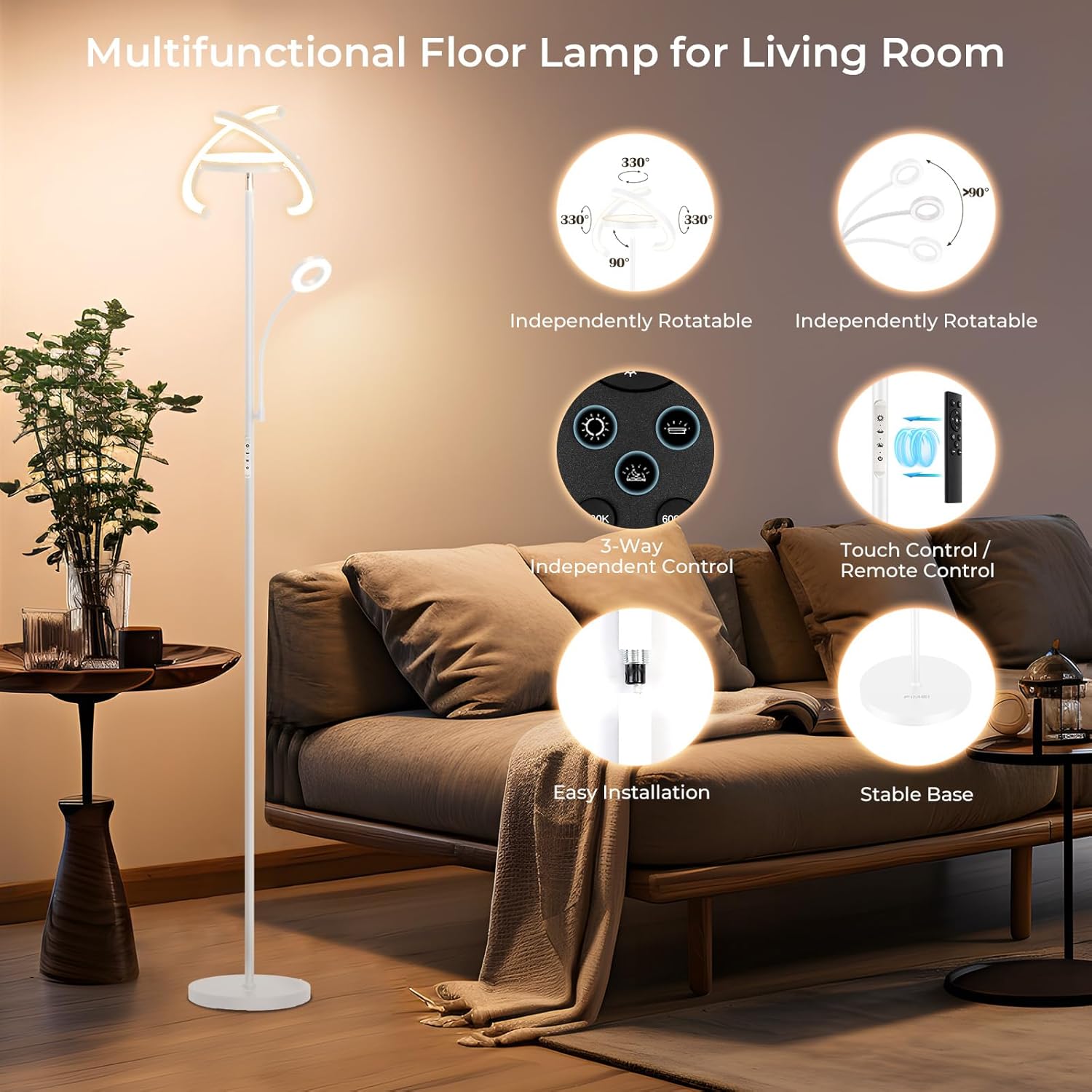
Image 4.1: Diagram highlighting the FIMEI floor lamp's features: independently rotatable lights, 3-way independent control, touch/remote control, easy installation, and stable base.
5. Assembly Instructions
The FIMEI 3-in-1 Bright Floor Lamp is designed for quick and tool-free assembly. Follow these steps:
- Unpack Components: Carefully remove all parts from the packaging and place them on a clean, flat surface.
- Assemble the Pole: Screw the lamp pole sections together clockwise until secure. Ensure the wires inside are not pinched.
- Attach to Base: Screw the assembled lamp pole into the heavy base clockwise until it is firmly attached and stable.
- Connect Lamp Head: Attach the lamp head assembly to the top of the pole, ensuring the electrical connector is properly seated and secured.
- Plug In: Insert the power adapter into a standard 110V AC outlet.

Image 5.1: Dimensional diagram of the FIMEI floor lamp, showing its height (68.3 inches), base diameter (10 inches), and the vertical and horizontal rotation capabilities of its light heads.
6. Operating Instructions
The FIMEI floor lamp offers both touch control on the lamp pole and a magnetic remote control for convenient operation.
6.1 Touch Control
The touch panel on the lamp pole allows for direct control:
- Power Button: Touch to turn the lamp ON/OFF.
- Light Source Selection: Separate icons for the Outer Ring Light, Central Upward Light, and Reading Light. Touch to activate or deactivate each light.
- Color Temperature Adjustment: Light-touch the color temperature icon to cycle through 3000K (Warm Yellow), 4000K (Warm White), 5000K (Natural White), and 6000K (Cold White).
- Brightness Adjustment: Touch and hold the brightness icon to adjust the light intensity steplessly from dim to bright.
6.2 Remote Control
The included remote control provides convenient access to all functions from a distance of up to 25 feet (7.62m). The remote has a magnetic design for easy storage.
- Power Button: Turns the lamp ON/OFF.
- Brightness +/-: Adjusts brightness steplessly.
- Color Temperature Buttons: Dedicated buttons for 3000K, 4000K, 5000K, 6000K.
- Light Source Buttons: Individual buttons to control the Central, Ring, and Reading lights.
- 1H Timer: Activates a one-hour timer, after which the lamp will automatically turn off.

Image 6.1: Close-up of the FIMEI floor lamp's touch control panel on the pole and the magnetic remote control, detailing their functions for power, color temperature, and brightness.
6.3 Color Temperature and Brightness Adjustment
The lamp offers a wide range of lighting options:
- Color Temperatures: Choose from Warm Yellow (3000K), Warm White (4000K), Natural White (5000K), and Cold White (6000K) to suit your preference or activity.
- Stepless Dimming: Adjust the brightness level smoothly from 5% to 100% for precise control over illumination.
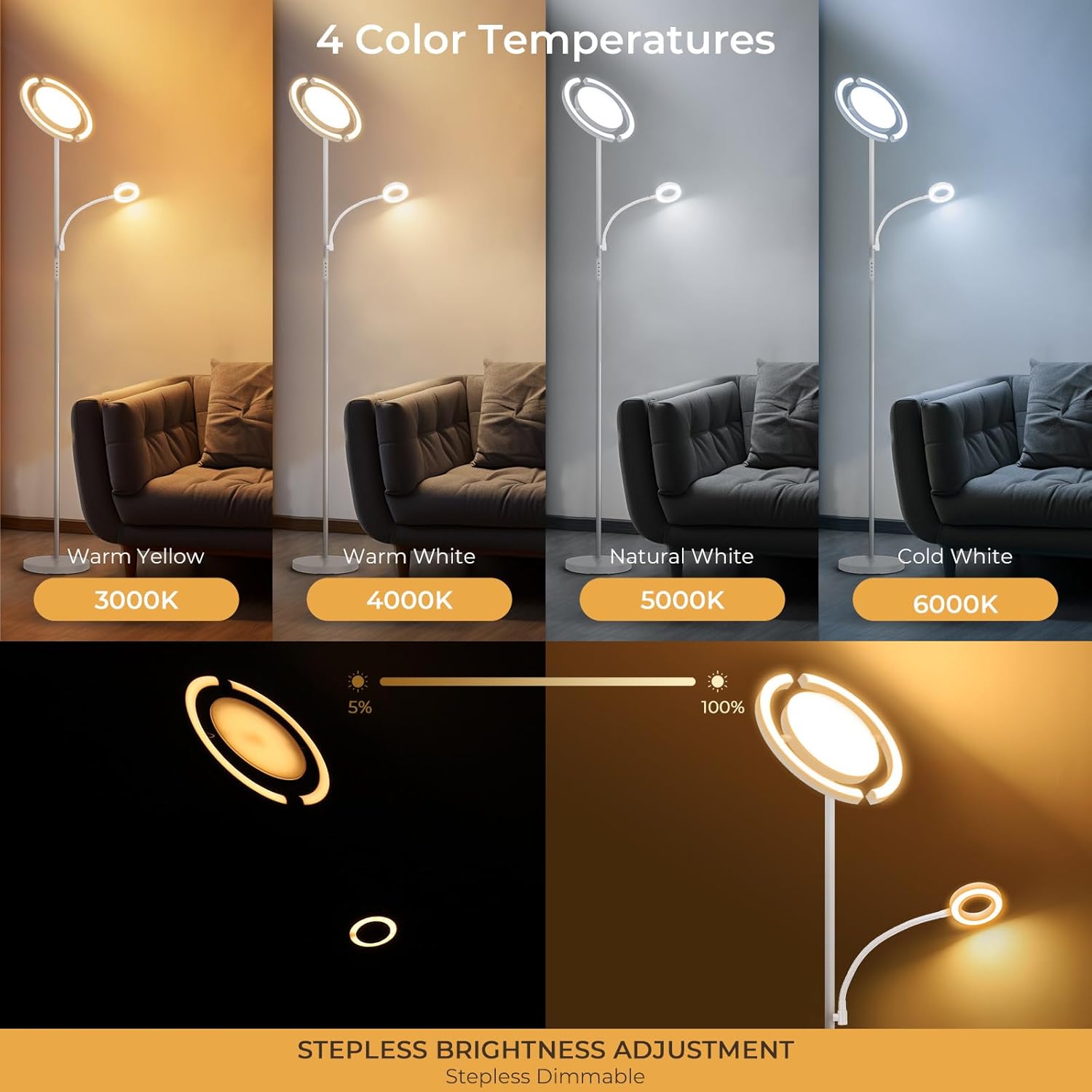
Image 6.2: Illustration of the FIMEI floor lamp's 4 color temperatures (3000K Warm Yellow, 4000K Warm White, 5000K Natural White, 6000K Cold White) and stepless brightness adjustment from 5% to 100%.
6.4 Memory Function
The lamp features a memory function that retains your last used brightness and color temperature settings when turned off and on again, providing convenience and consistency.

Image 6.3: FIMEI floor lamp providing soft, eye-caring light for reading, demonstrating its memory function in a bedroom setting with children.
7. Maintenance
To ensure the longevity and optimal performance of your FIMEI floor lamp, follow these maintenance guidelines:
- Cleaning: Unplug the lamp before cleaning. Use a soft, dry cloth to wipe down the lamp pole, base, and light heads. Do not use abrasive cleaners, solvents, or harsh chemicals, as these can damage the finish or electrical components.
- Dust Removal: Regularly dust the lamp to prevent accumulation, which can affect light output and aesthetics.
- Inspection: Periodically check the power cord and plug for any signs of damage. If damage is found, discontinue use and contact customer support.
- Storage: If storing the lamp for an extended period, disassemble it carefully and store it in its original packaging in a dry, cool place.
8. Troubleshooting
If you encounter issues with your FIMEI floor lamp, refer to the following common problems and solutions:
| Problem | Possible Cause | Solution |
|---|---|---|
| Lamp does not turn on. | No power, loose connection, faulty outlet. | Ensure the power cord is securely plugged into a working outlet. Check if the wall switch (if applicable) is on. Try plugging another device into the outlet to confirm it has power. |
| Remote control is not working. | Remote battery depleted, remote not paired, obstruction. | Replace the remote control battery. Ensure there are no obstructions between the remote and the lamp. If the issue persists, try re-pairing the remote (refer to specific instructions if provided with the lamp, typically involves unplugging/replugging and pressing a button on the remote within a few seconds). |
| Light flickers or is unstable. | Loose connection, power fluctuation. | Check all connections, including the power plug. Ensure the lamp is not connected to a circuit with other high-power appliances causing fluctuations. |
| Cannot adjust brightness or color temperature. | Incorrect control method, temporary software glitch. | Ensure you are using the correct buttons on the touch panel or remote. Try unplugging the lamp for 30 seconds and plugging it back in to reset. |
If these solutions do not resolve the issue, please contact FIMEI customer support for further assistance.
9. Specifications
| Feature | Specification |
|---|---|
| Brand | FIMEI |
| Model | B0F26CY4ML |
| Product Dimensions | 12.2"D x 12.2"W x 68.3"H (31cm D x 31cm W x 173.5cm H) |
| Item Weight | 11.3 pounds |
| Material | Metal |
| Finish Type | Coated |
| Light Source Type | LED |
| Number of Light Sources | 3 |
| Wattage | 35 watts |
| Brightness | 2280 Lumens (Maximum) |
| Color Temperature | 3000K - 6000K (Adjustable) |
| Control Method | Remote, Touch |
| Power Source | Corded Electric |
| Voltage | 110 Volts |
| Special Features | 3-in-1 Design, Easy Setup, Flexible Heads, Independent Control, Stepless Adjustment, Memory Function |
| Indoor/Outdoor Usage | Indoor |
| Assembly Required | Yes |
10. Warranty and Customer Support
FIMEI is committed to providing high-quality products. While specific warranty details are not provided in this manual, please retain your proof of purchase for any warranty claims.
For technical support, troubleshooting assistance, or inquiries regarding your product, please contact FIMEI customer service through the retailer where the product was purchased or visit the official FIMEI website for contact information.
Please have your model number (B0F26CY4ML) and purchase date ready when contacting support.