
Introduction
This manual provides essential information for setting up, operating, and maintaining your LAFVIN Super Starter Kit for ESP32-S3-WROOM. This kit is designed for learning MicroPython and C language programming, offering a comprehensive set of components and tutorials for various electronics projects.
Key features of this kit include:
- Supports programming in MicroPython and C languages.
- Includes a tutorial covering basic electronics knowledge.
- Features over 70 tutorial projects, each with code examples and circuit connection diagrams.
Kit Components
The LAFVIN Super Starter Kit includes a wide array of electronic components necessary for various projects. Please verify that all items listed below are present in your kit upon unboxing.

Figure 1: Overview of all components included in the LAFVIN ESP32-S3-WROOM Super Starter Kit.
The kit typically contains:
- ESP32-S3-WROOM x1
- GPIO Extension Board x1
- 830 Tie-Points Breadboard x1
- 1 Digit 7-segment Display x1
- LCD1602 IIC x1
- Joystick Module x1
- Ultrasonic Sensor x1
- LED Bar Graph x1
- Speaker x1
- Servo x1
- S8050 x2
- Potentiometer (10k) x3
- Photoresistor x2
- Thermistor x1
- Rectifier Diode x2
- 74H595 x1
- L293D x1
- Tilt Switch x1
- Resistor 10kΩ x10
- Resistor 220Ω x20
- Resistor 1kΩ x10
- Passive Buzzer x1
- Active Buzzer x1
- Motor & Fan x1
- LED-RGB x1
- LED-Red/Yellow/Green/White/Blue x5
- F-M DuPont Cable x10
- F-F DuPont Cable x10
- 9V Battery Connector x1
- 65 Jumper Wire x1
- Button x6
- Type C USB Cable x1
ESP32-S3-WROOM Module Overview
The core of this kit is the ESP32-S3-WROOM module, a powerful microcontroller with integrated Wi-Fi and Bluetooth capabilities. Understanding its specifications is crucial for advanced projects.
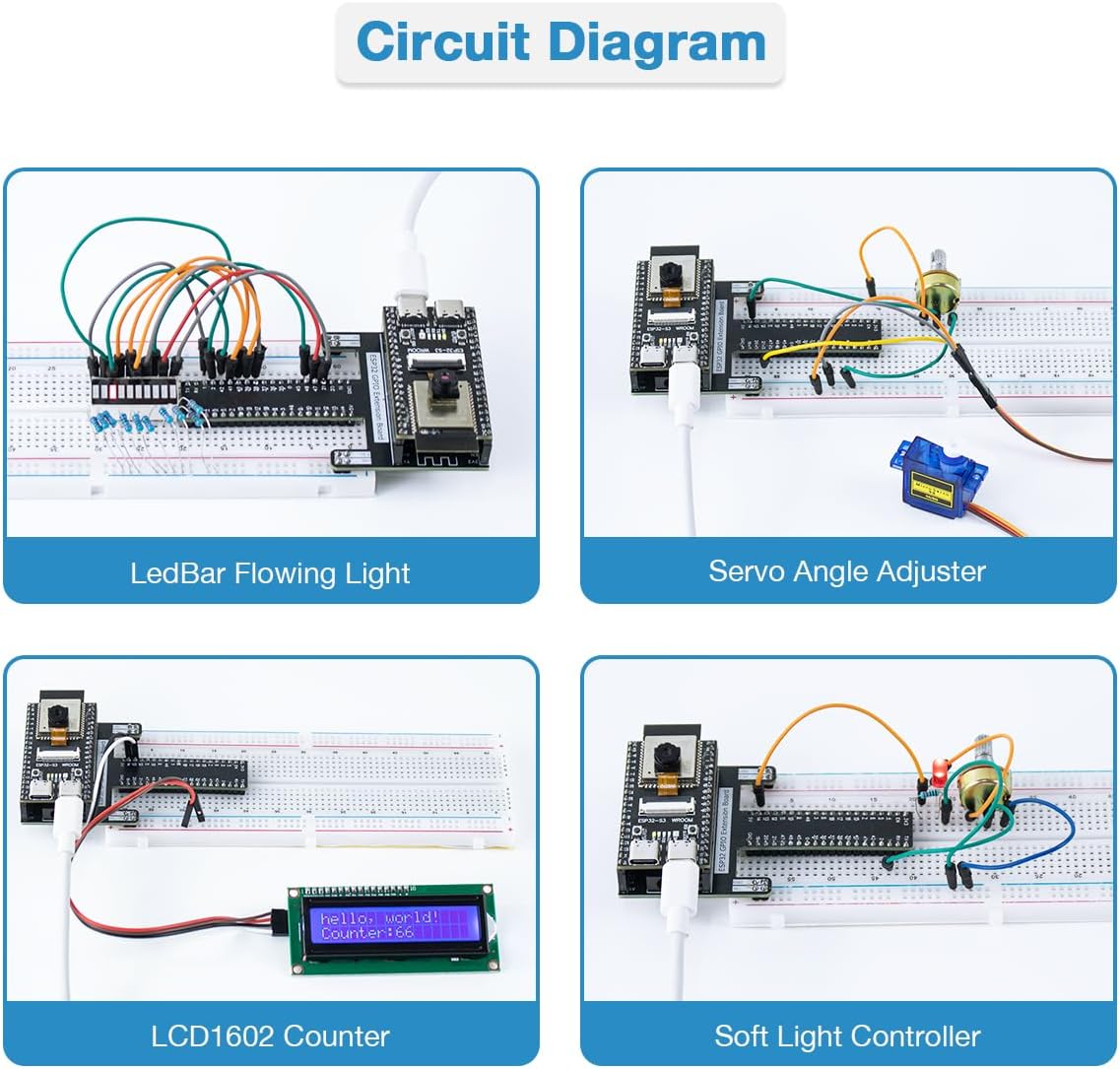
Figure 2: Specifications and pinout of the ESP32-S3-WROOM module.
CPU, Memory and Hardware Specifications:
- USB OTG: Full-speed USB 1.1 On-The-Go (OTG) interface for USB communication.
- ROM: 384 KB
- SRAM: 512 KB
- RTC SRAM: 16 KB
- PSRAM: 8 MB (Octal SPI)
- FLASH: 8 MB (Quad SPI)
- Oscillator: 40Mhz Crystal
- Operating Voltage: 3.0V-3.6V
Wi-Fi Specifications:
- Protocol: 802.11 b/g/n (802.11n, speed up to 150 Mbps)
- Operating Center Frequency: 2412 ~ 2484 MHz
Rich IO Interfaces:
The module features 45 programmable GPIOs as well as common peripheral interfaces such as SPI, I2S, I2C, PWM, RMT, ADC, UART, SD/MMC host controller, and TWAITM controller.
Setup Guide
Before beginning any project, proper setup of both hardware and software is essential.
Software Installation
- Install Arduino IDE or Thonny: The kit supports programming with both Arduino IDE (for C/C++) and Thonny (for MicroPython). Download and install your preferred environment from their official websites.
- Install ESP32-S3 Board Support: Within your chosen IDE, you will need to add board support for the ESP32-S3. Refer to the official LAFVIN website (lafvintech.com) for the correct board manager URLs and installation instructions.
- Driver Installation: For communication with your computer, you may need to install a USB-to-serial driver (e.g., CH343). The manufacturer's website provides links and instructions for driver installation. Ensure you download drivers from trusted sources.
- Download Tutorial Code: Access the comprehensive tutorials and code examples from the LAFVIN website or their GitHub repository.
Hardware Connection
Connecting components correctly is vital for project functionality. Always ensure the ESP32-S3-WROOM module is powered off before making or changing connections.

Figure 3: Example circuit diagrams illustrating component connections on a breadboard.
- Breadboard Usage: Use the provided breadboard to connect components without soldering. Pay attention to the power rails and signal lines.
- GPIO Extension Board: Utilize the GPIO Extension Board to easily access the pins of the ESP32-S3-WROOM module.
- Jumper Wires: Use the F-M (Female-Male) and F-F (Female-Female) DuPont cables to make connections between the ESP32-S3, breadboard, and other modules.
- Power Supply: The ESP32-S3 can be powered via the Type C USB cable connected to your computer or a 9V battery using the provided connector.
Operating Instructions
This kit supports two primary programming languages, MicroPython and C/C++, allowing for a wide range of project development.
Programming Languages

Figure 4: Overview of Python and C/C++ programming for the kit.
- MicroPython: A high-level, general-purpose programming language emphasizing code readability. Ideal for rapid prototyping and beginners.
- C/C++: A human-readable programming language that is compiled to machine language. Offers greater control and performance, suitable for more complex applications.
Project Examples
The kit includes over 70 tutorial projects. Each project typically involves:
- Circuit Connection: Follow the provided diagrams to connect the components on the breadboard.
- Code Upload: Open the corresponding code example in your IDE (Arduino IDE or Thonny). Select the correct board and port, then upload the code to the ESP32-S3-WROOM module.
- Testing and Observation: Observe the behavior of your circuit and code.
Video Streaming Functionality
The kit's camera component, when used with the ESP32-S3, supports video streaming over a local network.

Figure 5: Video streaming demonstration using the ESP32-S3 as a network camera.
To utilize this feature, you can enter the IP address printed by the Arduino IDE or Thonny into any web browser on the same local network. This allows you to view the video stream from the ESP32-S3 camera on devices such as PCs, Macs, or smartphones.
Maintenance
Proper care and maintenance will extend the lifespan of your LAFVIN Super Starter Kit components.
- Storage: Store all components in a dry, cool place, away from direct sunlight and extreme temperatures. The original plastic box is suitable for organized storage.
- Handling: Handle electronic components with care to avoid physical damage or electrostatic discharge. Avoid touching the pins of integrated circuits directly.
- Cleaning: Use a soft, dry cloth to clean components. Avoid using liquids or abrasive cleaners.
- Power Management: Always disconnect power before making changes to your circuit. Ensure correct voltage and current are applied to avoid damaging components.
Troubleshooting
If you encounter issues while using your kit, consider the following common troubleshooting steps:
- Software/Driver Issues: If the ESP32-S3 is not recognized by your computer or IDE, ensure all necessary drivers (e.g., CH343) are correctly installed. Verify that the board support package for ESP32-S3 is installed and updated in your IDE.
- Broken Links/Outdated Tutorials: If you find that tutorial links or information are outdated, always refer to the official LAFVIN website (lafvintech.com) for the most current documentation and resources.
- Circuit Errors: Double-check all wiring against the provided circuit diagrams. Incorrect connections are a common source of problems. Ensure components are inserted correctly into the breadboard.
- Code Errors: Verify that your code matches the tutorial examples exactly. Syntax errors or incorrect pin assignments can prevent your project from working. Use the IDE's serial monitor for debugging output.
- Power Problems: Ensure the ESP32-S3 module is receiving adequate power. If using a 9V battery, check its charge.
- Component Malfunction: If a specific component is not working, try isolating it and testing it in a simple circuit if possible.
For persistent issues, consult the LAFVIN support resources available on their official website.
Product Specifications
| Feature | Detail |
|---|---|
| Brand | LAFVIN |
| Model Name | ESP32-S3-WROOM |
| Connectivity Technology | Bluetooth, USB, Wi-Fi |
| Operating System | MicroPython |
| Processor Brand | Espressif |
| RAM Memory Technology | LPDDR4 |
| Processor Count | 1 |
| Total USB Ports | 1 (Type C) |
| Item Dimensions (L x W x H) | 7.8"L x 5.4"W x 1.9"H |
| UPC | 712110439983 |
| Manufacturer Part Number | LA-059 |
Warranty Information
For detailed and up-to-date warranty information regarding your LAFVIN Super Starter Kit, please refer to the official LAFVIN website or contact their customer support directly. Warranty terms and conditions may vary and are subject to change.
Customer Support
Should you require further assistance, have questions about the kit, or need technical support, please utilize the following resources:
- Official Website: Visit the LAFVIN official website at lafvintech.com for comprehensive tutorials, FAQs, and contact information.
- Online Resources: Explore community forums and online documentation related to ESP32-S3, MicroPython, and Arduino for additional learning and troubleshooting.