
1. Introduction
This manual provides essential information for the safe and efficient use of your Awoco 30" Under Cabinet Range Hood, Model AWC-RH-UC6-V30. This stainless steel range hood features a powerful 900 CFM exhaust fan with 4 adjustable speeds, a 1-30 minute delay shut-off timer, and versatile control options including voice, gesture, touch, and remote control. It is equipped with dimmable LED lights and dishwasher-safe baffle filters for easy maintenance.

Figure 1: Awoco 30" Under Cabinet Range Hood featuring voice control.
2. Safety Information
- Read all instructions carefully before installation and use.
- Ensure the power supply is disconnected before any installation, maintenance, or cleaning.
- Installation must be performed by a qualified technician in accordance with all local codes and standards.
- Do not operate the range hood without filters in place.
- Clean grease filters regularly to prevent fire hazards.
3. Package Contents
Verify that all components are present and undamaged upon unboxing.
- Awoco 30" Under Cabinet Range Hood unit
- Remote Control
- 6" Round Top Vent Adapter
- 3-1/4"D x 10"W Top Vent Adapter
- 3-1/4"D x 10"W Rear Vent Adapter
- 2 Magnetic Instruction Stickers
- Installation User Manual
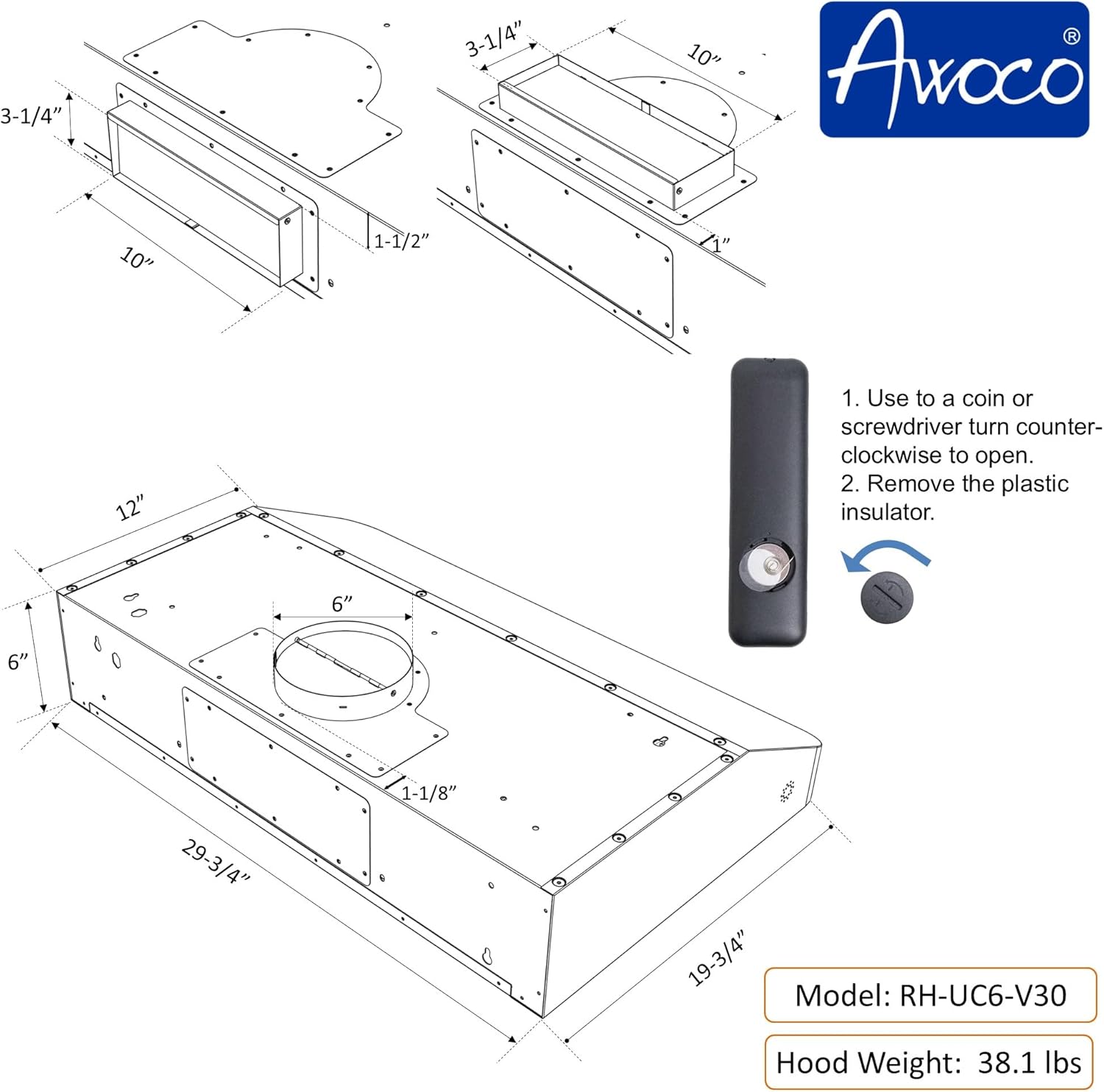
Figure 2: Product dimensions and remote control battery information.
Video 1: Official Awoco video demonstrating voice and gesture control features.
4. Setup and Installation
This range hood supports a 3-in-1 ventilation design, allowing for 6" round top vent, 3-1/4"D x 10"W top vent, or 3-1/4"D x 10"W rear vent configurations. Ducts are not included. The recommended installation height is 27" from the cooking surface.

Figure 3: Illustration of the three available venting options for the range hood.
For detailed installation steps, refer to the included Installation User Manual. Ensure proper mounting and electrical connections are made before operation.
Video 2: General installation guide for a 30-inch under cabinet range hood (VIKIO Home brand, provided as a general reference).
5. Operating Instructions
Your Awoco range hood offers multiple ways to control its functions:
5.1 Voice Control
Activate hands-free operation by saying, "Hi Awoco." You can then issue commands such as:
- "Power On" / "Power Off"
- "Light On" / "Light Off"
- "Speed 1, 2, 3, 4"
- "Higher Speed" / "Lower Speed"
- "Delay Shutdown"

Figure 4: Visual guide to voice control commands.
5.2 Gesture Control
Adjust fan speed with a simple hand wave across the sensing points. This feature can be disabled if preferred.
- Swipe Left to Right: Turn on, Fan Speed up
- Swipe Right to Left: Fan Speed down, Turn Off Fan and Light
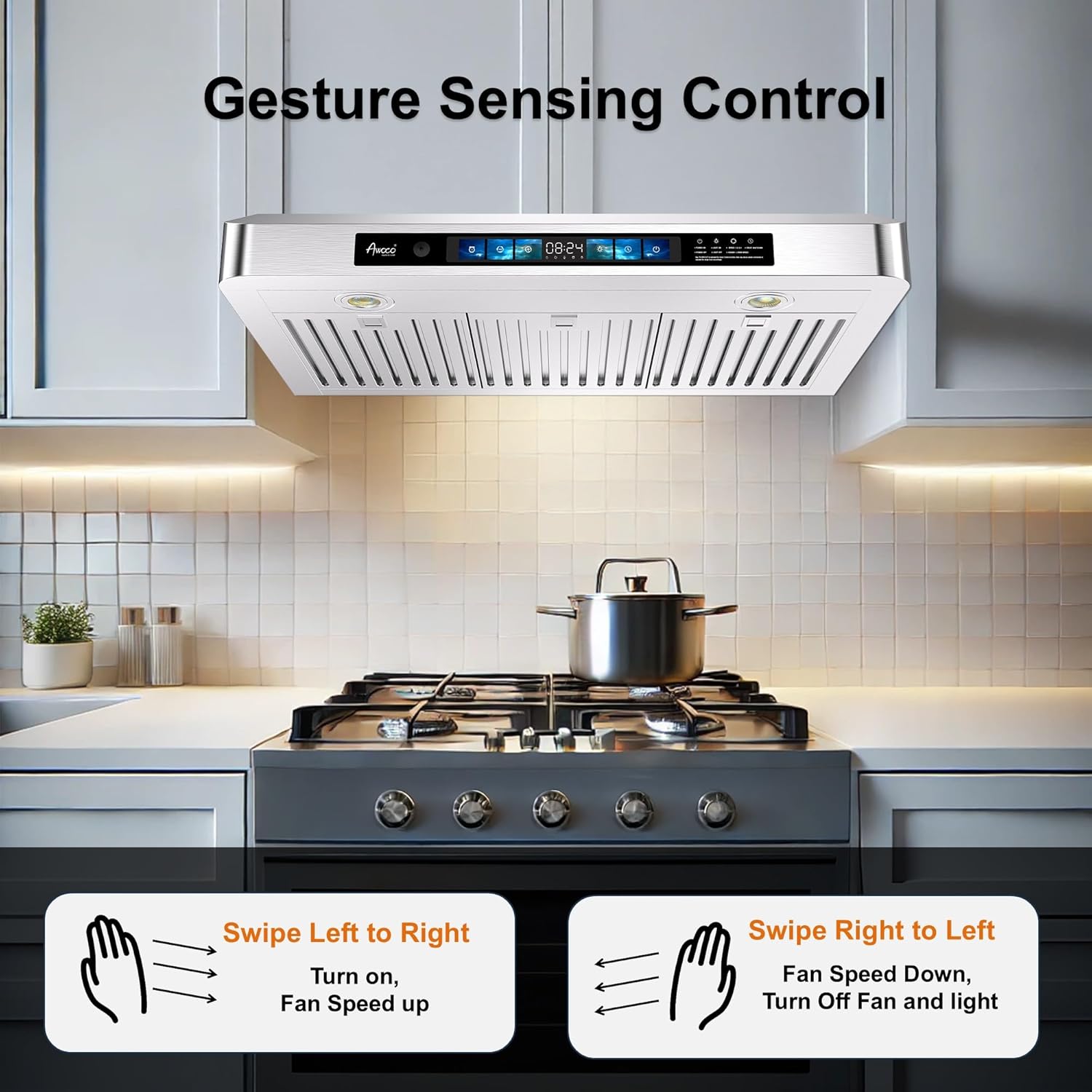
Figure 5: How to use gesture control for fan speed adjustment.
5.3 Touch Control Panel & Remote Control
The intuitive touch control panel and included remote provide full access to all functions:
- Fan Speeds: Select from 4 adjustable fan speeds, up to 900 CFM.
- Delay Shut-Off: Set the timer for 1 to 30 minutes to clear residual fumes after cooking. Default is 5 minutes.
- Dimmable LED Lights: Two 3W energy-saving LED lights provide bright illumination. Adjust brightness via remote or by holding the 'E' button on the touch panel.
- Memory Function: The range hood remembers your last settings and restores them automatically upon next use.

Figure 6: Overview of the touch control panel, remote, baffle filters, and LED lights.

Figure 7: Features displayed on the large color touch screen, including dimmable LED lights, clock, and fan speeds.
6. Maintenance
6.1 Baffle Filters
The baffle filters are designed to trap grease and are dishwasher-safe for easy cleaning. An internal collector further simplifies maintenance by gathering oil for disposal.
- Regularly remove and clean the baffle filters to maintain optimal performance and prevent grease buildup.
- The filters can be placed in a dishwasher for thorough cleaning.
7. Troubleshooting
If you encounter any issues with your range hood, please refer to the following common troubleshooting steps:
- Fan not turning on: Check power connection, ensure the unit is plugged in, and circuit breaker is not tripped.
- Lights not working: Verify power connection. If individual lights are out, they may need replacement (refer to the full manual for bulb type).
- Low suction: Ensure filters are clean and not clogged. Check for obstructions in the ductwork. Verify that the fan speed is set appropriately for your cooking needs.
- Unusual noise: Inspect for loose parts or obstructions in the fan area. Ensure the unit is securely mounted.
For more detailed troubleshooting or persistent issues, please contact customer support.
8. Specifications
| Feature | Detail |
|---|---|
| Model Number | AWC-RH-UC6-V30 |
| Dimensions (W x D x H) | 29-3/4" x 19-3/4" x 6" |
| Item Weight | 38.1 lbs |
| Material | Stainless Steel |
| Airflow Displacement | 900 Cubic Feet Per Minute (CFM) |
| Number of Speeds | 4 |
| Noise Level | 62 dB |
| Controls Type | Voice, Gesture, Touch, Remote |
| Light Source Type | Dimmable LED (2 x 3W) |
| Filter Type | Baffle (Dishwasher-safe) |
| Venting Type | Ducted/Vented (3-in-1 system) |
| Voltage | 120V/60Hz, AC only |
| Certifications | ETL Certified |
9. Warranty and Support
Your Awoco 30" Under Cabinet Range Hood comes with a 3 Years Parts Warranty. Parts can be replaced or repaired within this period. Awoco is committed to providing exceptional after-sales service, offering quick and efficient support for any issues you may encounter.
For support, please contact your retailer or the manufacturer directly. For purchases made through Amazon, you may contact 1234buy Equipment Supply via their Amazon store page: 1234buy Equipment Supply.
