
Dayton Audio DATS LA
Dayton Audio DATS LA Loudspeaker Analyzer User Manual
Model: DATS LA
1. Introduction
The Dayton Audio DATS LA (Dayton Audio Test System Loudspeaker Analyzer) is an advanced hardware and software suite designed for comprehensive evaluation of loudspeaker drivers and systems. It provides precise measurements of electromechanical parameters, enabling professionals and hobbyists to design and optimize audio components with high accuracy.
This system utilizes patented techniques for measuring loudspeaker non-linearity and asymmetry through multiple DC biased sweeps, offering detailed data for optimizing loudspeaker motors and suspensions. With its robust 100-watt AC/DC amplifier, the DATS LA facilitates precise measurement of drivers' small or large signal parameters under varying input levels. Its compact and durable design ensures portability and reliability.
2. What's in the Box
- Dayton Audio DATS LA Loudspeaker Analyzer Unit
- USB Cable
- Power Cable
- Test Leads (Red and Black)
- Calibration Resistor (100 Ohm)
- Mounting Brackets and Screws (Optional)
- Rubber Feet
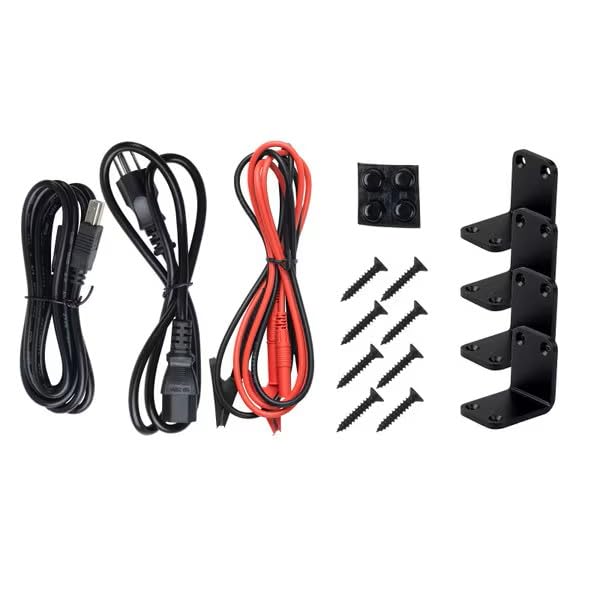
This image displays the various components included in the DATS LA package, such as the USB cable, power cable, red and black test leads, a calibration resistor, and optional mounting brackets with screws, along with rubber feet.
3. Setup
3.1 Hardware Connection
- Connect the DATS LA unit to your computer via the supplied USB cable.
- Connect the power cable to the DATS LA unit and plug it into a suitable power outlet.
- Ensure the power switch on the DATS LA unit is in the 'ON' position. The power indicator light should illuminate.
- Connect the red and black test leads to the corresponding binding posts on the DATS LA unit. Ensure secure connections.
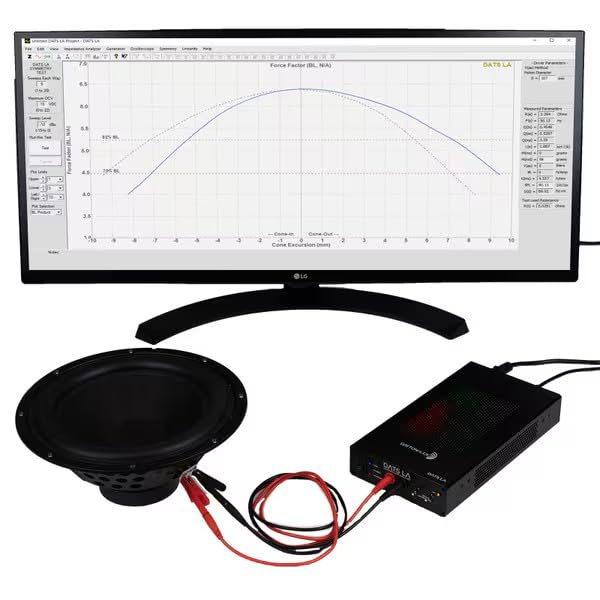
This image illustrates the DATS LA unit connected to a computer displaying the software interface, and test leads connected to a loudspeaker driver, ready for analysis.
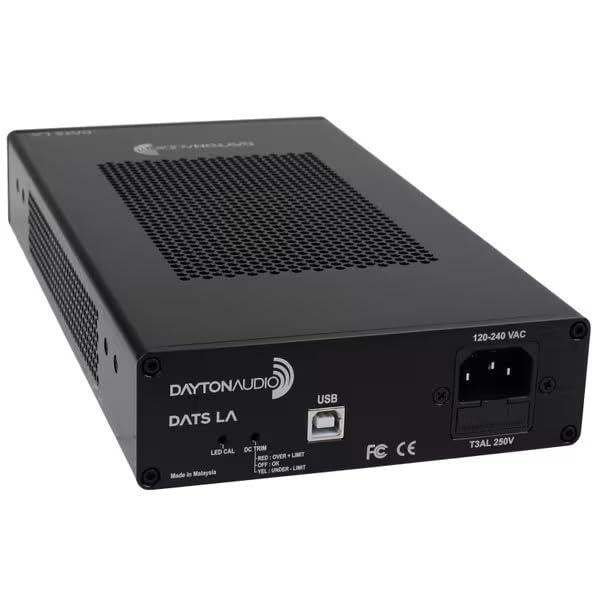
This image provides a clear view of the rear panel of the DATS LA unit, highlighting the USB port for computer connection and the power input.
3.2 Software Installation
The DATS LA software is typically provided on a USB drive or available for download from the Dayton Audio website. Follow the on-screen instructions to install the software on your Windows-based computer. Ensure your operating system meets the minimum requirements for optimal performance.
3.3 Initial Calibration
Before performing any measurements, it is crucial to calibrate the DATS LA system. This ensures accurate and reliable results. The calibration process involves three main steps: Null Calibration, Impedance Calibration, and Test Lead Calibration.
This video provides a step-by-step guide on how to set up and calibrate your Dayton Audio DATS LA Loudspeaker Analyzer, covering null calibration, impedance calibration using the supplied resistor, and test lead calibration.
- Null Calibration:
In the DATS LA software, navigate to the 'Impedance Analyzer' menu and select 'Null Calibration'. Disconnect all test leads from the DATS LA unit and any connected loudspeakers before proceeding. Click 'OK' when prompted. The system will perform a high-level signal test to establish a baseline.
- Impedance Calibration:
From the 'Impedance Analyzer' menu, select 'Impedance Calibration'. Connect the supplied 100 Ohm calibration resistor to the test leads, ensuring proper polarity. Enter "0.1" in the "Calibration Resistor Value" field (representing 0.1 kOhms or 100 Ohms). Click 'OK'. The system will measure the resistor and save the new calibration.
- Test Lead Calibration:
Finally, go to the 'Impedance Analyzer' menu and choose 'Test Leads Calibration'. Short the red and black test leads together (connect them directly to each other). Click 'OK'. The system will measure the resistance of the test leads and account for it in future measurements. A successful calibration will show a very low resistance value (e.g., 0.032 Ohms).
Once all three calibration steps are complete, your DATS LA system is ready for accurate loudspeaker measurements. Calibration is generally only required if you change computers or reinstall the software.
4. Operating the DATS LA
The DATS LA software provides various modes for analyzing loudspeaker parameters:
- Impedance Analyzer: Used for measuring loudspeaker electromechanical parameters such as Fs, Qts, Vas, Re, Le, and more. This mode supports both small (low power) and large (high power) signal analysis.
- Generator: A software signal generator with selectable waveform, frequency, and amplitude for various testing needs.
- Oscilloscope: Features a software oscilloscope mode with dual traces and adjustable time and amplitude scales for real-time signal monitoring.
- Symmetry: Calculates parameters like Bl, Cms, and Kms at specific cone positions to produce symmetry curves, aiding in the optimization of driver motors.
- Linearity: Measures advanced Wright Model parameters (Kr, Xr, Ki, Xi) for precision simulations, crucial for understanding and improving driver linearity.
Refer to the software's built-in help documentation for detailed instructions on using each specific measurement mode and interpreting the results.
5. Maintenance
The Dayton Audio DATS LA is designed for durability and requires minimal maintenance. Follow these guidelines to ensure its longevity:
- Keep the unit clean and free from dust. Use a soft, dry cloth for cleaning.
- Avoid exposing the unit to extreme temperatures, humidity, or direct sunlight.
- Store the unit in a safe place when not in use to prevent physical damage.
- Regularly check the test leads and cables for any signs of wear or damage. Replace if necessary.
- Ensure proper ventilation around the unit during operation, especially during high-power tests.
6. Troubleshooting
If you encounter issues with your DATS LA, consider the following troubleshooting steps:
- No Power:
Check if the power cable is securely connected to both the unit and the power outlet. Ensure the power switch is 'ON'. Verify the power outlet is functional.
- Software Not Recognizing Unit:
Ensure the USB cable is properly connected. Try a different USB port on your computer. Reinstall the DATS LA software and drivers. Restart your computer and the DATS LA unit.
- Inaccurate Measurements:
Perform all three calibration steps (Null, Impedance, Test Lead) as described in Section 3.3. Ensure test leads are securely connected to the unit and the device under test. Check for any damage to the test leads or calibration resistor.
- Software Freezing/Crashing:
Ensure your computer meets the minimum system requirements. Close other demanding applications. Update your operating system and graphics drivers. Reinstall the DATS LA software.
- Warning Messages During Calibration:
Pay close attention to the specific warning message. For 'Null Calibration', ensure nothing is connected to the test leads. For 'Impedance Calibration', ensure the 100 Ohm resistor is correctly connected. For 'Test Lead Calibration', ensure the leads are shorted together.
If problems persist after attempting these steps, contact Dayton Audio customer support for further assistance.
7. Specifications
| Feature | Detail |
|---|---|
| Product Name | Dayton Audio DATS LA Loudspeaker Analyzer |
| Model Number | DATS LA |
| Manufacturer | Dayton Audio |
| Amplifier Output | 100 Watts (DC capable) |
| Measurement Capabilities | Small Signal Parameters (Fs, Qts, Vas, etc.), Large Signal Parameters, Symmetry Curves, Linearity (Wright Model parameters) |
| Connectivity | USB |
| Dimensions (Package) | 12.87 x 7.8 x 4.13 inches |
| Weight (Package) | 4.67 Pounds |
8. Warranty and Support
For warranty information and technical support, please refer to the official Dayton Audio website or contact their customer service department. Keep your purchase receipt as proof of purchase for warranty claims.
Dayton Audio Official Website: www.daytonaudio.com
Related documentsDATS LA


Ask a question about this manual
Ask about setup, troubleshooting, compatibility, parts, safety, or missing instructions. Manuals+ will review the question and use this page’s manual context to help answer it.