
Introduction
This instruction manual provides detailed information for the installation, operation, and maintenance of your GLEDOPTO Pro Series ZigBee 5-in-1 LED Controller (Model GL-C-301P). This versatile controller is designed for various LED strip types, including single color, CCT (Tuneable White), RGB, RGBW, and RGB+CCT, offering seamless integration into ZigBee-compatible smart home systems.
Please read this manual thoroughly before installation and use to ensure safe and optimal performance of the device. Keep this manual for future reference.
Safety Information
Always observe the following safety precautions to prevent electric shock, fire, or damage to the device:
- Installation should only be performed by a qualified electrician or trained personnel.
- Ensure the power supply is disconnected before any installation, wiring, or maintenance work.
- Do not exceed the maximum input voltage (DC 12-24V) or total output current (10A).
- The device is rated IP20, meaning it is protected against solid objects larger than 12.5mm but has no protection against water. Avoid exposure to moisture or wet environments.
- Ensure proper ventilation around the device to prevent overheating.
- Use appropriate wiring gauges for the current load to prevent overheating of cables.
Product Overview
The GLEDOPTO GL-C-301P is a compact and powerful LED controller designed for flush-mounted installations. Its 5-in-1 functionality allows it to control a wide range of LED strip configurations, making it a flexible solution for various lighting needs. It integrates seamlessly with ZigBee 3.0 gateways, offering smart control capabilities.
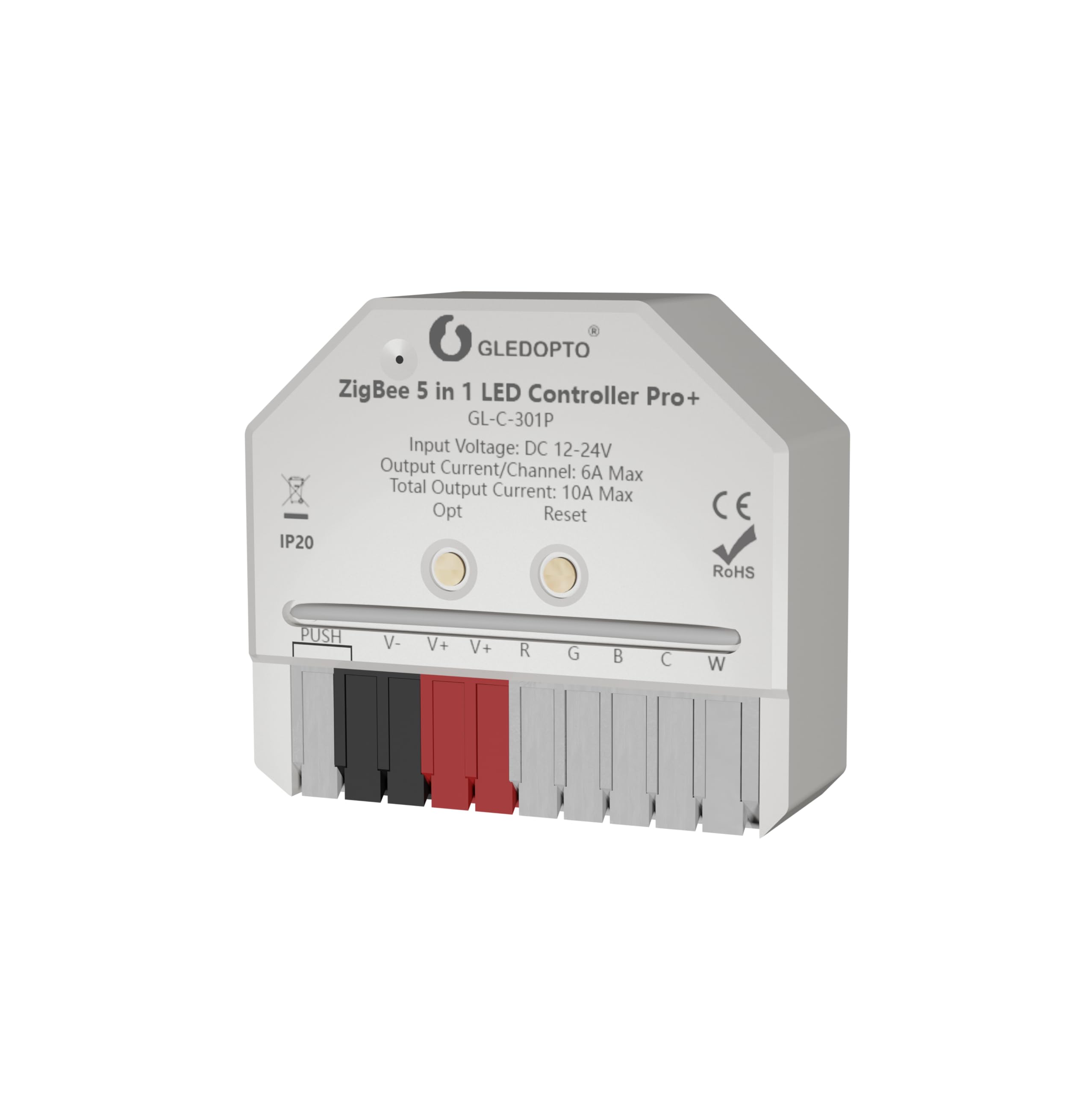
Image: The GLEDOPTO Pro Series ZigBee 5-in-1 LED Controller, showing its compact design and terminal blocks for wiring.
Key Features:
- Compact Design: Small form factor (42mm x 38mm x 17mm) allows for installation in standard flush-mounted boxes or small enclosures.
- Wide Voltage Range: Compatible with DC 12-24V LED strips.
- High Output: Up to 6A per channel, with a total maximum output current of 10A.
- 5-in-1 Functionality: Supports single color, CCT (Tuneable White), RGB, RGBW, and RGB+CCT LED strips.
- ZigBee 3.0 Compatible: Works with popular ZigBee gateways such as Philips Hue, ZigBee2MQTT, SmartThings, Amazon Alexa, Home Assistant, Homey, and Homee.
- Quick Connect Ports: Spring-loaded terminals for easy and secure wire connections.
- Adjustable Frequency Settings: Allows matching with various power supplies to reduce noise.
- Configurable Power-on State: Choose between remembering the last state or defaulting to 'on' after a power outage.

Image: Dimensions of the GLEDOPTO GL-C-301P controller, measuring 42mm in length, 38mm in width, and 17mm in height.
Specifications
| Manufacturer | GLEDOPTO |
| Model Number | GL-C-301P |
| Input Voltage | DC 12-24V |
| Output Current / Channel | 6A Max |
| Total Output Current | 10A Max |
| Operating Mode | ON-OFF (via ZigBee) |
| Connector Type | Clamp Terminal |
| Mounting Type | Flush Mounting |
| IP Rating | IP20 |
| Circuit Type | 5-way (for 5-in-1 functionality) |
Setup and Installation
Before proceeding with installation, ensure the main power supply is switched off at the circuit breaker.
Wiring Connections:
The GL-C-301P features quick connect ports for easy wiring. To connect a wire:
- Open the connector lever upwards.
- Insert the stripped wire into the terminal.
- Press the lever down to secure the wire.

Image: Illustration of the quick connect port design, showing how to open the lever, insert the wire, and secure it for a complete connection.
Wiring Diagrams for Different LED Strip Types:
Connect your LED strip and power supply according to the specific type of LED strip you are using. The controller supports various configurations:

Image: Comprehensive wiring diagrams for connecting RGB+CCT, RGBW, RGB, Dual Color (CCT), and Dimmer (single color) LED strips to the GLEDOPTO controller. Each diagram shows the DC power supply connection and the specific terminal connections for each LED strip type.
- RGB+CCT LED Strip: Connect V+, R, G, B, C, W terminals.
- RGBW LED Strip: Connect V+, R, G, B, W terminals.
- RGB LED Strip: Connect V+, R, G, B terminals.
- CCT (Dual Color) LED Strip: Connect V+, C, W terminals.
- Dimmer (Single Color) LED Strip: Connect V+ and one of the output terminals (e.g., W or C) for single color dimming. For multiple single color strips, connect each to a separate output terminal.
Ensure the DC power supply is connected to the V+ and V- terminals of the controller. The 'PUSH' terminal is for optional external push-button control, if supported by your setup.
Physical Installation:
The compact size of the controller allows it to be installed inside standard flush-mounted wall boxes, behind existing light switches, or within other small enclosures. Ensure there is adequate space and ventilation.

Image: An example installation showing the GLEDOPTO controller discreetly placed inside a wall box behind a standard push-button light switch, with wiring connected.
Operating Instructions
ZigBee Pairing:
To integrate the controller into your smart home system, you need to pair it with a compatible ZigBee gateway. The exact pairing procedure may vary depending on your gateway (e.g., Philips Hue, SmartThings, Homey). Generally, you will need to put your gateway into 'discovery' or 'pairing' mode, then power on the GLEDOPTO controller. The controller should appear as a new device in your gateway's app.

Image: A compatibility chart showing the GLEDOPTO controller's support for RGB, CCT, and Brightness control across various ZigBee 3.0 gateways including Philips Hue, Amazon Echo Plus, SmartThings, Tuya, Conbee, and Homey.
Frequency Settings:
The controller allows you to adjust the output frequency to match different power supplies and reduce potential flickering or noise. This is done via a one-touch frequency switching mechanism on the device itself.

Image: Diagram illustrating the frequency settings of the GLEDOPTO controller. A table shows different frequencies (600Hz to 8000Hz) corresponding to the number of flashes from the indicator light during adjustment, indicating how to cycle through settings to reduce noise.
To change the frequency, locate the 'Opt' or 'Reset' button on the controller. A short press will cycle through the available frequencies (e.g., 1000Hz -> 2000Hz -> 4000Hz -> 8000Hz -> 600Hz -> 800Hz -> 1000Hz). The indicator light will flash a specific number of times to indicate the selected frequency.
Power-on State Setting:
You can configure how the controller behaves after a power outage. There are two options:
- Remember Last State: The lights will return to their state (on/off, brightness, color) before the power failure.
- Lights Up by Default: The lights will turn on to a default setting (e.g., full brightness white) when power is restored.

Image: Illustration of the power-on state setting. It shows two scenarios: 'Remember the state of the on/off before power failure' and 'Lights up by default when powered on'. A long press of the 'Opt' button for more than 5 seconds is indicated to switch between these modes, with the indicator light flashing blue 3 times to confirm.
To switch between these modes, perform a long press (more than 5 seconds) on the 'Opt' or 'Reset' button. The indicator light will flash blue 3 times to confirm the change.
Maintenance
The GLEDOPTO GL-C-301P controller requires minimal maintenance. Follow these guidelines:
- Cleaning: Ensure the power is off before cleaning. Use a dry, soft cloth to wipe the device. Do not use liquid cleaners or solvents.
- Connections: Periodically check all wire connections to ensure they are secure and free from corrosion.
- Environment: Ensure the operating environment remains within the specified temperature and humidity ranges and free from excessive dust or moisture.
Troubleshooting
If you encounter issues with your GLEDOPTO controller, refer to the following common problems and solutions:
| Problem | Possible Cause | Solution |
|---|---|---|
| LED strip does not light up. | No power supply, incorrect wiring, faulty LED strip, controller not paired. | Check power supply connection and voltage. Verify all wiring connections according to diagrams. Test LED strip with a different power source if possible. Ensure controller is successfully paired with your ZigBee gateway. |
| LED strip flickers or makes noise. | Incompatible power supply, incorrect frequency setting. | Adjust the frequency setting of the controller (refer to 'Frequency Settings' section). Ensure your power supply is compatible with LED lighting. |
| Controller cannot be paired with ZigBee gateway. | Gateway not in pairing mode, controller too far from gateway, interference, controller already paired. | Ensure your ZigBee gateway is in discovery/pairing mode. Bring the controller closer to the gateway during pairing. Try resetting the controller (usually a long press on the 'Reset' button) and attempt pairing again. |
| Incorrect colors or dimming behavior. | Incorrect wiring for LED strip type, incorrect device type selected in gateway. | Double-check wiring against the specific LED strip type diagram. Ensure the correct device type (e.g., RGBW, CCT) is selected in your ZigBee gateway's app. |
Warranty and Support
For warranty information, please refer to the manufacturer's official website or contact your retailer directly. Warranty terms and conditions may vary by region and point of purchase.
If you require further assistance or have questions not covered in this manual, please contact GLEDOPTO customer support or your authorized retailer for technical support.


