
1. Product Overview
The ACE4U Automatic Dual Arms Electric Swing Gate Opener is designed for automating swing gates, providing convenience and enhanced security for residential, farm, garage, or business applications. This system is capable of handling gates with a maximum single leaf width of 4.5 meters and a maximum single leaf weight of 400KG.
Key Features:
- Easy to install and operate, with straightforward wired connections.
- Remote control and keypad operation for convenient gate access.
- Time promotion function for smooth gate movement: slow start, acceleration, and slow stop.
- Manual release clutch for operation during power failures.
- Automatic stop function when the gate encounters an obstacle, ensuring safety.
2. Kit Contents (Kit b)
Your package includes the following standard components:
- 2 x Arms Gate Openers (drive motors)
- 1 x Control Box (with transformer)
- 1 x Set of Hardware Accessories (mounting brackets, bolts, etc.)
- 4 x Remote Controls
- 1 x Pair of Photocell Sensors
- 1 x Flash Light

Figure 2.1: Overview of the main components included in Kit b.
3. Safety Information
Please read and understand all safety instructions before installation and operation to prevent injury or damage.
- Electrical Safety: Ensure all electrical connections are made by a qualified electrician and comply with local electrical codes. Disconnect power before performing any maintenance or installation.
- Pinch Points: Keep hands, feet, and clothing clear of the gate and opener mechanisms during operation.
- Obstacle Detection: While the system has obstacle detection, always visually confirm the gate path is clear before operation.
- Children and Pets: Do not allow children or pets to play near the gate or operate the controls.
- Emergency Access: Ensure you know how to manually operate the gate in case of power failure or system malfunction.
- Mounting: Ensure the gate and mounting points are structurally sound and can support the weight and forces of the opener.
4. Setup and Installation
Professional installation is recommended for optimal performance and safety. This section provides a general overview of the installation process.
4.1. Component Identification

Figure 4.1: Various components and their typical placement in a swing gate setup.
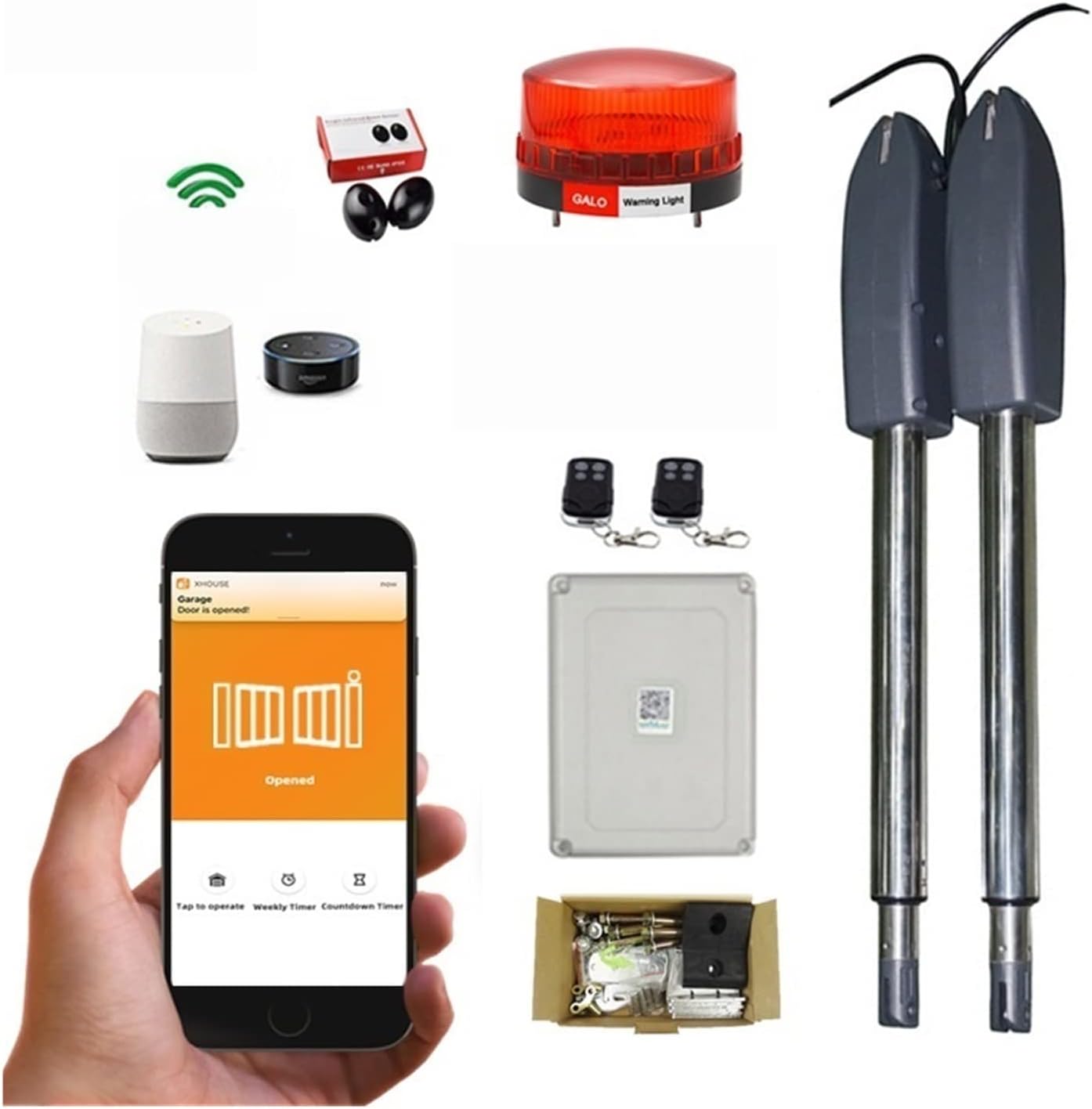
Figure 4.2: Additional accessories and smart home integration options.
4.2. Control Box Wiring
The control box houses the main circuit board and transformer. Refer to the detailed wiring diagram provided in the separate installation manual for precise connections of motors, power supply, photocells, and other accessories.

Figure 4.3: Internal view of the control box, showing wiring points.
4.3. Mounting the Actuators
Mount the two arm actuators securely to the gate posts and gate frames using the provided hardware. Ensure correct alignment and level installation for smooth operation. The rod's maximum travel is 400mm.

Figure 4.4: Example installation on a residential gate.

Figure 4.5: Example installation on a farm gate.
5. Operating Instructions
5.1. Remote Control Operation
Press the designated button on your remote control to open or close the gate. The gate will initiate movement slowly, accelerate, and then slow down again as it approaches its fully open or closed position.
5.2. Manual Override
In case of a power failure or system malfunction, the gate can be operated manually. Locate the manual release mechanism on each motor arm (typically a key-operated clutch). Turn the key to disengage the motor, allowing you to push the gate open or closed by hand. Remember to re-engage the clutch for automatic operation.
5.3. Obstacle Detection
The system is equipped with an obstacle detection feature. If the gate encounters an obstruction during its movement, it will automatically stop to prevent damage or injury. Always ensure the photocell sensors are clean and unobstructed for proper functioning.
6. Maintenance
Regular maintenance ensures the longevity and reliable operation of your gate opener.
- Monthly: Check for any loose bolts or connections. Ensure the gate moves freely without the opener engaged. Clean photocell lenses.
- Quarterly: Lubricate moving parts of the gate hinges and opener arms as recommended by the lubricant manufacturer. Inspect wiring for signs of wear or damage.
- Annually: Have a qualified technician inspect the entire system, including electrical components and safety features.
- Keep Clear: Ensure the area around the gate and opener is free from debris, vegetation, or anything that could obstruct movement.
7. Troubleshooting
Refer to the table below for common issues and their potential solutions.
| Problem | Possible Cause | Solution |
|---|---|---|
| Gate does not respond to remote. | No power; Remote battery low; Remote not programmed; Photocell obstructed. | Check power supply; Replace remote battery; Re-program remote; Clear photocell path. |
| Gate stops unexpectedly. | Obstacle detected; Motor overheating; Loose wiring. | Remove obstruction; Allow motor to cool; Check and secure all wiring connections. |
| Gate opens/closes partially. | Limit switch issue; Mechanical obstruction; Low voltage. | Inspect limit switches; Check for physical obstructions; Verify power supply voltage. |
| Gate makes unusual noises. | Lack of lubrication; Worn parts; Misalignment. | Lubricate hinges and moving parts; Inspect for worn components; Check gate and opener alignment. |
8. Technical Specifications
| Specification | Value |
|---|---|
| Brand | ACE4U |
| Model Number | 2354423644667 |
| Motor Power | 24VDC 40W |
| Running Speed | 1.6 cm/s |
| Rod Travel | 300 mm |
| Max Rod Travel | 400 mm |
| Max Single Leaf Gate Width | 4.5 meters |
| Max Single Leaf Gate Weight | 400 KG |
| Item Weight | 22 pounds (approx. 10 kg) |
| Product Dimensions | 1.18 x 0.79 x 0.39 inches (Control Box/Component size) |
| Color | Gris |
9. Warranty and Support
For warranty information, technical support, or service inquiries, please refer to the documentation included with your purchase or contact ACE4U customer service directly. Keep your purchase receipt as proof of purchase for warranty claims.
For further assistance, please visit the official ACE4U website or contact their support team.