
Shadowhawk S1618
Shadowhawk S1618 2000 High Lumens Rechargeable LED Flashlight User Manual
Model: S1618 | Brand: Shadowhawk
Introduction
Thank you for choosing the Shadowhawk S1618 LED Flashlight. This manual provides essential information for the safe and efficient use of your new flashlight. Please read it thoroughly before operation and retain it for future reference.
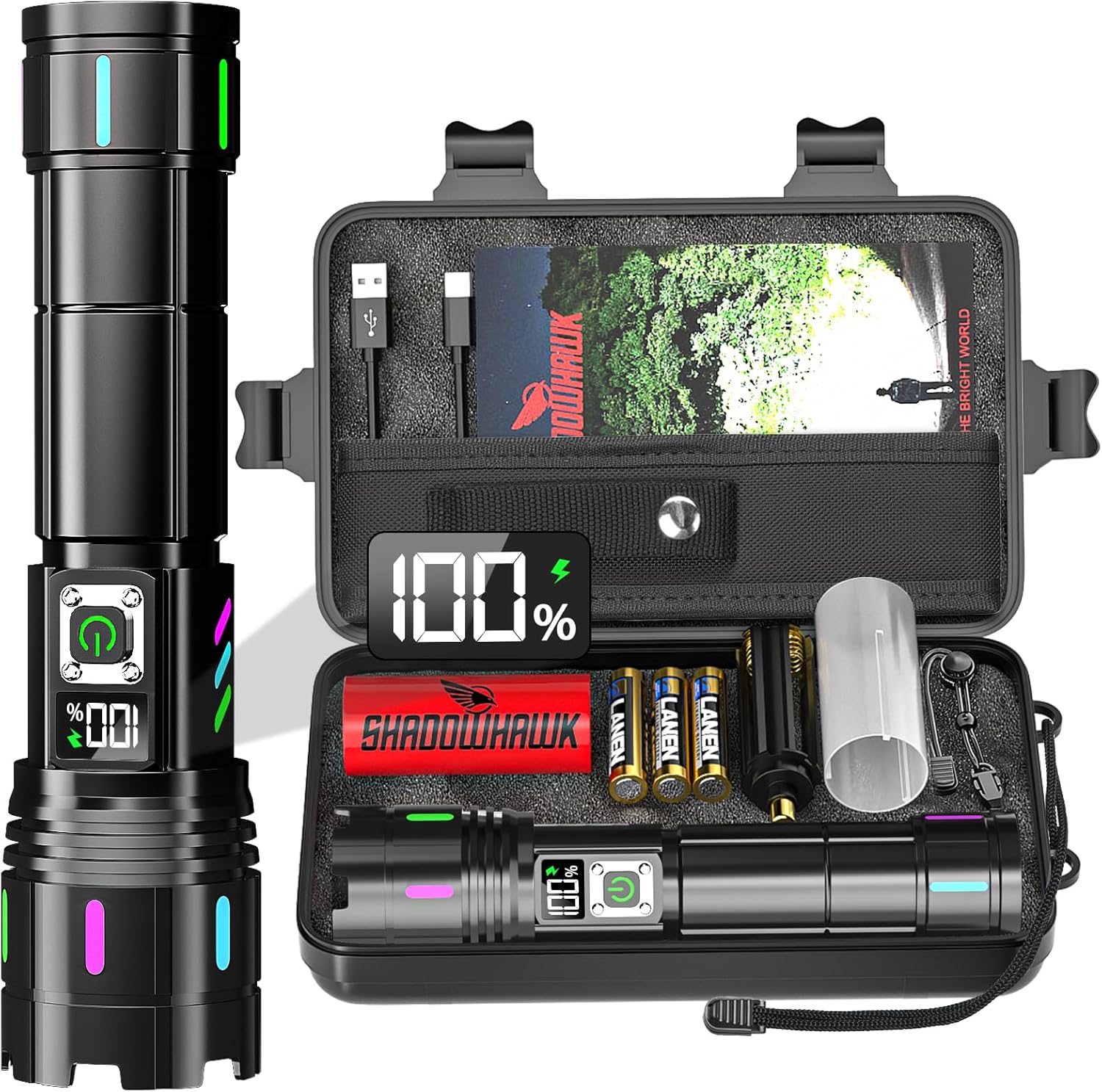
Image: The Shadowhawk S1618 flashlight and its included accessories, neatly arranged in a protective carrying case.
Setup
Battery Installation
The Shadowhawk S1618 flashlight supports two battery types: the included 6000mAh rechargeable battery or 3 AAA alkaline batteries (with holder).
- Unscrew the tail cap of the flashlight counter-clockwise.
- For Rechargeable Battery: Insert the 6000mAh rechargeable battery with the positive (+) pole facing towards the flashlight head. Ensure the transparent plastic protective film is removed from the battery surface before use.
- For AAA Batteries: Place 3 AAA alkaline batteries into the provided AAA battery holder, observing the correct polarity (+/-). Insert the holder into the flashlight with the positive (+) end facing towards the flashlight head.
- Screw the tail cap back on clockwise until secure.
Initial Charging
Before first use, fully charge the rechargeable battery.
- Locate the USB-C charging port on the flashlight, typically covered by a rubber protective cap.
- Connect the included USB-C charging cable to the flashlight's port.
- Connect the other end of the USB-C cable to a compatible USB power source (e.g., wall adapter, computer, power bank).
- The LCD display will show the charging progress. Charging typically takes 6-8 hours for a full charge.
- Once fully charged, disconnect the cable and replace the rubber protective cap to maintain water resistance.

Image: Visual guide for installing the 6000mAh rechargeable battery and AAA batteries, along with charging methods.
Operating Instructions
Power On/Off
- Press the power button once to turn the flashlight on.
- To turn off the flashlight directly from any mode, press and hold the power button for approximately 3 seconds.
Switching Lighting Modes
The flashlight features 5 lighting modes: High, Medium, Low, Strobe, and SOS. The brightness transitions gradually between modes to protect your eyes.
- With the flashlight on, press the power button repeatedly to cycle through the modes in the following order: High → Medium → Low → Strobe → SOS.

Image: Depiction of the five distinct lighting modes available on the Shadowhawk S1618 flashlight.
Adjustable Focus
The flashlight offers an adjustable focus function to switch between a long-range spotlight and a wide-angle floodlight.
- To adjust the focus, gently slide the head of the flashlight forward or backward.
- Sliding the head forward (zoom in) will narrow the beam for a long-range spotlight (up to 3937ft/1200m).
- Sliding the head backward (zoom out) will widen the beam for a broad floodlight (2160 sqft coverage).

Image: Visual representation of adjusting the flashlight head to achieve either a wide floodlight or a focused spotlight beam.
LCD Power Display
The integrated LCD screen displays the remaining battery power as a percentage, providing accurate power monitoring.
- The display activates when the flashlight is turned on or when charging.
- Monitor the percentage to anticipate charging needs and prevent unexpected power loss.

Image: A detailed view of the flashlight's LCD digital display, indicating the precise battery power percentage.
USB Discharging (Power Bank Function)
The flashlight can function as a power bank to charge other electronic devices in emergencies.
- Connect your device's charging cable to the USB-A output port on the flashlight.
- The flashlight will begin to discharge power to your connected device.
- Note that using this feature will deplete the flashlight's battery.

Image: The Shadowhawk S1618 flashlight demonstrating its USB discharging capability, charging a smartphone.
Maintenance
Cleaning
- Wipe the flashlight body with a soft, damp cloth. Avoid abrasive cleaners or solvents.
- Keep the lens clean for optimal light output. Use a lens cleaning cloth if necessary.
- Ensure the charging port and rubber cap are free from dirt and debris.
Battery Care
- Recharge the battery regularly, even if not frequently used, to maintain its lifespan.
- If storing for an extended period, charge the battery to approximately 50% and recharge every 3-6 months.
- Do not expose batteries to extreme temperatures or direct sunlight.
Storage
- Store the flashlight in a cool, dry place away from direct sunlight and moisture.
- If not using for a long time, remove the batteries to prevent leakage.
Troubleshooting
| Problem | Possible Cause | Solution |
|---|---|---|
| Flashlight does not turn on. | Battery is depleted or incorrectly installed. | Charge the battery or check battery orientation. Ensure protective film is removed. |
| Light is dim or flickers. | Low battery or loose connection. | Recharge the battery. Tighten the tail cap. |
| Flashlight not charging. | Charging cable or power source issue. | Try a different USB-C cable or power adapter. Ensure the cable is fully inserted. |
| Focus adjustment is stiff. | Dirt or debris in the sliding mechanism. | Clean the exterior of the flashlight. Avoid forcing the mechanism. |
Specifications
- Model: S1618
- Light Source: XHM90.2 LED
- Brightness: 2000 Lumens (Max)
- Power Output: 30 Watts
- Beam Distance: Up to 3937ft (1200m)
- Lighting Modes: High, Medium, Low, Strobe, SOS
- Focus: Adjustable (Spotlight & Floodlight)
- Battery: 1 x 6000mAh Rechargeable Lithium-Ion (Included) or 3 x AAA Alkaline (Included with holder)
- Charging: USB-C (Input & Output)
- Runtime: Up to 12 hours (Low mode)
- Material: Aviation-grade Aluminum Alloy
- Water Resistance: IP67 (Waterproof)
- Dimensions: 6.5 x 1.3 x 1.7 inches (approx.)
- Weight: 1.14 pounds (approx.)
- Special Features: LCD Power Display, Luminous Strips, USB Discharging

Image: The flashlight demonstrating its IP67 waterproof capability, with water droplets on its surface.
Safety Information
- Do not shine the flashlight directly into eyes, as the high lumen output can cause temporary vision impairment.
- Keep out of reach of children.
- Do not disassemble the flashlight, as this may void the warranty and cause damage.
- Use only recommended batteries and charging cables.
- Avoid exposing the flashlight to extreme heat or open flames.
Warranty and Support
Your Shadowhawk S1618 Flashlight is covered by a manufacturer's warranty against defects in materials and workmanship. For specific warranty details, please refer to the documentation included with your purchase or contact Shadowhawk customer support.
For technical assistance, troubleshooting, or warranty claims, please contact Shadowhawk customer service through the retailer's platform or the official Shadowhawk website.
Related documentsS1618


Ask a question about this manual
Ask about setup, troubleshooting, compatibility, parts, safety, or missing instructions. Manuals+ will review the question and use this page’s manual context to help answer it.