
1. Product Overview
The 1MORE P50 are high-resolution wired in-ear earphones designed for exceptional audio fidelity. They feature a unique hybrid 5-driver acoustic system, including a Diamond-Like Carbon (DLC) dynamic driver and four planar units, to deliver a wide frequency response from deep bass to crystalline highs. The earphones are equipped with a detachable MMCX cable and a 3.5mm jack for broad compatibility with audio devices. A built-in MEMS microphone and 3-button remote provide convenient control for music playback and calls.

Image: The 1MORE P50 earphones, showcasing the earbud design, detachable cable with inline remote, and 3.5mm audio jack.
2. What's in the Box
Upon opening your 1MORE P50 package, you should find the following components:
- 1MORE P50 In-Ear Earphones (1 pair)
- MMCX Detachable Audio Cable with 3.5mm Jack and 3-Button Remote (1)
- 3.5mm to Type-C Adapter (1)
- Silicone Ear Tips (Multiple sizes: XS, S, M, L, XL)
- Carrying Pouch (1)
- User Manual (This document)

Image: A visual representation of all items included in the 1MORE P50 product package.
3. Setup and Connection
3.1 Attaching the Cable
- Identify the left (L) and right (R) earpieces and the corresponding connectors on the MMCX cable.
- Align the MMCX connector on the cable with the port on the earpiece.
- Gently push the connector into the port until you feel a click, indicating a secure connection. Do not force it.
- To detach, firmly grasp the earpiece and the cable connector, then pull them straight apart. Avoid pulling on the cable itself.
3.2 Selecting and Installing Ear Tips
Proper ear tip selection is crucial for optimal sound quality and comfort. Experiment with the various sizes provided to find the best fit for your ears.
- Gently remove the pre-installed ear tips (if any) by pulling them off the nozzle.
- Select a pair of ear tips that feel comfortable and create a good seal in your ear canal. A good seal will enhance bass response and passive noise isolation.
- Push the new ear tip onto the earphone nozzle until it is securely seated.
3.3 Connecting to an Audio Source
Insert the 3.5mm audio jack of the cable into the headphone port of your audio device (smartphone, tablet, computer, MP3 player, etc.). If your device only has a USB-C port, use the provided 3.5mm to Type-C adapter.
4. Operating Instructions
4.1 Wearing the Earphones
The 1MORE P50 earphones are designed with 45° curved nozzles and pre-formed ear hooks for a secure and comfortable fit, especially during extended listening sessions.
- Identify the left (L) and right (R) earpieces.
- Gently insert the earpiece into your ear canal.
- Guide the pre-formed ear hook over the top and behind your ear to secure the earphone in place.
- Adjust the earpiece until it feels snug and comfortable, ensuring a proper seal for optimal sound.

Image: The 1MORE P50 earphones being worn, illustrating the ergonomic design with ear hooks for a stable fit.
4.2 Using the 3-Button Inline Remote
The inline remote control allows for easy management of music playback and phone calls without needing to access your connected device.
| Button | Action | Function |
|---|---|---|
| Middle Button | Press Once | Play/Pause Music; Answer/End Call |
| Middle Button | Press Twice | Next Track |
| Middle Button | Press Thrice | Previous Track |
| Middle Button | Press and Hold | Reject Call; Activate Voice Assistant |
| "+" Button | Press Once | Volume Up |
| "-" Button | Press Once | Volume Down |
4.3 Built-in MEMS Microphone
The integrated MEMS microphone ensures clear voice pickup for phone calls and voice commands. Position the microphone close to your mouth for best performance during calls.
5. Comfort and Acoustic Performance
The 1MORE P50 earphones are engineered for both comfort and superior sound. The hybrid 5-driver system, featuring a DLC dynamic driver and four planar units, works in harmony to reproduce accurate, full-bodied sound across the entire frequency spectrum.
Image: An exploded view diagram illustrating the innovative DLC dynamic driver and planar units within the 1MORE P50 earphones, designed for detailed acoustics.
The ergonomic design, including 45° curved nozzles and pre-formed ear hooks, ensures a secure and comfortable fit for various ear shapes. When properly fitted with the correct ear tips, the earphones can provide up to 28dB of passive noise isolation, allowing for an immersive listening experience.
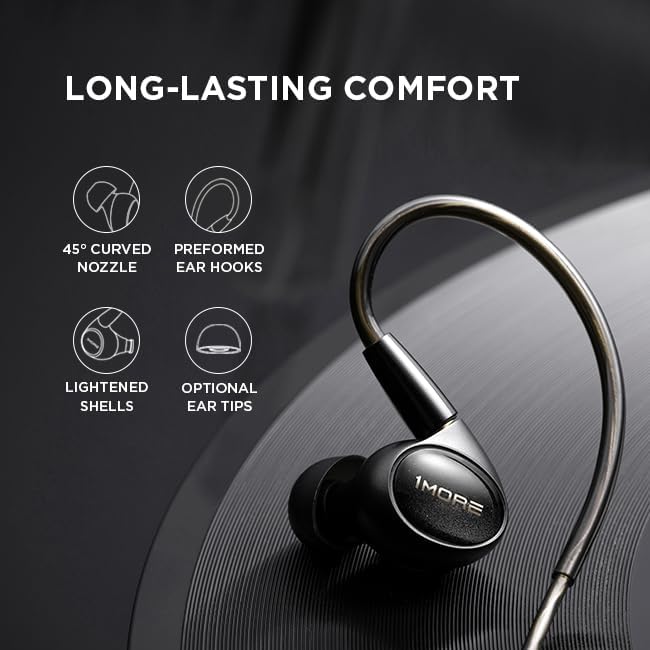
Image: Visual representation of key comfort features of the 1MORE P50, including the nozzle angle, ear hooks, lightweight design, and customizable ear tips.
6. Maintenance and Care
To ensure the longevity and optimal performance of your 1MORE P50 earphones, follow these care guidelines:
- Cleaning: Regularly clean the ear tips and earphone nozzles to prevent wax buildup, which can affect sound quality. Use a soft, dry cloth for the earphone body. For ear tips, they can be gently washed with mild soap and water, then thoroughly dried before reattaching.
- Storage: When not in use, store your earphones in the provided carrying pouch to protect them from dust, dirt, and physical damage.
- Handling the Cable: Avoid sharp bends or excessive pulling on the cable. When detaching the MMCX cable, always grasp the connector and the earpiece, not the cable itself.
- Moisture: Keep the earphones away from excessive moisture and liquids. Do not submerge them in water.
- Temperature: Avoid exposing the earphones to extreme temperatures (hot or cold) or direct sunlight for prolonged periods.
7. Troubleshooting
If you encounter any issues with your 1MORE P50 earphones, please refer to the following common solutions:
| Problem | Possible Cause | Solution |
|---|---|---|
| No sound or low volume | Cable not fully connected; Device volume too low; Incorrect audio output selected on device; Ear tips blocked. | Ensure MMCX cable is securely attached to both earpieces. Increase volume on your audio device. Check audio output settings on your device. Clean ear tips and earphone nozzles. |
| Poor sound quality (e.g., distorted, weak bass) | Poor ear tip seal; Dirty nozzles; Damaged cable; Low quality audio source. | Try different sized ear tips to achieve a better seal. Clean earphone nozzles. Inspect cable for damage; if damaged, consider replacing it. Use high-quality audio files. |
| Microphone not working | Microphone port blocked; Device settings; Cable issue. | Ensure microphone is not covered. Check privacy settings on your device to allow microphone access. Ensure cable is fully connected. |
| Remote control buttons not responding | Incompatibility with device; Cable issue. | Some older devices may have limited compatibility with inline remotes. Ensure cable is fully connected. |
8. Specifications
| Feature | Detail |
|---|---|
| Brand | 1MORE |
| Model Name | P50 |
| Color | Black |
| Driver Configuration | Hybrid 5-Driver (1 DLC Dynamic Driver + 4 Planar Units) |
| Frequency Response | 20Hz - 40kHz |
| Connector Type | MMCX Detachable |
| Audio Jack | 3.5mm |
| Microphone | Built-in MEMS Microphone |
| Inline Control | 3-Button Remote |
| Passive Noise Isolation | Up to -28dB (with proper ear tip fit) |
| Item Weight | 13.7 ounces |
| UPC | 190280002600 |
| ASIN | B0F24FQY2T |
| Date First Available | March 21, 2025 |
9. Warranty and Support
For detailed warranty information, please refer to the warranty card included with your product or visit the official 1MORE website. 1MORE provides customer support for product inquiries, technical assistance, and warranty claims.
Official 1MORE Website: www.1more.com
Please retain your proof of purchase for any warranty-related services.


