
Introduction
Thank you for choosing the CNBRO Smart Health Ring. This innovative device combines the elegance of a ring with advanced health tracking capabilities, featuring an integrated LED screen for real-time data display. This manual provides essential information for setting up, operating, and maintaining your Smart Health Ring to ensure optimal performance and longevity.

The CNBRO Smart Health Ring, shown here on its wireless charging base, features an integrated LED screen that displays vital information such as time and step count, providing immediate access to your health data.
Package Contents
Please check the package contents upon unboxing:
- Smart Ring x 1
- User Manual x 1
- Wireless Charging Line x 1
Product Overview & Features
The CNBRO Smart Health Ring is designed to seamlessly integrate health monitoring into your daily life. Its key features include:
- LED Screen Display: Provides real-time data such as time, date, steps, heart rate, and sleep quality directly on the ring.
- Time Display: Conveniently check the current time.
- Gestures: Control certain phone functions, such as browsing TikTok, with simple hand movements.
- Pedometer: Accurately tracks steps, calories burned, and distance traveled.
- Heart Rate Monitor: Continuous tracking of your heart rate.
- Exercise Monitor: Supports multiple exercise modes to track your workouts.
- Remote Camera Control: Capture photos and videos remotely using ring gestures.
- Searching for Rings: Feature to help locate your ring if misplaced.
- Female Cycle Function: Provides tracking for female physiological cycles.
- Sleep Tracker: Monitors sleep stages (light, deep, REM) to provide insights into sleep quality.

The Smart Health Ring's LED screen offers a clear display of various functions, including step count, heart rate, battery level, and current time, all at a glance.
Specifications
| Model Number | JYR11PFS |
| Bluetooth Version | 5.2 |
| Ring Battery Capacity | 15mAh |
| Full Charge Time | Approximately 1 Hour |
| Standby Time | 3-5 Days (working time) |
| Compatible OS | iOS 11.0 or above, Android 9.0 or above |
| Companion App | QRing |
| Ring Material | Stainless Steel |
| Waterproof Rating | IP68 |
| Item Weight | 3.52 ounces (0.1 Kilograms) |
| Color | Silver |
Ring Size Guide
| Ring Size | Inner Diameter | Circumference |
|---|---|---|
| #8 | 18.3mm (0.72") | 57.5mm (2.26") |
| #9 | 19.1mm (0.75") | 60mm (2.36") |
| #10 | 20mm (0.79") | 62.8mm (2.47") |
| #11 | 20.8mm (0.82") | 65.4mm (2.57") |
| #12 | 21.6mm (0.85") | 67.9mm (2.67") |
| #13 | 22.3mm (0.88") | 70mm (2.76") |
Setup Guide
1. Charging the Smart Ring
Before first use, fully charge your Smart Ring. Use the provided wireless charging line and place the ring onto the charging base. The LED screen on the ring will indicate charging status. A full charge takes approximately 1 hour and provides 3-5 days of working time.

Place the Smart Health Ring on its dedicated wireless charging base to ensure it is fully powered for optimal performance.
2. App Installation (QRing)
To unlock the full potential of your Smart Health Ring, download the "QRing" application from your smartphone's app store. The app is compatible with iOS 11.0 or above and Android 9.0 or above.
- Scan the QR code provided in the manual (if applicable) or search for "QRing" in the App Store (iOS) or Google Play Store (Android).
- Download and install the application.
- Open the QRing app and follow the on-screen instructions to create an account or log in.
3. Pairing with Your Smartphone
Ensure Bluetooth is enabled on your smartphone before proceeding.
- Open the QRing app on your smartphone.
- Navigate to the device pairing section within the app (usually found in "Settings" or "My Device").
- The app will search for available devices. Select your Smart Health Ring from the list.
- Confirm the pairing request on both your phone and the ring (if prompted).
- Once successfully paired, the app will synchronize data with your ring.
Operating Instructions
Time and Data Display
The Smart Health Ring's LED screen automatically displays time, date, and various health metrics. Simply raise your hand or turn your wrist to activate the display and cycle through different data points.
Activity Tracking (Pedometer)
The ring continuously tracks your daily activity. View your steps, calories burned, and distance directly on the ring's display or in detail within the QRing app.

Monitor your daily step count directly on the ring's LED screen, with detailed progress and historical data available through the companion app.
Heart Rate Monitoring
The ring provides continuous heart rate monitoring throughout the day. Access real-time heart rate data on the ring's display and detailed historical graphs in the QRing app.
Sleep Tracking
Wear the ring to bed for automatic sleep tracking. The QRing app will analyze your sleep patterns, including light, deep, and REM sleep stages, providing insights into your sleep quality.
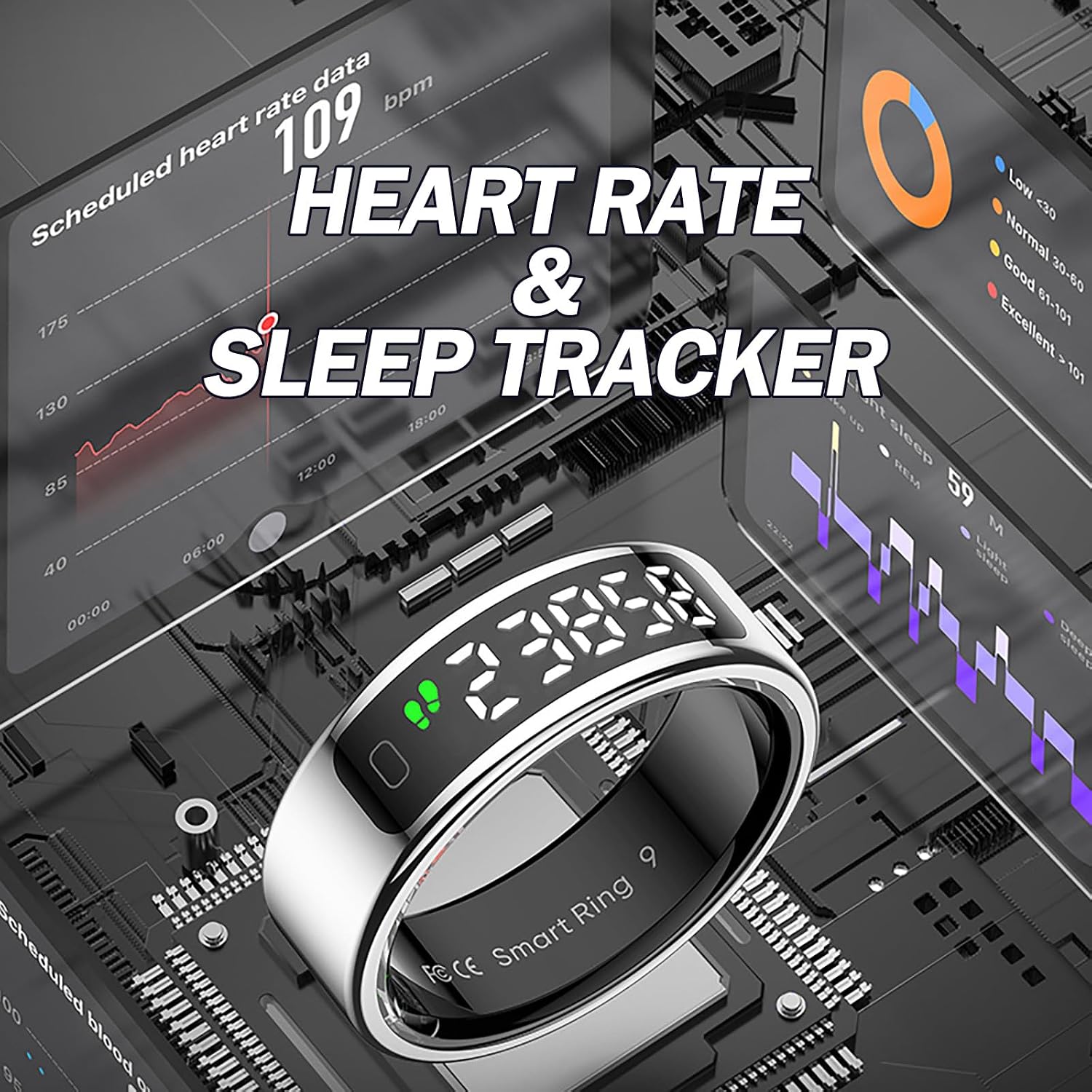
The Smart Health Ring provides comprehensive heart rate and sleep tracking, with detailed analytics accessible via the connected smartphone application.
Multiple Exercise Modes
Select from various exercise modes within the QRing app to track specific activities like walking, running, cycling, or climbing. The ring will record relevant metrics for your workout.

The Smart Health Ring supports multiple sports tracking, providing a summary of total steps, mileage, and calories burned across various activities.
Remote Control Functions (TikTok, Camera)
Utilize the ring's gesture control for convenient remote operation of your smartphone's camera and for navigating applications like TikTok. Refer to the QRing app for specific gesture configurations.

The Smart Health Ring offers intelligent control, allowing users to interact with smartphone applications such as games, social media, and the camera through intuitive gestures.
Female Cycle Function
For female users, the QRing app includes a dedicated function to track and predict menstrual cycles. Input your data into the app for personalized insights.
Maintenance
Cleaning Your Ring
To maintain the appearance and functionality of your Smart Health Ring, regularly wipe it with a soft, dry cloth. For stubborn dirt, a slightly damp cloth can be used, followed by immediate drying.
Water Resistance (IP68)
The Smart Health Ring is rated IP68 for water resistance, meaning it is protected against dust ingress and can withstand immersion in water up to 1.5 meters for up to 30 minutes. However, it is NOT suitable for:
- Hot water bathing or showering
- Diving
- Swimming for extended periods
- Water-related work involving high pressure or prolonged immersion
Exposure to hot water, steam, or chemicals can compromise the water resistance. Always dry the ring thoroughly after it gets wet.
Troubleshooting
If you encounter any issues with your Smart Health Ring, please try the following common troubleshooting steps:
- Ring Not Turning On: Ensure the ring is fully charged. Place it on the wireless charging base for at least 1 hour.
- Cannot Pair with App:
- Make sure Bluetooth is enabled on your phone.
- Ensure the ring is charged and within close proximity to your phone.
- Restart both your phone and the QRing app.
- Check if your phone's OS meets the minimum requirements (iOS 11.0+ / Android 9.0+).
- Inaccurate Data:
- Ensure the ring is worn snugly on your finger.
- Keep the ring's sensors clean.
- Synchronize data with the QRing app regularly.
- Short Battery Life:
- Ensure the ring is fully charged each time.
- Frequent screen activation or continuous high-intensity tracking may reduce battery life.
If these steps do not resolve your issue, please contact customer support for further assistance.
Customer Support
For any questions, technical support, or warranty inquiries regarding your CNBRO Smart Health Ring, please contact our customer service team. We are committed to providing the best solution to you.
Please refer to the contact information provided on the product packaging or the official CNBRO website for the most up-to-date support channels.


