
CUSHYBITE FVG52K-A95MB02
CUSHYBITE FVG52K-A95MB02 USB Lithium Cordless Compact Detail Scrubber Kit User Manual
Model: FVG52K-A95MB02 | Brand: CUSHYBITE
1. Important Safety Instructions
Read all safety warnings and instructions before operating this product. Failure to follow the warnings and instructions may result in electric shock, fire, and/or serious injury.
- Battery Safety: Use only the specified USB Lithium 2Ah battery. Do not attempt to open or modify the battery. Do not expose the battery to water, fire, or extreme temperatures.
- Charging: Use only the provided charging cable. Ensure the charging port is dry before connecting the cable.
- Water Resistance: The scrubber is IPX7 water-resistant, allowing submersion in up to 3 feet of water for 30 minutes. However, ensure the battery compartment is securely closed before exposing to water. Do not charge the device while wet.
- Attachments: Ensure attachments are securely fastened before operation. Do not use damaged attachments.
- Personal Safety: Keep hands, hair, and loose clothing away from moving parts. Wear appropriate eye protection when operating.
2. Package Contents
Verify that all items listed below are included in your package:
- USB Lithium Cordless Compact Detail Scrubber
- USB Lithium 2Ah Battery
- USB Charging Cable
- Medium Bristle Detail Brush
- Hard Bristle Grout Brush
- Scour Pad Attachment

Image: All components included in the CUSHYBITE FVG52K-A95MB02 USB Lithium Cordless Compact Detail Scrubber Kit, including the main scrubber unit, various brush and scour pad attachments, the USB Lithium 2Ah battery, and the USB charging cable.
3. Product Overview
Familiarize yourself with the key features and components of your detail scrubber.

Image: A detailed view of the CUSHYBITE FVG52K-A95MB02 scrubber with key parts labeled, including the attachment connection point, LED battery indicator, IPX7 water resistance rating, lightweight design, and the medium bristle detail brush.
4. Setup
4.1 Charging the Battery
- Connect the small end of the USB charging cable to the USB-C port on the USB Lithium 2Ah battery.
- Connect the large end of the USB charging cable to a standard USB power adapter (not included) or a powered USB port.
- The LED fuel gauge on the battery will indicate charging status. A full charge is indicated when all LEDs are solid.
4.2 Installing/Removing the Battery
- To install, align the battery with the battery compartment at the base of the scrubber handle. Push the battery firmly until it clicks into place.
- To remove, press the battery release button (if present) and pull the battery out of the compartment.

Image: A hand inserting the USB Lithium 2Ah battery into the base of the CUSHYBITE FVG52K-A95MB02 cordless detail scrubber, demonstrating the battery installation process.
4.3 Attaching/Removing Accessories
- To attach an accessory (brush or scour pad), align the accessory with the attachment connection point on the scrubber head. Push and twist gently until it locks securely.
- To remove, twist the accessory in the opposite direction and pull it off.
5. Operating Instructions
5.1 Powering On/Off
Press the power button located on the handle to turn the scrubber on. Press it again to turn the scrubber off.
5.2 Using the Scrubber
- Select the appropriate attachment for your cleaning task:
- Medium Bristle Detail Brush: Ideal for general cleaning of surfaces like tile, fiberglass, and delicate areas.
- Hard Bristle Grout Brush: Designed for aggressive cleaning of grout lines and stubborn stains.
- Scour Pad Attachment: Suitable for tough scrubbing tasks on durable surfaces.
- Apply a small amount of appropriate cleaning solution to the surface or the attachment, if desired.
- Turn on the scrubber and gently apply pressure to the surface you are cleaning. Allow the 6,300 oscillations per minute to do the work.
- Move the scrubber slowly and steadily over the area.
- After cleaning, turn off the scrubber and rinse the cleaned area and the attachment thoroughly.
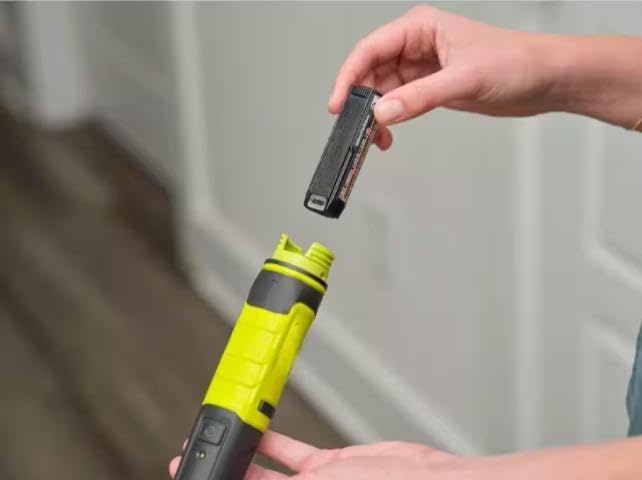
Image: A hand holding the CUSHYBITE FVG52K-A95MB02 detail scrubber, equipped with a blue scour pad attachment, actively cleaning around a sink drain, demonstrating its use in wet conditions.
6. Maintenance
6.1 Cleaning the Scrubber and Attachments
- After each use, remove the attachment and rinse it thoroughly under running water. Allow it to air dry completely before storing.
- Wipe the body of the scrubber with a damp cloth to remove any residue. Ensure the battery compartment is dry before closing.
- Do not use harsh chemicals or abrasive cleaners on any part of the scrubber.
6.2 Battery Care and Storage
- Store the battery in a cool, dry place away from direct sunlight and extreme temperatures.
- For long-term storage, charge the battery to approximately 50% capacity.
- Do not store the battery fully discharged or fully charged for extended periods.
- The USB Lithium 2Ah battery can also be used to charge mobile devices via its USB-C port.
7. Troubleshooting
If you encounter issues with your scrubber, refer to the following common problems and solutions:
| Problem | Possible Cause | Solution |
|---|---|---|
| Scrubber does not turn on. | Battery is not charged or not properly installed. | Ensure battery is fully charged and securely inserted into the compartment. |
| Poor cleaning performance. | Incorrect attachment for the task; attachment is worn; insufficient cleaning solution. | Select appropriate attachment. Replace worn attachments. Apply suitable cleaning solution. |
| Battery not charging. | Charging cable or power source issue; battery too hot/cold. | Check cable connections and power source. Ensure battery is at room temperature. |
8. Specifications
- Model Number: FVG52K-A95MB02
- Brand: CUSHYBITE
- Oscillations Per Minute: 6,300 OPM
- Water Resistance Rating: IPX7 (submersible up to 3 feet for 30 minutes)
- Battery Type: USB Lithium 2Ah
- Weight: Less than 1 pound (tool only)
9. Warranty and Support
This CUSHYBITE FVG52K-A95MB02 USB Lithium Cordless Compact Detail Scrubber Kit is backed by a 2-year manufacturer's warranty.
For warranty claims, technical support, or replacement parts, please contact CUSHYBITE customer service. Refer to your purchase documentation for specific contact information or visit the official CUSHYBITE website.
Ask a question about this manual
Ask about setup, troubleshooting, compatibility, parts, safety, or missing instructions. Manuals+ will review the question and use this page’s manual context to help answer it.