
Introduction
Thank you for choosing the KINKUNCO Extensible 3-Tier Bookshelf with Drawers, Model H03. This manual provides essential information for the safe and efficient assembly, operation, and maintenance of your new bookshelf. Please read these instructions carefully before assembly and retain them for future reference.

Image: The KINKUNCO Extensible 3-Tier Bookshelf (Model H03) in brown, showcasing its design and storage capabilities when fully assembled and decorated.
Safety Information
- Always assemble the unit on a soft, clean surface to prevent scratches.
- Ensure all parts are present and undamaged before beginning assembly.
- Do not overtighten screws, as this may damage the MDF material.
- Keep small parts away from children during assembly.
- Distribute weight evenly across shelves to prevent tipping. The maximum weight capacity is 100 kg.
- For stability, it is recommended to assemble the unit with the back panel attached.
Specifications
| Model Name | H03 |
| Brand | KINKUNCO |
| Material | MDF board |
| Color | Brown |
| Dimensions (L x W x H) | 80-150 x 24 x 120 cm (Extensible length) |
| Weight Capacity | 100 Kilograms |
| Mounting Type | Floor Mount, Freestanding |
| Special Feature | Expandable, 3-Tier, with Drawers |
| Assembly Required | Yes |
| Included Items | Installation instructions, all necessary parts |

Image: Dimensional diagram of the bookshelf, indicating its adjustable length from 80cm to 150cm, a fixed width of 24cm, and a height of 120cm.
Setup and Assembly
The KINKUNCO Extensible Bookshelf requires assembly. Please follow the included installation instructions carefully. Here are general guidelines:
- Unpack Components: Carefully unpack all parts and hardware. Verify that all components listed in the packing list are present and undamaged.
- Prepare Workspace: Choose a clean, flat, and soft surface for assembly to prevent scratching the furniture.
- Assemble Base Structure: Begin by assembling the main frame according to the step-by-step diagrams in the provided instructions. Ensure all connections are secure but do not overtighten.
- Install Shelves and Drawers: Insert the shelves and assemble the drawers as indicated. The bookshelf features 3 levels of space and cabinet doors for privacy.
- Attach Back Panel: The design includes a back panel for enhanced robustness and stability. Ensure it is properly attached.
- Adjust Length: The bookshelf is extensible from 80cm to 150cm. Adjust the length to your desired configuration before fully tightening all connections.
Tip: It is recommended to assemble the unit while it is lying down, as stability is achieved once both parts are joined and the back panel is installed.
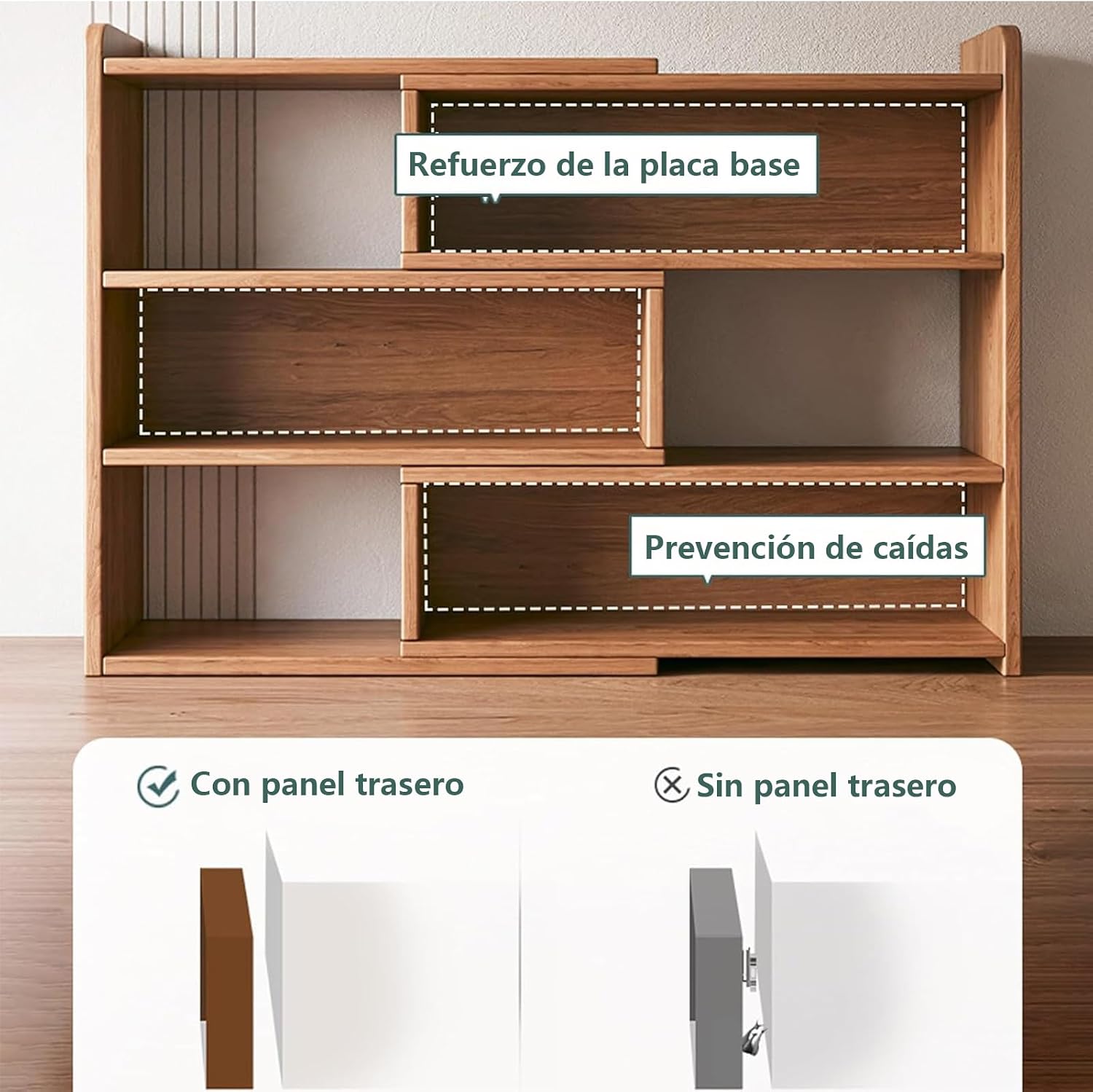
Image: Illustration highlighting the importance of the back panel for structural reinforcement and fall prevention. It shows the difference in stability with and without the back panel.
Operating and Use
Your KINKUNCO Extensible Bookshelf is designed for versatile storage and organization in various settings.
Adjusting Length and Angle:
The bookshelf's extensible design allows you to adjust its length from 80cm to 150cm. You can also configure it into an L-shape to utilize corner spaces. Gently slide the sections to achieve your desired length or angle. Ensure the unit is stable after adjustment.

Image: The bookshelf shown in both its compact (60cm) and extended (110cm) configurations, illustrating its flexible scaling capability.

Image: A visual guide demonstrating the creative rotation feature, allowing the bookshelf to be arranged in a straight line or an L-shape to fit various room layouts and utilize corner spaces.
Storage and Organization:
- Utilize the three open tiers for books, decorative items, and frequently accessed supplies.
- The integrated cabinet doors provide enclosed storage, protecting contents from dust and offering privacy for personal items.
- This bookshelf is suitable for use in living rooms, study areas, bedrooms, or offices.

Image: The bookshelf in a room setting, showcasing its capacity to organize various items such as books, stationery, toys, and decorative pieces, highlighting its diversified storage capabilities.

Image: A detailed view of the cabinet doors, illustrating their design for enhanced privacy and dust protection for stored items.

Image: A comparison showing a cluttered desk before using the bookshelf and a clean, organized desk after integrating the bookshelf, demonstrating its effectiveness in creating an orderly space.
Maintenance
- Cleaning: Wipe the bookshelf with a soft, damp cloth. Avoid harsh chemicals or abrasive cleaners that could damage the MDF finish.
- Dusting: Regularly dust the surfaces to maintain appearance.
- Inspection: Periodically check all screws and connections to ensure they remain tight. Retighten if necessary, but do not overtighten.
- Avoid Moisture: Keep the bookshelf away from excessive moisture or direct sunlight to prevent warping or discoloration.
Troubleshooting
| Problem | Possible Cause | Solution |
|---|---|---|
| Bookshelf feels unstable or wobbly. | Screws are loose; uneven weight distribution; back panel not properly installed. | Check and tighten all screws. Ensure weight is evenly distributed. Verify the back panel is securely attached. Assemble on a flat surface. |
| Difficulty adjusting length or angle. | Sections are stuck or misaligned. | Ensure no items are obstructing the sliding mechanism. Gently apply pressure while adjusting. If resistance persists, check for any debris or misalignment. |
| Missing parts during assembly. | Packaging error. | Contact KINKUNCO customer support with your purchase details and a list of missing parts. |
Warranty and Support
KINKUNCO products are designed for quality and durability. While specific warranty details may vary by region and retailer, we stand by our products.
Return Policy:
This product typically includes a 30-day free return policy. Please refer to your purchase receipt or retailer's terms for exact details regarding returns and exchanges.
Customer Support:
If you encounter any issues during assembly or use, or if you have any questions, please do not hesitate to contact KINKUNCO customer support. Our team is ready to assist you.
For support, please visit the KINKUNCO Brand Store on Amazon or refer to the contact information provided with your purchase.