
Varstrom VD618
Varstrom VD618 E-Bike Display User Manual
Model: VD618 | Brand: Varstrom
1. Introduction
The Varstrom VD618 3.5" LCD E-Bike Display is engineered to provide a comprehensive and user-friendly interface for your electric bicycle. It is specifically designed for use with BAFANG CAN Version mid-motor systems, enhancing your riding experience with clear data and convenient controls.
Key Features:
- Universal Voltage Compatibility: Supports 36V/48V/52V/60V/72V Bafang CAN protocol mid-drive motors.
- Vivid 3.5" Color LCD Screen: Features anti-glare technology for readability in direct sunlight and adjustable backlighting for low-light conditions.
- IP66 Weatherproof Durability: Designed to withstand rain, snow, and dust for reliable performance in various outdoor conditions.
- Smart Auto Headlight & Safety: Includes a built-in light sensor for automatic headlight activation and ergonomic handlebar-mounted buttons.
- Convenient TYPE-C Charging Port: Integrated 5V1A Type-C port for charging smartphones or other devices on the go.
2. Compatibility
The VD618 display operates using the CAN protocol. It is compatible with BAFANG M200, M300, M400, M410, M420, M500, M560, M510, M600, M620, M800, and M820 CAN Version mid-motor systems. It is crucial to verify your motor's protocol before installation.
Important Note:
- This display is not compatible with UART protocol motors (which typically have a 5-pin circular connector).
- Using adapter cables or modifying connectors will not resolve compatibility issues between CAN and UART protocols.
- Ensure your 1T4 cable connector is a 5-pin female triangle connector for proper connection.

Figure 2.1: VD618 Compatibility Overview. This diagram illustrates the correct CAN protocol connector (5-pin male triangular) required for the VD618 display and lists compatible Bafang mid-drive motors (M200, M300, M400, M410, M420, M500, M560, M510, M600, M620, M800, M820 CAN Version) while indicating incompatibility with UART protocol motors and certain hub motors.
3. Setup and Installation
Follow these steps for proper installation of your Varstrom VD618 display:
- Mounting the Display: Secure the display holder to your e-bike's handlebar. The adjustable mount fits handlebar diameters of 31.8mm, 25.4mm, and 22.2mm. Ensure the display is positioned for optimal visibility and access to controls.
- Mounting the Button Holder: Attach the separate button holder to the handlebar, typically near the left grip, for easy thumb access. This holder is designed for 22.2mm handlebars.
- Connecting Cables: Connect the display cable to your e-bike's 1T4 cable. Ensure the 5-pin male triangular connector from the display aligns correctly with the female connector of your 1T4 cable. Refer to the wiring diagram for correct pin assignments.
- Secure Connections: Ensure all connections are firm and secure to prevent accidental disconnections during riding.
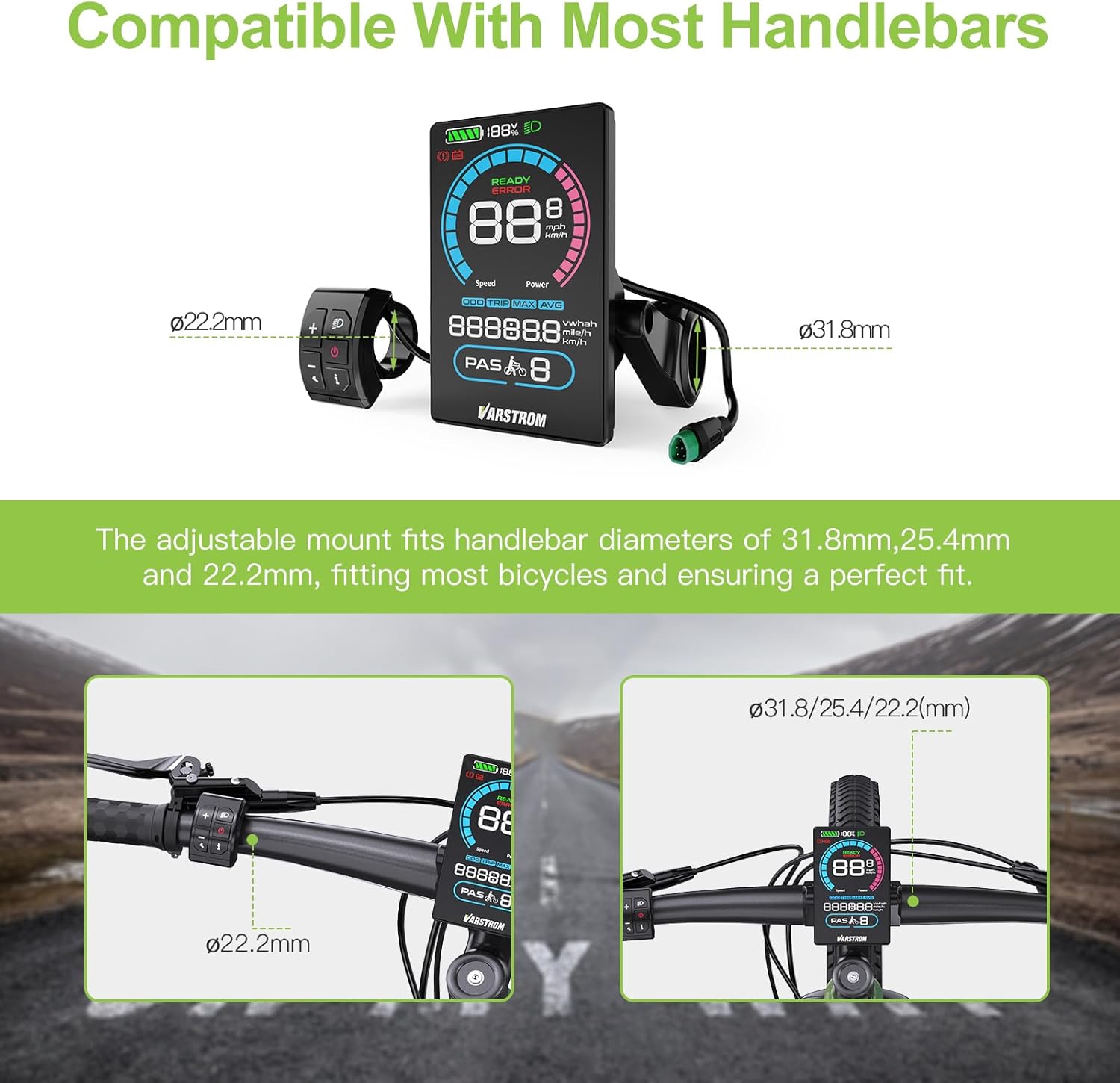
Figure 3.1: Handlebar Mounting Compatibility. The VD618 display and its button holder are designed to fit common handlebar diameters, ensuring a secure and ergonomic setup.

Figure 3.2: Cable Parameters and Wiring Diagram. This diagram details the wiring connections between the e-bike's 1T4 cable and the VD618 display, showing the function of each of the five pins (Green CAN H, Black GND, Brown P+, Orange Key signal, White CAN L).
4. Operating Instructions
4.1 Basic Operation
- Power On/Off: Press and hold the power button (usually marked with a power symbol) to turn the display on or off.
- Navigation: Use the '+' and '-' buttons to cycle through different display modes or adjust values. The 'i' button may provide additional information or switch between trip data.
- Headlight Control: The display features an automatic headlight function activated by a light sensor.
4.2 Display Information
The VD618 display provides comprehensive riding data at a glance:

Figure 4.1: VD618 Digital Display Layout. This image labels the various indicators and functions on the display, including battery level, speed, power, odometer, trip distance, maximum speed, average speed, pedal assist level, and the Type-C charging port.
4.3 Automatic Backlight
The display features an automatic backlight function that adjusts brightness based on ambient light conditions, ensuring optimal visibility day or night.

Figure 4.2: Automatic Backlight Function. This image demonstrates how the display's backlight automatically adjusts for clear visibility in both bright daylight and low-light environments.
4.4 Settings Menu
To access and adjust display settings:
- Enter Settings: When the display is on, double-tap the On/Off key to enter the Settings interface.
- Adjust Settings: On the Settings interface, press the On/Off key to select a setting item. Use the Plus Key (+) or Minus/Walk Assist Key (-) to set values. The value will blink after a change. Press the On/Off Key again to save the set value and move to the next item.
- Save and Exit: Double-tap the On/Off key to exit the Settings and save all set values. The system will automatically save and exit if there is no operation for 10 seconds.
Setting Items:
- P01: Backlight Brightness. Range: 1 (darkest) to 5 (brightest).
- P02: System Unit. 0: km (metric); 1: mile (imperial).
- P03: Auto-Off Time. 0: never; other values (1-60) represent auto-off time in minutes.
- P04: Pedal Assist Level. Options include 0-3, 1-3, 0-5, 1-5, 0-9, 1-9 level modes.
- P05: Wheel Size (Password 1919 Protected). Unit: inch; Increment: 0.1. Range: 0.1~50.0.
- P06: Speed Limit (Password 1919 Protected). Range: 0-100km/h. This setting controls the maximum speed.
- P07: Trip/ODO Clearance. To clear TRIP/ODO, select the desired option with +/- keys, then press and hold the Plus key for 5 seconds. To restore factory settings, press and hold the Minus/Walk Assist Key for 5 seconds.
- P08: Auto-Light. 0: auto-light deactivated; 1: auto-light activated.
- P09: Sensitivity of Light Sensor. Range: 20-100.
- P10: Boot Password. By default, no password. To remove a boot password, enter 0000.
5. Specifications
The following table outlines the technical specifications of the Varstrom VD618 E-Bike Display:
| Feature | Specification |
|---|---|
| Brand | Varstrom |
| Model | VD618 |
| Screen Size | 3.5 Inches |
| Display Type | LCD |
| Color | Black |
| Connector | Male 5 PIN (Triangular) |
| Protocol | CAN |
| Voltage Compatibility | 36V/48V/52V/60V/72V |
| PAS Level Options | 3, 5, 9 Optional |
| Speed Limit Range | 0km/h ~ 100km/h |
| Brightness | 1-3 Optional |
| Waterproof Rating | IP66 |
| Charge Port | Type-C (5V1A) |
| Operating Temperature | -20°C ~ 60°C |
| Storage Temperature | -30°C ~ 70°C |
| Auto Off Time | 0-60min Optional |
| Button Holder Diameter | Ø22.2mm |
| Display Holder Diameter | Ø31.8/25.4/22.2mm |
| Material | PC |
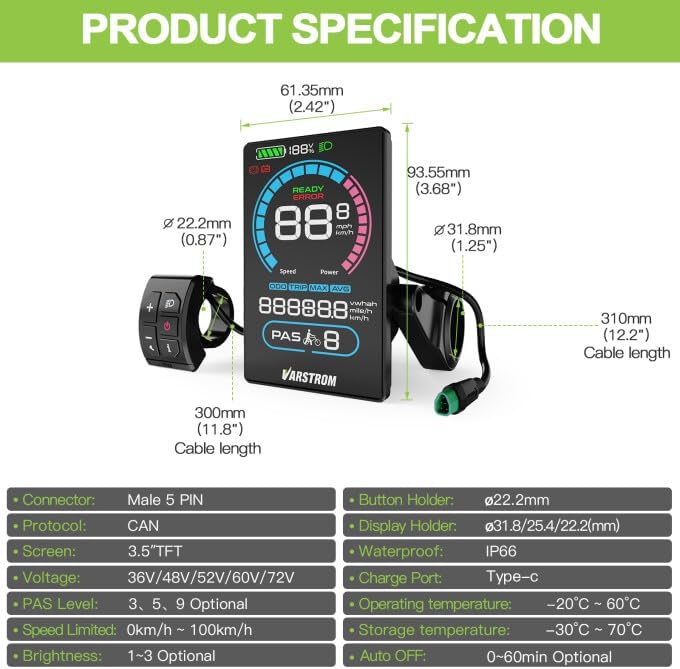
Figure 5.1: Product Specification Diagram. This image provides a visual representation of the VD618 display's physical dimensions and summarizes its key technical specifications.
6. Maintenance
To ensure the longevity and optimal performance of your Varstrom VD618 display, follow these maintenance guidelines:
- Cleaning: Regularly wipe the display screen and body with a soft, damp cloth. Avoid using abrasive cleaners or solvents that could damage the screen or casing.
- Connection Check: Periodically inspect all cable connections to ensure they are secure and free from corrosion or damage.
- Storage: When not in use for extended periods, store the e-bike and display in a cool, dry place away from direct sunlight and extreme temperatures.
- Water Exposure: While the display is IP66 waterproof, avoid submerging it in water or exposing it to high-pressure water jets.
7. Troubleshooting
If you encounter issues with your VD618 display, refer to the following common problems and solutions:
- Display Not Turning On:
- Check if the e-bike battery is charged and properly connected.
- Ensure all display cables are securely plugged into the motor system.
- Verify that the display's connector is compatible with your motor's protocol (CAN protocol required).
- Inaccurate Speed/Mileage Readings:
- Access the settings menu (P05) and verify that the wheel size is correctly set. An incorrect wheel size will lead to inaccurate readings.
- Ensure the speed sensor on your e-bike is clean and properly aligned.
- Display Segments Not Lighting Up / Partial Display:
- This could indicate a hardware issue. Try restarting the display. If the problem persists, contact customer support.
- Difficulty Resetting Trip Mileage:
- To reset trip mileage, navigate to setting P07. Select 'TRIP' using the Plus/Minus keys, then press and hold the Plus key for 5 seconds.
- Display Shows Error Message:
- Note the error code or message displayed. Refer to your motor's manual or contact the motor manufacturer for specific error code interpretations.
- Ensure all connections are secure and undamaged.
If troubleshooting steps do not resolve the issue, please refer to the Warranty and Support section for further assistance.
8. Warranty and Support
Your Varstrom VD618 E-Bike Display comes with the following warranty and support:
- Return Policy: 30 Days Return
- Replacement Policy: 90 Days Replacement
- Technical Guidance: Lifetime technical guidance is provided.
For any technical assistance, warranty claims, or support inquiries, please contact the seller or manufacturer directly. Ensure you have your product model number (VD618) and purchase details ready when contacting support.
Related documentsVD618

Ask a question about this manual
Ask about setup, troubleshooting, compatibility, parts, safety, or missing instructions. Manuals+ will review the question and use this page’s manual context to help answer it.