
1. Introduction
The Varstrom EKD01 2.4" TFT Ebike Display is designed for electric bicycles equipped with Bafang CAN protocol mid-drive motor systems. This manual provides essential information for the proper installation, operation, and maintenance of your EKD01 display to ensure a safe and efficient riding experience.
Important Compatibility Note: This display operates using the CAN protocol. It is not compatible with UART protocol motors, which typically feature a 5-pin circular connector. Attempting to use adapter cables or modifying connectors will not resolve compatibility issues. Always verify your motor's connector type before installation.
2. Product Overview

Figure 2.1: The Varstrom EKD01 Ebike Display mounted on a handlebar, showing its compact design and clear screen interface.
The EKD01 features a vibrant 2.4-inch TFT color screen, offering clear visibility in various lighting conditions. It integrates essential ebike data and controls into a user-friendly interface. Key features include:
- 2.4-inch TFT Color Screen with 4-level backlight adjustment.
- IP67 waterproof rating for robust outdoor performance.
- Universal compatibility with 24V/36V/48V/52V Bafang CAN protocol mid-drive motors.
- Fits 22.2mm and 25.4mm handlebars.
- Integrated Type-C charging port (5V1A) for external devices.
- Bluetooth 4.0+ BLE for smart app connectivity and data tracking.
- Multi-language support (9 languages).
3. Setup and Installation
3.1 Compatibility Check
Before installation, confirm that your ebike motor uses the Bafang CAN protocol. The EKD01 display is specifically designed for Bafang M200, M300, M400, M410, M420, M500, M560, M510, M600, M620, M800, and M820 CAN Version mid-motor systems. The required connector for your 1T4 cable should be a 5-pin female triangle connector.
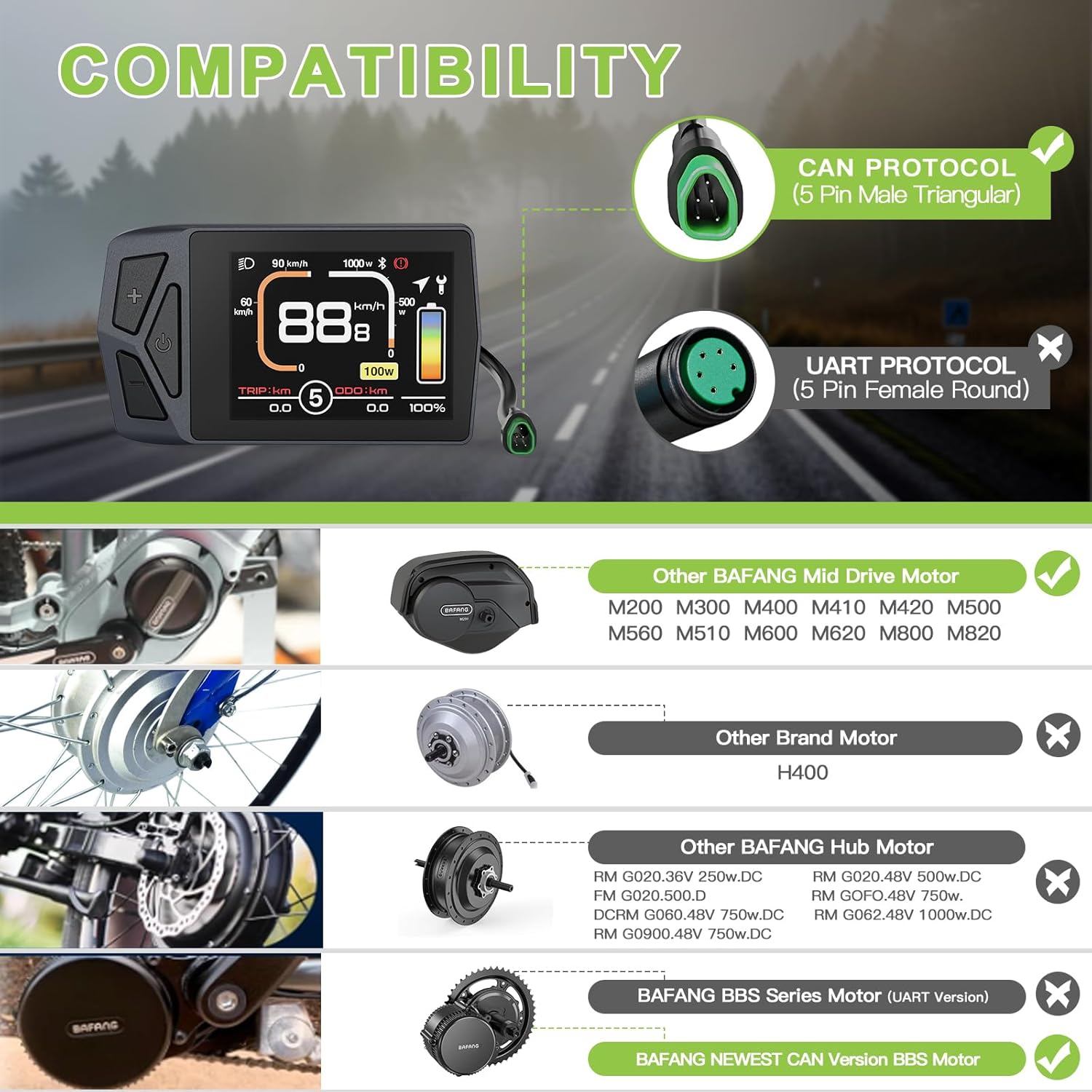
Figure 3.1: Visual guide for motor compatibility, distinguishing between CAN and UART protocols and listing compatible Bafang mid-drive motors.
3.2 Handlebar Mounting
The EKD01 display is designed to fit handlebars with diameters of 22.2mm or 25.4mm. Ensure the mounting bracket is securely fastened to your handlebar in a position that allows for clear visibility and easy access to the control buttons.

Figure 3.2: Illustration of handlebar compatibility, showing the display's adjustable mount for 22.2mm and 25.4mm handlebars.
3.3 Wiring Diagram
Connect the display to your ebike's 1T4 cable. The display connector is a Male 5-pin type. Verify that the wiring diagram matches your motor's cable to ensure proper functionality. Incorrect wiring can prevent the display from operating.

Figure 3.3: Detailed wiring diagram illustrating the pin configuration for connecting the EKD01 display to the ebike's 1T4 cable.
4. Operating Instructions
4.1 Display Interface Overview
The EKD01 display provides comprehensive information about your ride. Familiarize yourself with the various indicators and data points shown on the screen.

Figure 4.1: An annotated diagram of the EKD01 display, highlighting all key indicators and their functions.
- Real-time Speed: Current riding speed.
- PAS Level: Pedal Assist System level (0-9).
- Battery Level: Graphic and percentage indication of remaining battery.
- Odometer (ODO): Total distance traveled.
- Trip Distance (TRIP): Distance for the current ride.
- Headlight Indicator: Shows if headlights are active.
- Bluetooth Indicator: Shows Bluetooth connection status.
- Maintenance Tips: Alerts for service or issues.
- Type-C Charging Port: For charging external devices.
4.2 Basic Operations
- Power On/Off: Press and hold the power button (usually indicated by a power symbol) to turn the display on or off.
- Adjust PAS Level: Use the '+' and '-' buttons to increase or decrease the pedal assist level (0-9).
- Switch Display Modes: Short press the 'M' button (or similar) to cycle through different display modes (e.g., Trip, ODO, Max Speed, Average Speed).
- Headlight Control: Long press the '+' button (or specific light button) to turn the ebike's headlights on or off.
- Backlight Adjustment: Access settings menu to adjust the 4-level backlight brightness.
- Speed Unit Change: Within settings, switch between kilometers per hour (km/h) and miles per hour (mi/h).
- Wheel Size Calibration: Calibrate the wheel size in the settings menu for accurate speed and distance readings.
- Speed Limit Adjustment: Adjust the maximum speed limit (1-99 km/h) in the settings.
4.3 Smart App Integration
The EKD01 display supports Bluetooth 4.0+ BLE connectivity, allowing you to sync with a smartphone app for enhanced functionality. Search for "BIKEGO" in your device's app store.

Figure 4.2: Screenshots of the BIKEGO smartphone application, demonstrating its features for tracking ride data and managing bike settings.
Through the app, you can:
- Track real-time speed, distance, and battery life.
- Access navigation features.
- Customize display settings.
- Review ride history and data.
4.4 Type-C Charging Port
The integrated 5V1A Type-C port allows you to charge compatible electronic devices, such as smartphones or portable speakers, directly from your ebike display during rides.
5. Maintenance
- Cleaning: Wipe the display screen and body with a soft, damp cloth. Avoid using abrasive cleaners or solvents that could damage the screen or casing.
- Water Exposure: While the EKD01 is IP67 waterproof, prolonged submersion is not recommended. Ensure the Type-C port cover is securely closed when not in use, especially in wet conditions.
- Temperature: Operate and store the display within its specified operating temperature range of -20°C to 70°C. Extreme temperatures can affect performance and lifespan.
- Cable Inspection: Periodically check all cables and connectors for signs of wear, damage, or loose connections.
6. Troubleshooting
| Problem | Possible Cause | Solution |
|---|---|---|
| Display does not power on. |
|
|
| Incorrect speed or distance readings. |
|
|
| Bluetooth connection issues. |
|
|
| Type-C charging port not working. |
|
|
7. Specifications

Figure 7.1: Detailed product specifications including physical dimensions and technical parameters.
| Feature | Detail |
|---|---|
| Model Name | EKD01 |
| Connector | Male 5 PIN |
| Protocol | CAN |
| Screen Type | 2.4" TFT Color Screen |
| Voltage Compatibility | 24V/36V/48V/52V |
| PAS Levels | 3, 5, 9 (Optional) |
| Speed Limit Range | 1km/h ~ 99km/h |
| Brightness Settings | 30%, 50%, 75%, 100% |
| Handlebar Clamp Diameter | Ø22.2mm / 25.4mm |
| Bluetooth Version | 4.0+ BLE |
| Waterproof Rating | IP67 |
| Charging Port | Type-C (5V1A) |
| Weight | 67g |
| Auto Off Function | Yes |
| Operating Temperature | -20°C ~ 70°C |
| Cable Length | 230mm (9.06") |
| Material | PC |
8. Warranty and Support
Varstrom provides the following support for the EKD01 Ebike Display:
- 30 Days Return: Eligible for returns within 30 days of purchase.
- 90 Days Replacement: Product replacement available within 90 days for manufacturing defects.
- Lifetime Technical Guidance: Access to technical support and guidance for the lifetime of the product.
For further assistance or technical inquiries, please contact Varstrom customer support through their official channels.


